TESmart DKS202-M24 Review: High-Refresh KVM, Heavy Wiring
The DKS202-M24 switches two DisplayPort PCs across two monitors with EDID and high-refresh support. Check the six-cable layout and laptop limits first.
Research-based review
Recommendations are checked against product documentation, availability, comparative evidence, and clearly disclosed hands-on work where it exists.
Quick picks
The short answer, with the trade-off

Simpler value alternative
UGREEN 55851 DisplayPort KVM

Better for dual-HDMI office desks
TESmart HKS202-P23 V2
On this page
- Verdict
- Who this is for
- Who should skip it
- Pros and cons
- Key specifications
- The six-DisplayPort-cable layout
- EDID is the practical reason to pay more
- What the high-refresh claims really mean
- USB, Ethernet, audio, and switching controls
- Laptop and dock limitations
- DKS202-M24 vs UGREEN 55851
- Alternatives
- Setup checklist
- FAQ
- Final recommendation
- Sources and methodology
The TESmart DKS202-M24 makes sense for two DisplayPort desktops sharing two high-refresh monitors. It keeps display information available through EDID emulation, switches common USB peripherals, and adds Ethernet, audio, hotkeys, a remote, and front-panel controls.
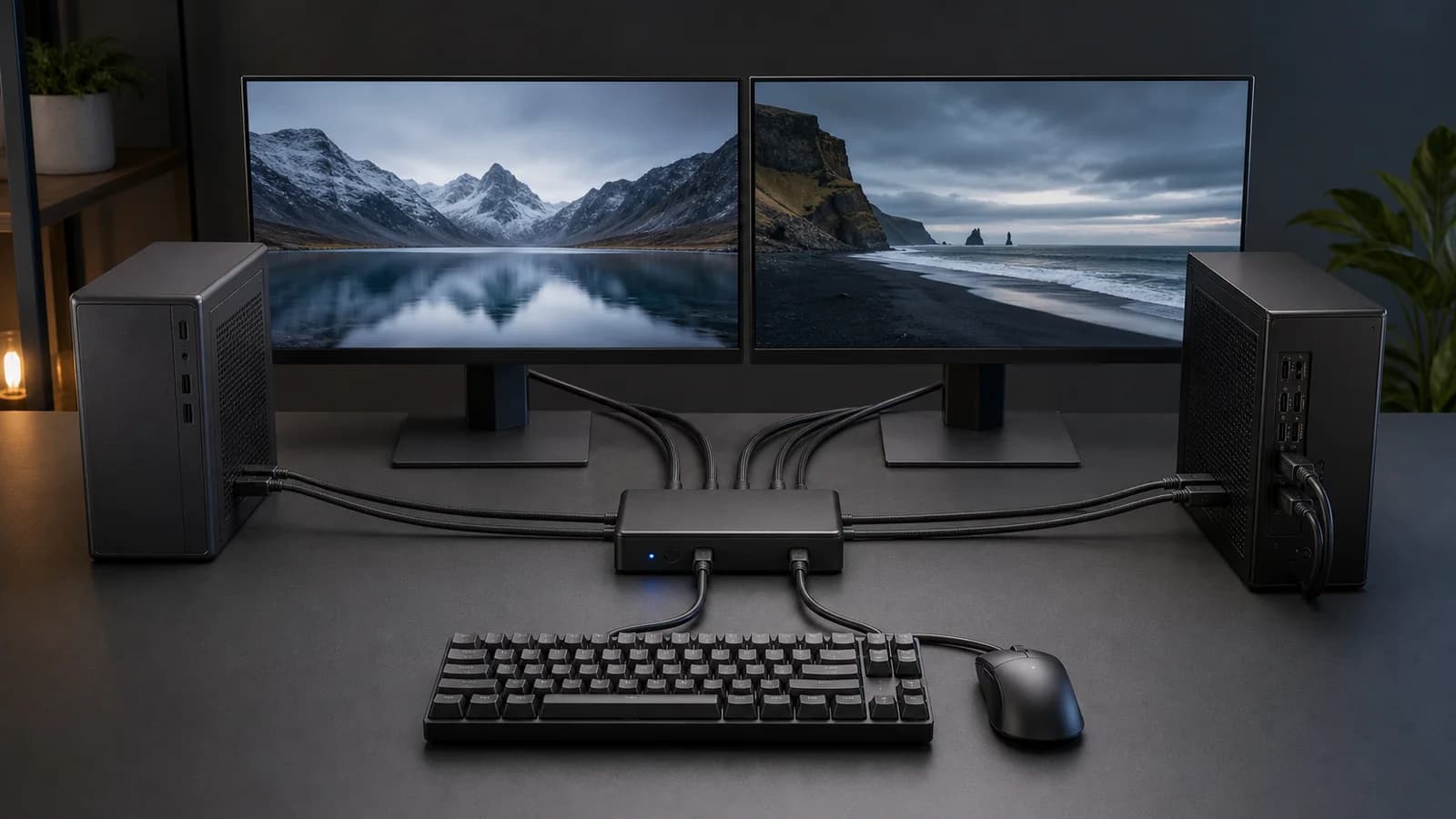
The catch is the desk around it. Each computer needs two DisplayPort video feeds and one USB data connection. The KVM then needs two more DisplayPort cables to the monitors. That is six DisplayPort runs before power, Ethernet, audio, and peripherals enter the picture.
Buy it when both computers already have the right DP outputs and window retention matters. Skip it if one machine is a USB-C laptop, you expect one-cable charging, or your exact resolution, refresh rate, HDR, and adaptive-sync combination is not documented.
This is a research-based review. We have not completed hands-on switching, latency, display-retention, image-quality, USB-throughput, adaptive-sync, thermal, noise, or long-term reliability tests. The verdict is based on TESmart's current product page, manual, connection topology, and exact US Amazon product validation.
Verdict
The DKS202-M24 is a specialist purchase, and that is its strength. A cheaper KVM can switch ordinary office displays. This one is aimed at buyers who need two DisplayPort computers, two monitors, EDID emulation, and more high-refresh headroom than a basic 4K60 HDMI box provides. Our HKS202-P23 vs DKS202-M24 comparison makes the HDMI-versus-DisplayPort decision explicit.
The sensible reason to pay more is display handling, not the 8K number. TESmart documents an EDID emulator on each input, DisplayPort 1.4, DSC, G-Sync and FreeSync support, and published modes up to 8K60 or 4K144. Those are useful capabilities for the right PC desk, but they remain signal-chain ceilings rather than a guarantee for every graphics card, cable, monitor, color depth, HDR mode, and driver.
We would not buy it for a laptop-first setup. There is no USB-C video input or laptop charging, and the KVM cannot make a computer drive a second external display that it does not support. A compatible dock may expose two DisplayPort outputs, but adding a dock also adds another compatibility point.
Who this is for
Buy the DKS202-M24 if:
- both computers have two usable DisplayPort outputs;
- both monitors accept DisplayPort;
- you want both displays and USB peripherals to change computers together;
- your windows need to stay arranged when the inactive computer is selected;
- your target mode is within TESmart's published DP 1.4 support;
- you are willing to map and route six DisplayPort cables.
Who should skip it
Skip this KVM if:
- one computer is a laptop that needs video, data, and charging over one cable;
- either host cannot natively drive two external displays;
- your monitors already have spare inputs and you switch computers infrequently;
- you need a guaranteed unusual combination of refresh rate, HDR, color depth, VRR, or ultrawide timing;
- two direct monitor-input changes plus a cheap USB switch would solve the desk for less.
If you have not settled on the topology, start with our dual-monitor KVM buying guide. It separates conventional HDMI and DisplayPort switches from dock-style models before product features muddy the decision.
Pros and cons
Pros
- Purpose-built for two DisplayPort computers and two monitors
- EDID emulation documented for the display inputs
- High-refresh DP 1.4 positioning with DSC and adaptive-sync support
- Shared USB, Gigabit Ethernet, audio, hotkeys, remote, and front controls
- Four host-side DisplayPort cables and two USB host cables listed in the box
Cons
- Six DisplayPort runs make cable planning unavoidable
- No USB-C video input or laptop charging
- Output cables to the monitors are not part of TESmart's four-cable box list
- Headline display modes still depend on the entire signal chain
- More expensive and complicated than direct video plus a USB switch
Key specifications
| Specification | TESmart's published detail | What it means before buying |
|---|---|---|
| Host layout | 2 computers | Both hosts need video and USB connections |
| Display layout | 2 monitors | Extended and duplicated layouts are supported by the KVM controls |
| Video inputs | 4 × DisplayPort | Two DP feeds are required from each computer |
| Video outputs | 2 × DisplayPort | You need two more DP cables to the monitors |
| Display standard | DisplayPort 1.4, up to 32.4Gbps stated | Final modes depend on source, cable, switch, monitor, DSC, and settings |
| Published ceiling | Up to 8K60; 4K60/120/144 modes documented | A ceiling, not proof of every dual-display combination |
| Display retention | EDID emulation on each input | Intended to keep monitor information visible to both computers |
| Shared data | USB 3.2 Gen 1 support stated | Suitable on paper for common peripherals; throughput not tested by us |
| Network | Gigabit Ethernet | One network connection can follow the active host |
| Controls | Front buttons, IR remote, hotkeys, and mouse switching | Several ways to change computers without reaching behind the desk |
| Laptop power | None | The KVM does not replace a charger or dock |
The exact retail suffix can vary by plug and package. The US Amazon product used here is the DKS202-M24-USBK dual-monitor DisplayPort model, ASIN B0F5M8MMBM. Do not substitute the similarly named HDMI, mixed HDMI/DP, three-monitor, or four-computer versions without remapping the ports.
The six-DisplayPort-cable layout
The wiring is easier to understand as two complete video paths per computer:
- Computer A DisplayPort output 1 goes to the KVM's first input for host A.
- Computer A DisplayPort output 2 goes to the KVM's second input for host A.
- Computer B repeats those two connections on its input bank.
- The KVM's first output goes to monitor 1.
- The KVM's second output goes to monitor 2.
- Each computer also gets a USB host connection so the keyboard, mouse, and shared USB devices can follow the selected host.
TESmart lists four DisplayPort cables and two USB 3.0 host cables in the package. Those four DP cables cover the computer-to-KVM side. Plan on supplying the two output cables from the KVM to the monitors unless the exact retail bundle says otherwise.
That distinction catches buyers out. “Two computers, two monitors” sounds like a four-cable problem, but the switch sits between both ends of the video path. A laptop with a single USB-C port does not match this topology without a dock or adapters that expose two compatible DP signals.
EDID is the practical reason to pay more
EDID is the information a display provides about its identity and supported modes. When a basic switch removes that information from the inactive computer, the operating system can behave as though the monitors were unplugged. Windows may move, desktops can collapse, and applications may reopen on the wrong screen.
TESmart says the DKS202-M24 keeps the correct display information available through EDID emulators on its inputs. That makes it more appropriate than the simpler UGREEN 55851 for workstations where window placement matters.
It is still not a promise of perfect behavior. Sleep states, graphics drivers, monitor firmware, mixed display pairs, operating-system updates, and unusual timings can affect reconnection. We have not independently verified the KVM across those combinations.
What the high-refresh claims really mean
TESmart publishes support for DisplayPort 1.4, a maximum bandwidth figure of 32.4Gbps, DSC, FEC, G-Sync, FreeSync, 8K60, and 4K modes through 144Hz. Its current product material also lists 5120×1440 at 120Hz, 3440×1440 at 144Hz, and 2560×1440 at 240Hz among the intended modes.
Those numbers do not stack into one universal promise. The usable result depends on:
- the graphics output on each computer;
- whether the monitor and graphics card negotiate DSC correctly;
- the number of displays active on the GPU;
- cable bandwidth and length;
- resolution, refresh rate, color depth, chroma, HDR, and adaptive sync;
- firmware, graphics drivers, and monitor input settings.
Check the exact combination you run. “Supports 8K” does not automatically prove dual 4K144 with HDR, full color depth, and VRR on every pair of monitors. If a particular mode is non-negotiable, buy from a seller with a practical return path and test that mode before reorganising the whole desk.
USB, Ethernet, audio, and switching controls
The DKS202-M24 is more than a video switch. TESmart documents shared USB 3.x ports, dedicated keyboard and mouse handling, audio connections, and Gigabit Ethernet. That lets common desk devices move with the active computer instead of leaving a separate USB hub and network cable on each host.
The four switching methods are also useful: front-panel controls, the included IR remote, keyboard hotkeys, and mouse switching. TESmart allows the hotkey trigger to be changed when Right Ctrl conflicts with an application.
Complex peripherals deserve caution. Macro keyboards, high-polling mice, wireless receivers, webcams, capture devices, audio interfaces, and bus-powered SSDs can be more demanding than a standard keyboard and mouse. We have not measured USB throughput, polling behavior, device reconnect time, or power delivery on the shared ports.
Laptop and dock limitations
This is not a one-cable laptop KVM. It does not accept USB-C video, negotiate Thunderbolt, or charge a connected laptop. A laptop side needs hardware that exposes two appropriate DisplayPort outputs plus USB data, while the laptop itself must support the two external displays.
A dock can make that possible, but only when every link agrees. Check:
- the laptop's native external-display limit;
- whether the dock exposes two independent DP outputs at the required mode;
- macOS versus Windows extended-display behavior;
- DSC, MST, HDR, and adaptive-sync support through the dock;
- whether the laptop still needs its original charger.
Our guide to running two monitors from a Thunderbolt dock on a Mac explains why two sockets on a dock do not guarantee two extended displays on every Mac. If the laptop is the main computer, the TESmart HDC202-X24 Thunderbolt KVM shows the purpose-built alternative, including its 60W charging and dual-display limits.
DKS202-M24 vs UGREEN 55851
The UGREEN 55851 DisplayPort KVM solves the same two-computer, two-monitor DP layout with fewer premium features.
Choose the TESmart when EDID emulation, hotkeys, Ethernet, audio, bundled host cables, and broader published high-refresh support justify the extra cost. Choose the UGREEN when you want the basic dual-DP job, four shared USB ports, and a wired controller without paying for features you may not use.
The UGREEN does not document EDID emulation, which is the most meaningful difference for a carefully arranged work desktop. The TESmart remains cable-heavy and cannot remove the compatibility risk from an ambitious display chain.
TESmart DKS202-M24 DisplayPort KVM
Why it works
- Documented EDID emulation
- DP 1.4 high-refresh positioning
- USB, Ethernet, audio, hotkeys, and remote
Main trade-off
- Six DisplayPort runs
- No USB-C input or laptop charging
Alternatives
UGREEN 55851 DisplayPort KVM
Buy the UGREEN for a simpler, lower-cost dual-DisplayPort setup. It shares four USB devices and supports high-resolution DP modes, but it omits the TESmart's documented EDID behavior and hotkey controls.

UGREEN 55851 Dual-Monitor DisplayPort KVM
Why it works
- Two-computer, two-monitor DP layout
- Four shared USB 3.0 ports
- Button and wired controller
Main trade-off
- No documented EDID emulation
- No hotkeys
TESmart HKS202-P23 V2
Buy the HKS202-P23 if both computers and monitors are HDMI-first and dual 4K60 is enough. It retains EDID and the practical switching controls without pretending to be a high-refresh DisplayPort solution. Our HKS202-P23 review maps its own six-cable HDMI layout.

TESmart HKS202-P23 V2 HDMI KVM
Why it works
- Dual 4K60 HDMI layout
- EDID emulation
- USB, audio, remote, and hotkeys
Main trade-off
- Not DisplayPort
- Not the right choice for high-refresh 4K
Direct video plus a USB switch
If both monitors have spare inputs, connect each computer directly to each display and switch only the keyboard, mouse, and peripherals. It takes extra button presses, but it keeps the KVM out of the video path and costs much less. Our USB switch vs KVM guide shows when that compromise is sensible.
Setup checklist
Before ordering:
- Confirm two usable DisplayPort outputs on each computer.
- Confirm DisplayPort inputs on both monitors.
- Write down the exact resolution and refresh rate for each screen.
- Check whether HDR, VRR, DSC, or unusual color settings are essential.
- Allow space for six DP cables, two USB host cables, power, and peripherals.
- Add two monitor-side DP cables if the retail bundle includes only the listed four.
- Check every laptop's native two-display support before adding a dock.
- Decide whether direct monitor inputs plus a USB switch would be good enough.
If you are still choosing displays, see our best work monitors and best gaming monitors guides. A monitor with a useful built-in KVM can remove the separate box, although its USB and high-refresh behavior still needs checking.
FAQ
Does the TESmart DKS202-M24 support 4K at 144Hz?
TESmart lists 4K144 among the supported modes. Treat it as a published ceiling that depends on the source GPU, DSC, cables, monitor input, color settings, HDR, adaptive sync, and the rest of the signal chain. We have not independently verified dual 4K144 operation.
Does it keep windows in place when switching?
TESmart documents EDID emulation intended to keep display information available to both computers. That should reduce the disconnect behavior that moves windows, but it cannot guarantee identical results across every operating system, driver, monitor, firmware, and sleep state.
Our KVM black-screen troubleshooting guide separates EDID symptoms from cable, bandwidth, dock, wake, and host-topology faults.
How many DisplayPort cables does it need?
Six for a complete two-computer, two-monitor setup: four from the computers to the KVM and two from the KVM to the monitors. TESmart's box list includes four DP cables, so plan to supply the two output cables unless the exact bundle states otherwise.
Does the DKS202-M24 charge a laptop?
No. It has no USB-C video-and-power host input. A laptop still needs its charger and, in many setups, a compatible dock that exposes two DisplayPort outputs.
Can it run one PC and one MacBook?
Only if the MacBook natively supports the required two-display arrangement and a compatible dock or adapters provide two DP feeds plus USB data. The KVM cannot bypass the Mac's external-display limit.
Does it work with G-Sync and FreeSync?
TESmart lists G-Sync and FreeSync support. We have not verified every GPU, monitor, refresh rate, DSC, HDR, and driver combination, so confirm the exact intended mode and retain a return option.
Is it better than a USB switch?
It is more convenient when both monitors, USB devices, audio, and network need to move together. A USB switch is cheaper and keeps video direct to the monitors, which can be the safer choice for an unusual or uncompromising gaming display setup.
Final recommendation
Buy the TESmart DKS202-M24 for two DisplayPort desktops and two monitors when EDID retention, high-refresh headroom, and one-action switching are worth the price and cable work.
Skip it for a one-cable laptop desk. Also skip it if the monitors already have spare inputs and changing video separately is a minor inconvenience. In that case, direct video plus a USB switch is simpler, cheaper, and removes one device from the display path.
Sources and methodology
- TESmart official DKS202-M24 product page
- TESmart official DKS202-M24 product specifications
- TESmart official DisplayPort KVM model comparison
- Amazon Creators API exact-product validation for TESmart DKS202-M24 (
B0F5M8MMBM), UGREEN 55851 (B0DXF5Z23S), and TESmart HKS202-P23 V2 (B0CQQYHQLL) using the configuredsoldermag-20Associate tag.
We weighted connection fit, EDID documentation, published display modes, control options, shared ports, cable requirements, and whether the feature set solves a real two-computer desk problem. We did not use fixed prices, discounts, ratings, review counts, or unverified hands-on claims.
As an Amazon Associate I earn from qualifying purchases.