UGREEN 55851 DisplayPort KVM Review: Check the Wiring First
UGREEN's 55851 switches two DisplayPort computers across two monitors and four USB devices, but it lacks EDID, hotkeys, charging, and included DP cables.
Research-based review
Recommendations are checked against product documentation, availability, comparative evidence, and clearly disclosed hands-on work where it exists.
Quick picks
The short answer, with the trade-off
Best for a simple dual-DP desk
UGREEN 55851 Dual-Monitor DisplayPort KVM
Two computers across two DisplayPort monitors
Trade-off: No EDID emulation or hotkeys
On this page
- Short verdict
- Who this is for
- Who should skip it
- UGREEN 55851 specifications
- The wiring is the real buying decision
- No EDID emulation is the main compromise
- DisplayPort 1.4 and the 4K240 claim
- USB sharing is useful but not unlimited
- Switching controls
- Laptop and Mac compatibility
- Value
- Alternatives
- Frequently asked questions
- Final recommendation
- Sources and methodology
The UGREEN 55851 is a sensible dual-monitor DisplayPort KVM for two computers that already have two DisplayPort outputs each. It moves both screens plus four shared USB devices between the computers using a front button or wired desktop controller. The published video ceiling is generous, too: DisplayPort 1.4 with stated support for modes up to 8K60 or 4K240 when the complete signal chain can handle them.
The warning is more important than the headline. This switch does not emulate EDID, does not support hotkey switching, does not charge a laptop, and does not include the six DisplayPort cables needed for a full two-computer, two-monitor setup. It is good value for a mapped desktop layout. It is a poor shortcut for a laptop that cannot already drive two external screens.
This is a research-based review. SolderMag has not completed hands-on switching, latency, wake-from-sleep, adaptive-sync, USB-compatibility, thermal, or long-term reliability testing of the 55851. The verdict is based on UGREEN's current product documentation, exact US Amazon product identity, connection topology, and comparison with nearby KVM designs.
Short verdict
Buy the UGREEN 55851 if you have two desktops—or a desktop and a fully compatible dock—with two DisplayPort feeds per computer. Its two-monitor topology, four 5Gbps USB ports, remote switch button, and high-refresh DisplayPort positioning cover the parts most buyers actually need.
Skip it if display persistence matters. UGREEN explicitly says the 55851 does not support EDID emulation, so an inactive computer may behave as if the displays have been disconnected. That can mean moved windows, altered resolutions, or a slower display handshake when switching back. Buyers who need EDID, keyboard hotkeys, audio, Ethernet, or a one-cable laptop input should pay for a model designed around those requirements.
UGREEN 55851 Dual-Monitor DisplayPort KVM
Why it works
- Two computers across two DisplayPort monitors
- Four shared 5Gbps USB ports
- Front button plus wired desktop controller
Main trade-off
- No EDID emulation or hotkeys
- No DisplayPort cables included
- No laptop charging, audio, or Ethernet
Who this is for
The 55851 fits a desk with:
- two computers that can each output two DisplayPort signals
- two DisplayPort monitors
- one shared keyboard and mouse
- up to two additional shared USB devices
- a button or wired controller within easy reach
- enough cable space behind the desk for six DP runs plus two USB host cables
That describes a pair of desktops particularly well. It can also describe a gaming desktop and a work laptop, but only when the laptop or its dock exposes two independent DisplayPort outputs and the laptop itself supports two external displays.
Our dual-monitor KVM buying guide compares this topology with dual-HDMI and one-cable laptop options.
Who should skip it
Skip the UGREEN 55851 if:
- either computer has only one suitable video output
- the monitors are HDMI-only
- you want one USB-C or Thunderbolt cable to handle video, peripherals, and laptop power
- window rearrangement after switching would disrupt your work
- you require keyboard hotkeys instead of a physical button
- you need the KVM to share analogue audio, Ethernet, or more than four USB devices
- the planned resolution and refresh rate rely on adapters or cables that are not rated for the full mode
A KVM routes signals. It does not add a second display engine to a computer, convert an HDMI-only setup cleanly by magic, or guarantee that every DisplayPort feature survives a long chain of adapters.
UGREEN 55851 specifications
| Feature | UGREEN 55851 / AK700 | What it means |
|---|---|---|
| Computers | 2 | Both monitors and shared USB devices follow one selected host |
| Monitor outputs | 2× DisplayPort | Both displays need suitable DP inputs or carefully chosen active conversion |
| Video inputs | 2× DP per computer | Four host-side DP feeds are required for dual-display use |
| Display standard | DisplayPort 1.4 | The complete chain still determines usable bandwidth and features |
| Published maximums | Up to 8K60; 4K240/120/60 | These are ceilings, not a promise for every two-monitor combination |
| Shared USB | 3× USB-A 3.0, 1× USB-C 3.0 | Four downstream devices share one 5Gbps-class host link at a time |
| Switching | Front button; wired desktop controller | No keyboard hotkey support |
| EDID emulation | No | The inactive host may not retain both display identities |
| Host USB | 1× USB-A data connection per computer | The two included USB-A cables carry peripherals, not video |
| Power | Included 12V/2A adapter | The KVM needs external power; it does not charge either computer |
| Included video cables | None | Budget for six suitable DisplayPort cables |
Amazon identifies the manufacturer part number as AK700. Match that identifier with UGREEN SKU 55851 and US ASIN B0DXF5Z23S rather than relying on a generic “8K KVM” title shared by similar products.
The wiring is the real buying decision
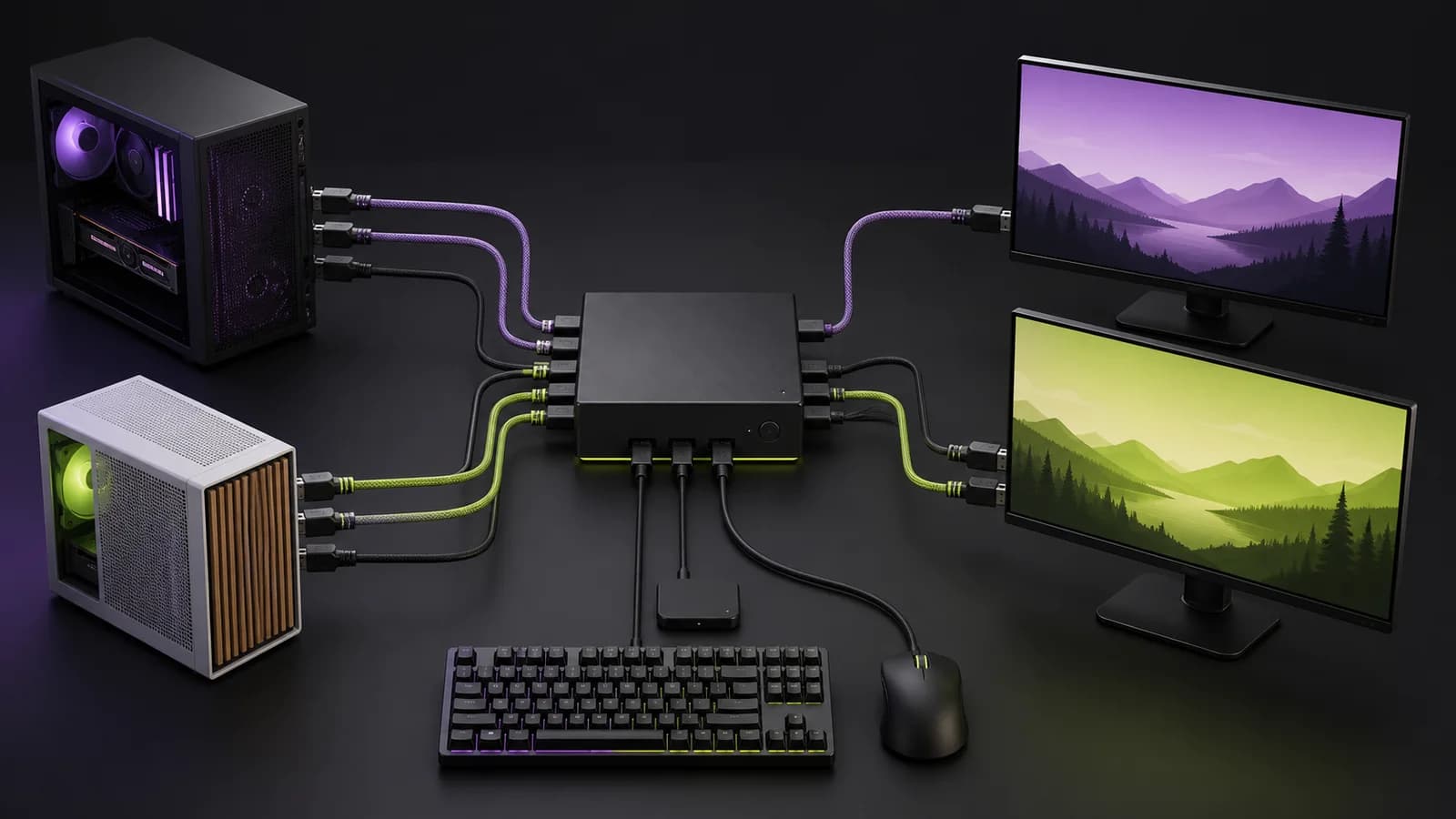
The 55851 needs more cables than its product photo suggests.
Each computer connects to the KVM with two DisplayPort cables and one USB-A data cable. Two more DisplayPort cables run from the KVM to the monitors. The supplied desktop controller and power adapter add two more leads, followed by the keyboard, mouse, and any shared storage or webcam.
For the complete setup, plan for:
- two DP cables from computer A to the KVM
- two DP cables from computer B to the KVM
- two DP cables from the KVM to the monitors
- one included USB-A host cable from each computer
- the 12V power adapter
- the wired switch controller if the front button will be out of reach
UGREEN includes the two USB-A cables, power adapter, controller, and manual. It does not include the six DisplayPort cables. That omission matters when comparing the current price with a more expensive KVM that includes host cables.
Map every connector before ordering. If a laptop needs a Thunderbolt dock and two USB-C-to-DP adapters to reach the KVM, those parts become part of the display chain and the troubleshooting burden.
No EDID emulation is the main compromise
EDID is the information a display provides to a computer about its identity and supported modes. A KVM with EDID emulation can keep that display information visible to the inactive computer. The operating system is less likely to think its monitors disappeared.
UGREEN states that the 55851 does not support EDID emulation. That does not make it unusable, but it changes the buyer fit. A simple gaming desk may tolerate a brief reconnect. A workstation with carefully arranged windows, remote sessions, or applications pinned to specific screens may not.
We have not independently measured the switch's handshake time or verified window behavior across Windows, macOS, Linux, sleep states, graphics drivers, and mixed monitor pairs. Treat display retention as an open risk, not a hidden feature.
If a screen is already failing after a switch, follow our KVM black-screen troubleshooting sequence to test the direct path, cables, bandwidth, host topology, and EDID separately.
If EDID is a purchase requirement, compare the TESmart DKS202-M24 because TESmart documents its EDID behavior and adds hotkeys, audio, and Ethernet. The UGREEN is the stripped-back choice on published features.
DisplayPort 1.4 and the 4K240 claim
UGREEN lists support for DisplayPort 1.4, HDR, variable refresh rate, G-Sync, FreeSync, 8K60, and 4K240/120/60. Those specifications describe the switch's intended ceiling. They do not guarantee that two displays can run at the headline mode from every graphics card.
The result depends on:
- the GPU and its output configuration
- whether Display Stream Compression is available across the chain
- the resolution and refresh rate of both monitors
- HDR, colour depth, and chroma settings
- every DisplayPort cable
- any dock, adapter, or converter before the KVM
- the monitor firmware and input mode
For a normal 1440p or 4K60 productivity desk, the bandwidth requirement is less demanding than for dual high-refresh gaming displays. In the latter setup, it is the whole purchase. Use short, certified cables and verify the exact resolution/refresh combination rather than buying from the “8K” label alone.
Our work monitor guide explains when refresh rate, USB-C power, and built-in KVM features are worth prioritising at the display instead.
USB sharing is useful but not unlimited
The front panel provides three USB-A 3.0 ports and one USB-C 3.0 port. UGREEN rates the downstream data connection at up to 5Gbps. A keyboard, mouse, webcam, printer, controller receiver, or occasional external drive can follow the selected computer without being replugged.
All four ports share the active computer's single USB host path. Do not read “four USB 3.0 ports” as four independent 5Gbps links. A fast SSD transfer and a high-resolution webcam can compete for bandwidth. Latency-sensitive audio hardware and devices with unusual drivers also deserve direct testing during the return window.
The USB-C port is a downstream data port. It does not provide a one-cable laptop connection or charge the host. Buyers who need power delivery should start with a laptop-first KVM or a compatible dock.
Switching controls
There are two ways to change computers: the front button and the included wired desktop controller. The controller is the better everyday option if the KVM and its cable bundle live under the desk.
There is no keyboard hotkey support. That is either irrelevant or decisive. A physical button avoids conflicts with compact and programmable keyboards, but it also means you cannot switch without taking a hand off the keyboard.
The two displays always follow the same selected computer. UGREEN says the 55851 does not support matrix behavior, so it cannot show computer A on one monitor and computer B on the other. It switches the desk as a unit.
Laptop and Mac compatibility
The 55851 can sit after a laptop dock, but it is not itself a dock. The laptop side still needs:
- native support for two external displays
- a dock or ports that expose two independent DisplayPort signals
- one USB-A data connection for the shared peripherals
- separate laptop power
Apple's external-display limits vary by Mac chip, model, lid state, resolution, and refresh rate. macOS also does not turn a generic DisplayPort MST split into two extended desktops in the same way many Windows systems do. Check Apple's specification for the exact Mac before buying.
Our guide to running two monitors from a Thunderbolt dock on a Mac walks through that compatibility check. If the Mac supports only one external display in the intended mode, the UGREEN cannot add another.
Value
The 55851 is attractive when it is meaningfully cheaper than a premium DisplayPort KVM and the omitted features do not matter. Four shared USB ports and dual-DP switching cover a lot of real desks.
Do not compare the box prices alone. Add six capable DP cables, any required laptop dock, and the cost of fixing an EDID problem if window retention turns out to matter. A more expensive KVM with included cables and documented EDID can be cheaper as a complete system.
The opposite is also true. If two monitors already have spare inputs, you may need only a small USB switch. Keep video connected directly to both computers, change monitor inputs, and use one button for the keyboard and mouse. It is less elegant but removes the KVM from the high-bandwidth display path.
Alternatives
TESmart DKS202-M24
Choose the TESmart when EDID emulation, hotkeys, audio, Ethernet, and bundled host cabling justify a higher price. Our TESmart DKS202-M24 review maps its six DisplayPort runs, published high-refresh ceilings, and laptop limits. It is the stronger high-refresh workstation option on paper, although every display mode still depends on the complete DP chain.

TESmart DKS202-M24 DisplayPort KVM
Why it works
- Documented EDID emulation
- Hotkeys, audio, Ethernet, and shared USB
- Host cables included
Main trade-off
- Costs more
- Still requires two video feeds from each host
TESmart HKS202-P23 V2
Choose the HKS202-P23 if both computers and monitors are HDMI-first and 4K60 is enough. Our TESmart HKS202-P23 review explains its EDID behavior, cable count, and laptop limitations.
Direct monitor inputs plus a USB switch
Choose this route if stable high-refresh video matters more than one-button switching. It avoids an extra device in the display path and can cost less, but each monitor input must be changed separately. Our USB switch vs KVM switch guide shows when that extra input-button press is worth accepting.
Laptop-first Thunderbolt KVM
Choose a Thunderbolt-oriented model if the laptop should connect with one cable and receive power. Our TESmart HDC202-X24 review covers a purpose-built one-laptop, one-desktop option. Confirm the exact dual-display support, 60W charging fit, monitor inputs, and operating-system behavior before paying the premium.
Frequently asked questions
Does the UGREEN 55851 support two extended monitors?
Yes, when the selected computer can already output two independent DisplayPort signals and the operating system is set to extend the desktop. The KVM cannot create a second display output that the computer or dock does not support.
Does it support 4K at 240Hz?
UGREEN lists 4K240 as a supported maximum. Real availability depends on the GPU, Display Stream Compression, monitor, colour settings, and every cable or adapter in the chain. SolderMag has not independently verified this mode.
Does the 55851 support EDID emulation?
No. UGREEN explicitly states that it does not support EDID emulation. Buyers who need the inactive computer to retain both display identities should choose another model.
Can I switch computers with a keyboard hotkey?
No. Switching uses the front button or included wired desktop controller. Keyboard hotkeys are not supported.
Are DisplayPort cables included?
No. The package includes two USB-A host cables, the 12V/2A adapter, wired controller, and manual. A complete dual-computer, dual-monitor setup needs six separately purchased DisplayPort cables.
Can it charge a laptop?
No. The USB-C socket is a downstream data port, not a Power Delivery host connection. A laptop needs its own charger or a separate compatible dock.
Final recommendation
Buy the UGREEN 55851 for a simple, mapped dual-DisplayPort desk where two computers already expose two video feeds each. It offers the useful core—two displays, four USB devices, and a reachable switch controller—without charging for a long feature list.
Skip it if EDID, hotkeys, one-cable laptop connectivity, included DP cables, or matrix-style display control matter. Those are not minor extras; they determine whether this KVM fits the desk at all.
Sources and methodology
- UGREEN official 55851 product page for video inputs/outputs, USB layout, switching methods, EDID limitation, package contents, and published display modes: https://eu.ugreen.com/en-gr/products/kvm-switch-2computers-2monitors-8k60hz
- UGREEN official SKU 55851 regional specification page for model identity, DP 1.4 claims, host-cable requirements, power adapter, and the lack of matrix and hotkey switching: https://www.ugreen.com/es-es/products/es-55851
- Apple model-specific external-display guidance: https://support.apple.com/en-us/102555
- VESA DisplayPort over USB-C overview for the distinction between USB-C connector shape and DisplayPort Alt Mode: https://www.displayport.org/displayport-over-usb-c/
- Amazon exact-product validation for US ASIN
B0DXF5Z23Susing SolderMag's configuredsoldermag-20Associate tag. The current production catalogue supplies a matching UGREEN product image and destination.
We weighted connection fit, EDID behavior, shared USB usefulness, switching control, cable requirements, laptop compatibility, documentation quality, and the risk of buying from maximum-resolution marketing alone. We did not convert manufacturer specifications into claims about measured latency, wake behavior, thermals, adaptive-sync reliability, or long-term durability.
As an Amazon Associate I earn from qualifying purchases.