Best 27‑Inch 4K Monitors (2026): Sharp Picks for Work and Coding
Here’s how to buy a 27-inch 4K monitor that looks sharp, avoids fake HDR traps, and stays comfortable through long workdays.
Editorial evidence review
Recommendations are checked against product documentation, availability, comparative evidence, and clearly disclosed hands-on work where it exists.
Quick picks
The short answer, with the trade-off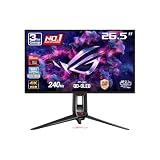
Best overall
ASUS ROG Swift OLED PG27UCDM
Superb picture quality
Trade-off: OLED burn-in risk

Best for professionals
Dell UltraSharp U2725QE
Trade-off: Wobbly stand

Best mid-range/gaming value
Acer Nitro XV275K P5biipruzx
Trade-off: Haloing around bright objects

Best budget
Dell S2725QS
Trade-off: No USB hub
On this page
- SolderMag Take: the best 4K monitors prioritize sharp text over HDR hype
- Who should buy a 27-inch 4K monitor in 2026
- Which 27-inch 4K monitor should you buy?
- 4K monitor specs that actually matter
- USB-C monitor vs separate dock
- 4K monitor buying traps to avoid
- 4K monitor buying checklist
- Our top 4K monitor picks for 2026
- Sources and methodology
A good 27‑inch 4K monitor is one of the highest-ROI upgrades you can make. It improves everything: text clarity, window management, eye comfort, and the simple feeling of not fighting your workspace.
But the market is full of traps: fake HDR, bad scaling advice, confusing USB‑C claims, and panels that look great in a showroom and awful after 6 hours of real work.
SolderMag Take: the best 4K monitors prioritize sharp text over HDR hype
If you’re buying a monitor for work (coding, docs, spreadsheets), don’t let the internet bully you into caring about HDR ratings.
Your daily quality is driven by:
- panel uniformity
- text rendering
- matte vs glossy reflections
- brightness that’s comfortable, not blinding
HDR is mostly noise unless you’re editing video or gaming seriously.
For most desk setups, a 27-inch 4K monitor is the clean default because it gives you sharp text without requiring the desk depth of a 32-inch panel or the window-management habits of an ultrawide. If you want the broader size map, start with our complete monitor buying guide.
Who should buy a 27-inch 4K monitor in 2026
Buy 27" 4K if you:
- code or write all day
- want crisp text
- use macOS and want better UI scaling options
Skip 27" 4K if you:
- need ultrawide multitasking more than sharpness
- have an older GPU that struggles with 4K at high refresh
If you travel often, a portable monitor is the better second-screen upgrade. If you want one screen to replace two displays, look at ultrawide monitors instead.
Which 27-inch 4K monitor should you buy?
ASUS ROG Swift OLED PG27UCDM: best overall if you also game
This is the premium pick for buyers who want workstation sharpness and serious gaming performance in one panel. OLED contrast and motion handling are excellent, but static UI burn-in remains a real consideration for all-day spreadsheets, IDEs, and browser windows.
Dell UltraSharp U2725QE: best for professionals
The Dell is the safest productivity recommendation because Thunderbolt 4, 140W USB-C power delivery, KVM, and the built-in hub can replace a separate dock. If your laptop lives on the desk, this is the pick most likely to reduce cable mess.
Acer Nitro XV275K: best mid-range gaming value
The Acer makes sense if you want 4K, higher refresh, useful HDR, and USB-C without jumping to OLED money. It is not as polished as the Dell for pure work, but it is a strong hybrid pick.
Dell S2725QS: best budget pick
The S2725QS is for buyers who want the core benefit: sharp 4K text at 27 inches. You give up the USB hub and premium docking features, but the ergonomics and 120Hz smoothness are strong for the price.
4K monitor specs that actually matter
1) Panel type (IPS is the safe choice)
IPS is still the best “no surprises” option for work:
- good viewing angles
- consistent colour
2) Refresh rate (60Hz is fine, 120Hz is a luxury)
For office work, 60Hz is okay. If you can get 120Hz without sacrificing panel quality or budget, it’s a nice comfort upgrade.
3) USB‑C (don’t assume it’s a dock)
A monitor having USB‑C doesn’t automatically mean:
- one-cable laptop charging
- hub features
- reliable video
Look for explicit support: USB‑C with power delivery + DP Alt Mode.
4) Ergonomics: stand > hype
A cheap stand will annoy you every day. A good monitor arm is usually a better investment than any bundled stand.
Prefer:
- height adjust
- tilt
- VESA mount support
USB-C monitor vs separate dock
USB-C can be the feature that makes a monitor feel premium every day. A monitor with 90W+ power delivery, USB data, Ethernet, and KVM support can replace a separate Thunderbolt dock.
Choose a USB-C monitor if:
- you use a laptop as your main computer
- you want one cable for display, charging, keyboard, mouse, and webcam
- you switch between work and personal machines
Choose a cheaper display plus a dock if:
- you already own a good dock
- you need multiple external displays
- you want easier replacement if one component fails
4K monitor buying traps to avoid
- “HDR400” marketing (not real HDR experience)
- edge-lit glow sold as “high contrast”
- glossy panels in bright rooms
- USB-C ports that only handle display, not laptop charging
- cheap stands with no height adjustment
- OLED panels for static office UI without understanding burn-in warranty terms
4K monitor buying checklist
- IPS panel
- solid stand or VESA
- sane ports for your setup (HDMI/DP/USB‑C)
- good warranty/returns
- return policy from a seller that handles panel defects cleanly
Our top 4K monitor picks for 2026
ASUS ROG Swift OLED PG27UCDM
Why it works
- Superb picture quality
- perfect blacks
- fantastic gaming/motion handling
Main trade-off
- OLED burn-in risk

Dell UltraSharp U2725QE
Why it works
- Massive USB hub
- Thunderbolt 4 + 140W PD
- KVM switch
Main trade-off
- Wobbly stand

Acer Nitro XV275K P5biipruzx
Why it works
- Excellent local dimming/HDR
- bright anti-glare
- KVM + 90W PD
Main trade-off
- Haloing around bright objects

Dell S2725QS
Why it works
- Ergonomic stand
- accurate sRGB mode
- smooth 120Hz scrolling
Main trade-off
- No USB hub
Want to get the most from your display? Read how to calibrate a 4K monitor.
If you want a larger single-screen workspace, compare these picks against our best 32-inch 4K monitors. MacBook users should also read our best monitors for MacBook Pro guide before choosing between 5K and 4K. If contrast and motion clarity matter more than static desktop use, our best OLED monitors guide explains the burn-in and text-rendering tradeoffs.
Sources and methodology
- Independent monitor review sites that measure brightness/uniformity
- Manufacturer spec sheets
If you need a second screen for travel, see our best portable monitors picks. For creative professionals, our best drawing tablets roundup covers displays that double as input devices. And for the full workstation picture, our desk setup essentials guide covers everything from chair to cable management.