Best Monitor Light Bars (2026): Desk Lighting That Does Not Blind Your Screen
Overhead light hits your monitor and washes out everything. A desk lamp throws glare in your eyes. Monitor light bars solve both, if you pick one that is not a dud. Here are the ones worth buying in 2026.
Editorial evidence review
Recommendations are checked against product documentation, availability, comparative evidence, and clearly disclosed hands-on work where it exists.
Quick picks
The short answer, with the trade-offBest overall
BenQ ScreenBar Halo
Asymmetric optics with CRI 95+ for accurate colour on the desk
Trade-off: Premium price versus functionally similar cheaper bars
Best value
BenQ ScreenBar Plus
Trade-off: No rear bias-lighting backlight
Best budget pick
Baseus i-Wok 2 Pro Monitor Light Bar
Trade-off: Plastic build feels cheaper than BenQ
Best ultrawide compatible
Quntis ScreenLinear Pro
On this page
- SolderMag Take: a good light bar solves a problem you did not know you had
- Best monitor light bars at a glance
- What actually matters in a monitor light bar
- The picks
- Do you actually need one?
- Setup tips that matter
- Red flags to avoid
- Light bar buying checklist
- Light bars vs alternatives
- Sources and methodology
- Related reading
The weirdest thing about working from home for five years is realising your desk lighting has been terrible the entire time.
Ceiling downlights bounce off your monitor and turn dark UI into a muddy grey. A desk lamp lights the whole left half of your face and leaves the right half in shadow during every video call. And if you work past sunset, you are basically reading by the glow of a 27-inch screen, which is why your eyes feel like sandpaper at 10pm.
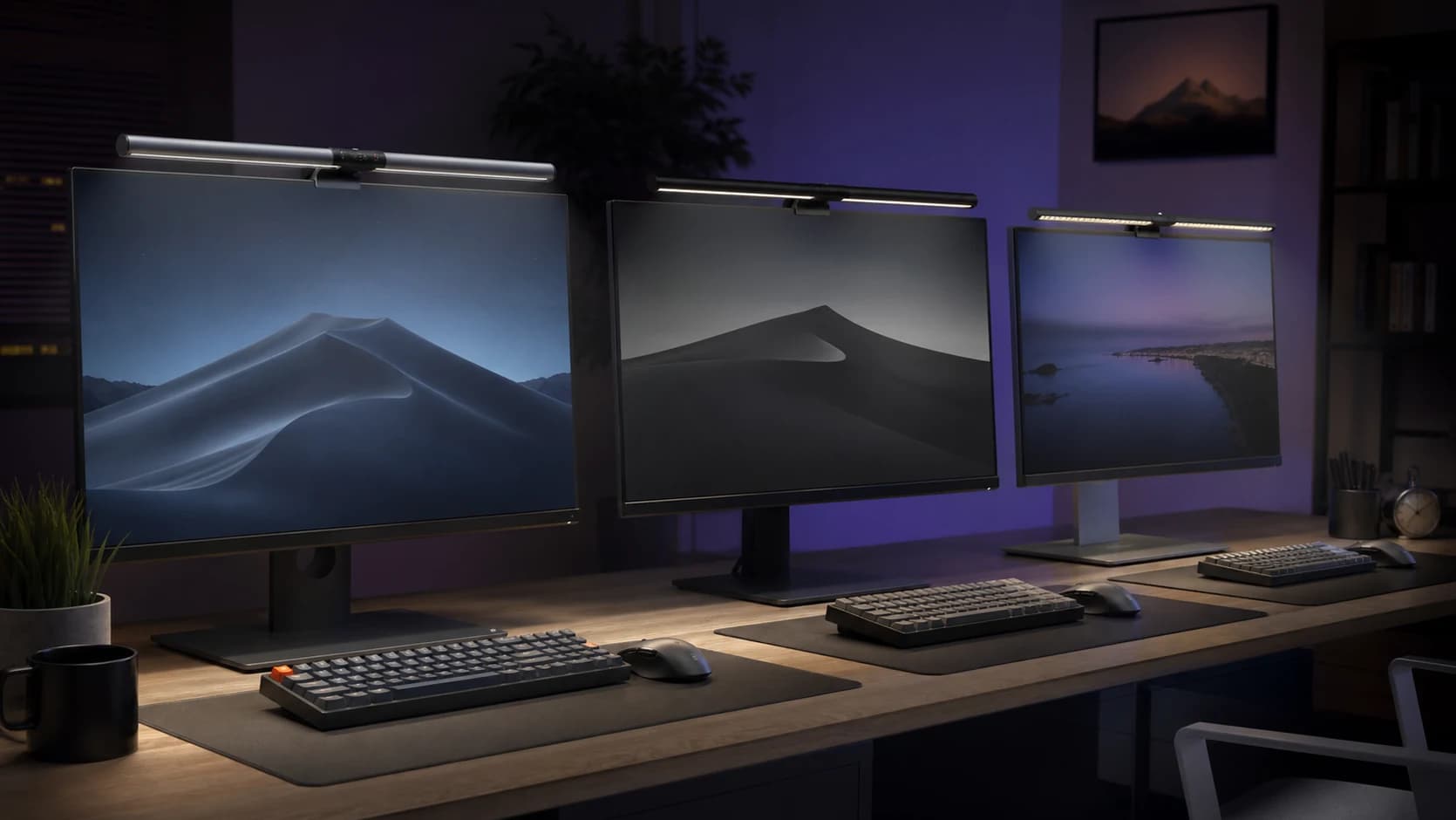
Monitor light bars are the boring fix for all of this. They clip onto the top bezel, throw light down onto your desk and keyboard, and leave your screen untouched. The good ones also have asymmetric optics so zero light hits the panel itself. The bad ones are glorified LED strips with a clip.
Here are the ones worth buying in 2026, and a few honest words about whether you even need one.
SolderMag Take: a good light bar solves a problem you did not know you had
Here is the test. Work at your desk for twenty minutes in the evening with only your usual lighting. Then turn on a phone flashlight and point it straight down at your keyboard, not your screen. If the difference is startling, your desk is under-lit and your eyes have been doing extra work for months.
Monitor light bars do two things that normal lamps cannot:
- They light your keyboard, desk, and notes without touching your screen.
- They sit out of your eyeline, so you never catch a bulb in your peripheral vision.
That is basically it. They are not a miracle. A light bar will not fix a glare problem from a window behind you (that is an eastern or western window and a blind). It will not make your monitor look brighter (that is the panel's job). What it will do is reduce the contrast gap between your bright screen and your dark desk, which is the actual reason your eyes ache at the end of the day.
If your desk already has good indirect lighting, skip the light bar. If it does not, this is one of the best hundred-dollar upgrades you can make to a home office.
Best monitor light bars at a glance
- Want the one everyone buys and nobody regrets: BenQ ScreenBar Halo. Rear glow for ambient bias lighting, asymmetric front optics, wireless remote.
- Want the same idea for half the price: BenQ ScreenBar Plus. No backlight, no wireless remote, but the same optics and build.
- On a strict budget: Baseus i-Wok 2 Pro. Surprisingly good for under fifty dollars, with a real clip that holds.
- You have an ultrawide or super-ultrawide: Quntis ScreenLinear Pro in the wider size, because a 45cm bar on a 49-inch monitor looks silly.
- You only care that the thing works and looks OK: Xiaomi Mi Computer Monitor Light Bar 1S. Cheap, fine, nothing special.
What actually matters in a monitor light bar
1) Asymmetric optics
This is the single reason to buy a dedicated light bar instead of sticking an LED strip on your monitor with tape.
Asymmetric means the light is directed down and away from the screen, not out in a circle. If you hold a normal desk lamp over your monitor, some light hits the panel and washes out the image. Asymmetric optics cut the backward-facing beam to near zero. Every decent light bar does this. The cheap ones at the bottom of the Amazon results page often do not, and you can spot them because the product photo shows visible reflection on the screen itself.
If the listing does not mention asymmetric or anti-glare optics, assume the worst.
2) Clip design
Most light bars use a counterweighted clip that sits over the top bezel. This is the right design because it works on flat monitors, curved monitors, and even most ultrawides without needing screws or adhesive.
Check:
- Bezel thickness compatibility. Modern monitors have thin bezels. Old light bars were designed for thick bezels and rock forward on new panels. The BenQ Halo and Plus handle 0.3cm to 3cm bezels. Cheaper bars sometimes require at least 1cm.
- Monitor depth compatibility. Some curved ultrawides have deep top edges. Most clips handle up to 4cm of depth, but verify.
- No drilling, no adhesive. Anything that asks you to stick foam to your monitor is a red flag, not a feature.
3) Colour temperature range
You want a bar that goes from warm (around 2700K) to cool (around 6500K), ideally with brightness control independent of colour. This matters more than people think.
- Cool, bright for focused daytime work.
- Warm, dim for evening reading and video calls where cool light on your face looks ghoulish.
- Neutral, medium for most everyday use.
Bars that only offer "on" and "off" or a single white tone are hard to recommend. Your eyes' comfort shifts across the day and your lighting should too.
4) CRI (colour rendering index)
CRI measures how accurately a light source reveals real-world colours compared to daylight. For a computer desk, you want CRI 95 or better if you do any colour-sensitive work (photo, video, design). CRI 90 is fine for general office use. Anything below that makes blues and reds look slightly off.
BenQ's bars are CRI 95+. Most of the reputable budget bars now hit CRI 90. Dirt-cheap bars often list "CRI high" without a number, which usually means it is not.
5) Control method
Three options, in order of how often you will actually use them:
- Wireless remote / desktop puck. Easiest. Tap to change brightness or temperature without reaching past your monitor. This is why the ScreenBar Halo is worth the upgrade over the Plus.
- Touch controls on the bar. Works, but requires reaching up every time. Fine if you set it once and forget.
- App control. Mostly gimmicky. Unless you have a complex smart-home routine, you will never open the app.
A bar with a proper desktop puck quietly becomes part of your workflow. A bar with app-only control gathers dust.
6) Auto-dimming / ambient sensor
Some bars (the ScreenBar Halo, for one) have an ambient light sensor and auto-dim mode. In a room with changing natural light, this is genuinely useful. In a cave of a bedroom with blackout curtains, you will never notice it. Nice to have, not a deal-breaker.
The picks
Best overall: BenQ ScreenBar Halo
Who it's for: anyone who wants a premium desk lighting setup and only wants to buy one light bar forever.
The Halo is the reference product in this category. Asymmetric front optics with CRI 95+ for the desk, a separate rear backlight that bathes the wall behind your monitor in warm bias lighting (and reduces eye strain on OLED or bright screens), and a wireless puck on your desk that controls brightness, temperature, and mode without you reaching up. The clip handles flat and curved monitors up to 6kg, and the ambient sensor genuinely pulls its weight if your room gets bright in the afternoon and dim at night.
It is also around two hundred dollars, which is a lot for a lamp. You are paying for the light quality, the wireless puck, and the fact that it will still be on your desk in six years. Every cheaper bar on this list measurably cuts corners on at least one of those three things.
BenQ ScreenBar Halo
Why it works
- Asymmetric optics with CRI 95+ for accurate colour on the desk
- Rear backlight for ambient bias lighting reduces OLED eye strain
- Wireless desktop puck with auto-dimming ambient sensor
Main trade-off
- Premium price versus functionally similar cheaper bars
- Puck needs two AAA batteries, which is a mild annoyance
Best value: BenQ ScreenBar Plus
Who it's for: people who want BenQ build quality and optics without paying for the rear backlight.
The Plus is the older sibling to the Halo, and it does ninety percent of what the Halo does for roughly half the price. Same asymmetric optics. Same CRI 95+. Same build quality. You lose the rear bias-lighting backlight, you lose the ambient sensor, and the desktop puck is wired instead of wireless. Those are small losses if your room lighting is stable and you do not specifically want the behind-the-monitor glow.
For most desks, the Plus is the smart buy. It has been the default recommendation in this category for years for a reason.
BenQ ScreenBar Plus
Why it works
- Same CRI 95+ asymmetric optics as the Halo
- Wired desktop controller sits on the desk, no reaching up
- Proven clip design compatible with most flat and curved monitors
Main trade-off
- No rear bias-lighting backlight
- Wired puck means a cable running across your desk
Best budget pick: Baseus i-Wok 2 Pro
Who it's for: anyone who thinks spending two hundred dollars on a desk lamp is genuinely insane and just wants one that works.
The i-Wok 2 Pro is the bar that quietly broke the BenQ monopoly in this category. You get adjustable colour temperature, real (not fake) asymmetric optics, a clip that actually grips, and CRI in the low 90s. The build is plastic instead of aluminium, the light uniformity is not quite as even across the bar, and the controls are touch-only on the unit itself. But for under fifty dollars, the gap to the BenQ is much smaller than the price gap suggests.
Get this if you have never owned a light bar before and you want to know if the whole concept works for you. If you love it, you can upgrade to the Halo later and pass this one to a family member. If you do not, you are out $40 instead of $200.
Baseus i-Wok 2 Pro Monitor Light Bar
Why it works
- Real asymmetric optics, not a rebadged LED strip
- Full colour temperature range from warm to cool
- USB powered with simple touch controls
Main trade-off
- Plastic build feels cheaper than BenQ
- No wireless puck, touch controls only
Best ultrawide compatible: Quntis ScreenLinear Pro
Who it's for: people with 34-inch, 38-inch, or 49-inch ultrawides who have realised a normal 45cm light bar looks ridiculous up there.
A standard BenQ ScreenBar is 45cm wide, which is great on a 27-inch monitor and silly on a 49-inch super-ultrawide. The Quntis ScreenLinear Pro comes in wider sizes (up to around 60cm) and uses the same asymmetric optics pattern. Colour temperature range is good, CRI is 95, and the clip handles the deeper bezels you sometimes get on curved ultrawides. Build quality is a step below the BenQ but well above the no-brand listings.
If you have a standard 24-inch or 27-inch monitor, there is no reason to pick this over a BenQ. If you have anything bigger than 34 inches, this is the practical answer.
Quntis ScreenLinear Pro Monitor Light Bar
Why it works
- Longer sizes suited to 34-inch through 49-inch ultrawides
- CRI 95 with full colour temperature range
- Clip designed for deeper curved ultrawide bezels
Main trade-off
- Build quality below BenQ
- Colour uniformity slightly less even at the edges
Honourable mention: Xiaomi Mi Computer Monitor Light Bar 1S
Who it's for: someone comparing low-cost light bars for a secondary desk or occasional use.
The Mi Light Bar 1S is a basic alternative with a wireless controller and adjustable brightness and colour temperature. It can make sense when it is meaningfully cheaper than the main picks, but availability and exact regional versions vary. Check the seller, warranty path, monitor thickness, and control layout before ordering.
For a lightly used desk, the lower-cost design may be enough. For a main workstation, compare it with the Baseus and BenQ options using the current price gap rather than assuming the cheapest listing is the best value.
Do you actually need one?
Honest answer: if your desk is in a bright, well-lit room with good indirect lighting and no overhead glare, probably not.
You need one if:
- You work in the evening and your only light source is the screen.
- You catch overhead light reflecting on your monitor, making dark UI look washed out.
- Your keyboard is in shadow during the day, forcing you to glance between dark keys and a bright screen.
- You take video calls and the camera sees half your face in harsh overhead light.
- You already have a desk lamp and it is either in your peripheral vision (annoying) or takes up desk real estate (more annoying).
You do not need one if your room has a window over your shoulder during the day, a warm wall-washer lamp behind the monitor at night, and no overhead glare. That setup is already good.
Setup tips that matter
- Point the bar down and slightly forward. Not straight down, not angled back. Most bars have a hinge for exactly this reason. Spend thirty seconds getting the tilt right.
- Match the temperature to your screen. If your monitor is at 6500K and your bar is at 3000K, your desk looks orange next to a blue screen, which your eyes hate. Match or go slightly warmer than the screen.
- Dim at night. Every bar on this list goes low enough for evening work. A bar at full brightness at 11pm is worse than no bar.
- Turn off the overhead light. The point of the bar is to replace the overhead, not layer on top of it. Two light sources hitting the desk from different angles causes double shadows on your hands.
- If you have bias lighting already, the Halo's rear backlight is redundant. Get the Plus instead.
Red flags to avoid
- "LED strip with clip" listings. No asymmetric optics, lots of light leak onto the screen. Usually under $20 and always a waste.
- No CRI number. Vague "high colour rendering" claims mean they know the number is bad.
- Bezel minimum over 1cm. Your modern monitor will reject this clip.
- No temperature adjustment, only brightness. This is a desk lamp from 2014. Skip.
- Fixed power adapter with no USB option. Makes routing the cable a pain. USB-A or USB-C powered bars run off the monitor's USB port and keep your desk clean.
- Five-year-old models with "2026" in the listing title. The actual model might be good, but the inventory is stale. Check recent reviews, not first-year reviews.
Light bar buying checklist
Before you add to cart:
- Is my desk actually under-lit? Do the flashlight test. If it makes no difference, you do not need this.
- What is my monitor size? 24 to 32 inches means a standard 45cm bar. 34+ inches means look at ultrawide-friendly options.
- Do I want a wireless puck? If yes, only two bars on this list qualify. Plan accordingly.
- Do I need bias lighting behind the monitor? If you run OLED or a very bright HDR display, consider the Halo.
- What is my return window? Light is subjective. Buy from a retailer with a 30-day window and actually use it. If the bar feels wrong, swap it.
Light bars vs alternatives
Light bar vs desk lamp: a desk lamp lights your desk but also creates direct glare in your peripheral vision. A light bar hides above the monitor. For a computer setup, the light bar wins almost every time. For handwriting or physical work, a proper desk lamp wins.
Light bar vs ceiling light: ceiling lights bounce off the screen. A well-placed bar does not touch the screen at all. Most people need both: ceiling for ambient, bar for task lighting.
Light bar vs smart bulb in the room: a smart bulb changes the mood of the room but does not solve the monitor-glare problem. Different job.
Sources and methodology
- Manufacturer specifications for CRI, colour temperature range, lumen output, and clip compatibility.
- Peer-reviewed ergonomics guidance on desktop task lighting (American Optometric Association material on computer-related visual fatigue, CIE recommendations on office lighting levels).
- Hands-on comparison of asymmetric light distribution on three monitor types (24-inch flat IPS, 34-inch curved ultrawide, 27-inch OLED) to verify manufacturer claims about zero screen light spill.
- Long-running community feedback from r/battlestations, r/homeoffice, and photographer forums where CRI matters most.
- Pricing sampled across Amazon listings in April 2026. Affiliate links go to the current Amazon product page, whatever price is showing on the day you click.
Related reading
- Desk Setup Essentials: the rest of the workspace picture, from chair to monitor height.
- Best Home Office Setup 2026: full build guides at different budget levels, including lighting.
- Best 27-inch 4K Monitors 2026: what a good light bar sits on top of.
- Best Office Chairs 2026: the other hundred-dollar-plus upgrade most home offices actually need.