Creative Pebble Pro Review: Small Speakers, One Power Catch
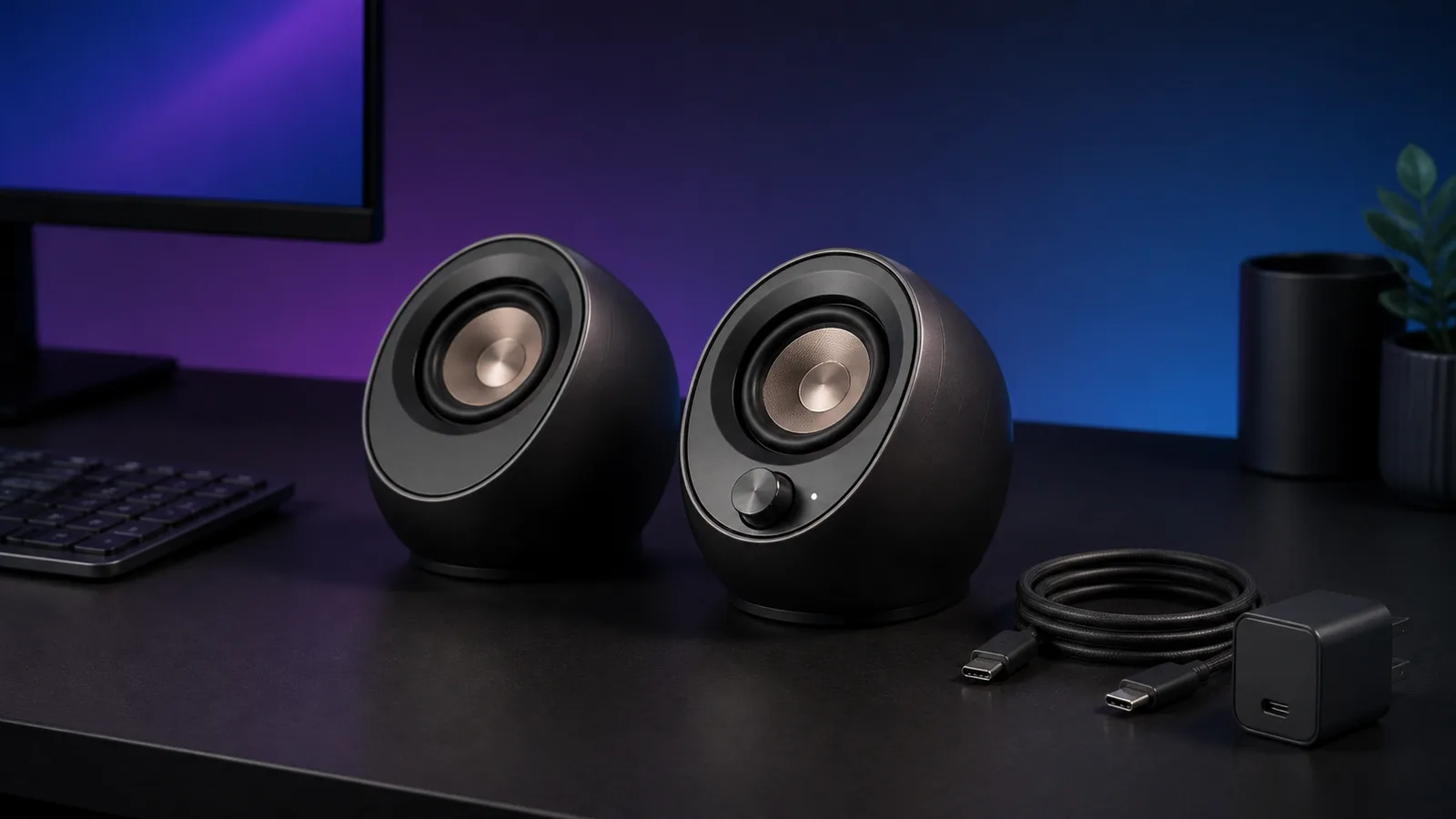
Creative Pebble Pro is a practical compact speaker pair with USB audio, Bluetooth and AUX. The catch is that its higher-output mode needs a separate USB-C PD adapter.
Research-based review
Recommendations are checked against product documentation, availability, comparative evidence, and clearly disclosed hands-on work where it exists.
Quick picks
The short answer, with the trade-off
Compact budget pick
Creative Pebble Pro
Compact 123mm-per-side footprint
Trade-off: 30W PD adapter sold separately

Larger wired alternative
Edifier MR4
On this page
- Short verdict
- Who this is for
- Who should skip it
- Key specifications
- The USB-C power catch
- Inputs and everyday controls
- Desk placement and cable planning
- Sound and gaming expectations
- RGB and software
- Setup and troubleshooting
- Value
- Creative Pebble Pro vs Pebble V3
- Alternatives
- Frequently asked questions
- Final recommendation
- Sources
The Creative Pebble Pro is a sensible compact speaker pair for a small desk that needs USB audio, Bluetooth, and a 3.5mm input without another large box. Its angled drivers, front volume control, and headset connections solve ordinary computer-audio problems neatly.
The catch is power. A normal USB-C connection gives the pair up to 10W RMS according to Creative. Reaching the advertised higher-output mode requires a separate 30W USB-C PD adapter, which is not included. That adapter supplies power only; USB audio still needs its own connection.
This is a research-based review. SolderMag has not completed hands-on sound, loudness, latency, microphone-pass-through, or long-term reliability testing of this model. The verdict is based on Creative's current specifications and setup guide, exact US Amazon product validation, and comparison with nearby desktop-speaker options.
Short verdict
Buy the Creative Pebble Pro if desk space is tight and you want one small pair to handle a computer over USB, a phone over Bluetooth, and another source over AUX. The front headset and microphone ports are useful on desktops whose audio jacks are awkward to reach.
Skip it if you want a subwoofer output, optical input, remote control, room-filling output, or monitor-style balanced connections. The Edifier MR4 and R1280DBs comparison covers larger speakers with more cabinet volume and very different input priorities.
Creative Pebble Pro
Buy it for the tiny footprint and useful inputs, but budget for a PD adapter only if the standard USB-powered mode is not enough.
Why it works
- Compact 123mm-per-side footprint
- USB audio, Bluetooth 5.3, and AUX input
- Front headset and microphone connections
Main trade-off
- 30W PD adapter sold separately
- No subwoofer or optical output
- No SolderMag hands-on sound measurements
Amazon's exact black US listing was validated through the Creators API. Availability and seller can still change, so treat the button as a current product check rather than a stock promise.
Who this is for
The Pebble Pro makes sense for:
- a small home-office desk where normal bookshelf speakers block the monitor or consume too much depth
- a laptop or desktop that benefits from direct USB audio instead of a noisy analog output
- someone who switches among a computer, phone, and 3.5mm source
- a desktop PC with inconvenient rear headset and microphone sockets
- casual music, video, calls, and gaming where simple placement matters more than studio connections
Each speaker is about 123mm wide, 123mm deep, and 118mm high. That does not make the cables disappear, but it does leave more usable desk surface than a conventional four-inch monitor pair.
Who should skip it
Skip the Pebble Pro if you are building a room-first music system. Creative specifies a pair of 2.25-inch full-range drivers with rear passive radiators. That is a space-efficient desktop design, not evidence that two tiny cabinets can replace larger speakers or a subwoofer.
Also skip it if you need multiple sources to play simultaneously. The source button cycles through USB audio, Bluetooth, and AUX. It is a switch, not a mixer.
Creators using an audio interface should look at the Edifier MR4 or another monitor with balanced inputs. Buyers who want a more premium compact pair, a subwoofer connection, and modern computer inputs should compare the Audioengine A2+ Next Gen and Kanto ORA.
Key specifications
| Feature | Creative Pebble Pro | Buyer impact |
|---|---|---|
| Speaker layout | 2.0 stereo pair | No separate subwoofer is included |
| Drivers | 2× 2.25-inch full-range with passive radiators | Compact nearfield design rather than a room speaker |
| Inputs | USB audio, Bluetooth 5.3, 3.5mm AUX | Covers the common computer, phone, and analog paths |
| Front connections | Headset/headphone out and microphone in | Useful when a desktop's rear audio ports are hard to reach |
| Standard USB power | Up to 10W RMS total; 20W peak claimed | The simple one-cable computer mode |
| External PD power | Up to 30W RMS total; 60W peak claimed | Requires a separate 30W / 15V 2A PD adapter |
| Frequency response | 80Hz–20kHz claimed | Does not establish bass depth or tonal accuracy by itself |
| Dimensions | 123 × 123 × 118mm per speaker | Fits under or beside many monitors |
| Pair weight | 780g combined | Easy to move; cable pull and desk vibration still matter |
The wattage figures are manufacturer ratings, not SolderMag measurements. Treat them as a guide to the two power modes, not a direct comparison with another brand's rating method.
The USB-C power catch
The Pebble Pro has two different USB-C jobs. One port carries USB audio and can power the speakers from a compatible computer. A second PD input can provide more power from an external 30W adapter.
Creative's setup guide says the normal USB-C connection supports up to 10W RMS total. With a 30W / 15V 2A PD supply attached, the claimed ceiling rises to 30W RMS total. The PD input does not carry audio, so the higher-output USB setup uses two connections: one to the computer for sound and another to the charger for power.
That distinction matters because the box does not include the PD adapter. Start with the normal USB connection. Add a suitable adapter only if the available output is not enough for your listening distance and room. Buying another charger before hearing the standard mode adds cost and cable clutter without proving you need it.
If you already own a compatible multiport supply, check how its power is divided when other devices connect. Our USB-C charger wattage guide explains why a charger's total number does not guarantee that every port can deliver the required profile at once.
Inputs and everyday controls
USB audio is the cleanest computer connection because one digital path handles the source without relying on a desktop's analog output. Bluetooth 5.3 is convenient for a phone or tablet. AUX is the fallback for older computers, monitors, docks, and other equipment with a 3.5mm output.
The right speaker carries the volume knob, source button, and RGB control. One press of the source button moves through USB, Bluetooth, and AUX. That is straightforward when you normally use one device at a time, but it is less convenient than separate physical input buttons and it does not combine sources.
The front headset and microphone sockets are an underrated feature. They can move an awkward PC connection to the desk surface. Creative's guide distinguishes a four-pole headset/headphone connection from the separate three-pole microphone input, so check the plug arrangement on your own headset before assuming one cable will handle everything.
Desk placement and cable planning
Small speakers still need sensible placement. Put the pair at similar distances from your head and avoid hiding one behind a laptop display. The angled drivers are designed to point upward from a low desk, but a very deep desk or high seating position can still put them off-axis.
Rear passive radiators need some breathing room. Do not press the speakers directly against a wall or pile cables behind them. There is no universal clearance figure in the setup guide, so start with a modest gap and adjust rather than treating the rear surface as dead space.
The connection between the left and right speakers is fixed and measures 1.8m according to Creative. That is generous for a normal monitor, but it is still a cable you cannot replace with a longer standard lead. Measure unusual ultrawide or dual-monitor layouts before ordering.
Our desk setup essentials guide covers monitor placement, cable routing, power, and the other small decisions that determine whether a compact setup stays tidy.
Sound and gaming expectations
Specifications can confirm driver size, rated power, inputs, and physical layout. They cannot prove tonal balance, distortion at high volume, stereo imaging, bass extension, or gaming latency. We would not describe the Pebble Pro as accurate, room-filling, or low-latency without matched measurements.
The safe expectation is a compact nearfield upgrade for ordinary desktop listening. The 80Hz lower frequency figure should not be read as equivalent to the bass of a larger cabinet or a system with a subwoofer. A frequency-response range without tolerance limits also says little about how evenly the speaker covers that range.
For gaming, use USB or AUX when audio delay matters. Bluetooth behavior depends on the source, operating system, codec, and complete signal path. Creative lists Bluetooth 5.3 but does not turn that version number into a universal latency guarantee.
RGB and software
The lighting is optional rather than structural. Creative provides cycle, pulse, solid-color, and off modes from the speaker's control. You do not need to install desktop software simply to turn it off.
That is the right implementation for a practical desk product. Buyers who dislike RGB can disable it. Buyers who want a restrained accent can select one color without tying basic speaker control to another background application.
Setup and troubleshooting
For the simplest USB setup:
- connect the included USB-C audio cable between the computer and the speaker
- select Creative Pebble Pro as the computer's output device
- confirm the speaker is in USB mode
- set the computer to a moderate level, then use the front knob for normal adjustment
- add the separate PD supply only if more output is genuinely required
If there is power but no USB sound, check that the computer is connected to the USB audio port rather than the power-only PD port. If Bluetooth will not reconnect cleanly, Creative documents an eight-second hold on the Bluetooth button for a master reset; that removes previous pairings.
For AUX, the speakers still need USB power. A 3.5mm cable carries audio, not operating power. If you connect through a USB-C hub or MacBook dock, verify which port is supplying audio and which is supplying power before blaming the speaker.
Value
The Pebble Pro earns its place by combining a very small footprint with three useful source types and front headset access. It is not automatically good value at every price, and the optional PD adapter changes the total cost.
Compare three complete setups:
- Pebble Pro using standard USB power
- Pebble Pro plus a suitable 30W PD adapter
- a larger speaker pair that already provides the input or output you need
If standard USB power is sufficient, the product stays simple. If you immediately need extra power, deeper bass, a subwoofer output, and more room coverage, paying once for a larger system may be the cleaner decision.
Creative Pebble Pro vs Pebble V3
The Pebble V3 is the simpler choice when you want compact USB audio and Bluetooth without the Pro-specific extras. The Pro is the step up for buyers who will use its front headset and microphone connections, lighting controls, Bluetooth 5.3, or optional higher-power PD mode.
Do not pay more just because “Pro” sounds newer. Pay for a connection or control you can name. If the speakers will stay on one computer and standard USB power is enough, the V3 may solve the same basic job with fewer reasons to add another cable.
Creative publishes a direct comparison chart for the two models. Check the exact package at the retailer as well: the Pro's extra power ceiling still does not mean the required 30W PD adapter is included.
Alternatives
Creative Pebble X: read our Creative Pebble Pro vs Pebble X comparison if larger drivers, a stronger one-cable USB mode, or deeper RGB control sound useful. If the included subwoofer is the real question, use our Pebble X vs Pebble X Plus comparison. Verify the exact model because Pebble, Pebble V3, Pebble Pro, Pebble X, and Pebble X Plus do not share the same ports or included hardware.
Edifier MR4: choose this for a larger wired desk, balanced TRS inputs, front AUX and headphone access, and a monitor-oriented workflow. It takes much more space and lacks the Pebble Pro's Bluetooth and direct USB audio.
Audioengine A2+ Next Gen: the premium compact route when appearance, connection flexibility, and a more conventional powered-speaker design matter more than budget.
Kanto ORA: the compact upgrade for buyers who want a clear path to a subwoofer and are prepared to spend more.
Start with our best computer speakers guide if you are not yet sure which size or input layout fits your desk.
Frequently asked questions
Does Creative Pebble Pro include a USB-C PD adapter?
No. Creative includes USB-C and 3.5mm cables, but the 30W / 15V 2A PD adapter required for the higher-output mode is sold separately.
Can Creative Pebble Pro run from one USB-C cable?
Yes, with a compatible computer connection for USB audio and power. Creative rates that mode up to 10W RMS total. The higher 30W RMS claim requires a separate PD power connection.
Can it play USB and Bluetooth audio at the same time?
Creative documents switching among USB audio, Bluetooth, and AUX. It does not document simultaneous mixing of those sources, so buy it as a switchable single-source system.
Does Creative Pebble Pro have a subwoofer output?
No subwoofer output is listed. Choose another speaker system if adding a subwoofer is part of the plan.
Is Creative Pebble Pro good for gaming?
It has practical USB and AUX paths for a gaming PC, but SolderMag has not measured its latency, imaging, or maximum clean output. Use USB or AUX rather than assuming Bluetooth will meet a latency-sensitive gaming requirement.
Can the RGB lighting be turned off?
Yes. The hardware control cycles through lighting modes and includes an off setting.
Final recommendation
Buy the Creative Pebble Pro if you need a very small speaker pair with USB audio, Bluetooth, AUX, and easy front controls. It is a practical upgrade path for cramped desks and ordinary computer listening.
Skip it if the separate PD adapter feels like an immediate requirement rather than an optional upgrade. At that point, compare the complete cost and cable layout with a larger speaker pair that better fits the output, bass, or connection job.
Sources
- Creative official Pebble Pro product page and specifications
- Creative official Pebble Pro technical specifications
- Creative official Pebble Pro vs Pebble V3 comparison chart
- Creative official Pebble Pro setup guide
- Amazon Creators API exact-product validation for US ASIN
B0DXW25R3Dwith the configuredsoldermag-20Associate tag.
As an Amazon Associate I earn from qualifying purchases.