Creative Pebble Pro vs Pebble X: Which Should You Buy?
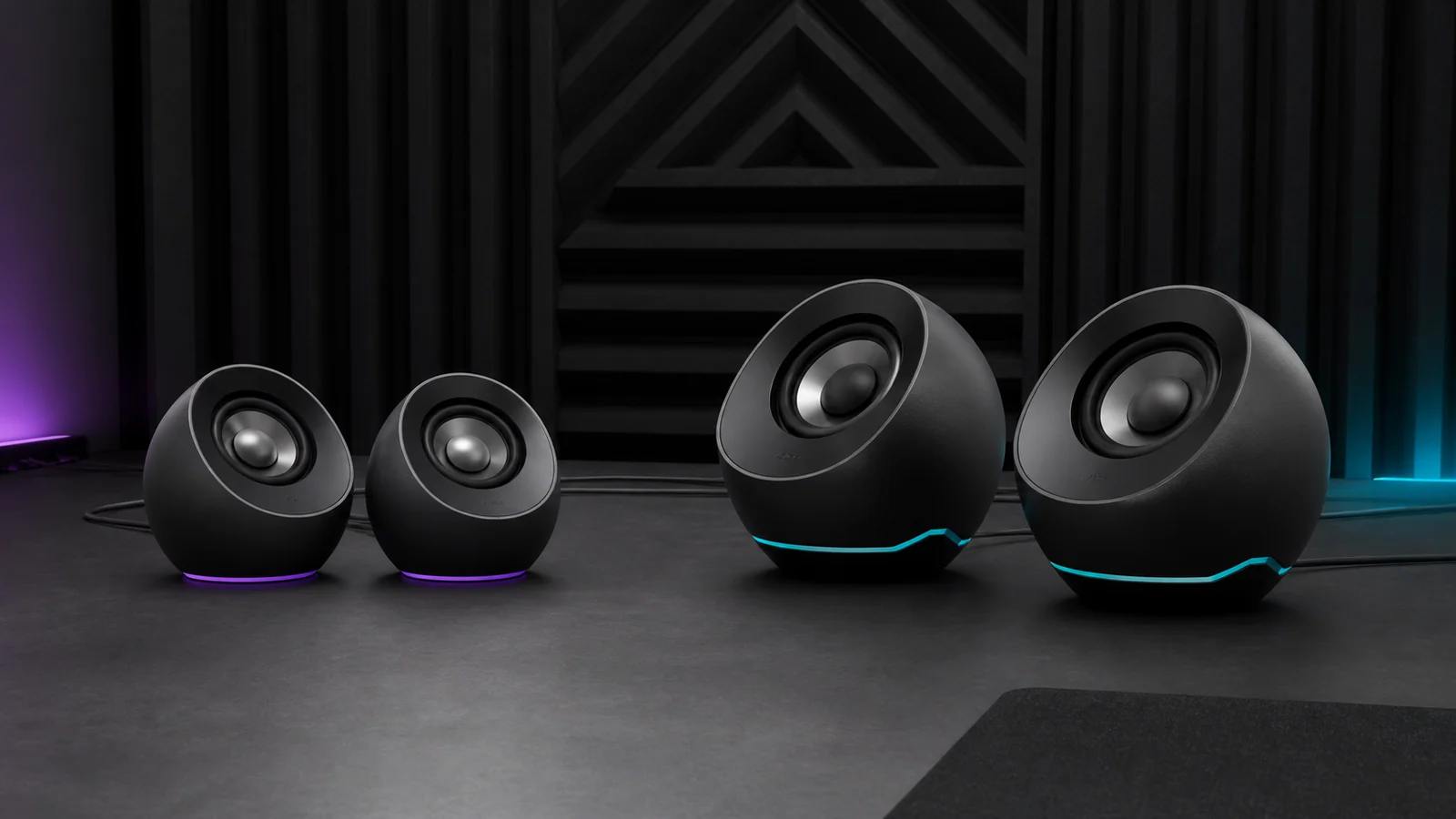
Pebble Pro is smaller with a longer speaker cable; Pebble X adds larger drivers and more one-cable USB power. Here is which pair fits your desk.
Research-based comparison
Recommendations are checked against product documentation, availability, comparative evidence, and clearly disclosed hands-on work where it exists.
Quick picks
The short answer, with the trade-offBest for most small desks
Creative Pebble Pro
Smaller and lighter cabinets
Trade-off: 10W RMS ceiling in normal USB mode
Best for larger drivers and app-controlled RGB
Creative Pebble X
Trade-off: Shorter 1.2m fixed speaker cable
On this page
- Quick answer
- Pebble Pro vs Pebble X specifications
- Desk space and cable length decide more than the model name
- USB power: one cable versus the optional PD setup
- Do larger drivers make Pebble X sound better?
- Inputs, headset ports, and everyday controls
- RGB and software
- Who should buy Creative Pebble Pro?
- Who should buy Creative Pebble X?
- Who should skip both?
- Price and value
- Alternatives
- Frequently asked questions
- Final recommendation
- How we compared them
- Sources
The Creative Pebble Pro is the better buy for most small desks. It takes less room, weighs less, and its 1.8m fixed speaker cable is much easier to route around an ultrawide or dual-monitor setup. With a separate 30W USB-C PD adapter, it reaches the same claimed 30W RMS ceiling as Pebble X.
Choose the Pebble X when you specifically want its larger 2.75-inch drivers, up to 15W RMS from a suitable 5V/3A computer USB-C port, and deeper RGB and app controls. It is not a straightforward upgrade: the cabinets are larger, the pair is heavier, and the 1.2m cable between the speakers can be restrictive.
This comparison is research-based. SolderMag has not completed matched listening, distortion, latency, maximum-output, or long-term reliability tests on these speakers. The recommendation uses Creative's current specifications and guides, desk fit, connection requirements, exact Amazon product identity, and the trade-offs a buyer can verify before ordering.
Quick answer
| Buyer | Better choice | Why |
|---|---|---|
| Small desk or tight monitor layout | Pebble Pro | Smaller and lighter, with a 1.8m speaker-to-speaker cable |
| Wants the stronger one-cable USB mode | Pebble X | Up to 15W RMS from a suitable 5V/3A USB-C port versus 10W RMS for Pro |
| Uses an ultrawide or two displays | Pebble Pro | The extra 60cm of fixed cable gives the pair more placement range |
| Wants larger drivers | Pebble X | 2.75-inch full-range drivers versus 2.25-inch drivers |
| Wants simple hardware lighting controls | Pebble Pro | Three effects and an off setting without depending on an app |
| Wants more RGB and software control | Pebble X | Six presets plus Creative app controls |
| Expects the larger model to be louder with PD | Neither wins on the published ceiling | Both are rated up to 30W RMS with a separate compatible adapter |
If you cannot name a Pebble X feature you will use, buy Pebble Pro and keep the desk space. If the larger drivers, stronger normal USB mode, or app-controlled lighting solve a real requirement, Pebble X is the more capable package.
Pebble Pro vs Pebble X specifications
| Feature | Creative Pebble Pro | Creative Pebble X | What matters |
|---|---|---|---|
| Full-range drivers | 2 × 2.25 inches | 2 × 2.75 inches | Driver size alone does not prove better sound |
| Standard computer USB-C mode | Up to 10W RMS total | Up to 15W RMS total with 5V/3A | X has more published output before adding a wall adapter |
| Separate USB-C PD mode | Up to 30W RMS total | Up to 30W RMS total | Both require a compatible adapter that is not included |
| Published frequency range | 80Hz–20kHz | 60Hz–20kHz | Neither range includes a tolerance or proves bass quality |
| Size per speaker | 123 × 123 × 118mm | About 139 × 137 × 132mm | X uses noticeably more desk area |
| Pair weight | About 780g | About 1,200g | Pro is easier to move and less demanding on shelves |
| Fixed speaker cable | 1.8m | 1.2m | Pro is much easier around wide displays |
| Inputs | USB audio, Bluetooth 5.3, 3.5mm AUX | USB audio, Bluetooth 5.3, 3.5mm AUX | Core source coverage is similar |
| Front audio ports | Headset/headphone out and microphone in | Headset/headphone out and microphone in | Both can bring awkward PC sockets to the desk |
| Lighting | Three hardware-controlled effects | Six presets plus app controls | Pick by how much RGB control you actually want |
| USB-C PD adapter included | No | No | Compare the complete setup cost, not just the speaker price |
The biggest practical differences are not hidden in audio jargon. They are the cabinet size, the cable between the speakers, and how much power the pair can draw from the computer without a second power connection.
Desk space and cable length decide more than the model name
Pebble Pro is already compact, but Pebble X is larger in every cabinet dimension. A few centimetres sounds trivial until a speaker has to sit between a monitor foot, dock, microphone arm, and wall. Measure the available width and depth on both sides of the display before buying.
The fixed cable matters even more. Creative lists 1.8m between the Pebble Pro speakers and 1.2m for Pebble X. Neither cable can be replaced with a normal longer lead. The shorter X cable may be fine around a single 24- or 27-inch display, but it leaves less freedom around a wide monitor, dual screens, or a desk with a large centre stand.
Do not measure only the straight distance between the cabinets. Allow cable for routing behind the display and down around a stand. Pebble Pro is the safer choice when the layout is unusual or likely to change.
Our desk setup essentials guide covers placement, cable routing, monitor arms, and the other details that determine whether a compact setup stays compact.
USB power: one cable versus the optional PD setup
Both pairs can take USB audio and power from a compatible computer. They also provide a second USB-C power input for a separate PD adapter.
The normal computer connection is where Pebble X has a clear specification advantage. Creative rates Pebble Pro up to 10W RMS total in its standard USB mode. Pebble X is rated up to 15W RMS when the source port can supply 5V/3A.
That does not mean every laptop, hub, or monitor USB-C port will deliver the required power. Port labels are unreliable, and a dock may divide its available power among several devices. Check the source specification rather than assuming any USB-C socket unlocks the published maximum.
With a separate 15V/2A PD supply, both models are rated up to 30W RMS total. Pebble X does not gain a higher published ceiling simply because its drivers and cabinets are larger. The required PD adapter is not included with either pair.
Start with the one-cable setup. Add a compatible adapter only if the standard mode does not provide enough output at your listening distance. Our USB-C charger wattage guide explains why a charger's total rating does not guarantee a specific profile from every port.
Do larger drivers make Pebble X sound better?
Pebble X uses 2.75-inch full-range drivers; Pebble Pro uses 2.25-inch drivers. Creative also publishes a lower 60Hz response limit for X, compared with 80Hz for Pro.
Those specifications make Pebble X the more ambitious design. They do not establish a sound-quality winner. Driver size and a frequency range without tolerance limits cannot show tonal balance, usable bass level, distortion, stereo imaging, cabinet resonance, or maximum clean output.
SolderMag has not level-matched and measured both pairs, so we would not tell a buyer that X is automatically clearer, deeper, or more powerful. Treat the larger hardware as a reason to shortlist X, not proof that it justifies any price gap.
For gaming or video, use USB or AUX when delay matters. Both models list Bluetooth 5.3, but the Bluetooth version alone does not guarantee lip-sync performance across every phone, computer, codec, and operating system.
Inputs, headset ports, and everyday controls
The core connection list is similar. Both support direct USB audio, Bluetooth 5.3, and a 3.5mm AUX input. Both also provide a four-pole headset/headphone output and a separate microphone input on the right speaker.
That front access can be more useful than it looks. A desktop PC under the desk or a dock behind a monitor may have inconvenient audio sockets. Moving those connections beside the volume control saves reaching and reduces the length of cable lying across the desk.
Neither pair should be bought as a multi-source mixer. Creative documents switching among USB, Bluetooth, and AUX rather than playing those inputs together. If simultaneous sources are essential, use an external mixer or choose a speaker designed for that workflow.
The fuller Creative Pebble Pro review explains its port layout, two USB-C roles, source switching, and setup troubleshooting in more detail.
RGB and software
Pebble Pro keeps lighting simple. Its hardware control provides cycle, pulse, solid-colour, and off behaviour. That is enough if you want a small accent or want the lighting disabled without installing another application.
Pebble X puts more emphasis on customisation. Creative lists six built-in RGB presets and provides Creative app control for lighting and audio settings. Buy X for that only if software control is part of the appeal. It adds options; it does not improve the physical placement or raise the published PD-powered output ceiling.
If background applications and firmware tools are unwelcome on a work computer, Pebble Pro's simpler hardware path is a feature rather than a compromise.
Who should buy Creative Pebble Pro?
Buy Pebble Pro if:
- the desk is small or already crowded;
- an ultrawide or dual-monitor layout needs the longer fixed cable;
- USB, Bluetooth, and AUX cover the sources you own;
- you want front headset and microphone access;
- simple hardware lighting controls are enough;
- the standard 10W RMS mode is likely to cover nearfield listening;
- you do not want to pay for larger cabinets without matched sound evidence.
The main trade-off is its lower published output in the normal one-cable USB mode. With a separate PD supply, however, its 30W RMS claim matches Pebble X.
Creative Pebble Pro
Why it works
- Smaller and lighter cabinets
- Long 1.8m speaker cable
- USB audio, Bluetooth, AUX, and front headset ports
Main trade-off
- 10W RMS ceiling in normal USB mode
- Separate adapter needed for the 30W RMS claim
Who should buy Creative Pebble X?
Buy Pebble X if:
- the larger cabinets fit with space to spare;
- a suitable computer port can supply 5V/3A;
- 15W RMS in the one-cable mode is worth the extra desk area;
- larger drivers are part of a shortlist you plan to audition;
- app-controlled lighting and audio settings matter;
- the 1.2m speaker cable reaches cleanly around your monitor setup;
- the price gap is reasonable when you buy.
The main trade-off is placement. Pebble X is larger and heavier, yet provides 60cm less cable between the speakers. Measure before ordering.
Creative Pebble X
Why it works
- Larger 2.75-inch drivers
- Up to 15W RMS from a suitable computer port
- Six RGB presets and Creative app controls
Main trade-off
- Shorter 1.2m fixed speaker cable
- Larger cabinets with the same 30W RMS PD ceiling
Who should skip both?
Skip both if you need deep bass without adding a separate system. These are compact full-range desktop speakers, not replacements for larger cabinets or a properly integrated subwoofer.
Skip both if you need balanced inputs for an audio interface. The larger Edifier MR4 is a more practical wired monitor-style option; our MR4 vs R1280DBs comparison explains the connection trade-off.
Skip both if the fixed speaker cable cannot fit your layout. A compact cabinet does not help when the pair cannot sit where it needs to.
Skip both if you need independently measured sound performance before choosing. This article can verify specifications and setup differences, but not settle tonal balance or clean output without matched testing.
Price and value
Do not use a fixed price gap as the decision rule. Retail prices and sellers change. Compare the complete setup on the day you buy:
- speaker pair alone in standard USB mode;
- speaker pair plus a suitable 30W PD adapter;
- any stand, isolation pad, hub, or cable-routing change the desk requires.
Pebble Pro is the value pick when it is cheaper and its normal USB mode is sufficient. Pebble X earns more when the buyer will actually use its 15W one-cable rating, larger drivers, or deeper app controls.
We would not pay extra for X solely because it is the larger model. Its maximum published RMS output with the optional adapter is the same, and its shorter fixed cable can make it less useful on a wide desk.
Alternatives
Creative Pebble X Plus: choose the 2.1 package when a compact included subwoofer is the reason for moving beyond Pebble Pro. Our Creative Pebble X vs Pebble X Plus comparison explains what the subwoofer adds, what it does not change, and how much extra space the system needs.
Edifier MR4: the value route for a larger wired creator desk with balanced TRS inputs. It gives up Bluetooth and direct USB audio. The MR4 comparison covers the practical input differences.
Audioengine A2+ Next Gen: the premium compact option for buyers who care about a more conventional powered-speaker design and flexible inputs. Kanto ORA is the subwoofer-ready alternative. Our A2+ vs Kanto ORA comparison helps decide whether that higher tier is worth it.
Use the best computer speakers guide if you are still deciding between tiny USB speakers, compact premium pairs, and larger wired monitors. For a room-first system, start with the complete home audio setup guide.
Frequently asked questions
Is Creative Pebble X better than Pebble Pro?
Pebble X has larger drivers, up to 15W RMS from a suitable computer USB-C port, and more RGB and app control. Pebble Pro is smaller, lighter, has a longer fixed cable, and matches X's claimed 30W RMS ceiling when both use a separate compatible PD adapter. X is better only when its specific extras matter more than desk fit.
Do Pebble Pro and Pebble X include a 30W USB-C PD adapter?
No. Creative documents the adapter as a separate requirement for the higher-output mode. Check the complete package rather than assuming the speaker box includes the power supply.
Can either pair run from one USB-C cable?
Yes, with a compatible computer USB-C connection carrying audio and power. Creative rates Pebble Pro up to 10W RMS total in this mode and Pebble X up to 15W RMS with a 5V/3A source.
Which pair is better for an ultrawide monitor?
Pebble Pro is safer because its fixed speaker-to-speaker cable is listed at 1.8m, compared with 1.2m for Pebble X. Measure the routed path behind the display before buying either model.
Does Pebble X sound better than Pebble Pro?
Its larger drivers and lower published response limit make it the more ambitious design, but those specifications do not prove sound quality. SolderMag has not completed matched measurements or listening tests, so we would not name a sound winner.
Can the RGB lighting be turned off?
Yes. Both models provide an off state. Pebble X adds more presets and Creative app control; Pebble Pro keeps the hardware options simpler.
Final recommendation
Buy the Creative Pebble Pro for a small or wide-monitor desk. Its smaller cabinets and longer fixed cable solve more real placement problems, while the optional PD mode reaches the same published RMS ceiling as Pebble X.
Buy the Creative Pebble X when its larger drivers, 15W one-cable USB rating, and richer RGB controls are features you can name and use. Measure the 1.2m speaker cable first.
How we compared them
We compared current Creative specifications and setup guides, exact US Amazon product identity, power requirements, physical dimensions, fixed-cable length, input layout, and buyer use cases. We did not convert manufacturer power or frequency claims into a sound-quality verdict. Both US ASINs were returned as exact products by the configured Amazon Creators API with the soldermag-20 Associate tag before publication.
Sources
- Creative official Pebble Pro product page
- Creative official Pebble Pro technical specifications
- Creative official Pebble Pro setup guide
- Creative official Pebble X product page
- Creative official Pebble X technical specifications
- Creative official Pebble X setup guide
- Amazon Creators API exact-product validation for Pebble Pro
B0DXW25R3Dand Pebble XB0CT8HLXBMin the US marketplace with the configured Associate tag.
As an Amazon Associate I earn from qualifying purchases.