Audioengine A2+ Next Gen Review: Small Desk, Clear Limits
The Audioengine A2+ Next Gen is a compact USB-C speaker pair with broad inputs and a rear volume knob. Here is who should buy it—and who should not.
Research-based review
Recommendations are checked against product documentation, availability, comparative evidence, and clearly disclosed hands-on work where it exists.
Quick picks
The short answer, with the trade-offCompact premium pick
Audioengine A2+ Next Gen
Compact 6 × 4-inch footprint
Trade-off: Volume and power control is on the rear

Budget alternative
Creative Pebble Pro

Larger wired alternative
Edifier MR4
On this page
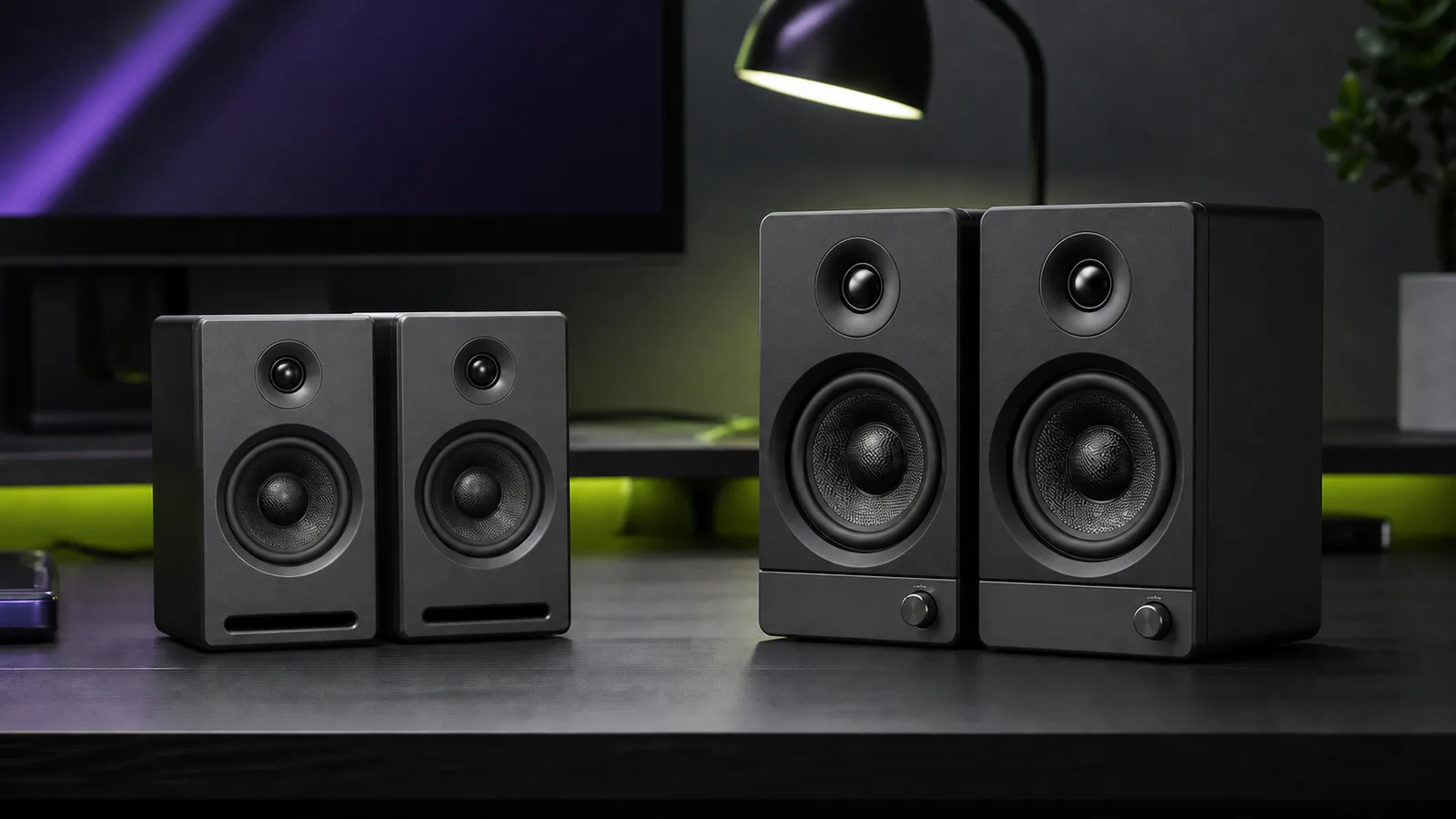
The Audioengine A2+ Next Gen is a sensible premium speaker pair for a small desk. It accepts USB-C audio, Bluetooth 5.3, 3.5mm and RCA sources; its front ports make shallow placement less awkward; and each cabinet is only 6 inches tall.
Buy it for compact stereo and flexible connections. Skip it if you need HDMI ARC, optical input, a headphone socket, front-mounted controls, or deep bass without adding a subwoofer. It is also a poor reason to use Bluetooth for competitive gaming: Audioengine publishes roughly 120ms typical wireless latency.
This is a research-based review. SolderMag has not completed matched listening, acoustic measurements, noise-floor testing, maximum-output testing, long-term reliability work, or hands-on Bluetooth-latency testing on this model. The verdict uses Audioengine's current specifications and setup documentation, and comparison with nearby desktop-speaker designs.
Verdict
The A2+ Next Gen earns its place when desk space and input flexibility matter more than bass depth or front-panel convenience. The current model combines a USB-C input, four documented Bluetooth codecs, two common analog inputs, and a variable RCA output in cabinets narrow enough to fit beside a normal monitor.
The main compromise is not a hidden specification. These are small 2.75-inch-woofer speakers. Audioengine publishes a 65Hz–22kHz response range, but that manufacturer figure does not establish usable deep-bass output, room response, or clean volume. Buy the A2+ for a close-range desktop system, not because a tiny pair is expected to replace larger bookshelf speakers.
Audioengine A2+ Next Gen
Buy it for compact stereo, USB-C and flexible analog inputs; skip it for TV-first connections, front controls or deep bass without a subwoofer.
Why it works
- Compact 6 × 4-inch footprint
- USB-C, Bluetooth, 3.5mm and RCA inputs
- Variable output supports a powered subwoofer
Main trade-off
- Volume and power control is on the rear
- No optical, HDMI or headphone output
- Published Bluetooth latency is unsuitable for competitive play
Who this is for
Buy the A2+ Next Gen if:
- a real stereo pair must fit beside one or two monitors;
- one computer will connect over USB-C while a phone uses Bluetooth;
- 3.5mm and RCA inputs are useful for older or analog sources;
- the speakers will sit close to a wall and front ports are easier to accommodate;
- you want to add a powered subwoofer later without replacing the pair;
- you prefer a conventional powered speaker system over a soundbar or one-box Bluetooth speaker.
The strongest use case is a home-office desk where the speakers stay in place, USB handles daily computer audio, and Bluetooth is an occasional convenience rather than the main gaming connection.
Who should skip it
Skip the A2+ Next Gen if:
- a television is a core source and you need HDMI ARC or optical input;
- you want a front volume knob, remote control, or headphone socket;
- balanced TRS or XLR inputs are required for an audio interface;
- Bluetooth is the intended low-latency gaming path;
- the room needs stronger bass or higher output from larger cabinets;
- you cannot position a left and right speaker properly around the display.
Buying compact stereo speakers and then hiding one behind a monitor wastes the main advantage. If the desk cannot support roughly symmetrical placement, good headphones or a carefully chosen soundbar can be the more practical answer.
Key specifications
| Specification | Audioengine A2+ Next Gen | Buying consequence |
|---|---|---|
| Amplification | Class AB, 15W RMS per channel into 4 ohms | A desktop-scale rating, not proof of room-filling output |
| Drivers | 2.75-inch aramid-fibre woofer; 0.75-inch silk-dome tweeter per speaker | Compact cabinets remain the limiting physical factor |
| USB | USB-C, 24-bit padded at 48kHz | Straightforward computer audio; do not misread “padded” as a sound-quality result |
| Bluetooth | 5.3 with aptX-HD, aptX, AAC and SBC | Broad codec support; the source still decides which codec is used |
| Analog inputs | 3.5mm stereo and RCA | Easier to share between common consumer sources |
| Output | Variable RCA line output | Suitable for feeding a powered subwoofer or another line-level device |
| Published wireless latency | About 120ms | Use USB or analog when timing matters |
| Published response | 65Hz–22kHz ±2dB | Manufacturer specification, not an in-room bass measurement |
| Size per speaker | 6 × 4 × 5.25 inches | A strong fit for narrow or shallow desks |
| Controls | Rear volume/power knob on the powered speaker | Clean front, less convenient physical adjustment |
Make sure you are buying the Next Gen model
The A2+ name has existed across several hardware revisions, and older reviews can look current in search results. The easiest practical check is the computer input.
The current A2+ Next Gen uses USB-C and Audioengine lists Bluetooth 5.3 with aptX-HD, aptX, AAC and SBC. Older A2+ material may show a different USB connector, earlier Bluetooth details, or different digital-audio wording. Do not assume every review, manual or used listing describes the same generation merely because the cabinet looks similar.
Before buying:
- Check that the listing names the A2+ Next Gen or clearly shows the USB-C model.
- Confirm the input panel matches the current Audioengine specification.
- Treat colour and bundle choices as variants, not proof of a newer generation.
- Check used listings carefully; a seller may write “A2+” without identifying the revision.
The A2+ buying links here lead to Audioengine's own Next Gen product page. When shopping elsewhere, confirm that the selected version has USB-C and Bluetooth 5.3; an “A2+” title alone does not identify the generation.
Design and desk fit
Each speaker is 4 inches wide, 6 inches tall and 5.25 inches deep. That footprint is the main reason to consider the A2+ over larger powered monitors. A pair can fit beside a 27-inch display without demanding the depth of an Edifier MR4 or a conventional bookshelf speaker.
The bass slots face forward. That does not make wall distance irrelevant, but it avoids putting a rear port directly against the wall on a shallow desk. Corners and hard desktops can still exaggerate bass unevenly, while a monitor or shelf can block the tweeter.
Audioengine puts the electronics and inputs in the left speaker, which connects to the passive right speaker with ordinary speaker wire. Plan the cable route before placing the pair on separate shelves or wide monitor stands. The powered speaker also needs the external power supply and source cables, so its side of the desk carries more wiring.
The physical annoyance is the rear volume and power control. It keeps the front tidy, but reaching behind the speaker is less convenient than a front knob. This matters less if the computer controls daily volume and the rear knob stays at one sensible level.
Inputs and source switching
The A2+ covers more source types than its size suggests:
- USB-C for direct computer audio;
- Bluetooth 5.3 for phones, tablets and wireless computer playback;
- 3.5mm stereo for a monitor, dock, handheld or older device;
- RCA for a line-level source such as a preamplified turntable, DAC or streamer.
A bare turntable cartridge still needs a phono preamp. RCA describes the connector, not the signal level. Check whether the turntable has a built-in phono stage before connecting it directly.
The output is variable RCA, so its level follows the speaker volume. That is useful for a powered subwoofer. It is not a headphone output, and the A2+ does not publish the automatic high-pass/low-pass crossover behaviour offered by Kanto ORA. The main speakers continue operating normally while the subwoofer handles its own crossover and level settings.
There is no optical input or HDMI. Buyers routing TV audio should choose a system built for that job rather than stacking adapters around the A2+.
USB-C and the 24-bit claim
Audioengine describes the USB input as 24-bit padded at 48kHz. The careful reading is simple: the current model accepts USB-C computer audio and uses a fixed published sample-rate path. It is not evidence that the speakers resolve more detail, sound better than the analog input, or outperform another model with a larger number on the specification sheet.
For ordinary desktop use, the practical benefit is avoiding the computer's analog headphone output. One USB connection carries the audio signal directly to the speaker system. That can simplify a laptop or dock setup, though operating-system volume, app routing and sleep behaviour still depend on the computer.
Bluetooth and gaming
Codec support is unusually clear. Audioengine lists aptX-HD, aptX, AAC and SBC. A compatible source chooses the codec: Apple devices generally use AAC, while supported Android or Windows hardware may use an aptX option.
Audioengine also publishes typical wireless latency of about 120ms. That is enough delay to matter in rhythm games, competitive shooters, live monitoring and other timing-sensitive work. It may be acceptable for background listening, and some video apps compensate for wireless delay, but neither point makes Bluetooth the safe gaming choice.
Use USB-C or analog for predictable timing. The A2+ can still be a good gaming speaker pair; the warning is specifically about the wireless path. SolderMag has not measured the model's real end-to-end delay or positional performance.
What we can and cannot say about sound
The current specification lists 15W RMS per channel, 65Hz–22kHz frequency response, better than 95dB typical A-weighted signal-to-noise ratio, and less than 0.05% THD+N. Those numbers are useful documentation, but they do not answer the questions most buyers actually mean by “does it sound good?”
They do not establish:
- bass extension at a useful listening level;
- neutral frequency response at the desk;
- stereo imaging around a monitor;
- distortion near maximum output;
- hiss at close range;
- performance in a large room;
- preference against Kanto, Edifier or Creative alternatives.
A credible sound verdict needs independent measurements or a controlled, level-matched listening setup. This review does not invent one. The safe conclusion is that the A2+ is designed for nearfield and small-room use, while its cabinet and woofer size set obvious physical limits.
Setup checklist
- Put the left and right speakers at similar distances from your listening position.
- Keep each tweeter visible and aimed near ear height; use small stands if the desk is low.
- Connect the powered left speaker to the passive right speaker with the included wire, matching polarity.
- Start with USB-C for a computer and reserve Bluetooth for a phone or casual wireless use.
- Keep the powered speaker's volume low during first setup, then raise it gradually.
- Move the speakers away from corners if bass becomes uneven.
- If adding a subwoofer, start with conservative crossover and level settings rather than trying to make a small desk shake.
- Recheck operating-system output after sleep or reconnecting a dock.
Placement can matter more than a small upgrade in electronics. Our desk setup guide covers monitor arms, cable routing and other changes that help create usable speaker space.
Value
Do not judge the A2+ from a fixed price quoted in a review. Finish, seller and promotion can change the gap to alternatives.
It is good value when the compact cabinet, USB-C input and two analog connection types prevent you from buying another box or rearranging the desk. It is weak value when you need to add adapters for a TV, buy a subwoofer immediately, or leave its Bluetooth and analog flexibility unused.
Use the price gap as a feature test:
- choose the A2+ when it is the cleanest compact all-rounder;
- choose Creative Pebble Pro when basic desktop audio and a small footprint are enough;
- choose Edifier MR4 when a larger wired desk can use balanced TRS inputs;
- choose Kanto ORA when front controls and automatic subwoofer crossover management justify the extra cost.
Alternatives
Kanto ORA: the better system to build around when its 24-bit/96kHz USB specification, front control and automatic 100Hz subwoofer crossover solve real problems. The A2+ remains easier for shallow placement and common analog sources.
Creative Pebble Pro: the cheaper, smaller option for calls, videos, background music and casual gaming. Its separate power-mode details and fixed cable limits need checking, but it is enough for buyers who do not need a premium conventional speaker pair.
Edifier MR4: the larger wired alternative when balanced TRS inputs matter more than Bluetooth and USB. Read the MR4 vs R1280DBs comparison before choosing between creator-oriented inputs and living-room convenience.
Larger powered bookshelf speakers: the honest route when deeper bass and greater room output matter more than desk space. Our computer-speaker guide keeps the compact and larger options in one decision tree.
FAQ
Is the Audioengine A2+ Next Gen worth it?
Yes, if the compact size, USB-C input, Bluetooth codecs and two analog inputs all help your desk. It is harder to justify if you need HDMI, optical, front controls or strong bass without a subwoofer.
Does the Audioengine A2+ Next Gen use USB-C?
Yes. The current Next Gen specification lists a USB Type-C input. Check the connector and model description because older A2+ coverage can refer to an earlier revision.
Can the A2+ connect to a subwoofer?
Yes. It provides a variable RCA line output that can feed a powered subwoofer. Audioengine does not list the automatic 100Hz crossover management found on Kanto ORA.
Is the A2+ good for gaming?
It can work as a compact wired stereo pair. Use USB-C or analog when timing matters. Audioengine publishes roughly 120ms typical Bluetooth latency, and SolderMag has not measured positional audio or real end-to-end delay.
Does the A2+ have a headphone jack?
No headphone output is listed. The 3.5mm socket is an input, while the RCA connection is a variable line output.
Does it support optical input or HDMI ARC?
No. The current input list includes USB-C, Bluetooth, 3.5mm and RCA. Choose a TV-oriented system if optical or HDMI is required.
Is the A2+ Next Gen a studio monitor?
It is a compact powered speaker system, not a substitute for choosing a known monitoring reference. It lacks balanced inputs, and this review does not claim measured neutrality or suitability for professional mix decisions.
Final recommendation
Buy the Audioengine A2+ Next Gen for a small premium desk where USB-C, Bluetooth and common analog inputs all earn their space. Its compact cabinets and front ports are the practical advantages.
Skip it when the system starts with a television, demands front controls, or needs substantial bass without another box. In those cases, paying for the A2+ name does not solve the actual setup problem.
Sources
- Audioengine A2+ Next Gen product page for current identity, connection overview and box contents: https://audioengine.com/shop/wirelessspeakers/a2-wireless-computer-speakers/
- Audioengine A2+ Next Gen technical specifications for amplification, drivers, inputs, outputs, Bluetooth, USB, latency, cabinets, dimensions and weight: https://audioengine.com/product-tech-specs/a2-wireless-computer-speakers/
- Audioengine A2+ Next Gen introduction for generation changes, USB-C, Bluetooth 5.3 and included accessories: https://audioengine.com/explore/introducing-the-next-generation-a2-home-music-system-now-with-24-bit-audio-and-usb-c/
- Audioengine current quick-start guide for wiring, power and first setup: https://audioengine.com/wp-content/uploads/2025/07/A2-QSG-12.30.24.pdf
As an Amazon Associate I earn from qualifying purchases.