Best 100W USB-C Chargers (2026): Four Picks With Clear Trade-Offs
The best 100W USB-C charger depends on port count, power sharing, cables, and where it sits. These four picks solve different laptop-charging jobs.
Research-based buying guide
Recommendations are checked against product documentation, availability, comparative evidence, and clearly disclosed hands-on work where it exists.
Quick picks
The short answer, with the trade-off
Best overall
Anker Prime Charger 100W A2688
Two USB-C plus one USB-A port
Trade-off: 89W total with all three ports occupied

Best for one laptop
Anker 317 Charger 100W A2672
Trade-off: Only one output

Best four-port wall charger
UGREEN Nexode 100W 4-Port Charger

Best corded desk charger
Satechi 100W USB-C PD Compact GaN Charger
On this page
- Quick picks
- Best overall: Anker Prime Charger 100W A2688
- Best for one laptop: Anker 317 Charger 100W A2672
- Best four-port wall charger: UGREEN Nexode 100W 4-Port
- Best corded desk charger: Satechi 100W USB-C PD Compact GaN
- How we chose
- What to look for in a 100W USB-C charger
- Common mistakes
- Who should buy a 100W charger?
- Who should skip this category?
- Frequently asked questions
- Final recommendation
- Sources and methodology
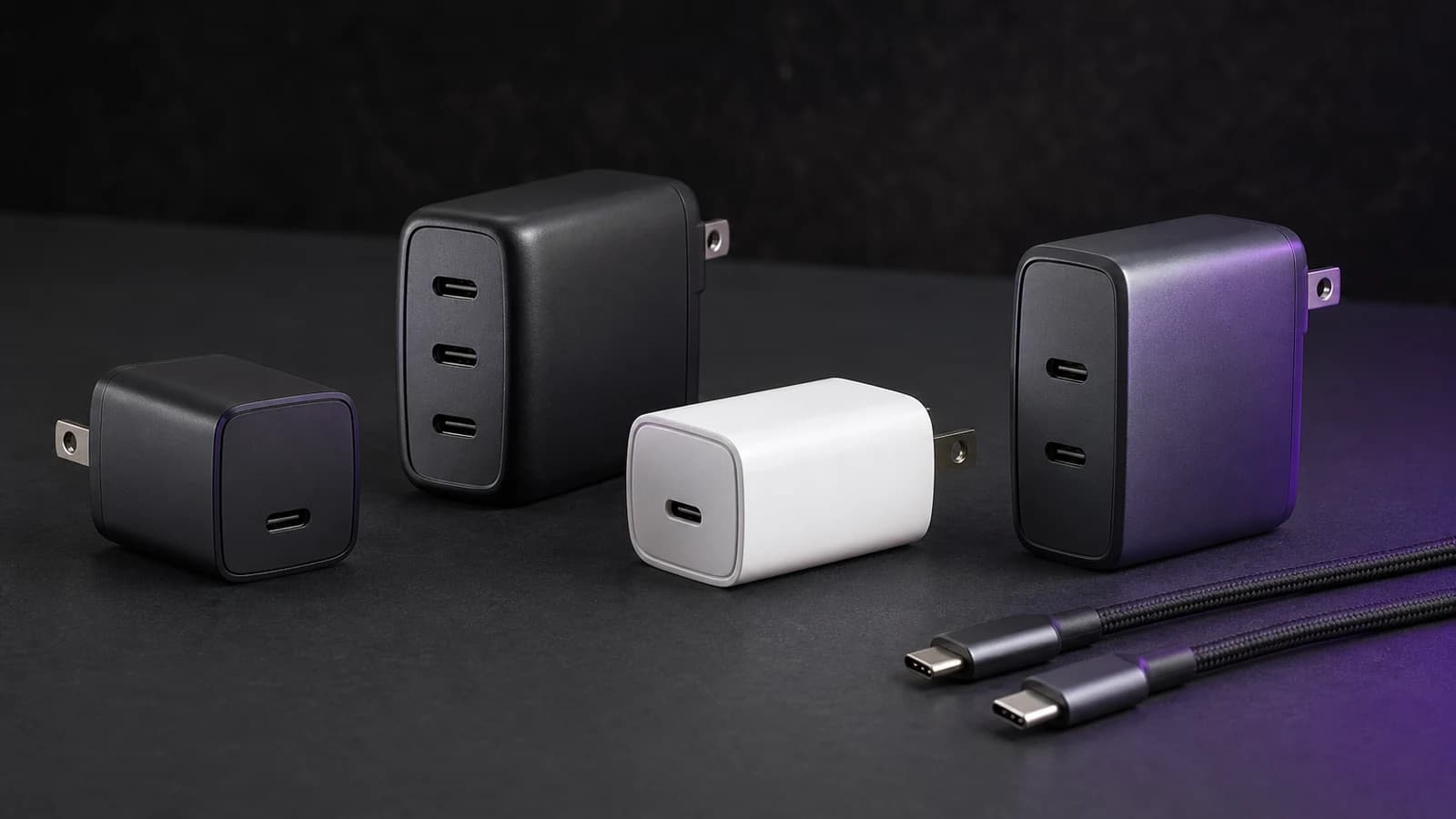
The Anker Prime 100W A2688 is the best 100W USB-C charger for most people. It has two USB-C ports, one USB-A port, and a useful 65W + 35W split when both USB-C ports are occupied.
Buy the Anker 317 instead if one laptop is the whole job. It has a single 100W USB-C output and includes a suitable 5-foot cable. Choose the UGREEN Nexode 100W 4-Port when four connections matter most, or the Satechi 100W Compact GaN when a corded charger is easier to position on a desk.
This guide is research-based. SolderMag has not completed matched sustained-output, efficiency, thermal, drop, travel, or long-term reliability tests on these four chargers. We selected them using current manufacturer specifications, exact US Amazon product identity, port layouts, cable requirements, and the compromises buyers can verify before ordering.
Quick picks
| Pick | Ports | Best for | Main trade-off |
|---|---|---|---|
| Anker Prime 100W A2688 | 2 × USB-C, 1 × USB-A | Laptop, phone, and older accessory | Multi-port use reduces the laptop allocation |
| Anker 317 A2672 | 1 × USB-C | One laptop and the least complexity | Cannot charge a second device |
| UGREEN Nexode 100W 4-Port | 3 × USB-C, 1 × USB-A | Buyers who value connection count | One 100W budget is shared across four ports |
| Satechi 100W Compact GaN | 2 × USB-C, 1 × USB-A | A desk where a corded unit is easier to reach | Heavier and less convenient as a pocket wall charger |
Do not buy by the 100W number alone. A one-port charger, three-port wall charger, four-port wall charger, and corded desktop charger solve different problems even when all can provide 100W to one compatible device.
Best overall: Anker Prime Charger 100W A2688
The Prime A2688 has the most useful default layout: two USB-C ports for modern devices and one USB-A port for a watch puck, headphones, camera cable, or another older accessory.
Either USB-C port can provide up to 100W when used alone. With both USB-C ports connected, Anker publishes a 65W + 35W split. USB-C1 plus USB-A receives 65W + 22.5W. With all three ports occupied, total output is 89W.
That is enough for a mainstream 45W-to-65W laptop plus a phone or tablet. It is not enough to keep a laptop at 100W while two other devices charge. The allocation is predictable, but buyers still need to read it.
The standard Anker product page says charging cables are not included. Use a 5A, e-marked USB-C cable when the laptop needs the full 100W profile.
Buy this if you want one wall charger for a laptop, phone, and accessory. Skip it if the laptop must retain 100W with another device connected, or if three USB-C ports would fit your kit better than 2C1A.
Anker Prime Charger 100W A2688
The sensible travel pick for one laptop and two smaller devices, provided 65W remains enough for the laptop during multi-port use.
Why it works
- Two USB-C plus one USB-A port
- 100W from either USB-C port alone
- Published 65W + 35W two-USB-C split
Main trade-off
- 89W total with all three ports occupied
- No cable on the standard product page
If UGREEN is also on your shortlist, the Anker Prime 100W vs UGREEN Nexode comparison separates the three-port and four-port approaches.
Best for one laptop: Anker 317 Charger 100W A2672
The Anker 317 is deliberately simple: one USB-C port, up to 100W. It does not have two ports, and Anker's current documentation does not position GaN as the reason to buy it.
The useful bundle detail is the included 5-foot / 1.5-metre USB-C cable. Anker describes it as a 5A cable with an e-marker, which gives a buyer the required cable path for the 100W profile without another purchase.
One port means no allocation surprises. It also means the phone waits while the laptop charges. This is the better buy only when that trade-off matches your routine.
Buy it to replace one USB-C laptop brick. Skip it for travel with a laptop, phone, tablet, and earbuds, because the low purchase price does not create more wall outlets.

Anker 317 Charger 100W A2672
Buy the 317 for one USB-C laptop and an included high-current cable. Skip it when even one additional charging port matters.
Why it works
- Single 100W USB-C output
- 5 ft / 1.5 m 5A cable included
- Foldable US plug
Main trade-off
- Only one output
- No multi-device charging
Our Anker 317 vs Anker Prime 100W comparison explains why one-port simplicity can be better than paying for three ports you will not use.
The full Anker 317 review checks its output profiles, PPS range, included cable, regional plug differences, and the point where one-port simplicity becomes restrictive.
Best four-port wall charger: UGREEN Nexode 100W 4-Port
UGREEN's 40737 uses three USB-C ports and one USB-A port. The connection count is its advantage: it can keep four cables attached without adapters or repeated swapping.
The limit is still one 100W total power budget. Four ports do not mean four fast laptop outputs, and UGREEN's product pages are less clear about every multi-port split than Anker's A2688 documentation. Check the allocation graphic for the exact SKU and put the laptop on the designated high-power USB-C port.
This is the better wall charger for a buyer who regularly connects a laptop, phone, tablet, and low-power accessory but does not need all of them at maximum speed. It is a worse choice when transparent power allocation matters more than port count.
Buy it for four-device convenience. Skip it if you want a guaranteed 65W laptop share without checking the exact connection pattern.

UGREEN Nexode 100W 4-Port Charger 40737
Choose this when three USB-C sockets and USB-A reduce cable swapping. Treat 100W as a shared total, not a promise for every port.
Why it works
- Three USB-C plus one USB-A port
- 100W from a compatible single USB-C connection
- Foldable wall-charger form
Main trade-off
- Shared 100W budget across four ports
- Multi-port allocation needs careful checking
Best corded desk charger: Satechi 100W USB-C PD Compact GaN
The Satechi is not a tiny folding wall brick. It uses a detachable two-pin wall-power connection and sits where the cord reaches, which can make its two USB-C ports and USB-A port easier to access on a desk.
Either USB-C PD port can provide up to 100W when used alone. With both USB-C ports occupied, Satechi publishes a 60W + 30W split. Adding USB-A keeps that port for a lower-power accessory while further sharing the charger's total capacity.
The trade-off is portability. Satechi lists the charger at 11.2 ounces before considering whatever cable arrangement you pack. Its corded form is convenient behind a desk but less tidy in a small travel pouch.
Buy it when outlet placement makes wall chargers awkward. Skip it when the charger lives in a backpack or directly on an airport outlet.

Satechi 100W USB-C PD Compact GaN Charger ST-TC100GM
A practical 2C1A desk charger when a cord brings the ports within reach; too cumbersome for buyers who want a small folding wall brick.
Why it works
- Corded placement is easier on a desk
- Two USB-C plus one USB-A port
- Published 60W + 30W dual-USB-C mode
Main trade-off
- Heavier than the wall-charger picks
- High-power USB-C cable sold separately
How we chose
We started with the jobs buyers actually have: one laptop, laptop-plus-phone travel, a four-cable kit, and a desk with an awkward wall outlet. We then checked current model numbers, direct US Amazon identity, official port counts, single-port ceilings, documented multi-port behavior, and cable inclusions.
We did not rank products using fixed prices, discounts, Amazon star ratings, review counts, unsourced thermal claims, or marketing charging-time examples. Those inputs change or depend on test conditions we did not reproduce.
The Anker Prime wins the default slot because its 2C1A layout and published allocation fit the broadest common kit. The other picks are better only when their specific layout solves a real problem.
What to look for in a 100W USB-C charger
The exact multi-port split
"100W" usually describes a single-port maximum or the shared ceiling. Connect a second device and the laptop may drop to 65W, 60W, or less. Find the manufacturer's allocation table for the exact model.
If charging pauses when you add a phone, our guide to USB-C charger disconnects when a second device is connected separates a documented power-sharing transition from repeated cable or dock problems.
A suitable cable
A standard 3A USB-C cable commonly tops out at 60W. Full 100W charging needs a suitable 5A cable with an e-marker. The connector shape does not reveal the rating.
Use our USB-C cable guide if you need a replacement. Do not pay for USB4 data speed when the cable will only carry power.
The laptop's actual input requirement
A 100W charger does not make a 65W laptop charge faster than the computer permits. It also cannot replace a 140W or proprietary workstation adapter at full load.
Our charger wattage guide explains how device demand, cable rating, and port allocation fit together.
Port type, not just port count
Three USB-C ports may be more useful than 2C1A for a modern kit. USB-A may still be essential for a watch puck or older accessory. Count the cable ends you own before deciding that more total ports means a better charger.
Wall brick or corded desk unit
A folding wall charger packs neatly but can block another outlet or sit awkwardly behind furniture. A corded desktop unit adds cable bulk but puts the ports where you can reach them.
Common mistakes
Assuming every port can output 100W: multi-port chargers share one budget. Only the documented single-port mode usually reaches the headline number.
Calling every compact charger GaN: use the manufacturer's current specification. The Anker 317's useful facts are one 100W port and an included cable; an unsupported chemistry label does not improve the purchase.
Ignoring bundle contents: the Anker 317 includes a suitable cable in its documented bundle, while the standard Anker Prime and Satechi product pages say the high-power charging cable is not included.
Buying 100W for a 30W phone: the phone negotiates only the power it supports. Extra charger capacity helps when several devices share the brick, not when one low-power device is connected.
Expecting 140W laptop behavior: 100W chargers cannot provide a 140W USB-PD 3.1 fast-charge path. MacBook Pro buyers can use our 100W, 140W, and desktop charger guide.
Who should buy a 100W charger?
Buy one if your laptop accepts 65W to 100W over USB-C, you want headroom for a second device, or you are replacing a larger stock brick with a multi-port option.
The Anker 317 is enough for one laptop. The Prime is the better general travel pick. The UGREEN earns its extra port when four cables stay attached. The Satechi belongs on a desk where cord placement matters.
Who should skip this category?
Skip 100W if every device in your bag uses 45W or less and a smaller charger is more convenient.
Skip it if a compatible laptop needs 140W fast charging, or two laptops need meaningful power together. Compare the Anker Prime 160W and 100W or move to a 200W multiport charger.
Skip a wall charger for a permanent desk with four or more devices. A corded charging station is easier to position and puts less weight on the outlet.
Frequently asked questions
Is a 100W USB-C charger enough for a laptop?
It is enough for many USB-C laptops, but not every laptop. Check the manufacturer's input specification. High-performance and gaming models may need 130W, 140W, 180W, 240W, or a proprietary adapter under load.
Can a 100W charger damage a phone?
A compliant USB-C Power Delivery device negotiates a supported profile; the charger does not force 100W into a phone. Use reputable, undamaged equipment and a suitable cable.
Why does my 100W charger show only 65W?
The laptop may accept only 65W, another connected device may trigger a shared-power mode, the cable may be limited to 60W, or the battery may be tapering near full. Check those four conditions before assuming the charger is defective.
Do I need a 100W cable?
Yes when the device is expected to receive more than 60W. Use a marked 100W or 240W USB-C cable with the required e-marker.
Is the Anker 317 a two-port charger?
No. It has one USB-C output. Buy the Anker Prime A2688 if you need two USB-C connections and USB-A.
Is a four-port 100W charger better than a three-port model?
Only if the extra connection matters more than the power available to each port. Four low-demand devices can be a good fit; a laptop that must keep 100W while other devices charge is not.
Final recommendation
Buy the Anker Prime 100W A2688 for the broadest useful mix of laptop, phone, and accessory charging. Buy the Anker 317 when one laptop and an included cable are enough.
Choose the UGREEN Nexode 100W 4-Port for connection count, or the Satechi 100W Compact GaN for a corded desk setup. Do not pay for ports, power, or portability you will not use.
Sources and methodology
- Anker official Prime 100W A2688 product page and support specifications.
- Anker official 317 Charger product page and A2672 support specifications.
- UGREEN official Nexode 100W 4-Port Charger 40737 page.
- Satechi official 100W USB-C PD Compact GaN product page and support manual.
- Amazon Creators API exact-product validation for Anker Prime 100W
B0GH8W1JTK, Anker 317B0C1FZWT8M, UGREEN Nexode 100WB091Z6JNX4, and Satechi 100WB08JHGKFD2in the US marketplace with the configuredsoldermag-20Associate tag.
We weighted port usefulness, published allocation, cable requirements, form factor, and clear buyer fit. We did not claim hands-on results or use fixed prices, discounts, ratings, review counts, or availability promises.
As an Amazon Associate I earn from qualifying purchases.