Anker Prime 160W vs 100W: Which Should You Buy?
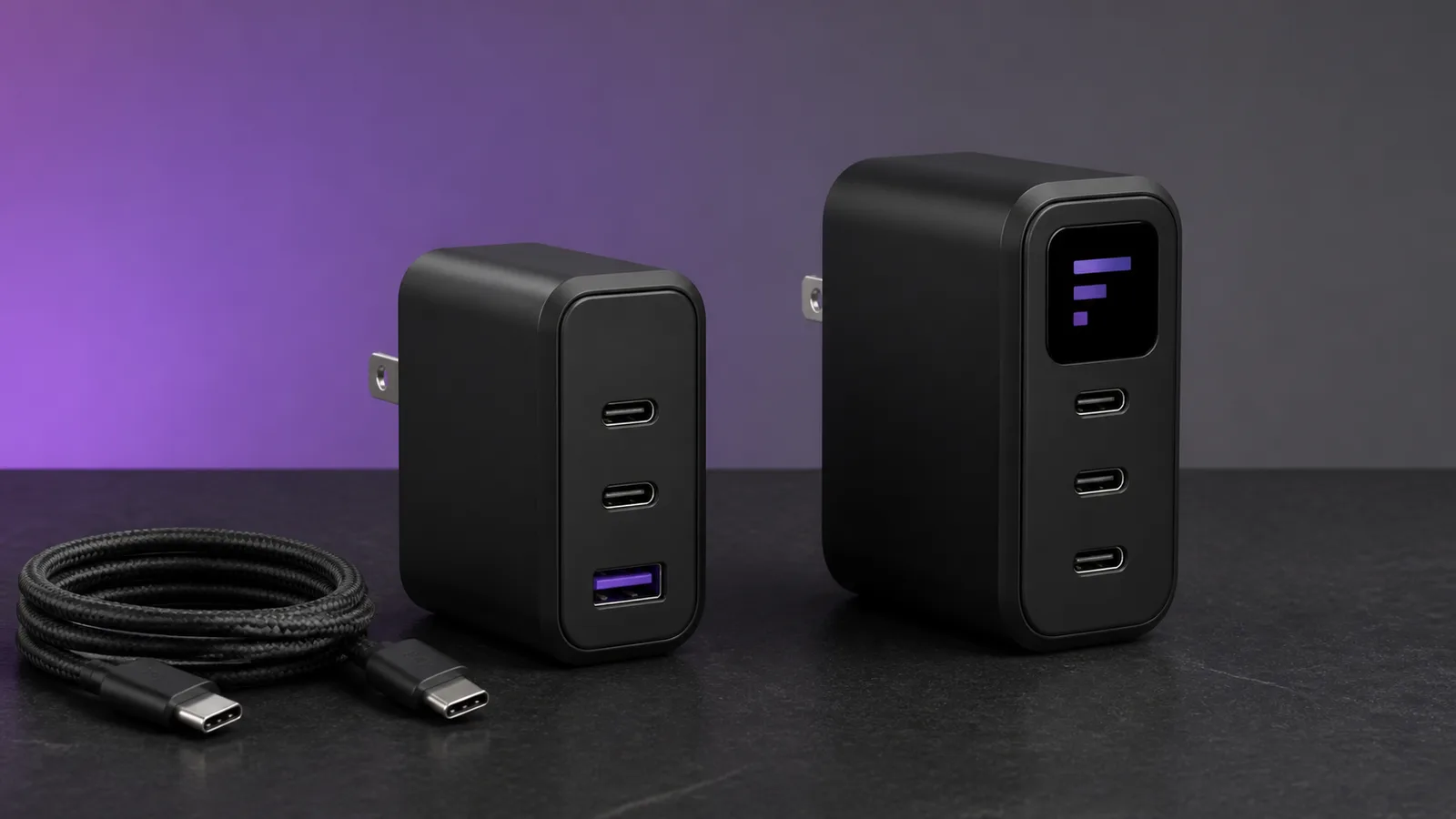
The Prime 100W keeps USB-A; the 160W adds 140W laptop charging, three USB-C ports, a display, and app controls. Here is who should pay more.
Research-based comparison
Recommendations are checked against product documentation, availability, comparative evidence, and clearly disclosed hands-on work where it exists.
Quick picks
The short answer, with the trade-off
Best for most people
Anker Prime Charger 100W A2688
100W from either USB-C port when used alone
Trade-off: 65W + 35W across two USB-C ports

Best for 140W laptops and two-laptop charging
Anker Prime Charger 160W A2687
Trade-off: No USB-A port
On this page
- Quick answer
- Anker Prime 160W vs 100W specifications
- The real difference is shared power
- Which is better for a 14-inch MacBook Pro?
- Which is better for a 16-inch MacBook Pro?
- Charging two laptops
- Three USB-C ports or one USB-A port?
- Is the display and app worth paying for?
- Cable requirements
- Who should buy the Anker Prime 100W?
- Who should buy the Anker Prime 160W?
- Who should skip both?
- Alternatives
- Frequently asked questions
- Final recommendation
- How we compared them
- Sources
The Anker Prime 100W A2688 is the sensible buy for most people. It can give either USB-C port up to 100W when used alone, keeps a USB-A port for an older cable, and covers a laptop-plus-phone travel kit without charging features you may never open.
Choose the Anker Prime 160W A2687 when you need 140W USB-PD 3.1 charging for a compatible laptop, want to charge two laptops from one wall outlet, or specifically value three USB-C ports, live power readouts, and selectable allocation modes. It is not a faster phone charger. You are paying for more shared power and control.
This is a research-based comparison. SolderMag has not completed matched thermal, sustained-output, travel, or long-term reliability tests on these chargers. The recommendation is based on Anker's current specifications, support documentation, user guide, exact Amazon product identity, cable requirements, and the power splits buyers can check before ordering.
Quick answer
| Buyer | Better choice | Why |
|---|---|---|
| One laptop, phone, and older USB-A accessory | Prime 100W | Its 2C1A layout is practical and 100W is enough for many laptops |
| Compatible 16-inch MacBook Pro fast charging | Prime 160W | Supports the standard 140W USB-PD 3.1 path with the right cable |
| Two laptops from one wall outlet | Prime 160W | 160W total output leaves useful power for both computers |
| Small travel kit | Prime 100W | Fewer controls and less power than most travellers need |
| Three modern USB-C devices | Prime 160W | All three ports are USB-C; there is no USB-A socket |
| Wants live wattage and custom allocation | Prime 160W | Screen, button, Bluetooth app, and selectable modes |
| Expects 160W to charge a phone faster | Prime 100W | Phones take only what they negotiate; unused headroom does not force more power |
If you cannot name a device that needs more than 100W or a second laptop you will charge at the same time, buy the 100W model. The 160W charger earns its place when the extra power changes what can stay plugged in.
Anker Prime 160W vs 100W specifications
| Feature | Prime 100W A2688 | Prime 160W A2687 | What matters |
|---|---|---|---|
| Ports | 2 × USB-C, 1 × USB-A | 3 × USB-C | Pick 100W for legacy cables; 160W for an all-USB-C kit |
| Total output | 100W | 160W | The difference matters most with two or three devices connected |
| Standard single-port maximum | 100W from either USB-C | 140W USB-PD 3.1 | The 160W model suits compatible high-power laptops |
| Two USB-C ports | 65W + 35W | Up to 160W total, depending on mode and devices | 100W fits one laptop plus a smaller device; 160W can serve two laptops |
| All ports occupied | 89W maximum | 160W maximum | The 100W model gives up some headline output when all three ports are used |
| Controls | Automatic allocation | Display, button, app, and AI/standard/custom modes | More control also means more setup and firmware dependence |
| Cable for headline laptop output | 5A E-Marker cable for 100W | EPR 140W/240W cable or supported MagSafe path | The wrong cable silently limits charging |
| Model number | A2688 | A2687 | Check the model, not just the similar Prime name |
Do not treat the 160W model's specialised 150W Anker Protocol mode as normal USB-C laptop output. Anker limits that claim to selected Anker hardware, AI Mode 2.0, and a compatible cable. For ordinary laptops, the relevant standard ceiling is 140W.
The real difference is shared power
The 100W A2688 is straightforward when one device is connected: either USB-C port can provide up to 100W. Connect both USB-C ports and Anker documents a 65W + 35W split. Use all three ports and the total drops to 89W.
That makes the 100W model a good laptop-first charger, not a three-device powerhouse. A typical 45W-to-65W laptop can keep a meaningful share while a phone or tablet charges on the second USB-C port. Fill the USB-A port as well and every device has less room.
The 160W A2687 keeps its 160W total ceiling with two or three ports in use. Its modes decide how that budget is allocated, and the display shows what each connected device is drawing. That is the feature worth paying for—not the larger number printed on the front.
Remember that a device controls its own negotiated draw. A charger capable of 140W will not make a 30W phone take 140W, and a nearly full battery may reduce its draw substantially.
Our USB-C charger wattage guide explains device demand, charger headroom, and why multi-port allocation tables matter more than the total wattage alone.
Which is better for a 14-inch MacBook Pro?
Buy the 100W model for most 14-inch MacBook Pro travel kits. It has enough headroom for the laptop and can still share power with a phone. The smaller charger also keeps USB-A for a watch puck, headphones, or another older accessory.
The 160W model makes sense if the MacBook is only one part of the load. A second laptop, iPad, camera battery charger, or handheld gaming PC can justify the extra 60W total budget. Buying 160W for the 14-inch MacBook alone is usually paying for capacity that sits idle.
If the smaller model is your likely pick, the full Anker Prime 100W review covers its port allocation and buyer fit in more detail. Our Anker Prime 100W vs UGREEN Nexode 100W comparison and best 100W GaN charger guide cover alternatives beyond this pair.
Which is better for a 16-inch MacBook Pro?
Choose the 160W model if 140W fast charging is a requirement. Anker says M1 and M2 16-inch MacBook Pro models need a USB-C-to-MagSafe 3 cable for that path. M3 and M4 models can use either a suitable EPR USB-C cable or USB-C to MagSafe 3.
The laptop, charger, and cable all need to support the target power. Charging also tapers as the battery fills, so a lower reading above roughly 80% does not automatically mean the charger has failed.
The 100W model can still charge a 16-inch MacBook Pro. It is the cheaper, simpler choice for overnight charging, lighter work, or a travel kit where maximum charging speed is not important. It is less suitable when the laptop is under a heavy workload while also powering other devices.
Our MacBook Pro GaN charger guide separates 100W travel bricks, 140W fast-charge options, and higher-output desk chargers.
Charging two laptops
This is the clearest reason to buy the 160W A2687. Anker documents a dual-laptop mode that can provide an equal 70W + 70W split. That is useful for two mainstream work laptops, or a laptop and a USB-C-powered monitor or handheld that can use a similar budget.
The 100W A2688's 65W + 35W two-USB-C split is less flexible. It can cover a work laptop and a smaller Chromebook or tablet, but 35W may be too little for a second performance laptop under load.
Do not assume every two-device combination will draw the maximum. Device support, battery level, cable rating, temperature, and the selected mode all affect the live result. The 160W model's screen is useful here because it makes the negotiated allocation visible without a separate USB power meter.
Three USB-C ports or one USB-A port?
The 100W model uses two USB-C ports and one USB-A port. That mixed layout is better if your bag still contains an older watch charger, headphones cable, camera cable, or low-power accessory that ends in USB-A.
The 160W model drops USB-A completely. That is cleaner for a modern kit, but it may force an extra cable purchase or adapter. Check every device you travel with before assuming three USB-C ports are automatically more useful.
Port count also changes the buying logic. The 100W model's USB-A port reaches up to 22.5W alone, while the USB-C ports do the laptop work. On the 160W model, any of the three USB-C ports can handle a high-power device when used alone. The latter is easier when cables are frequently moved between ports.
Is the display and app worth paying for?
The A2687's display shows per-port power status and cable class. It also lets you select AI, standard, and custom modes, while additional controls are available through the Anker app over Bluetooth.
That is useful when you regularly troubleshoot a multi-device setup. You can see whether the laptop is receiving the expected share, whether a cable is being recognised as 3A, 5A, or EPR, and whether changing modes affects allocation.
It is unnecessary for a simple one-laptop kit. Automatic charging is usually the point of USB-PD, and another app, Bluetooth connection, screen, and firmware path add complexity. The display is a diagnostic convenience, not proof of better charging quality.
We would not pay extra for the smart features unless the 160W output is already useful. Treat the display as a bonus after the power and port layout fit—not the reason to buy the charger by itself.
Cable requirements
For the 100W model, use a 5A cable with an E-Marker when you want the full 100W USB-C output. A basic 3A USB-C cable is normally limited to 60W.
For standard 140W charging from the 160W model, use a compatible EPR cable rated for 140W or 240W, or the supported USB-C-to-MagSafe 3 path for the relevant MacBook. Cable packaging should state the power rating; connector shape alone tells you nothing.
Anker's display can identify broad cable classes, but it cannot make an under-rated cable carry more power. If charging seems slow, verify the device's input limit, cable rating, selected port, battery level, and power-allocation mode before blaming the charger.
See our 240W USB-C cable guide for suitable power-first cable choices. Do not pay for USB4 data speed when the cable's only job is charging.
Who should buy the Anker Prime 100W?
Buy the Prime 100W if:
- you charge one laptop and one or two smaller devices;
- your laptop does not need more than 100W;
- an older USB-A accessory is still part of the kit;
- you prefer automatic allocation over screens and app controls;
- you want a straightforward travel charger rather than a two-laptop power hub;
- the 160W model costs materially more when you shop.
The main trade-off is the multi-port ceiling. With both USB-C ports occupied, the split is 65W + 35W, and all three ports together top out at 89W.
Anker Prime Charger 100W A2688
Buy this for one laptop, a phone, and a legacy USB-A accessory; skip it if a 140W laptop or second laptop needs meaningful power.
Why it works
- 100W from either USB-C port when used alone
- Useful 2C1A port mix
- Simple automatic allocation
Main trade-off
- 65W + 35W across two USB-C ports
- 89W maximum with all three ports occupied
Who should buy the Anker Prime 160W?
Buy the Prime 160W if:
- a compatible laptop benefits from standard 140W USB-PD 3.1 charging;
- you regularly charge two laptops from one wall outlet;
- three USB-C ports fit your cables better than a 2C1A layout;
- live per-port wattage helps you diagnose charging behaviour;
- you will use selectable allocation modes;
- the higher total output replaces another charger you would otherwise carry.
The main trade-off is paying for complexity. If one 65W-to-100W laptop is the only demanding device, most of the extra output and control system will go unused.

Anker Prime Charger 160W A2687
Buy this when 140W laptop charging or two useful laptop outputs replace a second brick; skip it for a phone-first or single-ultrabook kit.
Why it works
- 140W standard single-port laptop output
- 160W total with two or three ports
- Per-port display and selectable power modes
Main trade-off
- No USB-A port
- Smart controls add setup without making ordinary phones faster
Who should skip both?
Skip both if your only demanding device tops out at 45W or 65W. A smaller reputable charger will be easier to pack and should cost less.
Skip both if you need four or more permanent desk ports. A 200W multiport charger or desktop charging station can reduce cable swapping.
Skip both if the wall socket is loose or blocked by furniture. High-output wall chargers are still cantilevered from the outlet; a corded desktop unit may sit more securely.
Skip both if you expect the charger to include every cable you need. Check the exact bundle. The 100W product page says charging cables are not included, while the 160W model's cable inclusions can vary by purchase option and retailer.
Alternatives
Apple 140W USB-C Power Adapter: the conservative single-port choice for a 16-inch MacBook Pro. It gives up multi-device charging and the Anker display, but removes allocation decisions.
UGREEN Nexode Pro 160W: consider this when you want a high-output multiport charger without buying into Anker's screen-and-app approach. Compare the exact port splits and cable bundle rather than assuming equal headline wattage means equal behaviour.
Anker Prime 200W desktop charger: better for a permanent desk where wall weight and portability do not matter. It is easier to cable cleanly and has more headroom for several devices, but it is a different form factor.
A reputable 65W charger: enough for many thin-and-light laptops, phones, tablets, and handhelds. Spending more does not help if no connected device can use the headroom.
Frequently asked questions
Is the Anker Prime 160W faster than the 100W for phones?
Usually no. A phone negotiates the charging power it supports, and unused charger capacity does not force more wattage into it. The 160W model's advantage is shared output and 140W-class laptop support.
Can the Anker Prime 100W charge a 16-inch MacBook Pro?
Yes, but it cannot provide the 140W fast-charge path. It is reasonable for overnight charging, travel, or lighter workloads. Choose the 160W model if 140W charging is an actual requirement.
Can the Prime 160W output 150W to a laptop?
Do not assume so. Anker's 150W claim uses its proprietary protocol with selected Anker products, AI Mode 2.0, and a compatible cable. For normal USB-PD 3.1 laptop charging, treat 140W as the relevant maximum.
Does the Prime 160W need the Anker app?
Basic charging works without building your routine around the app. Bluetooth setup is needed for additional functions such as dual-laptop mode and custom modes. If those controls do not matter, the 100W model is simpler.
Why does the Prime 100W drop to 89W with all ports used?
That is the three-port allocation Anker publishes for A2688. Multi-port chargers often have a lower combined mode or reserve power for conversion and port management. Buy by the documented split, not the 100W headline alone.
Which cable do I need for 140W charging?
Use a compatible EPR USB-C cable rated for 140W or 240W, or the supported USB-C-to-MagSafe 3 route for the relevant MacBook. A 60W or ordinary unmarked cable can limit the result.
Final recommendation
Buy the Anker Prime 100W A2688 for one laptop, a phone, and an accessory. Its 2C1A layout and automatic allocation solve the common travel problem without turning the charger into another device to configure.
Buy the Anker Prime 160W A2687 when 140W laptop charging, two useful laptop outputs, or three USB-C ports let you leave another power brick at home. If those conditions do not apply, the 100W model is enough.
How we compared them
We compared current Anker product pages, support documentation, the A2687 user guide, published port allocations, cable requirements, model numbers, and exact US Amazon product identity. We did not convert manufacturer thermal, efficiency, safety, size, or charging-time claims into independent test results. Both US ASINs were returned as exact products by the configured Amazon Creators API with the soldermag-20 Associate tag before publication.
Sources
- Anker official Prime 100W A2688 product page
- Anker support A2688 output and port-allocation specifications
- Anker official Prime 160W A2687 product page and specifications
- Anker official A2687 user guide
- Anker support 140W device and cable requirements
- Amazon Creators API exact-product validation for Prime 160W A2687
B0F9NK4M7Qand Prime 100W A2688B0GH8W1JTKin the US marketplace with the configured Associate tag.
As an Amazon Associate I earn from qualifying purchases.