Anker Nano 45W Smart Display Charger Review: Useful Screen?
Anker's A121D shows live charging power and adds a battery-care mode. Buy it for visibility and awkward outlets, not because 45W needs a screen.
Research-based review
Recommendations are checked against product documentation, availability, comparative evidence, and clearly disclosed hands-on work where it exists.
Quick picks
The short answer, with the trade-off
Best for visible charging data
Anker Nano 45W Smart Display Charger (A121D)
Live wattage and charging-status display
Trade-off: Only one USB-C port
Simpler 45W option
Anker Nano Charger 45W (A2692)

Laptop-first alternative
Anker Prime 100W Charger (A2688)
On this page
- Short verdict
- Who this is for
- Who should skip it
- Key specifications
- What the display is actually good for
- Smart recognition and Care Mode
- 45W charging: enough for phones, conditional for laptops
- The 180-degree plug is more useful than it sounds
- Setup and daily use
- Value: pay for information, not wattage
- Alternatives
- Common mistakes
- Frequently asked questions
- Final recommendation
- Sources and evidence limits
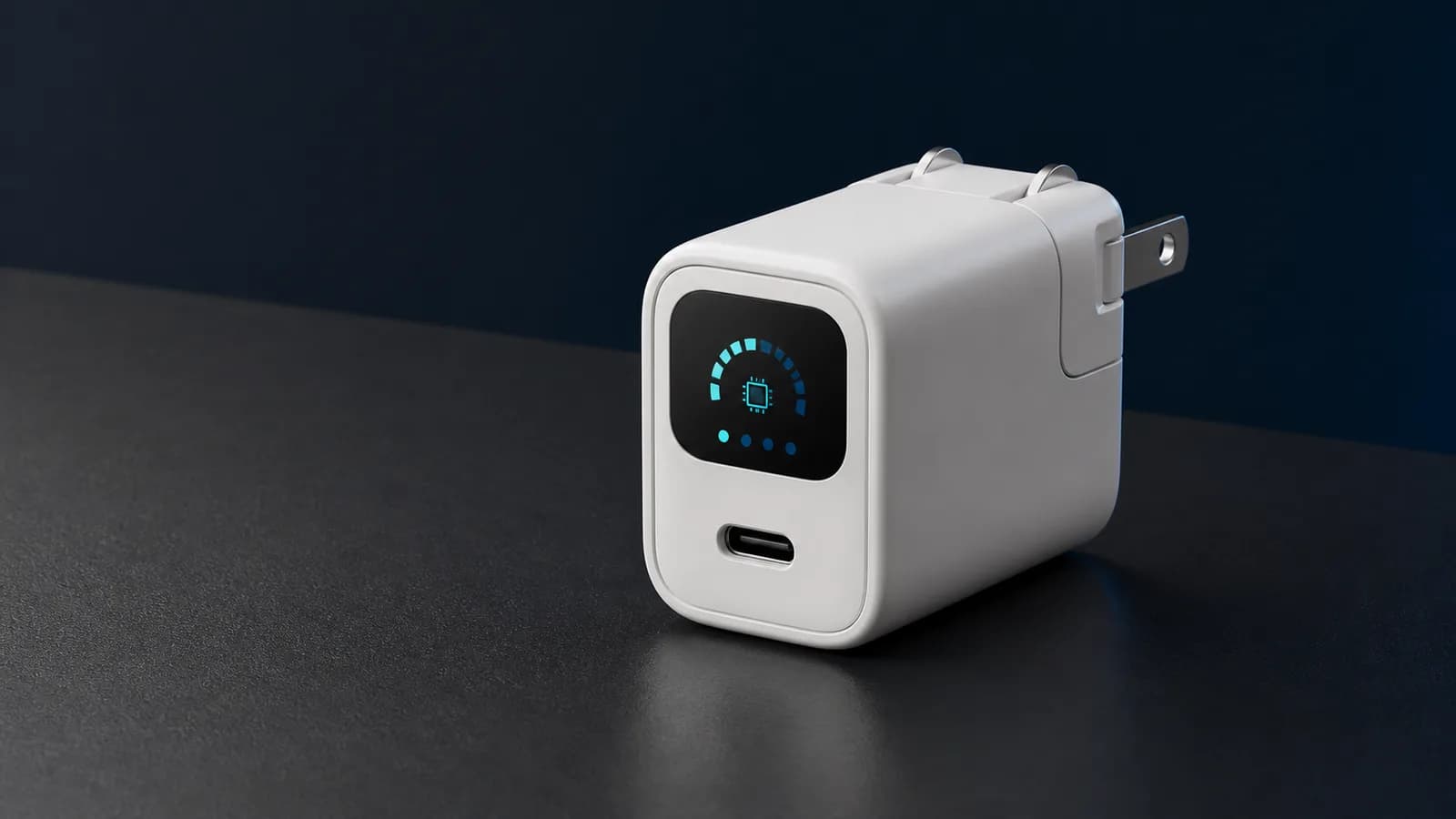
The Anker Nano 45W Smart Display Charger is worth buying if you want to see what a device is drawing and you regularly fight awkward wall outlets. Its small screen reports live wattage, rotates with the plug and exposes Anker's Auto and Care charging modes without an app.
Skip it if you only need a compact charger. The A121D still has one USB-C port and a 45W ceiling. A plain 45W charger handles the same basic phone, tablet and light-laptop job for less, while a good 65W or 100W model is more useful for a laptop-heavy bag.
This is a research-based review. SolderMag has not completed hands-on screen-accuracy, charging-speed, temperature, outlet-fit, standby-power or long-term hinge testing on the A121D. The verdict is based on Anker's current specifications and user guide, exact US product identity, USB-C power requirements and comparison with simpler chargers.
Short verdict
Buy the A121D when the display will change how you troubleshoot or place the charger. Seeing a device draw 7W instead of an expected 25W can point you toward the cable, battery state or charging protocol before you replace the brick. The 180-degree plug is also useful behind furniture and on power strips where a normal cube points the cable the wrong way.
Do not buy it because a screen makes charging faster. Maximum output is 45W through one USB-C port, with fixed profiles up to 20V at 2.25A. The connected device decides what it can accept. The charger cannot force 45W into an iPhone, make a laptop ignore its own wattage requirement or turn an unsuitable cable into a fast one.
Anker also markets Care Mode around lower charging temperature and battery longevity. Treat that as a manufacturer feature claim, not a guarantee that this wall charger will extend the life of every battery. Phone battery management, ambient temperature, case insulation, usage while charging and time spent at a high state of charge still matter.
Who this is for
The A121D makes sense for:
- an iPhone owner who wants live charging power and compatible battery-progress information;
- someone who charges in a tight outlet, crowded power strip or hotel room and will use the rotating plug;
- a buyer who likes checking whether a cable or device is negotiating sensible power;
- a phone-and-tablet travel kit that only needs one USB-C port;
- a smaller USB-C laptop or handheld that accepts 45W and does not need a second device charged at the same time;
- overnight charging where Anker's selectable Care Mode is more useful than maximum speed.
The display has to earn its space. If you will glance at it once and never again, a conventional charger is the sensible purchase.
Who should skip it
Skip the A121D if a laptop is the main device and its supplied adapter is 65W, 100W or 140W. A 45W charger may still top up some laptops, but it can charge slowly or lose ground during heavy work. Our USB-C charger wattage guide explains how to match the brick to the device.
Skip it if you travel with a phone, watch, earbuds and tablet. One port means taking turns or packing another charger. A compact multiport model is less interesting to watch but more useful at a hotel desk.
Also skip it if you expect the display to replace a USB power meter. It reports consumer-facing status, not a complete protocol trace. It cannot tell you every voltage request, cable marker, charging fault or battery-health cause.
Anker Nano 45W Smart Display Charger (A121D)
Buy it for the rotating display and plug. Choose a plain 45W charger for value or a multiport 65W-to-100W charger for a laptop bag.
Why it works
- Live wattage and charging-status display
- 180-degree foldable US plug
- Compact single-port 45W design
Main trade-off
- Only one USB-C port
- 45W is limiting for larger laptops
- Battery-life benefit is not independently established here
The Amazon listing is for the current A121D smart-display charger. Colour and featured-offer availability can change, so treat the button as an exact-product availability check rather than a stock or price promise.
Key specifications
| Specification | Anker Nano A121D | Buyer impact |
|---|---|---|
| Maximum output | 45W | Suitable for phones, tablets, handhelds and some small laptops |
| Ports | 1× USB-C | No simultaneous device charging |
| Output profiles | 5V/3A, 9V/3A, 15V/3A, 20V/2.25A | Device and cable still control the negotiated rate |
| Display | Rotating colour status screen | Shows live wattage, modes and compatible-device progress |
| Charging modes | Auto and Care | Choice between normal automatic charging and Anker's lower-temperature mode |
| Plug | US prongs with 180-degree folding range | More placement options and protected prongs in a bag |
| Dimensions | 34 × 35.5 × 40mm | Small cube, though the screen adds complexity |
| Listed weight | 75g | Light enough for travel, heavier than the tiniest phone bricks |
| Input | 100–240V, 50/60Hz | International voltage support; plug adapters still required abroad |
| Cable | Not included with the base charger | Budget for a suitable USB-C cable if needed |
The dimensions and weight are manufacturer specifications. We have not independently measured this retail unit.
What the display is actually good for
The useful part of the screen is the live wattage reading. Charging power changes constantly: it can be high when a battery is low, then fall as the battery fills, warms up or reaches a software-controlled limit. A falling number is not automatically a fault.
That visibility helps with three common problems.
Finding a weak cable
If two cables produce very different readings with the same device at a similar battery level, the cable is worth checking. The display cannot prove why the difference exists, but it gives you a reason to test the cable before blaming the phone or charger.
Use a reputable cable rated for the power and device. The USB-C cable guide covers e-markers, data capability and why connector shape alone tells you little.
Understanding charging taper
People often assume a “45W charger” should show 45W from empty to full. That is not how battery charging works. The device requests power and usually reduces the rate as the battery fills. Screen output can also move with temperature, background use and battery-protection settings.
The right question is whether the device charges as expected for its own specification, not whether the charger displays its headline maximum all afternoon.
Checking whether 45W is enough
Connect a small laptop during normal work. If the battery continues to fall, the workload is using more power than the charger path supplies. That does not make the A121D defective; it means the setup needs more headroom.
The display is a quick diagnostic, not a laboratory instrument. SolderMag has not compared its reading with a calibrated inline USB-C meter, so this review does not claim measurement accuracy.
Smart recognition and Care Mode
Anker says the charger can recognise compatible iPhone families and show battery progress. Its product documentation also describes a three-stage charging approach and two selectable modes:
- Auto Mode prioritises normal automatic charging.
- Care Mode is intended to reduce charging temperature, particularly during longer or overnight sessions.
The important limitation is compatibility. Anker's smart-recognition pitch is centred on recent iPhones, and the company notes that the name shown can depend on iOS recognition. Android phones, tablets, handhelds and laptops can still negotiate USB-C power, but do not assume they receive the same model name, battery-progress view or charging behaviour.
Care Mode is not a substitute for the device's own battery tools. Apple, Samsung, Google and laptop makers already use charging management inside the device. The wall charger sees the power conversation; the phone still owns the battery, temperature sensors and operating-system limits.
Anker says its mode lowers charging heat under its test conditions. Without matched long-term battery testing, we would not convert that into a promised battery-health percentage or extra years of service. Use Care Mode when time is available and lower charging stress is the priority. Use Auto Mode when the device needs to be ready sooner.
45W charging: enough for phones, conditional for laptops
For an iPhone, 45W provides more charger capacity than the phone will continuously draw. That headroom is fine, but it does not mean the phone charges at 45W. The iPhone negotiates its own rate and tapers it as conditions change.
For many Android phones, the answer depends on protocol support. A phone advertised at 45W may rely on a specific USB PD PPS profile, cable or proprietary charger. Anker's published A121D output line does not justify promising every brand's named 45W mode. Check the phone maker's exact requirement.
For Steam Deck, 45W matches Valve's supplied power-adapter rating. A suitable USB-C PD charger can cover the basic job, but cable quality and connected dock accessories still matter. If the charger will feed a handheld dock, confirm the dock's power path and remember that peripherals use some of the available budget.
For MacBook Air and other efficient USB-C notebooks, 45W can be a practical travel or overnight rate. For a 14-inch or 16-inch MacBook Pro, a workstation laptop or a system under sustained load, it is the wrong default. Start with the manufacturer's supplied wattage and buy down only when you understand the slower-charge trade-off.
The 180-degree plug is more useful than it sounds
Most foldable chargers offer two states: open or closed. Anker's hinge can place the body at different orientations through a 180-degree range. That can keep the USB-C port accessible when:
- a bedside outlet sits behind furniture;
- a power strip has tightly spaced sockets;
- a hotel outlet is mounted sideways;
- a heavy cable would otherwise bend sharply;
- the charger body would block the neighbouring receptacle.
It does not guarantee a perfect fit. Outlet grip, wall-plate depth, nearby plugs and cable direction still vary. A rotating body also introduces a moving joint. We have not tested whether the hinge loosens after repeated travel use, so long-term stiffness remains an open question.
Do not hang a power bank or phone from the cable below a loose outlet. Repositioning the charger can reduce strain; it cannot repair a worn receptacle.
Setup and daily use
The basic setup is simple:
- Rotate the prongs to the position that keeps the body stable and the USB-C port clear.
- Connect a known-good USB-C cable.
- Plug in the device and wait for power negotiation.
- Read the live wattage as a moment-in-time value, not a permanent target.
- Select Care Mode only when a slower, lower-temperature charging approach suits the schedule.
If the screen reports less power than expected, compare at a low battery level and stop using the device heavily during the check. Then try another cable and wall outlet. Verify the device's charge limit and temperature. A 90% battery while gaming is a poor test of a charger’s peak capability.
If the screen is distracting at night, consult the current user guide for display controls and behaviour. We have not tested bedroom brightness or whether every screen state can be disabled permanently.
Value: pay for information, not wattage
The A121D is not the value winner on watts per dollar. Its value is the combination of a visible power readout, device-aware status features and a plug that can face more than one direction.
We would pay extra when the charger is used as a small troubleshooting tool or when outlet placement is a recurring annoyance. We would not pay extra for an office outlet where the same cable and phone are connected every night.
Compare the current gap with a plain 45W charger. If the A121D is only slightly more expensive, the screen is a useful bonus. If the gap is large, decide how often you will genuinely read it. Then compare a compact 65W multiport model: more power and a second port can beat a clever display for everyday travel.
Avoid using a temporary discount as the whole argument. Charger prices move. Buy by the port count, output and physical design you need, then check the current total at checkout.
Alternatives
Anker Nano 45W A2692: the sensible alternative when you want one compact 45W USB-C port and do not need a screen. It keeps the core charging job simple. Check whether the cable is included in the exact bundle.
Anker Prime 100W A2688: choose it for a laptop-first bag, two USB-C ports and one USB-A port. It is larger and more expensive, but the extra power and ports solve more device combinations. Our Anker 317 vs Prime 100W comparison explains when a multiport 100W brick is worth it.
A compact 65W dual-port charger: this is the practical middle ground for a MacBook Air plus phone. You give up the display but gain charging flexibility. Read the USB-C laptop charger guide for the wider decision.
Your device's supplied charger: keep it if the wattage, ports and size already fit. A screen is interesting; it is not a reason to replace a safe, working charger by itself.
Common mistakes
- Treating 45W as the phone's fixed draw. The device controls charging and tapers power.
- Assuming every 45W phone uses the same protocol. Check PPS, cable and proprietary requirements.
- Buying one port for a four-device trip. Port count often matters more than a display.
- Using the screen as a battery-health test. Live input power does not diagnose cell condition.
- Expecting Care Mode to override the phone. The device's charging system remains in control.
- Testing peak output near a full battery. Charge taper makes that comparison misleading.
- Ignoring cable capability. A poor or unsuitable cable can limit the whole path.
Frequently asked questions
Is the Anker Nano 45W Smart Display Charger worth it?
Yes, when you will use the live wattage readout or rotating plug. A conventional 45W charger is better value when you only need one small USB-C brick.
What does the A121D screen show?
Anker lists real-time charging power, status icons, mode information, automatic screen rotation and battery progress for compatible devices. The exact information can vary by device.
Does it charge an iPhone at 45W?
The charger can supply up to 45W, but the iPhone negotiates its own rate. Do not expect the screen to remain at 45W throughout a charge.
Will it charge a MacBook Air?
Many MacBook Air configurations can charge from a 45W USB-C source, though the rate and ability to keep up under load depend on the model and workload. Check the adapter supplied with the exact Mac.
Does it support Samsung 45W Super Fast Charging 2.0?
Do not assume support from the headline wattage alone. Samsung's fastest modes depend on the charger's USB PD PPS profiles and a suitable cable. Verify the current A121D and phone compatibility before buying for that specific feature.
Does Care Mode guarantee longer battery life?
No. Anker positions Care Mode as a lower-temperature charging option, but battery ageing depends on the device, temperature, state of charge, usage and time. SolderMag has not completed the long-term matched testing needed to promise a lifespan gain.
Does the charger include a cable?
The base A121D charger listing does not include a cable. Anker also sells bundles, so check the exact box contents before ordering.
Can the display replace a USB-C power meter?
No. It is useful for a quick live-wattage check, but a proper meter exposes more protocol and electrical detail. This review has not validated the display against calibrated test equipment.
Final recommendation
Buy the Anker Nano 45W Smart Display Charger if the rotating plug fixes awkward outlet placement and you want a quick view of charging power without carrying a meter. It is a neat single-device tool with a clear purpose.
Skip it if the screen is only a novelty. A plain 45W charger does the same core job, while a 65W or 100W multiport charger is the stronger buy for laptops and travel kits.
Sources and evidence limits
- Anker official A121D product page for current dimensions, weight, output profiles, display functions, charging modes, plug design, box contents and compatibility notes.
- Anker official A121D user guide for operating and safety guidance.
- Anker official smart-display charger overview for the current feature comparison with its other charger models.
- Amazon Creators API exact-product validation identified
B0G1MRLXMVas the Anker Nano Smart Display Charger, 45W, in the US marketplace with the configuredsoldermag-20tag on August 27, 2026. Price, seller, colour and featured-offer availability can change.
SolderMag has not completed hands-on display-accuracy, protocol, temperature, outlet-fit, standby-power, charging-speed or durability testing of this product. Manufacturer battery-care claims remain unverified by SolderMag.
As an Amazon Associate I earn from qualifying purchases.