Anker 535 Car Charger Review: 67W With One Port, 45W With Three
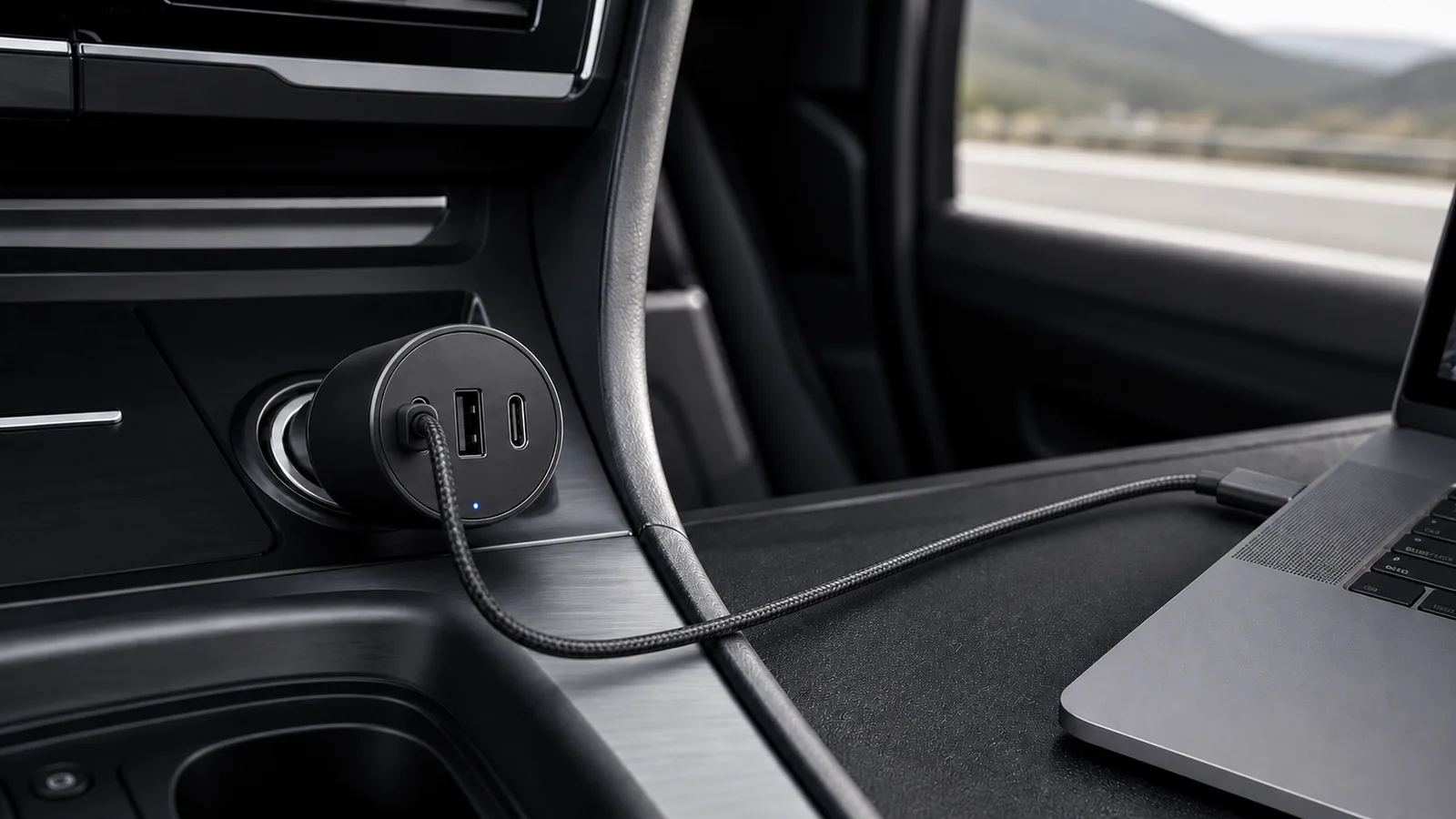
Anker's 535 is a practical 2C1A car charger for phones, tablets and light laptops. With all three ports used, only the first USB-C port stays fast.
Research-based review
Recommendations are checked against product documentation, availability, comparative evidence, and clearly disclosed hands-on work where it exists.
Quick picks
The short answer, with the trade-off
Best for everyday three-port charging
Anker 535 Car Charger (67W)
Up to 67W from either USB-C port when used alone
Trade-off: All-three-port use drops secondary ports to 9W each

Higher-output laptop alternative
UGREEN 130W USB-C Car Charger
On this page
- Short verdict
- Who this is for
- Who should skip it
- Key specifications
- The port split matters more than 67W
- Can it charge a laptop?
- Phones, tablets, and handhelds
- Cable requirements
- Vehicle fit, heat, and power
- Setup and troubleshooting
- Value
- Alternatives
- Frequently asked questions
- Final recommendation
- Sources and methodology
The Anker 535 Car Charger is a sensible three-port charger for a phone, tablet, handheld, or light USB-C laptop. It gives you two USB-C ports, one USB-A port, and up to 67W from a USB-C port when used on its own. That is enough power for fast phone charging and useful laptop top-ups without buying a much larger 100W-class adapter.
The catch appears when all three ports are occupied. Anker specifies up to 45W from USB-C1, while USB-C2 and USB-A fall to 9W each. The main device still gets useful power, but the other two ports become slow top-up connections rather than three equal fast chargers.
This is a research-based review. SolderMag has not bench-tested sustained output, temperature, socket retention, charging negotiation, or long-term reliability in a hot vehicle. The verdict is based on Anker's current specifications and charging guidance, exact US Amazon product validation, USB-C requirements, and the device combinations a buyer can check before ordering.
Short verdict
Buy the Anker 535 if you want one known-brand charger for a phone, passenger device, and occasional laptop top-up. Its 2C1A layout handles old and new cables, and the 67W single-port mode is useful for MacBook Air-class and similar USB-C laptops.
Skip it if a 90W or 100W laptop is the main load, two passengers both need fast USB-C charging, or you want a built-in retractable cable. The UGREEN 130W comparison covers the stronger laptop option.
Anker 535 Car Charger (67W)
Why it works
- Up to 67W from either USB-C port when used alone
- Two USB-C ports plus one USB-A port
- 12V and 24V vehicle input support
Main trade-off
- All-three-port use drops secondary ports to 9W each
- Not enough for every high-power laptop
- No SolderMag hot-car or sustained-output measurements
Amazon's US listing matched model A2731 when checked on August 7, 2026 and retained the soldermag-20 tag. Anker's own US store showed the model as sold out, so verify the seller and return policy rather than assuming first-party stock.
Who this is for
The Anker 535 makes sense for:
- a driver who wants USB-C for a current phone and USB-A for an older cable or accessory
- a passenger setup that needs three physical ports but only one high-power device at a time
- a tablet, camera, handheld console, or power bank that benefits from USB-C Power Delivery
- occasional MacBook Air-class or other roughly 45W-to-67W laptop charging
- 12V or 24V vehicles with a firm, accessible accessory socket
- a rental-car or road-trip kit where the built-in USB ports cannot supply useful charging power
This is a generalist charger. Its value comes from supporting a mixed bag of devices, not from winning a maximum-wattage contest.
Who should skip it
Skip the 535 if your laptop normally ships with a 90W, 100W, 140W, or proprietary power adapter and you expect the car charger to replace it under load. A 67W USB-C source may slow battery drain or charge while the laptop is idle, but it cannot provide power the charger does not have.
Also skip it if two or three devices need fast charging at the same time. The second and third ports are useful for keeping a phone, watch, camera, or navigation device alive, but 9W is not modern fast charging.
If the car already has a verified high-wattage USB-C PD port, test that first. Adding another adapter solves nothing when the built-in port already meets the device's requirement.
Key specifications
| Feature | Anker 535 Car Charger | Buyer impact |
|---|---|---|
| Model | A2731 | Check the retailer title and model, not only “535” |
| Vehicle input | 12–24V, up to 7.2A | Covers ordinary cars and many larger vehicles |
| Ports | 2× USB-C, 1× USB-A | Modern charging plus one legacy connection |
| USB-C single-port output | Up to 67W | Useful for phones, tablets, handhelds, and lighter laptops |
| USB-A single-port output | Up to 22.5W | Useful for compatible older cables and accessories |
| Three-device allocation | USB-C1 up to 45W; USB-C2 and USB-A up to 9W each | Only the first USB-C port remains fast |
| Charging system | PowerIQ 3.0, USB PD/PPS support on relevant profiles | Device and cable still decide the negotiated rate |
| Safety system | ActiveShield 2.0 | Manufacturer-controlled temperature monitoring, not an independent thermal result |
| Included cable | USB-C to USB-C | Confirm the package contents at the retailer before relying on it |
The published numbers are maximum supported profiles. The vehicle socket, cable, connected device, temperature, and active port combination decide actual power.
The port split matters more than 67W
With one USB-C device connected, the 535 can advertise up to 67W. That is the simple use case: plug a laptop, tablet, power bank, handheld, or phone into either USB-C port and let the devices negotiate an available profile.
Using all three ports changes the job. Anker documents USB-C1 at up to 45W through PD or PPS, with USB-C2 and USB-A at up to 9W each. In practice, that means:
- put the laptop, tablet, handheld, or fastest-charging phone on USB-C1
- use USB-C2 for a passenger phone that only needs a steady top-up
- use USB-A for a watch cable, navigation device, older phone, camera, or other low-demand accessory
Do not give the laptop whichever cable is easiest to reach. Port order matters when the charger is shared.
The same warning applies to two-port use. Anker reallocates power according to the active combination. Check the port diagram on the current product page and keep the priority device on USB-C1 instead of assuming every pair behaves like the single-port maximum.
Can it charge a laptop?
Yes, when the laptop accepts USB-C Power Delivery and its normal power requirement is within reach. The useful decision starts with the wattage printed on the laptop's original adapter:
- 30W to 45W laptop: the 535 has comfortable paper headroom from a single USB-C port
- 65W laptop: the 67W single-port mode is a reasonable match with a suitably rated cable
- 90W to 100W laptop: expect reduced performance or slower charging; choose a 100W-class car charger
- more than 100W or proprietary input: treat the 535 as an emergency top-up only if the laptop supports USB-C charging at all
A laptop can consume more power while compiling code, rendering video, gaming, or driving external devices than it does while sleeping. “Charging” may mean gaining battery, holding steady, or merely draining more slowly depending on the workload.
Our USB-C charger wattage guide explains why the source and device negotiate rather than simply forcing 67W into everything.
Phones, tablets, and handhelds
For a phone, the 535 has more capacity than the device will usually request. That is fine. USB-C charging is negotiated, so a 67W-capable port does not push 67W into a phone that asks for less.
PPS support is particularly relevant to compatible Samsung Galaxy devices because it allows finer voltage and current adjustment. It does not guarantee every branded fast-charging mode on every phone. The cable, phone model, firmware, and active port combination still matter.
Tablets, handheld gaming PCs, and larger power banks are the sweet spot. They can make better use of a 30W-to-45W source than a phone, without necessarily requiring the 100W output of a laptop-first charger.
Use USB-C1 when several products are connected. A handheld or tablet on the 9W secondary allocation may charge too slowly to gain battery during use.
Cable requirements
The charger includes a USB-C to USB-C cable according to Anker's product material, but package contents can vary by seller or region. Check the listing immediately before ordering.
For full 67W output, use Anker's included cable or another 5A e-marked USB-C cable sold for 100W or 240W charging. A standard 3A/60W cable caps the usable profile below the charger's headline output.
Lightning iPhones need a USB-C-to-Lightning cable. USB-A-to-Lightning will use the USB-A path and its different limits. Newer USB-C iPhones should use USB-C to USB-C.
Replace damaged, loose, kinked, or heat-discoloured cables. A charger cannot compensate for a poor cable, and a car is an unfriendly place for a lead that gets trapped under seats or pulled across the console. Our USB-C cable guide covers rating and construction mistakes.
Vehicle fit, heat, and power
Anker specifies 12V-to-24V input, which covers the accessory sockets used in ordinary cars and many larger vehicles. That does not guarantee a perfect physical fit in every recessed or angled socket.
Before relying on it for a trip:
- confirm the charger seats firmly and does not lose contact over bumps
- verify that cables do not interfere with the shifter, cup holders, steering, or pedals
- check the vehicle manual for the accessory socket rating
- watch for repeated resets when another device is connected
- stop using the setup if the charger, socket, or cable shows damage, smells hot, or repeatedly shuts down
ActiveShield 2.0 is Anker's temperature-monitoring and output-control system. That is a useful design feature, but it is not evidence that SolderMag measured safe continuous 67W output in a sun-heated cabin.
Some vehicles keep the accessory socket live after the ignition is switched off. A small idle load is unlikely to matter during a short stop, but leaving devices connected for days is avoidable. Unplug the charger or devices if the socket remains powered while parked.
Setup and troubleshooting
For a single priority device:
- seat the 535 fully in the vehicle socket
- connect a suitably rated cable to either USB-C port
- connect the device and confirm it reports charging
- compare the result with the device's normal adapter expectations
For three devices, put the highest-power device on USB-C1 before connecting the other two. If adding another device causes repeated charging cycles, disconnect it and recheck the cable and port combination.
If charging is slower than expected, check:
- whether all three ports are occupied
- whether the priority device is on USB-C1
- the cable's power rating and condition
- whether the device supports the advertised PD or PPS profile
- whether the vehicle socket is loose or shared with another adapter
- whether heat is causing the charger or device to reduce power
Do not diagnose charging speed from a marketing icon alone. Use the device's battery screen or a trustworthy USB-C power meter if exact behavior matters.
Value
Value depends on whether the 2C1A layout replaces two adapters and only one device needs high power. If all three devices need fast charging, buy from the multi-port allocation, not the port count.
Compare the 535 with a smaller phone-only charger, a 100W-primary UGREEN 130W model for laptops, and Anker's 75W retractable model for cable control. Pay for a connection or charging job you will use, not the familiar brand name.
Alternatives
UGREEN 130W USB-C Car Charger: choose this when a 90W-to-100W laptop is the main device or when laptop-plus-phone headroom matters more than compactness. It has the same 2C1A connector count but much more total capacity.
Anker Nano 75W Retractable Car Charger: choose this if a built-in 45W USB-C cable solves a real cable-management problem. The cable is convenient but cannot be replaced separately if damaged.
Belkin BoostCharge 37W Dual Car Charger: choose this for a simple phone-first setup. Its lower output is enough when a laptop will never enter the car.
Our best USB-C car chargers guide compares these jobs across a wider shortlist.
Frequently asked questions
Can the Anker 535 charge a MacBook Pro?
It can charge USB-C MacBooks that accept an available PD profile, but speed depends on the model, workload, cable, and active ports. A lower-power USB-C MacBook configuration is a closer match than a high-power 16-inch model; check the original adapter and USB-C charging support for the exact MacBook.
Does either USB-C port provide 67W?
Anker's output table lists both USB-C ports with profiles up to 67W when used in the appropriate single-port configuration. With several devices connected, USB-C1 should hold the priority device.
What happens when all three ports are used?
Anker specifies up to 45W from USB-C1 and up to 9W each from USB-C2 and USB-A. The secondary devices will charge, but not at modern fast-charging rates.
Does the Anker 535 support Samsung Super Fast Charging?
Anker documents USB PD/PPS support and describes up to 45W PPS charging for compatible Galaxy devices. The exact result depends on the phone, cable, firmware, and port combination.
Does it include a USB-C cable?
Anker's product material lists a USB-C-to-USB-C cable. Confirm the current retailer package and seller before ordering because bundles can vary.
Will the charger drain a car battery?
Charging while the vehicle runs is a small load relative to normal vehicle operation. Some accessory sockets stay live after shutdown, so unplug devices or the adapter before long parking periods if your socket remains powered.
Is 67W enough for a phone?
Yes. A phone will request only a supported charging profile. The extra capacity is useful for tablets, handhelds, power banks, and lighter laptops rather than making every phone charge at 67W.
Final recommendation
Buy the Anker 535 Car Charger if you need a practical mix of USB-C and USB-A for everyday trips, with one priority device drawing meaningful power. It is especially sensible for phone, tablet, handheld, and occasional light-laptop use.
Skip it if the three-port count makes you expect three fast ports. With all three occupied, only USB-C1 remains a proper high-power connection. For laptop-first trips, spend more on a verified 100W-primary charger instead.
Sources and methodology
- Anker official 535 Car Charger product page and output specifications
- Anker official car charger selection and port-allocation guide
- USB Implementers Forum USB fast-charging and PPS certification overview
- Amazon Creators API exact-product validation for US ASIN
B0BSVB93DK, model A2731, with the configuredsoldermag-20Associate tag.
Product identity, supported power profiles, port allocation, input range, and documented safety instructions were checked against current product material. Price, seller, availability, fit in every vehicle, real sustained output, thermal behavior, cable quality, and long-term reliability remain unverified unless explicitly stated otherwise.
As an Amazon Associate I earn from qualifying purchases.