UGREEN 9-in-1 Steam Deck Dock Review: Flexible, but HDMI-Only
UGREEN's model 25869 dock adds an adjustable stand, card readers and two 10Gbps ports, but skips DisplayPort and a charger. Here is who should buy it.
Research-based review
Recommendations are checked against product documentation, availability, comparative evidence, and clearly disclosed hands-on work where it exists.
Quick picks
The short answer, with the trade-off
Flexible HDMI pick
UGREEN 9-in-1 Steam Deck Dock (25869)
Adjustable foldable stand
Trade-off: No DisplayPort
DisplayPort alternative
Valve Steam Deck Docking Station
On this page
- Short verdict
- Who this is for
- Who should skip it
- Key specifications
- Design and physical fit
- Ports: a better mix than the number suggests
- Display output and the HDMI limitation
- Charging: 100W input is not 100W to the Deck
- Setup and troubleshooting
- Value
- Alternatives
- Frequently asked questions
- Final recommendation
- Sources
The UGREEN 9-in-1 Steam Deck Dock (model 25869) is a sensible buy when you want an adjustable stand, card readers, and two fast data ports in one compact dock. It covers the common TV and desk jobs without turning every USB socket into the same slow port.
The reason to skip it is just as clear: this is an HDMI-only dock with no power adapter in the box. Valve's official dock costs more, but it adds DisplayPort, documented FreeSync/VRR and multi-display support, firmware updates through SteamOS, and a 45W charger.
Our UGREEN 9-in-1 vs Valve Steam Deck Dock comparison turns those differences into a direct display, charger, fit, and port-layout decision.
This is a research-based review. SolderMag has not completed hands-on fit, display-compatibility, thermal, transfer-speed, or long-term cable testing on model 25869. The verdict is based on UGREEN's current specifications, Valve's docking requirements, exact US Amazon product validation, and comparison with nearby dock designs.
Short verdict
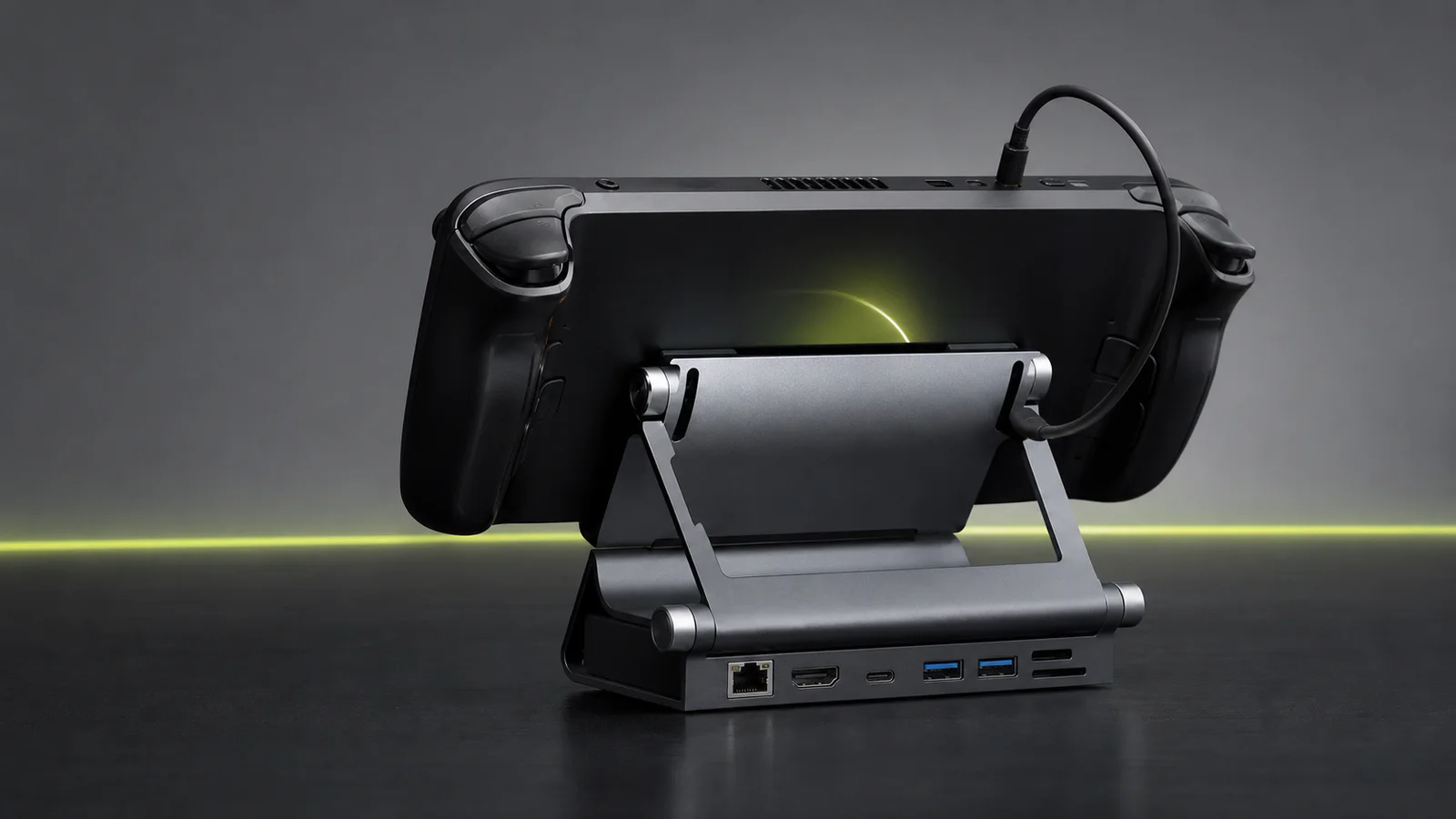
Buy the UGREEN 25869 if the adjustable cradle and nine-port layout solve real problems for you. The useful ports are HDMI 2.0, gigabit Ethernet, SD and microSD readers, one 10Gbps USB-C data port, one 10Gbps USB-A data port, two USB-A 2.0 ports, and USB-C Power Delivery input rated up to 100W.
Skip it if your monitor works best over DisplayPort, you need two external displays, or you want the charger included. The “100W” label describes what the dock can accept at its power input; it does not make a Steam Deck charge at 100W.
UGREEN 9-in-1 Steam Deck Dock (25869)
Why it works
- Adjustable foldable stand
- SD and microSD readers
- 10Gbps USB-C and USB-A data ports
Main trade-off
- No DisplayPort
- Power adapter not included
The exact Amazon listing can move between a featured offer and third-party availability. Treat the button as an availability check, not a promise that stock or a specific seller will be present.
Who this is for
The UGREEN 25869 makes sense for:
- a Steam Deck owner who wants HDMI, Ethernet, charging, and peripherals at a TV
- a desk setup that uses both SD and microSD cards
- someone connecting an external SSD through a 10Gbps USB-C or USB-A port
- a household with more than one USB-C handheld, where an adjustable stand is useful
- travel between two fixed setups when a foldable dock is easier to pack than Valve's rigid cradle
The two slow USB-A ports are not wasted space. They are suitable for a keyboard, mouse, controller receiver, or headset dongle, leaving the faster sockets available for storage.
Who should skip it
Skip this dock if DisplayPort is a requirement. UGREEN lists one HDMI 2.0 display output; it does not list a DisplayPort output, a second display, or the FreeSync/VRR support Valve documents for its own dock.
Skip it if you want one purchase to include the power supply. UGREEN rates the PD input up to 100W but does not bundle a wall charger. A Steam Deck owner can use a suitable 45W USB-C PD supply. Faster Windows handhelds may need a higher-output charger to reach their intended docked power mode.
Also skip it as a permanent multi-monitor laptop dock. A proper laptop docking station is larger and more expensive because it is designed around displays, desk peripherals, host charging, and daily cable management rather than one handheld.
Key specifications
| Feature | UGREEN 9-in-1 model 25869 | What it means |
|---|---|---|
| Stand | Two-panel adjustable, foldable design | More fit flexibility than a fixed-width cradle |
| Display | HDMI 2.0, up to 4K at 60Hz | Good for one TV or monitor; no DisplayPort |
| Fast data | 1× USB-C and 1× USB-A, up to 10Gbps | Use for SSDs, capture storage, or large file transfers |
| Peripheral data | 2× USB-A 2.0 | Suitable for low-bandwidth receivers and input devices |
| Networking | Gigabit Ethernet | Enough for downloads, remote play, and normal home networks |
| Card readers | SD and microSD | Useful for moving media without occupying the Deck's own card slot |
| Power input | USB-C PD, up to 100W | Charger sold separately; host power depends on the device and supply |
| Dimensions | 160 × 115 × 40mm | Wider and heavier than a pocket USB-C hub |
| Listed weight | 417g | Intended to stay planted while cables are attached |
UGREEN's US specifications describe nine connections, but only two are 10Gbps data ports. Count port capability, not just the number printed in the product name.
Design and physical fit
The adjustable stand is the product's best idea. A fixed Steam Deck dock usually has a narrow channel sized around an uncased device. UGREEN uses two hinged panels so the support angle and opening can change for a Steam Deck, ROG Ally, Legion Go, or another compatible USB-C device.
Adjustment improves the odds of fitting a protective case, but it does not guarantee it. Check four things before buying:
- the handheld's thickness with its case attached
- whether the USB-C connector can reach without bending the cable sharply
- whether the rear panel blocks an intake or exhaust vent
- whether the case's kickstand or grip rests securely on the dock
The stand folds down for a bag. At 417g, it is not a tiny travel hub, but the extra mass should be useful on a desk with Ethernet, HDMI, power, and storage cables pulling in different directions. We have not tested hinge stiffness or long-term wear, so those remain open reliability questions.
Ports: a better mix than the number suggests
The 25869 separates high- and low-bandwidth devices sensibly. Put an external SSD on the 10Gbps USB-C or USB-A port. Put a controller receiver, keyboard, or mouse on USB 2.0. Use the card readers for photos, ROM backups, or file transfers without removing the microSD card that holds the Deck's game library.
Do not expect every port to run at its headline maximum at the same time. The dock shares one USB-C host connection among display, Ethernet, cards, USB data, and power negotiation. Real transfer rates depend on the drive, file workload, host controller, operating system, and other active devices.
Gigabit Ethernet is the right level for most handheld setups. A faster adapter only helps when the switch, router, storage, and workload can exceed gigabit. For a wider network decision, our 2.5GbE vs 10GbE guide explains the complete path.
Display output and the HDMI limitation
UGREEN lists HDMI 2.0 output up to 4K60, plus higher refresh rates at lower resolutions. That is enough for desktop use, streaming, and lighter games on a modern TV. It does not mean demanding Steam Deck games will render well at 4K60. The dock carries the signal; it does not add graphics performance.
Choose a sensible game resolution and frame target. A 1080p or 1440p output can be more useful than chasing the largest mode the port accepts. Our portable monitor guide covers USB-C video, HDMI, and power trade-offs for a smaller screen.
Valve's official dock is the cleaner choice for a gaming monitor that needs DisplayPort or documented VRR. Valve lists DisplayPort 1.4, HDMI 2.0, FreeSync support, and Multi-Stream Transport for multiple displays. UGREEN does not make equivalent claims for model 25869, so they should not be inferred from its HDMI resolution table.
Charging: 100W input is not 100W to the Deck
Power Delivery is negotiated. A Steam Deck requests the power profile it supports; a 100W-capable dock cannot force 100W into it. The rating gives the dock headroom for higher-power handhelds and connected peripherals when paired with a suitable charger.
Use the handheld's original charger wattage as the baseline. Valve supplies a 45W adapter with the official Steam Deck dock. UGREEN recommends at least a 45W supply for Steam Deck and higher-capacity power for handhelds whose turbo modes require it.
The power adapter is a separate purchase. If you need one charger for the dock and other devices, start with our 100W GaN charger guide. Use a properly rated USB-C cable on any detachable charger connection; connector shape alone does not guarantee power capability.
Setup and troubleshooting
Start with the simplest connection order:
- connect the charger to the dock
- connect HDMI to the TV or monitor
- connect the dock's host cable to the handheld
- confirm charging and display output
- add Ethernet, storage, and other peripherals one at a time
This sequence makes a fault easier to isolate. If video fails, try a known-good HDMI cable and a conservative resolution or refresh rate. If Ethernet fails, remove and reconnect the network in SteamOS before assuming the dock is defective. If charging is slow, verify the charger's PD rating and the cable rather than reading the dock's 100W input figure as delivered host power.
If the external screen stays blank, follow our Steam Deck dock display troubleshooting guide to separate display settings, cable changes and power checks before buying a replacement.
Value
The UGREEN 25869 earns its place when you will use the adjustable stand, card readers, and two 10Gbps data ports. If you only need HDMI, Ethernet, charging, and one controller receiver, a simpler six-port dock can be enough.
Compare the total setup cost, not only the dock. Add a charger if you cannot reuse one. Then compare that total with Valve's dock, which includes its 45W supply and adds DisplayPort, VRR documentation, multi-display support, and first-party firmware updates.
We would pay for UGREEN's extra port variety when the desk needs it. We would pay for Valve's display and support advantages when the monitor needs them. Buying nine ports that remain empty is not better value than buying six useful ones.
Alternatives
Valve Steam Deck Docking Station: the better choice for DisplayPort, documented FreeSync/VRR, two-display support, a bundled charger, and firmware updates through SteamOS. It has no card reader and uses a fixed cradle.
Anker 6-in-1 dock for handheld consoles: a simpler layout for buyers who want HDMI, Ethernet, USB data, and charging without card readers. Check the exact handheld and case fit before buying.
JSAUX HB0603: a basic value option when it is meaningfully cheaper. Confirm the model number because HB0603 and HB0603S have different display and compatibility claims.
A compact USB-C hub: better for occasional hotel or meeting-room HDMI use when you do not need a cradle. It is easier to pack but leaves the handheld lying flat or supported separately.
Our best Steam Deck docks guide compares all four paths in one place. If you are still choosing the handheld, the handheld gaming PC guide covers SteamOS, Windows, screen, battery, and weight trade-offs.
Frequently asked questions
Is the UGREEN 9-in-1 dock compatible with Steam Deck OLED?
UGREEN lists Steam Deck and Steam Deck OLED compatibility for model 25869. Check physical fit if the handheld wears a thick case, and use an appropriate USB-C PD charger.
Does the UGREEN 25869 include a charger?
No. The dock accepts USB-C Power Delivery input up to 100W, but the wall charger is a separate item.
Does it have DisplayPort?
No. Model 25869 uses one HDMI 2.0 display output. Choose Valve's dock or another clearly specified model when DisplayPort is required.
Can it charge a Steam Deck at 100W?
No. The 100W figure is the dock's supported input ceiling. The Steam Deck negotiates only the power it is designed to accept.
Can it work with a ROG Ally or Legion Go?
UGREEN lists both families as compatible. Confirm the exact handheld, case thickness, cable reach, and required charger wattage before buying. Electrical compatibility does not guarantee a perfect physical fit.
Final recommendation
Buy the UGREEN 9-in-1 Steam Deck Dock (25869) if you want an adjustable stand, SD and microSD readers, and two 10Gbps data ports alongside HDMI and Ethernet. That is a genuinely useful configuration for a mixed gaming and file-transfer desk.
Skip it when DisplayPort, VRR, multiple displays, an included charger, or Valve's firmware support matters more. The main trade-off is not hidden: UGREEN gives you more port variety; Valve gives you a stronger display and support package.
Sources
- UGREEN official 9-in-1 Steam Deck Dock product page and model 25869 specifications
- UGREEN official model 25869 product record
- Valve official Steam Deck Dock technical specifications
- Valve official Steam Deck docking and third-party hub support guide
- Amazon US exact-product validation for ASIN
B0CR6JND4Mwith the configured Associate tag.
As an Amazon Associate I earn from qualifying purchases.