Best Handheld Gaming PCs (2026): Steam Deck OLED, ROG Ally X, Legion Go S Compared
Handheld gaming PCs went from clunky experiment to genuine console replacement in two years. Here's which one to buy in 2026, with honest notes on battery life, the Windows-vs-SteamOS question, and the trap models you should skip.
Research-based buying guide
Recommendations are checked against product documentation, availability, comparative evidence, and clearly disclosed hands-on work where it exists.
Quick picks
The short answer, with the trade-offBest for AAA performance
ASUS ROG Ally X
Best Windows handheld
Lenovo Legion Go S (SteamOS)
Best for big-screen gaming
Lenovo Legion Go (8.8-inch)
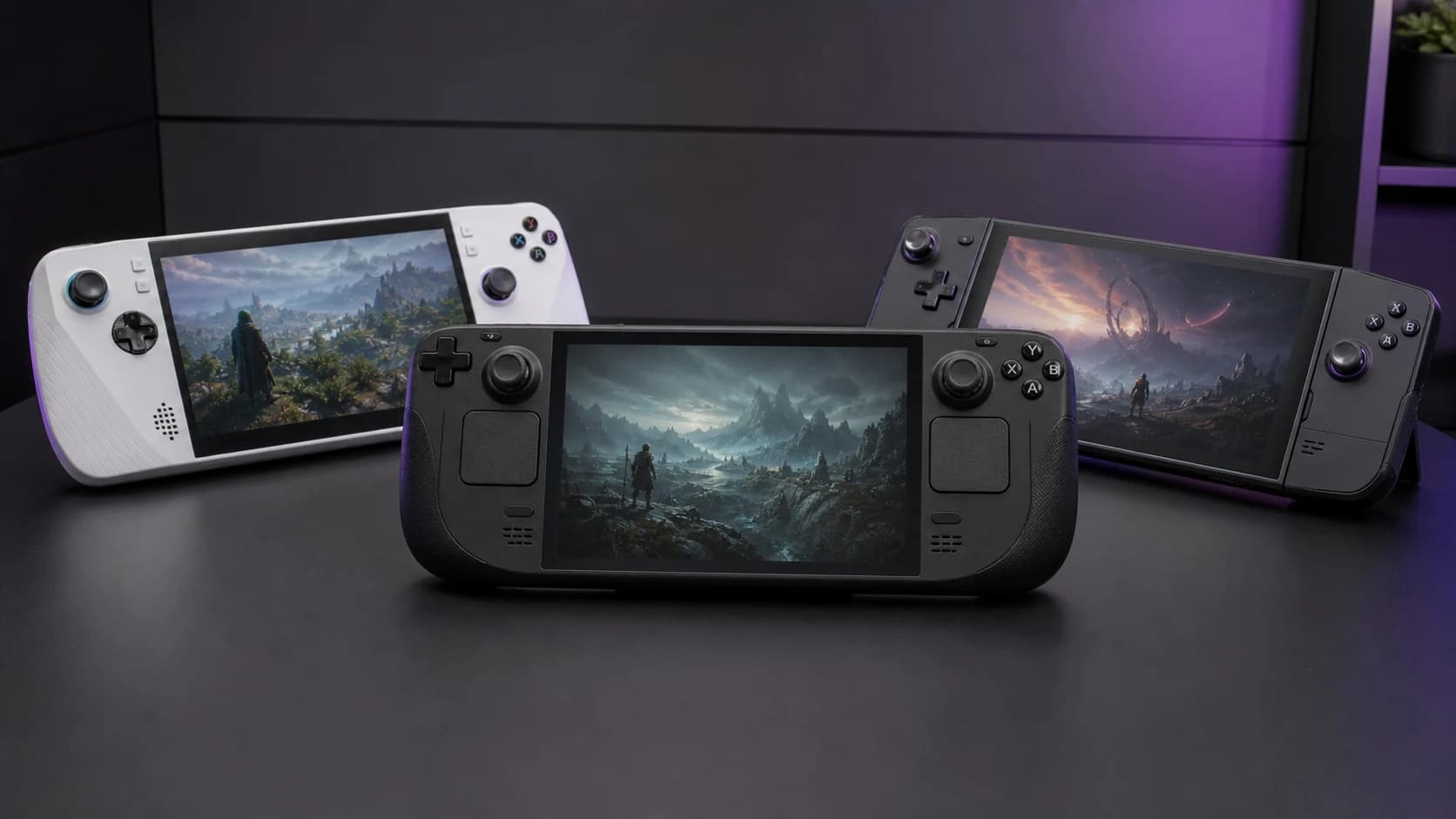
A handheld gaming PC is now a practical way to carry a large PC game library, but every model still trades battery life, software simplicity, screen size, and performance against each other. Steam Deck OLED makes SteamOS feel console-like. ROG Ally X keeps full Windows game-store compatibility. Legion Go models prioritize a larger screen.
The buying decision is harder because the operating system, screen, weight, battery capacity, and game library can matter more than the fastest processor. A powerful Windows handheld is a poor fit for someone who wants console-like suspend and resume. A large screen is less useful if the extra weight keeps the device at home.
This is a research-based guide. We have not completed repeatable lab testing across every current handheld, so recommendations are based on official specifications, current software and compatibility information, product availability, and comparative analysis. Battery life varies heavily by game, power limit, brightness, and frame cap.
SolderMag Take: SteamOS won, mostly
SteamOS is the cleaner handheld interface for a Steam-first library. It is designed around controller navigation, per-game performance controls, and suspend/resume. Windows remains more flexible for Game Pass and third-party launchers, but its desktop interface and background updates are less comfortable on a small touchscreen.
That is why the Steam Deck OLED remains our default recommendation. Its chip is not the fastest. The advantage is that the operating system and controls feel designed as one product.
The exception is when you specifically need Game Pass, Battle.net, or another Windows-first launcher. Then the ROG Ally X earns consideration for its higher performance ceiling, larger battery, and full Windows access. The trade-off is more operating-system maintenance.
Best handheld gaming PCs at a glance
- Want SteamOS, OLED, and trackpads: Steam Deck OLED. The 7.4-inch 90Hz HDR OLED and SteamOS interface matter more here than headline processor speed.
- Need Windows library access and more battery capacity: ROG Ally X. It combines Windows 11, 24GB of memory, an 80Wh battery, and a 1080p 120Hz VRR display.
- Want SteamOS with a larger screen: Legion Go S (SteamOS edition). Lenovo lists an 8-inch 1200p 120Hz VRR display and a starting weight of 730g.
- Want detachable controls and an 8.8-inch screen: Legion Go (original). The design is flexible, but it is the heaviest option in this shortlist.
- Need the lowest-cost Steam Deck route: Steam Deck LCD (256GB). It gives up the OLED panel, 90Hz refresh rate, Wi-Fi 6E, and larger battery of the OLED models.
What actually matters in a handheld gaming PC
1) The operating system, not the chip
Processor specifications matter, but the operating system controls the repeated parts of ownership: launching games, changing performance settings, installing updates, and using suspend and resume.
SteamOS is the cleaner Steam-first route. Its interface is designed around controller navigation, quick settings, per-game performance controls, and suspend/resume. Desktop mode remains available when a keyboard-and-mouse environment is needed.
Windows wins on native storefront and launcher access. Game Pass and Windows-first launchers are the reason to choose it. The trade-off is a desktop operating system with more small-screen setup, update, and navigation work.
The middle option exists. Lenovo sells Legion Go S configurations with SteamOS or Windows. Choose the operating system around the library you use; do not pay for Windows when the device will be used as a Steam-only console.
2) Battery capacity is only a starting point
Manufacturer runtime ranges are not directly comparable because games, brightness, frame caps, wireless use, and power limits change the result. Use battery capacity to understand the hardware, then check measurements for the specific games and settings you care about.
Steam Deck OLED has a 50Wh battery. ROG Ally X has an 80Wh battery. Larger capacity helps, but a higher power limit and higher-resolution display can consume that advantage. For travel, prioritize a device that lets you set a frame cap and power limit without fighting the interface.
3) The controls, especially the sticks
Hall-effect and TMR sensors avoid the wear mechanism of traditional potentiometer sticks, but do not assume every newer handheld uses them. Steam Deck OLED and the 2024 ROG Ally X do not advertise Hall-effect thumbsticks in their official specifications. Legion Go S and MSI Claw 8 AI+ do. Check the exact model rather than relying on the release year or a retailer bullet point.
Trackpads remain Steam-Deck-only. If you play strategy games, RTS, or anything designed for mouse and keyboard, the absence of trackpads on every other handheld is genuinely disqualifying for those titles.
4) Weight and ergonomics over an hour
Published device weights are roughly:
- Steam Deck OLED: 640g
- ROG Ally X: 678g
- Legion Go S: 730g
- Legion Go (original): 854g
- MSI Claw 8 AI+: 795g
The original Legion Go is substantially heavier than Steam Deck OLED. That difference matters during long unsupported sessions. Grip shape is personal, so try the device in person or buy from a retailer with a workable return policy if hand comfort is a concern.
5) The screen, where AAA games actually live
Three real choices in 2026:
- OLED: Steam Deck OLED uses a 90Hz 1280×800 HDR OLED panel with per-pixel black levels.
- High-refresh IPS: ROG Ally X uses 1080p 120Hz; Legion Go S uses 1200p 120Hz. Both list variable refresh rate support.
- High-resolution IPS: the original Legion Go uses a 1600p 144Hz panel. That native resolution creates a heavier rendering target than the Deck's 800p panel.
Higher output resolution requires more GPU work. A high-resolution panel can still be useful for desktop text, older games, and video, but demanding games may need a lower render resolution or upscaling to hold a useful frame rate.
The picks, in detail
Best overall: Steam Deck OLED (1TB)
This is still the handheld gaming PC we recommend to most people. The OLED panel delivers much stronger contrast than an IPS screen, and SteamOS makes the device feel more like a console than a small Windows laptop. The 50Wh battery and 90Hz display are meaningful upgrades over the LCD Deck. The official specifications do not claim Hall-effect thumbsticks.
The Deck's 6nm AMD APU is less powerful than newer high-wattage Windows handheld processors. That matters most in demanding recent games. Buy the Deck for SteamOS, controls, efficiency, and the OLED screen—not for maximum settings in new AAA releases.
Choose 512GB or 1TB around the games you keep installed and whether the 1TB model's etched anti-glare glass matters. Both OLED models also accept UHS-I microSD storage. Large modern games make the higher-capacity model more convenient, but it is not mandatory for a small or mostly independent-game library.
Best for AAA performance: ASUS ROG Ally X
The Ally X is the handheld for the person who already has a Steam library, a Game Pass subscription, and several Windows launchers. Its Ryzen Z1 Extreme, 24GB of memory, and 80Wh battery provide more performance and battery headroom than the original Ally.
Buying it means accepting Windows on a handheld. ASUS uses Armoury Crate SE to provide a controller-focused library and settings layer, but Windows configuration and updates still sit underneath it. That extra administration is the price of wider native game-store compatibility.
Prefer the X over the original Ally when the price gap is reasonable. It doubles battery capacity, increases memory, and relocates the microSD reader. ASUS revised the internal cooling layout after widely reported microSD reader failures on the original model.
Best Windows-class hardware on SteamOS: Lenovo Legion Go S (SteamOS edition)
The Legion Go S exists for the buyer who wants more screen than a Steam Deck without giving up SteamOS. The 8-inch 1200p 120Hz IPS panel is a real upgrade if you primarily play indoors at full brightness. Hall effect sticks, dedicated mouse-mode trigger, and a slightly bigger battery than the original Go round out a genuinely competitive package.
Two caveats matter. Lenovo lists a starting weight of 730g, about 90g above Steam Deck OLED, and the 1200p screen asks more of the processor than an 800p panel at native resolution. Choose it when the larger display is worth those trade-offs; choose the Deck OLED when lower weight and OLED contrast matter more.
Best big-screen handheld: Lenovo Legion Go (8.8-inch original)
The original Legion Go combines an 8.8-inch 1600p 144Hz display, detachable controllers, a built-in kickstand, and a right controller that can operate in a vertical mouse mode. At roughly 854g with the controllers attached, it is also substantially heavier than Steam Deck OLED.
Buy this if you specifically want a tablet-sized handheld for couch gaming, mostly with the kickstand deployed and a charger nearby. It is genuinely the best at that one job. As a sit-on-the-train, play-for-three-hours handheld, it's a worse Steam Deck.
Cheap entry: Steam Deck LCD (256GB)
The original Steam Deck is still capable, but you give up the OLED panel, the larger battery, and other refinements of the OLED model. Consider it only when it is meaningfully cheaper and the smaller storage or older display will not become an immediate upgrade expense.
If the OLED model is within budget, its larger battery and display upgrades justify comparing the total cost before choosing the LCD version. The LCD model remains the lower-cost route into SteamOS when the price gap is substantial.
Lower-priority options
Original ROG Ally (2023) — it has half the Ally X battery capacity and a widely documented history of microSD reader failures. Consider a refurbished unit only with a strong warranty and a large price gap.
MSI Claw (original Intel version) — newer Claw models substantially change the processor and battery proposition. Compare the exact generation rather than buying the original model on name alone.
AYANEO and OneXPlayer — these brands offer unusual sizes and configurations, but support, return logistics, replacement parts, and regional warranty handling deserve more scrutiny than the specification table.
Switch 2 — different category. If you want to play Switch exclusives (which are excellent), you need a Switch 2. It is not a handheld gaming PC and won't run your Steam library.
A note on docking
Every handheld in this list can dock to a TV or monitor over USB-C. Docking adds display, network, power, and peripheral connections; it does not add GPU performance. If you expect one device to handle handheld play, couch gaming, and a permanent work desk, check the display and peripheral limitations carefully.
Our Steam Deck dock guide compares the official Valve dock with UGREEN, Anker, and JSAUX options, including case fit, charger, HDMI, DisplayPort, and Ethernet trade-offs. For the most flexible port layout, the dedicated UGREEN 9-in-1 dock review explains model 25869 in more detail. If the official dock is the other option, the UGREEN-versus-Valve comparison separates port variety from display and firmware support.
The bottom line
Buy the Steam Deck OLED (1TB) if you want SteamOS instead of Windows and play a mix of indies, older AAA games, and newer demanding games at moderated settings. Its OLED display, controls, and software integration make it the most broadly suitable option here, but newer Windows hardware can deliver more performance.
Buy the ROG Ally X if your library lives outside Steam, you specifically need Game Pass on a handheld, and you've already accepted that Windows on a 7-inch screen comes with paper cuts.
Buy the Legion Go S (SteamOS) if you want a bigger screen than the Deck without giving up SteamOS.
Buy the Steam Deck LCD if your budget is firm, the price is meaningfully below the OLED model, and you mostly play less-demanding games.
Start with those three families, then move to a niche model only when it solves a specific screen-size, operating-system, control, or compatibility requirement.
Sources
- Valve official Steam Deck OLED technical specifications
- ASUS official ROG Ally X product and specification pages
- Lenovo official Legion Go S product specifications
- Lenovo official original Legion Go product specifications