SteelSeries Arctis Nova 7 Gen 2 Review: Worth It?
Nova 7 Gen 2 suits gamers who mix game and phone audio. Its larger battery matters; original Nova 7 owners can now get mobile controls without upgrading.
Research-based review
How we evaluateQuick picks
The short answer, with the trade-off
Verdict
SteelSeries Arctis Nova 7 Wireless Gen 2
Simultaneous 2.4GHz and Bluetooth audio
Trade-off: Standard version does not support Xbox wireless

Cheaper alternative
SteelSeries Arctis Nova 5 Wireless
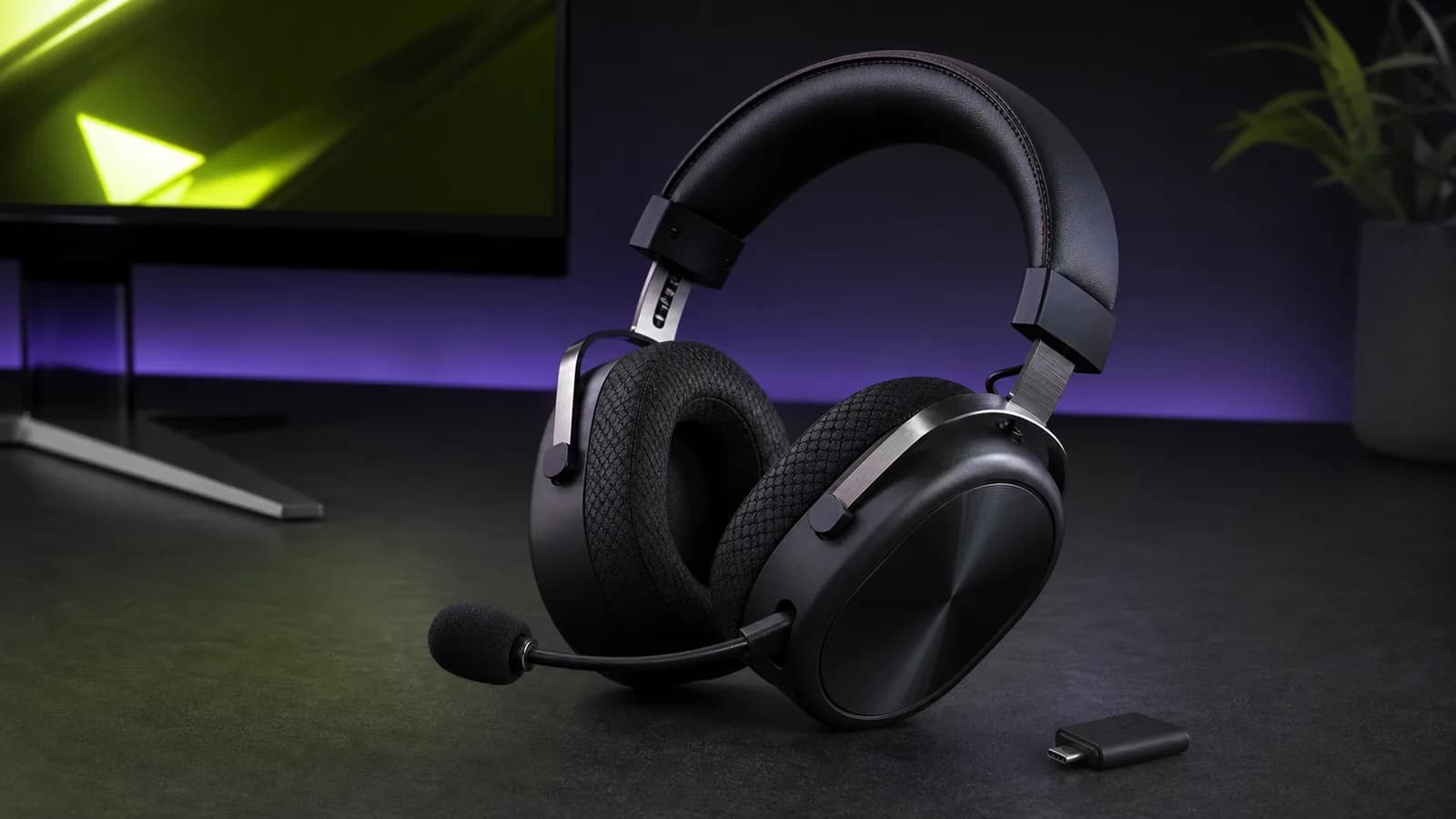
The SteelSeries Arctis Nova 7 Gen 2 is worth buying if you want game audio and phone audio at the same time. That is still its clearest advantage. The larger claimed battery is a reason to consider Gen 2. Mobile controls are no longer a reason to replace the original Nova 7: SteelSeries added Companion app support through a firmware update in January 2026.
Buy it for a PC, PlayStation, Switch, or handheld setup where simultaneous 2.4GHz and Bluetooth mixing solves a real problem. Skip it if you need Xbox support without buying the 7X variant, or if a cheaper headset that switches between wireless modes is good enough.
This is a research-based review. We have not completed hands-on or long-term battery testing of this model. The verdict is based on SteelSeries documentation, platform compatibility, current product identity, the exact US Amazon listing, and comparison with nearby alternatives.
Short verdict
The Nova 7 Gen 2 is the sensible SteelSeries pick for buyers who need simultaneous audio. It can mix low-latency game audio from its USB-C 2.4GHz dongle with music, calls, or chat from a phone over Bluetooth. The mobile app also makes EQ and microphone adjustment far less awkward for console players.
The main trade-off is value. The cheaper Nova 5 Wireless covers the same platforms, mobile presets, and quick wireless switching, but it cannot play both wireless sources at once. If you rarely take calls or listen to a phone while gaming, the Nova 7 premium is buying a feature you may not use.
SteelSeries Arctis Nova 7 Wireless Gen 2
Buy it for mixed game-and-phone audio, longer battery life, and mobile controls—not for an assumed sound overhaul.
Why it works
- Simultaneous 2.4GHz and Bluetooth audio
- 50+ hour manufacturer battery claim
- Companion app with 200+ presets
Main trade-off
- Standard version does not support Xbox wireless
- Cheaper models suit single-source buyers
- No SolderMag hands-on battery measurement
Who this is for
Buy the Nova 7 Gen 2 if you:
- want to hear game audio and a phone call, podcast, or Discord conversation together
- move between PC, PlayStation, Switch, a USB-C handheld, and a phone
- tune EQ or sidetone from the couch instead of reconnecting to a PC
- want more battery margin than the original Nova 7 provides on paper
- prefer a suspended headband over a conventional padded band
The strongest case is not “premium gaming audio.” It is convenience across two devices. A person playing on a handheld while listening to something from a phone will use the Nova 7's defining feature every session.
Who should skip it
Skip the standard Nova 7 if Xbox wireless support is required. SteelSeries sells a 7X variant for Xbox; the suffix is a compatibility decision, not a colour choice. Check the exact product title before ordering.
Also skip it if you use one wireless source at a time. The Nova 7 Gen 2 vs Nova 5 Wireless comparison explains why the cheaper Nova 5 is enough for buyers who are happy to switch between Bluetooth and 2.4GHz.
Existing Nova 7 owners should usually keep their headset. Our Gen 2 vs Gen 1 guide covers that upgrade decision in detail.
Key specifications
| Feature | Nova 7 Gen 2 | Buyer impact |
|---|---|---|
| Wireless | 2.4GHz plus Bluetooth | Both sources can play simultaneously |
| Claimed battery | 50+ hours | More charging margin; not a SolderMag lab result |
| Quick charge | 6 hours from 15 minutes | Useful when the headset was left empty |
| Mobile software | Arctis Companion app | EQ, sidetone, mic controls, and 200+ presets |
| Wireless receiver | USB-C dongle; USB-A adapter included | Check the host platform and exact headset variant |
| Microphone | Retractable noise-rejecting boom | Tucks away when not needed |
| Construction | Steel-supported frame and elastic suspension band | Familiar Nova fit rather than a full redesign |
| Platform families | 7, 7P, and 7X | Exact variant matters, especially for Xbox |
Manufacturer runtime is a comparison tool, not a promise. Volume, Bluetooth use, microphone activity, distance, and battery age will change the result.
Design and comfort
Gen 2 keeps the recognizable Nova approach: an elastic suspension band carries most of the load while a steel-supported outer frame provides structure. This avoids concentrating all pressure on a narrow padded strip, although head shape and clamp tolerance still decide whether it works for you.
The retractable boom mic is practical for mixed work and gaming use. It can disappear into the earcup rather than sitting permanently beside your face. On-ear controls also reduce how often you need software for routine volume and microphone changes.
Do not expect Gen 2 to feel like a clean-sheet redesign. The larger claimed battery remains a useful distinction; mobile app access is now available on the original generation too.
Wireless and everyday use
Simultaneous wireless is the reason to pay attention. Many competing headsets advertise both Bluetooth and 2.4GHz, then make you toggle between them. The Nova 7 can mix the two sources.
There is a limit: SteelSeries says the microphone cannot transmit to both sources simultaneously. When a Bluetooth call takes control of the mic, it is not also sending your voice to game chat. That is normal enough, but it matters if your ideal setup involves two live conversations.
The USB-C dongle supports PC, PlayStation, Switch, and compatible handheld devices on the standard model. Port placement can still be awkward on tightly packed laptops or docks, so check whether the dongle blocks a neighboring connector.
App controls and presets
The Arctis Companion app lets console users change headset settings from a phone. SteelSeries offers more than 200 game and entertainment presets, plus controls for EQ, sidetone, microphone behavior, and other headset settings.
App access is no longer exclusive to Gen 2. SteelSeries' January 21, 2026 firmware release added Companion support to the original Nova 7, 7P and 7X, including the Diablo IV and World of Warcraft editions, through GG on a Windows PC. If mobile controls are your only reason to upgrade, update the original headset first. Our Companion app connection guide explains the firmware and pairing checks.
The number is less important than the location. A PS5 or Switch player can adjust the headset from a phone instead of taking it back to a computer running SteelSeries GG. If you select one profile and never touch it, the app is a convenience. If you swap between competitive games, films, and music, it removes friction.
Battery and charging
SteelSeries describes the battery as 50-plus hours and specifies 54 hours in its launch material. It also claims six hours of play after 15 minutes of charging.
Those figures are not independent measurements. Still, they show the design target: several long sessions between charges and a useful emergency top-up. The battery improvement is more valuable to travelers and forgetful chargers than to desk users who already keep a USB-C cable nearby.
Sound and microphone expectations
SteelSeries positions Gen 2 around the same core Nova Acoustic System rather than a new driver platform. We would not promise a major sound improvement over Gen 1 without controlled measurements.
Software presets can make dialogue, footsteps, or bass easier to emphasize, but a preset is not a replacement for good source audio or a fit that seals properly. The retractable microphone is built for chat convenience. Buyers prioritizing broadcast-quality voice recording should still use a dedicated USB microphone.
For a battery-first alternative, see the Nova 7 Gen 2 vs HyperX Cloud III S Wireless comparison. For ANC without a base station, our Nova 7 Gen 2 vs Razer BlackShark V3 Pro comparison covers the trade-offs. The Nova Pro Omni review is the premium step-up when PC-and-console mixing, universal platform support, and hot-swap batteries solve a real problem; the Omni vs original comparison is for current flagship owners.
Value
The Nova 7 Gen 2 is good value when simultaneous audio is on your requirements list. It is poor value when that line item is only a vague “nice to have.”
Do not use a fixed price threshold because retailer pricing changes. Compare the Nova 7 Gen 2 with the Nova 5 Wireless on the day you buy. If the gap is meaningful and you cannot describe when you would mix two sources, save the money. If dual audio replaces a second headset or constant device switching, pay for it.
Alternatives
SteelSeries Arctis Nova 5 Wireless: the cheaper in-brand pick. It offers mobile presets and broad platform compatibility, but switches rather than mixes Bluetooth and 2.4GHz.
HyperX Cloud III S Wireless: the battery-focused alternative. Choose it when long manufacturer-rated runtime matters more than simultaneous phone audio.
Razer BlackShark V3 Pro: a competing premium wireless headset for buyers more interested in its mic and game-focused tuning than the Nova family's suspended fit.
Logitech G522: the lighter RGB alternative with a detachable boom. Our G522 vs Nova 7 Gen 2 comparison explains why source switching versus simultaneous audio matters more than the lighting.
For a broader shortlist across budgets, see our best gaming headsets guide.
Frequently asked questions
Can the Nova 7 Gen 2 play Bluetooth and game audio together?
Yes. It can mix Bluetooth audio with the 2.4GHz game connection. The microphone does not transmit to both sources at once.
Does the standard Nova 7 Gen 2 work with Xbox?
Not as the Xbox wireless model. Buy the Nova 7X variant and verify the exact retailer listing when Xbox compatibility is required.
Is the Nova 7 Gen 2 better than the Nova 5?
It is better for simultaneous audio and has the more premium construction. The Nova 5 is enough if switching between Bluetooth and 2.4GHz is acceptable.
Should Nova 7 Gen 1 owners upgrade?
Usually not. Original Nova 7 models now support the Companion app after the required firmware update. Consider Gen 2 when longer battery runtime matters enough to justify replacement, the older battery has degraded, or the headset needs replacing for another reason.
Final recommendation
Buy the Arctis Nova 7 Gen 2 if simultaneous game and phone audio is central to your setup. The longer battery claim and phone-based controls support that use case without changing what made the Nova 7 distinct.
Skip it if you use one source at a time. The cheaper Nova 5 or a battery-first HyperX model will cover more of your actual needs for less money.
Sources
- SteelSeries official Arctis Nova 7 Gen 2 product page
- SteelSeries official Nova 7 Gen 2 launch announcement
- SteelSeries official Nova 7 Gen 2 introduction
- Amazon US exact-product validation for
B0FRNR8Y11with the configured Associate tag.
As an Amazon Associate I earn from qualifying purchases.