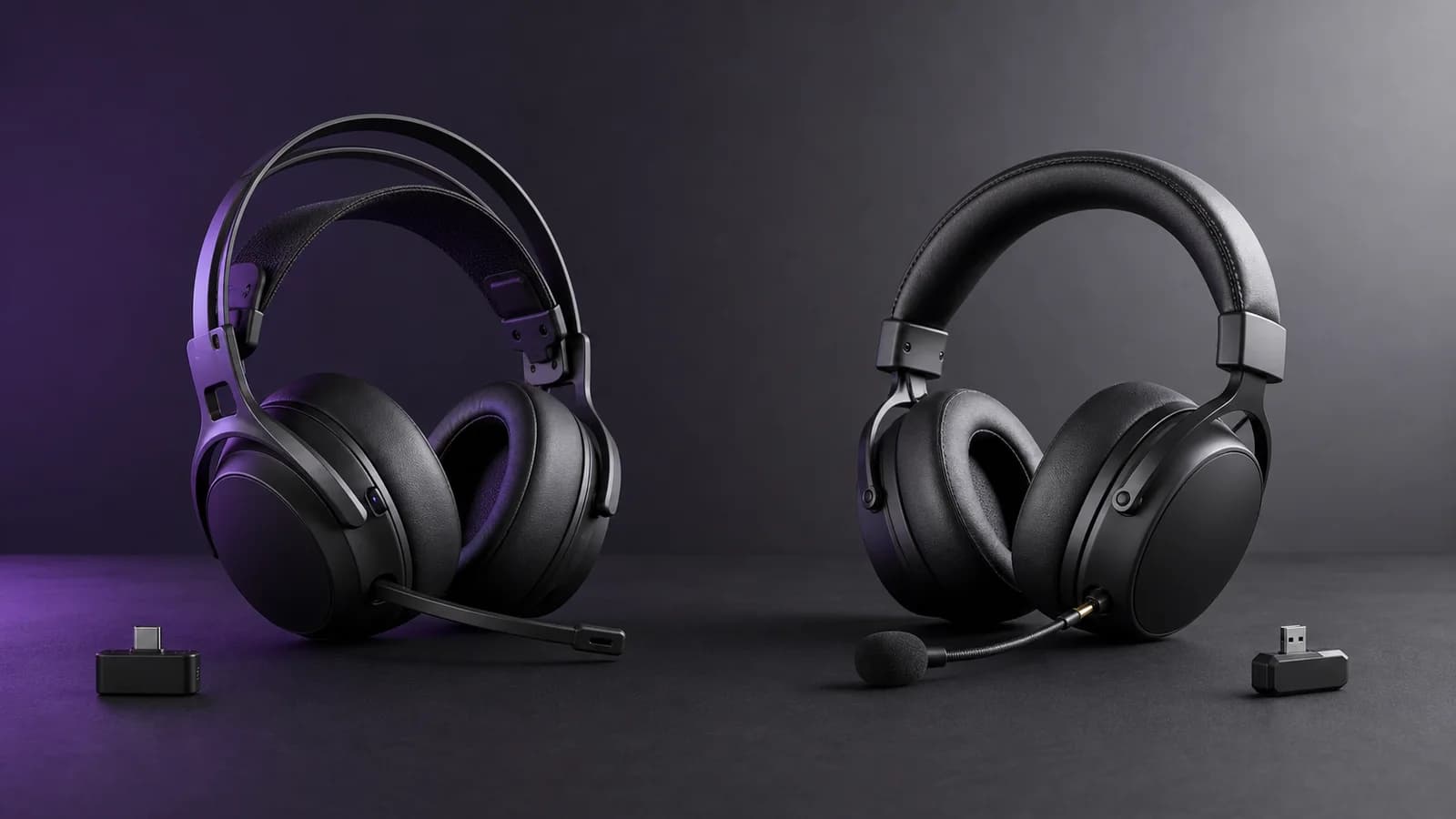
SteelSeries Arctis Nova 7 Gen 2 vs HyperX Cloud III S Wireless
Nova 7 Gen 2 mixes game and phone audio and adds mobile EQ. Cloud III S trades that for much longer claimed battery life. Here is which fits your setup.
Research-based comparison
Recommendations are checked against product documentation, availability, comparative evidence, and clearly disclosed hands-on work where it exists.
Quick picks
The short answer, with the trade-offBest for simultaneous game and phone audio
SteelSeries Arctis Nova 7 Wireless Gen 2
Simultaneous 2.4GHz and Bluetooth
Trade-off: Much lower battery claim than HyperX
Best for battery life
HyperX Cloud III S Wireless
Trade-off: No documented simultaneous source mixing
On this page
- Quick comparison
- The difference that decides it: mixing versus switching
- Battery life: HyperX has the stronger claim
- App controls and software
- Compatibility: Xbox is the trap
- Build, controls, and fit
- Who should buy the Nova 7 Gen 2?
- Who should buy the Cloud III S Wireless?
- Who should skip both?
- Price and value
- Alternatives
- FAQ
- Final recommendation
- Sources
Buy the SteelSeries Arctis Nova 7 Gen 2 if you want game audio and phone audio at the same time. Buy the HyperX Cloud III S Wireless if you would rather charge less often and are happy to switch between 2.4GHz and Bluetooth.
That is the useful answer. SteelSeries is the more flexible two-source headset. HyperX is the simpler battery-first headset. We would not pick a sound, microphone, comfort, latency, or durability winner without measuring both under the same conditions.
This is a research-based comparison. SolderMag has not completed a controlled side-by-side test of these two models. The verdict is based on current manufacturer specifications, supported connection modes, software, exact product identity, and the daily trade-offs each design creates.
Quick comparison
| Decision | Arctis Nova 7 Gen 2 | Cloud III S Wireless | What matters |
|---|---|---|---|
| Wireless behavior | 2.4GHz and Bluetooth can play simultaneously | 2.4GHz or Bluetooth, selected by mode control | SteelSeries is better if two live sources matter |
| Manufacturer battery claim | 50+ hours | Up to 120 hours on 2.4GHz; up to 200 hours in Bluetooth mode | HyperX is the charging-avoidance pick |
| Fast charging | Six hours from a 15-minute charge | Five-hour published full charge time | SteelSeries documents the more useful emergency top-up |
| Mobile control | Arctis Companion app with EQ and presets | NGENUITY is Windows-only for customisation | SteelSeries is easier to adjust away from a PC |
| Drivers | Neodymium magnetic drivers; size is not the buying reason | Angled 53 mm dynamic drivers | Driver diameter does not establish a sound winner |
| Microphone | Retractable noise-rejecting boom | Detachable 10 mm boom plus built-in mic | Choose the physical design you prefer; quality is unverified here |
| PC / PlayStation / Switch | Supported | Supported | Either works for the mainstream USB-C use case |
| Xbox | Buy the Nova 7X Gen 2 variant | Not listed as compatible by HyperX | SteelSeries has the clear Xbox route |
The difference that decides it: mixing versus switching
The Nova 7 Gen 2 can keep its 2.4GHz dongle connection active while Bluetooth plays from a phone. SteelSeries explicitly says the two audio streams are mixed. You can hear a PC or console game and a phone call, podcast, music stream, or mobile Discord audio without changing the headset's wireless mode.
There is one limitation worth knowing: the microphone does not transmit to both sources at once. If you answer a Bluetooth call, the microphone moves to that call rather than sending your voice to both the call and game chat.
The Cloud III S Wireless gives you both 2.4GHz and Bluetooth, but HyperX describes a wireless mode selector and tells buyers they can switch between modes. Its official material does not claim simultaneous playback from both sources. Treat it as 2.4GHz or Bluetooth unless HyperX documents otherwise for your exact firmware and setup.
This is not a small distinction hidden in a spec sheet. It changes how the headset works every day.
Buy the Nova 7 Gen 2 if you regularly:
- play through a dongle while taking phone calls;
- keep mobile Discord or another chat source active;
- listen to a phone stream underneath game audio;
- move between work calls, PC audio, and a console without wanting a separate headset.
The Cloud III S is enough if Bluetooth is an alternate connection rather than a second live source. Many people only need a low-latency dongle at the desk and Bluetooth when they leave it.
Battery life: HyperX has the stronger claim
HyperX publishes up to 120 hours over 2.4GHz and up to 200 hours in Bluetooth mode for the Cloud III S Wireless. Those figures come with test conditions: 50% headphone volume and continuous playback. Actual life will change with volume, microphone use, wireless range, EQ, battery age, and connection mode.
SteelSeries publishes 50+ hours for the Nova 7 Gen 2 and says a 15-minute USB-C charge provides six hours of play. The claimed runtime is much higher than the original Nova 7's 38-hour figure, but it remains far below the Cloud III S headline.
Do not turn those claims into an exact number of days. Instead, pick the inconvenience you want to remove:
- Cloud III S Wireless: better if remembering to charge is the problem.
- Nova 7 Gen 2: better if a short emergency charge and simultaneous audio are more useful than maximum endurance.
SolderMag has not run a matched battery test, so we cannot say how close either unit gets to its claim at your normal volume.
App controls and software
The Nova 7 Gen 2 adds the Arctis Companion mobile app, which is one of the meaningful changes from the original Nova 7. SteelSeries advertises more than 200 game presets, custom EQ, microphone EQ, and separate treatment for game and mobile audio. PC users can also use SteelSeries GG and Sonar for routing and per-application controls.
That is useful if you play on console or a handheld and do not want to connect the headset to a Windows PC just to change a setting. It can also be too much software if you only want a volume wheel and mute button.
The Cloud III S Wireless works with HyperX NGENUITY. HyperX currently says NGENUITY is available only on Windows; Mac, Linux, and console users need a Windows PC to customise and save supported settings to an onboard profile. The headset still has hardware controls for volume, mute, wireless mode, calls, and media.
Choose SteelSeries for more adjustment from a phone. Choose HyperX if you expect to set the headset once on Windows and mostly leave it alone.
Compatibility: Xbox is the trap
Both standard models cover the common USB headset platforms: PC, PlayStation, Switch, Mac, mobile devices, and compatible handhelds. Both include paths for USB-C use, and HyperX also includes a USB-C-to-USB-A adapter.
Xbox changes the answer. The standard Nova 7 Gen 2 is not the Xbox model. Buy the Arctis Nova 7X Wireless Gen 2 if Xbox wireless support is required. SteelSeries lists that variant for Xbox, PlayStation, PC, Switch, Mac, handhelds, mobile, and more.
HyperX does not list Xbox in the Cloud III S Wireless compatibility line. Do not assume a USB headset works on Xbox because it works on PlayStation. Check the exact platform list before ordering.
For PC-only or PlayStation-only buyers, the standard Nova 7 Gen 2 and Cloud III S both fit. For an Xbox plus PC or Xbox plus PlayStation setup, the Nova 7X Gen 2 is the practical route.
Build, controls, and fit
The two headsets take visibly different approaches.
The Nova 7 Gen 2 uses an elastic suspension band under a steel outer headband, fabric-covered cushions, rotating earcups, and a retractable microphone. The suspension design spreads contact across the band rather than placing a conventional padded headband directly on the head.
The Cloud III S uses HyperX's conventional padded headband, memory-foam cushions with leatherette surfaces, an aluminium-fork and steel-frame construction, and a detachable boom microphone. HyperX lists the headset itself at 0.79 lb, or roughly 358 g.
None of those facts proves which will feel better on your head. Clamp, ear shape, glasses, heat, cushion condition, and headband adjustment matter more than marketing language. Buy from a seller with a workable return policy if fit is uncertain.
The microphone design is a clearer preference:
- choose the Nova 7 Gen 2 if you want the boom to retract into the earcup;
- choose the Cloud III S if you prefer to remove the boom and use its built-in microphone for casual calls.
We have not measured microphone frequency response in a shared setup, so there is no defensible quality winner here.
Who should buy the Nova 7 Gen 2?
Buy the SteelSeries if:
- simultaneous 2.4GHz and Bluetooth is part of the job;
- you want to adjust EQ from a phone rather than a Windows PC;
- a 15-minute fast charge is useful;
- you want a retractable boom microphone;
- you need an Xbox-compatible option and will choose the 7X variant;
- you already know you like suspension headbands and fabric cushions.
The main trade-off is battery life. Fifty-plus claimed hours is plenty for many buyers, but it is not the reason to choose this over HyperX.
SteelSeries Arctis Nova 7 Wireless Gen 2
Why it works
- Simultaneous 2.4GHz and Bluetooth
- Companion mobile app
- Six-hour fast charge from 15 minutes
Main trade-off
- Much lower battery claim than HyperX
- Requires the separate 7X variant for Xbox
Who should buy the Cloud III S Wireless?
Buy the HyperX if:
- charging as rarely as possible is the priority;
- you only need one wireless source at a time;
- you prefer a traditional padded headband and memory-foam cushions;
- a detachable boom plus built-in microphone suits your use;
- Windows-only software setup is acceptable;
- you do not need Xbox compatibility.
Read our full HyperX Cloud III S Wireless review if battery routine, boomless calls or NGENUITY support will decide the purchase.
The compromise is source handling. Bluetooth is present, but it is not documented as a simultaneous second stream beside the dongle.
HyperX Cloud III S Wireless
Why it works
- Up to 120-hour 2.4GHz claim
- Bluetooth plus 2.4GHz modes
- Detachable boom and built-in microphone
Main trade-off
- No documented simultaneous source mixing
- NGENUITY customisation is Windows-only
Who should skip both?
Skip both if you already own the original Nova 7 and only want better sound. SteelSeries says the Gen 2 keeps the core Nova sound; its useful upgrades are battery life and app control. Our Nova 7 Gen 2 vs Gen 1 comparison covers that upgrade decision.
Skip both if you need active noise cancellation. Neither model is sold around ANC for listening; microphone noise processing is a different feature. Our Nova 7 Gen 2 vs Razer BlackShark V3 Pro comparison covers the premium ANC alternative. If HyperX remains on the shortlist, use the direct BlackShark V3 Pro vs Cloud III S Wireless comparison.
Skip both if you mostly sit at one desk and a cable does not bother you. A good wired headset avoids batteries, dongle management, and wireless mode decisions.
Skip the standard variants if Xbox is the main console. The Nova 7X Gen 2 is the relevant SteelSeries model, and the Cloud III S compatibility list does not include Xbox.
Price and value
We would not pay more for the Cloud III S unless its battery advantage matters to you. We would not pay more for the Nova 7 Gen 2 unless simultaneous audio, mobile control, or the 7X platform option will be used.
If the two are close in price, the decision remains functional:
- buy Nova 7 Gen 2 for two-source audio and software flexibility;
- buy Cloud III S for much longer claimed runtime and a simpler wireless routine.
Also check the model name carefully. Retail pages can mix the original Nova 7 with Nova 7 Gen 2, and the older Cloud III Wireless with Cloud III S Wireless. The old HyperX model has no Bluetooth. The original Nova 7 lacks the Gen 2 mobile-app and battery upgrades.
Alternatives
Original Arctis Nova 7: sensible only when it is meaningfully cheaper or already in your drawer. It retains simultaneous 2.4GHz and Bluetooth, but SteelSeries rates it at 38 hours and does not give it the Gen 2 Companion-app feature set.
SteelSeries Arctis Nova 5 Wireless: the in-brand value alternative when one source at a time is enough. Our Nova 7 Gen 2 vs Nova 5 Wireless comparison explains the 60 g weight difference, QuickSwitch behavior, wired fallback, and physical ChatMix trade-off.
Original Cloud III Wireless: a 2.4GHz-only clearance option. Read our Cloud III Wireless vs Cloud III S comparison before paying close to S-model money.
SteelSeries Arctis Nova 3 Wireless: the cheaper current SteelSeries choice if quick switching and app presets are enough. It does not replace the Nova 7's simultaneous source mixing. Our Nova 3 Wireless vs Cloud III S comparison explains the lower-price decision.
Logitech G522: a lighter RGB alternative with a removable boom, but it switches rather than mixes Bluetooth and LIGHTSPEED. Use our G522 vs Nova 7 Gen 2 comparison when those are the final two.
For a wider shortlist, use our best gaming headsets guide.
FAQ
Can the HyperX Cloud III S use Bluetooth and 2.4GHz at the same time?
HyperX documents 2.4GHz and Bluetooth modes plus a hardware wireless-mode selector. It does not claim simultaneous playback from both sources. Buy it expecting to switch modes, not mix them.
Can the Nova 7 Gen 2 play game and phone audio together?
Yes. SteelSeries explicitly supports simultaneous 2.4GHz and Bluetooth, with both streams mixed. The microphone can be active on only one source at a time.
Which headset has better battery life?
HyperX has the stronger manufacturer claim: up to 120 hours on 2.4GHz and up to 200 hours in Bluetooth mode. SteelSeries claims 50+ hours. These are not SolderMag test results, and actual runtime will vary.
Does the Cloud III S Wireless work on Xbox?
HyperX does not list Xbox in its official compatibility line. Do not buy it for Xbox based on USB compatibility with other consoles.
Does the Nova 7 Gen 2 work on Xbox?
The standard Nova 7 Gen 2 is the PC/PlayStation-oriented model. Choose the Nova 7X Gen 2 variant for Xbox support.
Which is better for PlayStation 5?
Either can handle the mainstream PS5 wireless use case. Choose Nova 7 Gen 2 if simultaneous phone audio and mobile control matter; choose Cloud III S if battery life matters more.
Which sounds better?
SolderMag has not measured these headsets side by side, so we will not declare a winner. Driver size and manufacturer tuning descriptions are not substitutes for matched frequency-response, distortion, imaging, and level-controlled listening tests.
Final recommendation
Buy the SteelSeries Arctis Nova 7 Gen 2 when you want one headset to keep game and phone audio live together. Its mobile app and quick-charge support make it the more flexible daily tool.
Buy the HyperX Cloud III S Wireless when you want to charge less often and only need one active wireless source at a time. Its battery claim is the reason to pick it; do not buy it expecting Nova-style source mixing.
Sources
- SteelSeries Arctis Nova 7 Gen 2 official product page for simultaneous audio, app control, battery, fast charging, compatibility, and design: https://steelseries.com/gaming-headsets/arctis-nova-7-gen-2?color=black&primaryPlatform=pc
- SteelSeries official simultaneous Bluetooth and 2.4GHz support note, including microphone behavior: https://support.steelseries.com/hc/en-us/articles/8602059869837-Can-Arctis-Nova-7-Use-Bluetooth-and-2-4GHz-at-the-Same-Time
- SteelSeries Nova 7X Gen 2 official product page for Xbox compatibility: https://steelseries.com/gaming-headsets/arctis-nova-7-gen-2?color=black&primaryPlatform=xbox
- HyperX Cloud III S Wireless official product page for connection modes, battery test conditions, compatibility, drivers, microphones, materials, weight, and controls: https://hyperx.com/products/hyperx-cloud-iii-s-wireless-gaming-headset
- HyperX NGENUITY official support page for operating-system and Cloud III S compatibility: https://row.hyperx.com/pages/ngenuity
- Amazon US product-page checks for Nova 7 Gen 2 (
B0FRNR8Y11) and Cloud III S Wireless (B0F6NZWPTC) using the configuredsoldermag-20Associate tag. Both URLs returned HTTP 200 on July 19, 2026; Amazon served automated-access verification instead of product titles, so seller and stock remain unverified.
As an Amazon Associate I earn from qualifying purchases.