Logitech G522 vs SteelSeries Arctis Nova 7 Gen 2
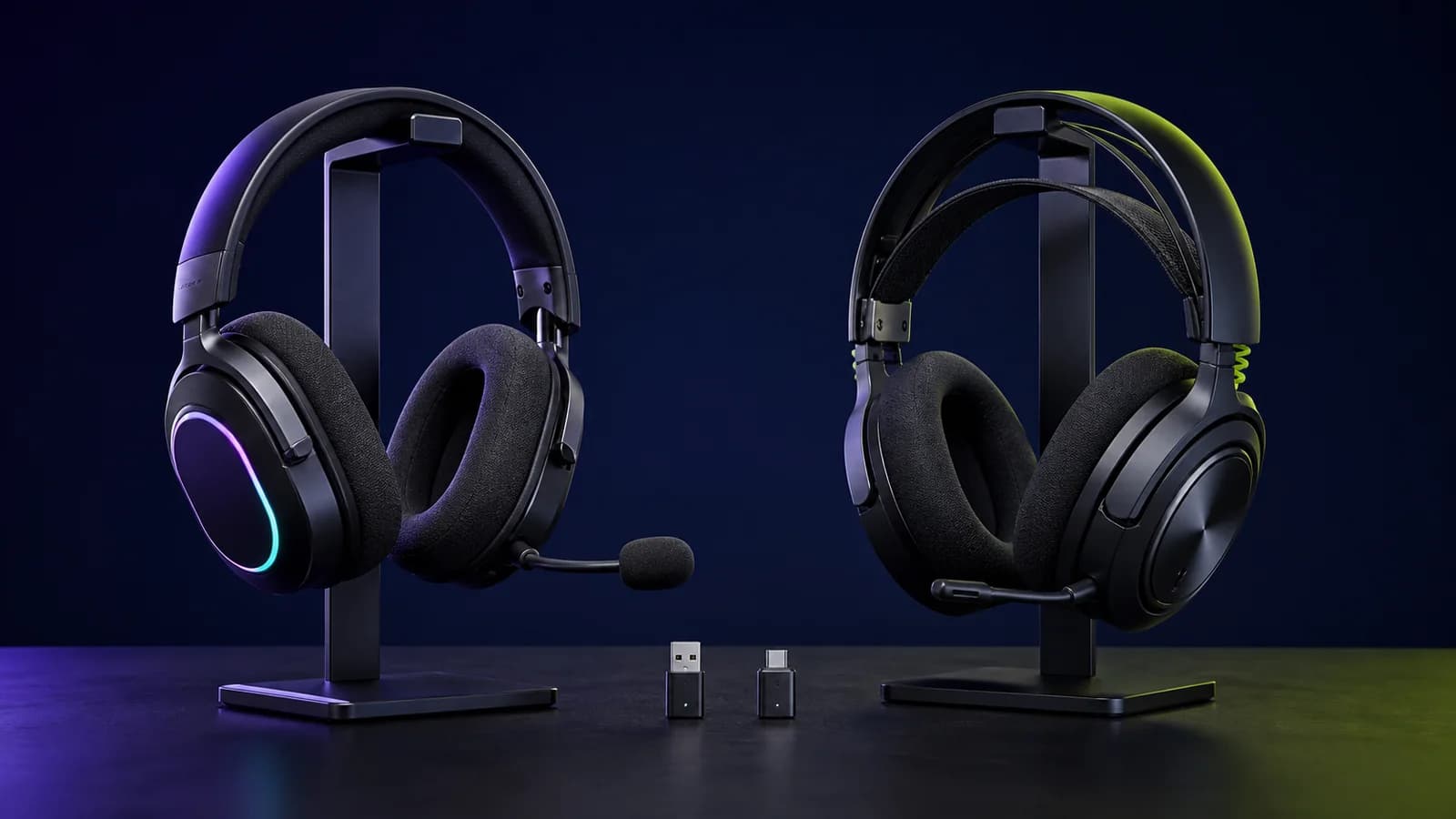
G522 is lighter and built around a detachable mic and RGB. Nova 7 Gen 2 mixes game and phone audio. Here is which trade-off matters.
Research-based comparison
Recommendations are checked against product documentation, availability, comparative evidence, and clearly disclosed hands-on work where it exists.
Quick picks
The short answer, with the trade-off
Best for simultaneous game and phone audio
SteelSeries Arctis Nova 7 Wireless Gen 2
Simultaneous 2.4GHz and Bluetooth
Trade-off: 35 g heavier by published figures

Best for lighter weight and a detachable mic
Logitech G522 Lightspeed
Trade-off: Cannot mix Bluetooth and LIGHTSPEED
On this page
- Quick answer
- Logitech G522 vs Nova 7 Gen 2 specs
- The decisive difference: mixing or switching
- Who should buy the Logitech G522?
- Who should buy the Nova 7 Gen 2?
- Weight and fit: G522 is lighter, not automatically more comfortable
- Microphones: detachable versus retractable
- Battery life and RGB
- Platform and connection traps
- Software and controls
- Which one sounds better?
- Price and value
- Who should skip both?
- Alternatives worth considering
- Common mistakes to avoid
- FAQ
- Final recommendation
- Sources
Buy the SteelSeries Arctis Nova 7 Gen 2 if you want to hear game audio and phone audio at the same time. Buy the Logitech G522 if you want the lighter headset, a removable microphone, and RGB, and you are happy to switch between wireless sources.
That source behavior is the real decision. Both have a dedicated USB wireless receiver, Bluetooth, software controls, and long manufacturer battery claims. Their wired paths differ: G522 supports USB cable audio, while Nova 7 Gen 2 uses its 3.5mm jack for wired listening. Only the Nova is documented to mix its 2.4GHz and Bluetooth streams. The G522 makes you choose one connection at a time.
This is a research-based comparison. SolderMag has not completed a controlled side-by-side test of these headsets. The verdict is based on current manufacturer documentation, exact product identity, connection behavior, compatibility, physical design, and the practical trade-offs each creates. We do not name a sound, microphone, comfort, latency, or durability winner without matched testing.
If simultaneous phone and game audio is unnecessary, our G522 versus Nova 5 comparison compares lower weight and a USB-C receiver against direct USB audio and a removable microphone.
Quick answer
- Choose Nova 7 Gen 2 for simultaneous 2.4GHz and Bluetooth, a 3.5mm backup connection, physical ChatMix, and a USB-C dongle that works across PC, PlayStation, Switch, and handhelds.
- Choose Logitech G522 for a 290 g listed weight, removable boom microphone, RGB lighting, and a straightforward PC or PlayStation setup where switching sources is acceptable.
- Skip the standard Nova 7 model for Xbox. The 7X Gen 2 is the Xbox version. Logitech lists PC, macOS, and PS5 in its support specifications; do not assume wider console support from the G522 name alone.
- Do not choose by driver size or marketing claims. Those do not establish which headset sounds or records better.
Logitech G522 vs Nova 7 Gen 2 specs
| Decision | Logitech G522 | Arctis Nova 7 Gen 2 | Buyer impact |
|---|---|---|---|
| Wireless sources | LIGHTSPEED or Bluetooth 5.3 | 2.4GHz and Bluetooth simultaneously | Nova is the clear pick for mixed game and phone audio |
| Wired audio | USB-C audio | 3.5mm analog audio | G522 uses digital USB; Nova retains a passive-style analog path |
| Listed weight | 290 g with boom microphone | 325 g | G522 is 35 g lighter on paper; fit still needs trying |
| Microphone design | Detachable omnidirectional boom | Retractable noise-rejecting boom | Choose removal versus storage, not an untested quality winner |
| Manufacturer battery claim | Official sources differ: 35–40 hours with lighting; 80–90 without | 50+ hours; six hours from a 15-minute charge | Lighting changes the G522 battery decision |
| Lighting | LIGHTSYNC RGB | No RGB | G522 if visible lighting matters; Nova if it does not |
| Controls | Power, mute, volume, connectivity | Volume, mute, ChatMix, Bluetooth and media controls | Nova puts more source control on the headset |
| Main software | G HUB and G Mobile | Arctis Companion plus SteelSeries GG/Sonar | Both offer EQ; Nova's mobile controls are useful away from a PC |
| Standard-model platforms | Windows, macOS, PS5; Logitech also markets Switch support | PC, PlayStation, Switch, Mac, handhelds, mobile | Verify the exact device and dongle port before buying |
The decisive difference: mixing or switching
The Nova 7 Gen 2 can play audio from its USB-C 2.4GHz dongle and a Bluetooth phone at the same time. SteelSeries calls this simultaneous audio. It means you can hear a game through the dongle while taking a phone call, listening to mobile Discord, or playing something from your phone.
The G522 has LIGHTSPEED, Bluetooth, and wired USB audio, but Logitech's support guidance says Bluetooth and LIGHTSPEED cannot be mixed. You switch connections with the headset control instead. “Tri-mode” describes three available paths, not three concurrent audio streams. Our multipoint and simultaneous audio guide explains what to check for playback and microphone priority before buying.
Buy the Nova if you regularly:
- play on PC or console while taking calls;
- use mobile Discord beside game audio;
- want a podcast or music stream from a phone underneath a game;
- move between work and play without dropping one live source.
The G522 is enough if Bluetooth is an alternate connection for a phone or tablet. Many buyers only need LIGHTSPEED at the desk and Bluetooth when away from it. Do not pay for simultaneous audio if you cannot name a situation where you would use it.
There is also a microphone caveat on the Nova. Simultaneous listening does not mean your voice goes to both sources. SteelSeries says the microphone changes to the Bluetooth call when you answer it rather than transmitting to game chat and the call together.
Who should buy the Logitech G522?
Buy the G522 if:
- a 290 g listed weight is more appealing than the Nova's 325 g;
- you want to remove the boom microphone completely;
- LIGHTSYNC RGB is part of the desk setup you want;
- you mainly play on Windows, macOS, or PS5;
- switching between LIGHTSPEED and Bluetooth is fine;
- G HUB or the Logitech G Mobile app already fits your setup.
The main compromise is source handling. The G522 is not the right pick if “Bluetooth plus 2.4GHz” means you expect to hear both at once.

Logitech G522 Lightspeed
Choose it for a lighter listed weight, detachable microphone, and RGB—not for simultaneous wireless audio.
Why it works
- 290 g listed weight with boom mic
- Detachable boom microphone
- LIGHTSYNC RGB and onboard profiles
Main trade-off
- Cannot mix Bluetooth and LIGHTSPEED
- Battery claim drops when default lighting is used
Who should buy the Nova 7 Gen 2?
Buy the Nova 7 Gen 2 if:
- simultaneous game and phone audio solves a real problem;
- you want a retractable microphone that stays attached;
- a 3.5mm backup connection matters;
- you want physical ChatMix controls on a supported PC setup;
- you use PlayStation, Switch, a handheld, and a phone across the same week;
- six hours from a published 15-minute fast charge is more useful than RGB.
The compromise is weight and complexity. It is 35 g heavier by the published figures and has more controls, app options, and variants to understand before ordering.
SteelSeries Arctis Nova 7 Wireless Gen 2
Choose it when mixing game and phone audio matters; the rest of the feature list is secondary.
Why it works
- Simultaneous 2.4GHz and Bluetooth
- Retractable boom and 3.5mm backup
- Companion app and physical ChatMix
Main trade-off
- 35 g heavier by published figures
- Xbox requires the separate 7X variant
Weight and fit: G522 is lighter, not automatically more comfortable
Logitech lists the G522 at 290 g with its boom microphone. SteelSeries lists the Nova 7 Gen 2 at 325 g. The 35 g difference is large enough to notice on paper and gives the G522 the cleaner answer for buyers trying to reduce headset weight.
It does not settle comfort. Both use suspension-style headbands and fabric around the ears, but head shape, clamp, ear depth, glasses, heat, and cushion wear can matter more than a scale reading. Logitech says the G522 uses a reversible suspension band and redesigned cushions. SteelSeries uses an elastic band under a steel outer headband. Those are construction facts, not proof that either fits you better.
If comfort is the main concern, buy from a seller with a workable return policy and keep the packaging until you have worn the headset through a normal session. A ten-minute try-on is not the same as three hours at a desk.
Microphones: detachable versus retractable
The G522's boom microphone detaches. That leaves a cleaner headset for listening or travel, but it creates a small part that can be misplaced. Logitech specifies an omnidirectional pattern, a 70 Hz to 20 kHz response, and BLUE VO!CE processing through its software.
The Nova's microphone retracts into the left earcup. It is always available, and SteelSeries provides microphone EQ plus Sonar processing on PC. Retraction is more convenient if you move between calls and listening; removal is neater if you rarely use voice chat.
We would not treat “full bandwidth,” microphone frequency response, noise rejection, or software processing as a quality verdict. Background noise, input gain, distance, wireless transport, firmware, and processing settings all affect the result. Neither product has been recorded here in the same room through the same call service.
Battery life and RGB
Logitech’s official sources disagree on the G522 maximum: its support specifications list up to 35 hours with default lighting and 80 hours without, while its current G522 comparison page lists 40 and 90 hours. We have not established why those figures differ. Neither is a measured SolderMag result.
The useful buying lesson is consistent: RGB substantially reduces the claimed runtime. Compare the lighting-on figure with your routine if you intend to keep the lights on, and do not choose a winner from headline battery numbers alone.
SteelSeries publishes 50+ hours for the Nova 7 Gen 2 and says a 15-minute USB-C charge provides six hours of play. The company does not need to divide that figure around earcup lighting because the Nova is not an RGB headset.
These are manufacturer claims, not matched SolderMag results. Volume, microphone use, source mixing, wireless range, EQ, battery age, and lighting can change runtime. The practical reading is simpler:
- choose G522 if its lighter design and lighting matter more than a consistent maximum-runtime story;
- choose Nova if you want a documented fast top-up and do not care about RGB;
- keep the charging cable accessible either way.
Platform and connection traps
The standard Nova 7 Gen 2 uses a USB-C dongle and is sold for PC, PlayStation, Switch, handhelds, Mac, and mobile use. It also includes a USB-C-to-USB-A adapter and retains 3.5mm analog audio. The Gen 2 manual labels the headset’s USB-C port as a charging jack and the 3.5mm port as its wired audio jack. Do not mistake plugging the wireless dongle into USB for connecting a USB audio cable directly to the headset. For Xbox wireless support, buy the Nova 7X Gen 2 rather than assuming the standard version will work.
Logitech's detailed support sheet lists Windows, macOS, and PS5 requirements, a USB-A LIGHTSPEED receiver, Bluetooth 5.3, and USB-C wired audio. Logitech's retail page also advertises Switch and Switch 2 compatibility. Because the support and shop pages express the platform list differently, verify your exact console, port, and intended mode before ordering.
The dongle shape matters too. Nova's USB-C receiver and the G522's USB-A receiver may suit different laptops, docks, and consoles. An adapter can solve connector shape, but it does not create platform certification or make every USB audio device work on Xbox.
Software and controls
The G522 works with Logitech G HUB on desktop and the Logitech G Mobile app. Logitech offers a 10-band EQ, microphone processing, RGB control, and up to three profiles stored on the headset. This is useful if you want one saved setup without reopening software every session.
The Nova 7 Gen 2 works with the Arctis Companion mobile app and SteelSeries GG/Sonar on PC. SteelSeries offers game presets, separate EQ treatment for game and mobile audio, microphone settings, and software routing. Physical ChatMix control is useful on supported PC setups, while the mobile app removes the need to return to a desktop just to change an EQ preset.
Neither software stack is a reason to install more background tools than you use. If you prefer simple hardware controls, set a sensible profile, confirm it saves correctly, and close the software. If you already depend on Sonar routing or G HUB profiles, staying in that ecosystem reduces setup work.
Which one sounds better?
There is no evidence-based winner here. Logitech specifies 40 mm synchronized PRO-G drivers and makes strong claims about spatial cues and layered audio. SteelSeries describes neodymium magnetic drivers, spatial audio, and a large preset library. Those descriptions explain the intended features; they do not replace measurements.
Driver diameter, codec labels, EQ preset counts, and words such as “spatial” do not tell you whether dialogue is clear, bass is controlled, or positional cues remain accurate after EQ. A useful comparison would require level-matched listening, frequency-response and distortion measurements, identical source material, and checks with software processing both on and off.
Buy on the documented features you can use. Treat sound and microphone preference as the remaining uncertainty, especially if you cannot return the product.
Price and value
Do not anchor this decision to a fixed list price. Retail prices change, and a temporary gap can make either model more attractive.
When they are close in price, we would choose the Nova for simultaneous audio and the G522 for lower weight, a removable boom, and RGB. If the G522 is meaningfully cheaper, it is the sensible buy for one-source-at-a-time use. If the Nova costs more, pay the difference only if source mixing, 3.5mm, ChatMix, or its broader variant path will actually be used.
Check the exact listing names. “Nova 7” can refer to the original or Gen 2 model, while Nova 7, 7P, and 7X variants do not have identical platform controls. For Logitech, confirm G522 rather than assuming a similarly styled G-series headset has the same microphone, battery, or connection behavior.
Who should skip both?
Skip both if you need active noise cancellation for travel. Neither is built around listening ANC. Microphone noise processing is a different feature.
Skip both if Xbox is the primary console and you are looking at the standard models on this page. Start with the Nova 7X Gen 2 and verify the exact variant.
Skip both if you only play at one desk and do not mind a cable. A good wired headset removes battery management and wireless-source decisions.
Skip both if broadcast-quality voice is the priority. A dedicated USB microphone gives you more control over placement and processing than either headset boom.
Alternatives worth considering
SteelSeries Arctis Nova 5 Wireless: the cheaper in-brand option when switching sources is enough. Our Nova 7 Gen 2 vs Nova 5 comparison explains the simultaneous-audio, weight, wired-backup, and control differences.
HyperX Cloud III S Wireless: the battery-first alternative. Its manufacturer claims are much higher than the Nova's, but it also switches rather than mixes wireless sources. See the Nova 7 Gen 2 vs Cloud III S comparison.
Razer BlackShark V3 Pro: the premium alternative when ANC is on the requirements list. Our G522 vs BlackShark V3 Pro comparison covers the 77g listed weight gap, simultaneous audio and extra wired paths without inventing a sound or microphone winner.
For a wider shortlist, use our best gaming headsets guide.
Common mistakes to avoid
- Assuming Bluetooth plus 2.4GHz always means both can play together.
- Comparing a G522 lights-off battery claim with the Nova while planning to leave RGB on.
- Buying the standard Nova 7 Gen 2 for Xbox instead of the 7X variant.
- Treating a larger driver or wider microphone response as proof of better sound.
- Ignoring the dongle connector and available space around a laptop or dock.
- Buying for software features you will never configure.
- Expecting a light headset to fit every head more comfortably.
FAQ
Can the Logitech G522 use Bluetooth and LIGHTSPEED at the same time?
No. Logitech says the G522 cannot mix its Bluetooth and LIGHTSPEED audio sources. You can switch between them with the connectivity control.
Can the Nova 7 Gen 2 play game and phone audio together?
Yes. SteelSeries documents simultaneous 2.4GHz game audio and Bluetooth phone audio. Its microphone can be active on only one source at a time.
Is the Logitech G522 lighter than the Nova 7 Gen 2?
Yes, by the published figures. Logitech lists 290 g with the boom microphone, while SteelSeries lists 325 g. That 35 g difference does not guarantee better fit or lower clamp.
Which has better battery life?
There is no matched runtime result here. Logitech support lists 35 hours with default lighting or 80 without; its current marketing lists 40 and 90. SteelSeries claims 50+ hours and a six-hour top-up from 15 minutes. Lighting and the unresolved Logitech documentation difference make a simple maximum-hours ranking misleading.
Does the Logitech G522 work on PS5?
Yes. Logitech includes PlayStation 5 in the G522 system requirements. Check whether the USB-A receiver suits your available ports.
Does the Nova 7 Gen 2 work on Xbox?
Choose the Nova 7X Gen 2 for Xbox support. The standard Nova 7 Gen 2 is the PC and PlayStation-oriented model.
Which microphone is better?
SolderMag has not recorded them in a matched setup, so there is no defensible quality winner here. Choose the G522 if you want a removable boom or the Nova if you want it to retract into the earcup.
Final recommendation
Buy the SteelSeries Arctis Nova 7 Gen 2 if simultaneous game and phone audio is the reason you are shopping. Its 3.5mm backup, physical ChatMix, broad USB-C platform path, and fast-charge claim make it the more flexible tool.
Buy the Logitech G522 if you use one source at a time and prefer the lighter listed weight, detachable microphone, and RGB. It is the cleaner choice for a focused PC or PS5 setup, provided you do not mistake tri-mode connectivity for mixed audio.
Sources
- Logitech Support: G522 specifications for model numbers, dimensions, weight, connections, platforms, drivers, microphone response, charging, and battery claims.
- Logitech Support: G522 Bluetooth and LIGHTSPEED source behavior for the switching-versus-mixing limitation.
- Logitech G: G522 product page and official launch announcement for design, software, profiles, Switch positioning, and launch context.
- SteelSeries: Arctis Nova 7 Gen 2 product page for simultaneous audio, controls, app features, battery, charging, compatibility, and construction.
- SteelSeries: Arctis Nova 7 Gen 2 product information guide for connection, control, and setup details.
- Amazon Creators API identity checks for G522
B0FFM5SP6Mand Nova 7 Gen 2B0FRNR8Y11. Both exact tagged US product URLs returned HTTP 200 on August 21, 2026. Seller, price, and stock can still change.
As an Amazon Associate I earn from qualifying purchases.