HyperX Cloud III S Wireless Review: Battery First
HyperX claims up to 120 hours over 2.4GHz and 200 over Bluetooth. Buy it for battery life; skip it for Xbox or two live audio sources.
Research-based review
Recommendations are checked against product documentation, availability, comparative evidence, and clearly disclosed hands-on work where it exists.
Quick picks
The short answer, with the trade-off
Best for long battery life
HyperX Cloud III S Wireless
Up to 120-hour 2.4GHz claim
Trade-off: No documented dual-source mixing
On this page
- Verdict
- Who this is for
- Who should skip it
- Pros and cons
- Key specifications
- Design and build: familiar, substantial, not especially light
- Wireless modes: switching is the key distinction
- Battery life: the main reason to buy
- Sound and gaming performance: what is known and unknown
- Microphones and controls
- Setup and software
- Value
- Alternatives
- FAQ
- Final recommendation
- Sources and evidence limits
The HyperX Cloud III S Wireless is worth buying if long battery life and simple device switching matter more than active noise cancellation or simultaneous audio. It adds Bluetooth to the familiar Cloud III wireless formula, keeps a conventional padded frame, and includes both a detachable boom microphone and built-in microphones for boomless calls.
The limitation is easy to miss: this is a 2.4GHz-or-Bluetooth headset, not a headset built to play both sources together. It also has no listed analog audio input and HyperX does not list Xbox compatibility.
This is a research-based review. SolderMag has not completed hands-on listening, microphone, latency, battery, range, comfort, heat or durability testing of this model. The recommendation is based on current HyperX specifications and software documentation, exact US product identity, current retail-page checks, and comparison with relevant alternatives.
Verdict
Buy the Cloud III S Wireless if you want a gaming headset that can move between a PC or PS5 dongle and Bluetooth devices without demanding frequent charging. HyperX's published battery claim is the clearest reason to choose it: up to 120 hours over 2.4GHz and up to 200 hours in Bluetooth mode under its stated test conditions.
Skip it if you need game audio and phone audio at the same time. The SteelSeries Arctis Nova 7 Gen 2 is the better choice because it can mix both streams. Also skip the HyperX for Xbox unless the company adds explicit support for your exact model and connection path.
Existing owners gain Bluetooth and built-in call microphones, but the 2.4GHz battery claim remains 120 hours. Read our Cloud III Wireless vs Cloud III S comparison before replacing a working headset.
If PC sound becomes muffled when a call starts, check our Bluetooth microphone and Windows audio guide before replacing the headset. It covers input routing, gaming receivers and the LE Audio compatibility checks.
Who this is for
The Cloud III S Wireless makes the most sense for buyers who:
- use a PC, Mac, PS5, PS4, Switch, handheld or phone;
- want 2.4GHz wireless for games and Bluetooth for casual listening;
- prefer a padded headband and leatherette-covered memory-foam cushions;
- want to remove the boom microphone without losing basic call capability;
- dislike frequent charging more than they value advanced source mixing;
- have access to Windows for NGENUITY setup.
Who should skip it
Choose something else if:
- you need simultaneous game and phone audio;
- Xbox is the main platform;
- active noise cancellation is required;
- a 3.5mm cable is an important fallback;
- low weight is more important than a substantial padded frame;
- you need full software control from macOS, Linux, a phone or a console.
Pros and cons
| Strengths | Limits |
|---|---|
| Up to 120-hour 2.4GHz battery claim | No documented simultaneous 2.4GHz and Bluetooth playback |
| Bluetooth 5.3 plus a USB-C 2.4GHz dongle | Xbox is absent from HyperX's compatibility list |
| Detachable 10mm boom and built-in microphones | No listed 3.5mm or USB wired-audio fallback |
| USB-C-to-USB-A adapter is included | NGENUITY configuration requires Windows |
| Hardware volume, mute, media and mode controls | Five-hour published full-charge time |
| Two-year manufacturer warranty | Fit, heat and long-term wear remain unverified here |
Key specifications
| Specification | HyperX Cloud III S Wireless | Buyer impact |
|---|---|---|
| Wireless | 2.4GHz USB, Bluetooth 5.3, Instant Pair on select OMEN laptops | Flexible switching, but no mixed-source claim |
| Drivers | Angled 53mm dynamic drivers | A design specification, not proof of sound quality |
| Headphone response | 20Hz–20kHz | Too broad to establish tuning or detail performance |
| Battery claim | Up to 120 hours on 2.4GHz; up to 200 hours on Bluetooth | Strong reason to buy if charging is a recurring annoyance |
| Published test condition | Continuous playback at 50% volume | Actual runtime will vary with use and battery age |
| Charge time | Five hours | Long full charge; plan around the large battery |
| Headset weight | HyperX sources vary between 340g and about 358g before the boom | Verify the exact regional SKU |
| Boom mic | Detachable 10mm unidirectional electret condenser | Intended for game chat; quality not tested here |
| Built-in mic | Omnidirectional MEMS | Useful for casual boomless calls |
| Frame and cushions | Stainless steel, aluminium forks, memory foam, leatherette | Conventional Cloud construction; comfort remains personal |
| Listed platforms | PC, Mac, PS5, PS4, Switch, mobile and Bluetooth devices | Xbox is not listed |
| Software | HyperX NGENUITY on Windows | HyperX does not clearly document which Cloud III S settings persist elsewhere |
| Warranty | Two years | Useful baseline, subject to regional terms |
Design and build: familiar, substantial, not especially light
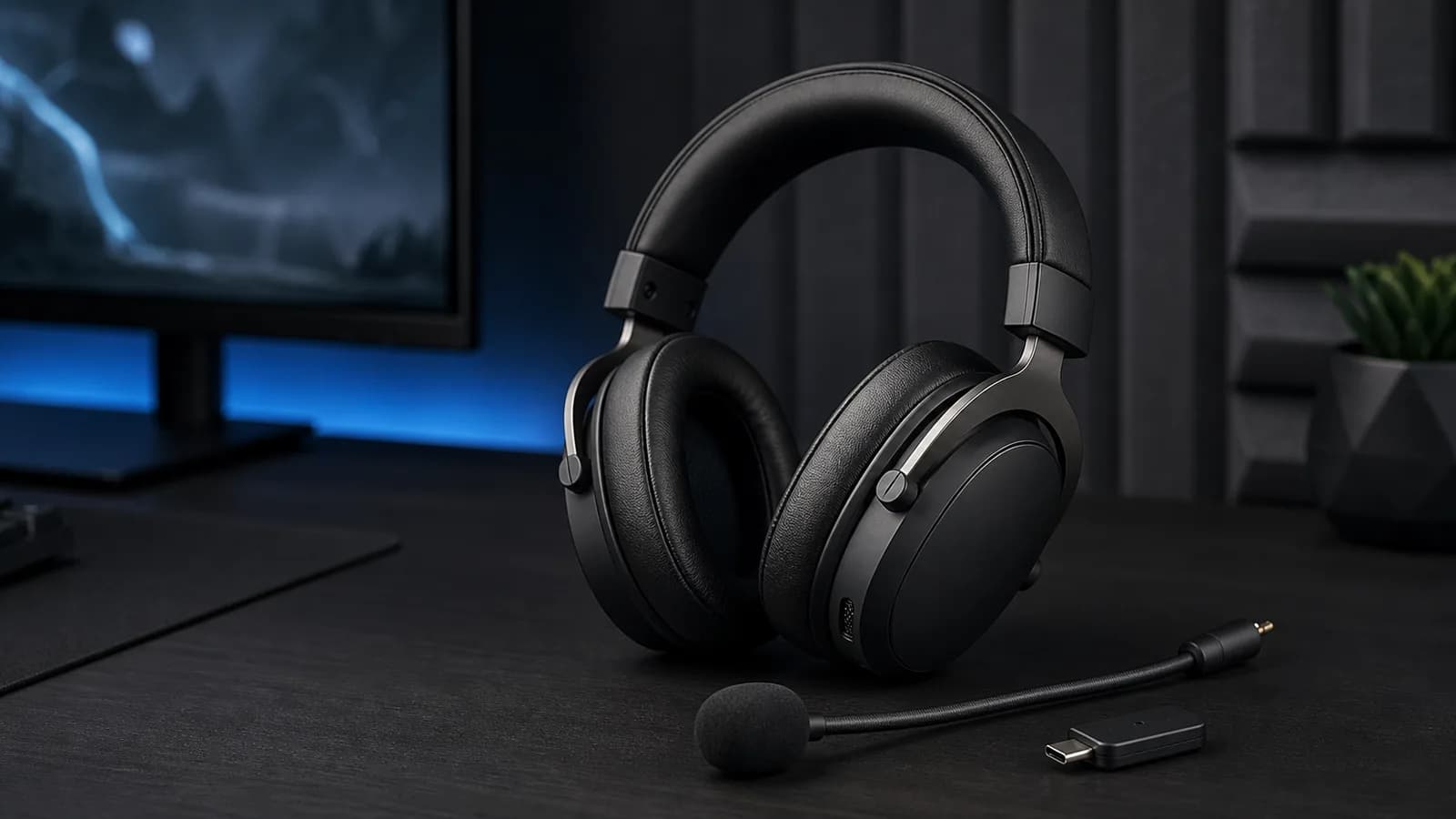
HyperX keeps the traditional Cloud layout: a padded headband, oval closed-back cups, memory-foam ear cushions with leatherette surfaces, steel in the frame and aluminium forks. The official US specification lists the headset at 0.79lb, roughly 358g, while a HyperX regional specification lists 340g. The regional page separately lists the removable boom microphone at 12g. Check the specification for the exact SKU sold in your region rather than treating one converted figure as universal.
Either published figure puts it above lighter suspension-band alternatives such as the Nova 5. Our Nova 5 vs Cloud III S comparison covers that design trade-off. Weight distribution can matter more than the number, so do not turn either specification into a comfort verdict.
Leatherette may feel warmer than fabric, but seal, heat and pressure remain untested and depend on fit. Buy from a seller with a workable return policy if you have not worn this shape before.
The detachable boom is a practical choice. Remove it when listening away from the desk, then use the built-in microphones for calls. HyperX describes the boom as the optimal microphone option; without matched samples, we cannot say the built-in microphones equal it for clarity or noise rejection.
HyperX Cloud III S Wireless
Buy it for long gaps between charges and easy switching between dongle and Bluetooth devices, not for simultaneous audio or Xbox.
Why it works
- Up to 120-hour 2.4GHz claim
- Bluetooth 5.3 plus USB-C dongle
- Detachable boom and built-in microphones
Main trade-off
- No documented dual-source mixing
- Xbox is not listed
- Windows required for NGENUITY setup
Already own the headset? Our Cloud III S Bluetooth pairing guide covers the button combination, mode switching and checks to make before buying replacement hardware.
Wireless modes: switching is the key distinction
The Cloud III S supports 2.4GHz wireless through its compact USB-C dongle and Bluetooth 5.3. HyperX also lists Instant Pair for select OMEN laptops, which can remove the need for the dongle on supported hardware.
The headset has a hardware wireless-mode selector. HyperX describes 2.4GHz or Bluetooth and does not claim that the two streams play together. Buy it expecting to change modes.
That works well when the routine looks like this:
- Use the dongle for PC, PS5 or handheld gaming.
- Switch to Bluetooth for a phone call, tablet or music away from the desk.
- Switch back when gaming resumes.
It works less well when Discord runs on a phone while the game runs on a console, or when work calls must remain audible beside PC audio. The Nova 7 Gen 2 vs Cloud III S comparison explains why simultaneous playback changes that workflow.
HyperX lists wireless range up to 20m. Walls, interference, USB placement and the local radio environment can reduce it. We have not measured dropout distance or latency, so this page does not promise room-to-room coverage.
Battery life: the main reason to buy
HyperX claims up to 120 hours of continuous playback over 2.4GHz at 50% volume, and up to 200 hours in Bluetooth mode. These are manufacturer figures, not SolderMag test results.
SoundGuys reported 113 hours in its independent Cloud III S Wireless battery test. That result supports the direction of HyperX's 2.4GHz claim under one outside protocol, but it is not a guarantee for different volume, firmware, microphone use or radio conditions.
The 120-hour claim is the product's main documented advantage. That matters if charging is routinely forgotten, the headset moves between rooms, or a cable is hard to reach.
It matters less if a weekly charge is already easy. A large battery claim does not improve sound, microphone quality or fit. The published full-charge time is five hours, and maximum capacity will decline with age and use.
We would not translate the claim into a fixed number of days. Volume, radio mode, microphone use, distance, firmware, EQ and battery condition all change the result.
Sound and gaming performance: what is known and unknown
HyperX uses angled 53mm dynamic drivers with a listed 20Hz–20kHz response. The international product page also lists DTS Headphone:X spatial audio on PC through NGENUITY; availability can vary by region and NGENUITY version.
Those details do not prove tonal balance, imaging, bass control, distortion or spatial accuracy. Driver diameter is not a score. A fair sound judgement requires level-matched listening and measurements across the same test setup.
The honest buying advice is:
- use 2.4GHz rather than Bluetooth for latency-sensitive games;
- start with a neutral EQ and change one band at a time;
- treat spatial processing as optional, not automatically more accurate;
- check current measurements and microphone samples if sound quality is the deciding factor;
- buy for the verified connection and battery features unless you can audition the headset.
Microphones and controls
The detachable boom is a 10mm unidirectional electret condenser microphone with a mute indicator. The headset also has built-in omnidirectional MEMS microphones for calls without the boom.
That combination is useful for a headset that moves between gaming and casual listening. Keep the boom attached for game chat; remove it when walking around or listening from a phone. Do not assume the built-in microphones reject room noise as well as a close boom.
On-headset controls cover volume, microphone mute and monitoring, wireless mode, calls and media. That is enough for daily use without opening software. Microphone clarity, background rejection and sidetone behavior remain unverified in this review.
Setup and software
The package includes the headset, detachable boom microphone, USB-C wireless dongle, USB-C-to-USB-A adapter, USB-C charging cable and quick-start guide. That covers modern USB-C ports and older USB-A systems without buying another adapter.
NGENUITY supports the Cloud III S Wireless, but HyperX lists the software for Windows only. HyperX's current software page says devices with onboard memory can carry limited saved settings to other platforms, but it does not identify exactly which Cloud III S settings persist. Assume a Windows PC is required whenever you need to change software-controlled features.
Before buying, check:
- whether your preferred device has a free USB-C or USB-A port;
- whether the dongle blocks an adjacent port;
- whether Xbox support is required;
- whether you can use Windows for firmware and profile setup;
- whether simultaneous audio or merely switching is needed;
- whether the seller's return policy covers fit problems.
Value
Compare its checkout price with the Nova 5 and remaining Cloud III Wireless stock. The premium only makes sense if Bluetooth and the larger battery margin solve a real problem. It is harder to justify when the older Cloud III Wireless is deeply discounted and Bluetooth is unnecessary, or when a lighter wired headset would stay at one desk.
Do not pay more merely for the S suffix. Pay for the Bluetooth path, built-in microphones and current-model support. If the old and new HyperX versions are close in price, the S is the safer buy. If the old model is meaningfully cheaper, the generation comparison shows what the savings cost.
For a wider shortlist, the best gaming headsets guide separates battery-first, simultaneous-audio, ANC and budget choices.
Alternatives
SteelSeries Arctis Nova 7 Gen 2: Choose it for simultaneous 2.4GHz and Bluetooth, mobile app controls and an Xbox-specific 7X version. Its battery claim is much lower. Read our Nova 7 Gen 2 review for the full decision.
Razer BlackShark V3 Pro: Choose it for hybrid ANC, simultaneous game-and-phone audio, USB and 3.5mm inputs, and a more ambitious detachable microphone specification. The BlackShark V3 Pro vs Cloud III S comparison covers the trade-offs without claiming a tested winner.
SteelSeries Arctis Nova 5 Wireless: Choose it for much lower published weight, phone-based presets and quick switching. It does not mix its wireless sources. Buy HyperX when long runtime and the padded Cloud shape matter more.
Original HyperX Cloud III Wireless: Consider remaining stock only when it is clearly cheaper and Bluetooth is irrelevant. It is no longer the default new HyperX recommendation.
A wired headset: Choose wired if the headset stays at one desk; it removes charging and wireless routing entirely.
FAQ
Is the HyperX Cloud III S Wireless worth it?
Yes, if you want a current HyperX headset with both 2.4GHz and Bluetooth, rarely want to charge, and only need one active wireless source at a time. It is not the right value choice for Xbox or simultaneous phone-and-game audio.
Can the Cloud III S use Bluetooth and 2.4GHz at the same time?
HyperX documents separate 2.4GHz and Bluetooth modes plus a hardware mode selector. It does not claim mixed playback from both sources. Buy it expecting to switch, not mix.
Does the HyperX Cloud III S Wireless work on Xbox?
HyperX does not list Xbox in the official compatibility line. Do not infer Xbox support from PC, PlayStation or USB compatibility.
How long does the battery last?
HyperX claims up to 120 hours over 2.4GHz at 50% volume with continuous playback, and up to 200 hours in Bluetooth mode. Actual runtime will vary, and SolderMag has not reproduced those figures.
Can it work without the detachable microphone?
Yes. The Cloud III S includes built-in microphones for boomless calls. HyperX recommends the detachable boom for optimal microphone performance.
Does it have active noise cancellation?
No active noise cancellation is listed. The closed-back cups and leatherette cushions provide passive isolation, but that is not ANC.
Can it use a 3.5mm cable?
HyperX lists 2.4GHz wireless and Bluetooth audio. The included USB-C cable is identified as a charging cable, and no 3.5mm audio input is listed.
Is the Cloud III S better than the original Cloud III Wireless?
It is the better current buy when Bluetooth or boomless calls matter. The original still makes sense as a discounted 2.4GHz-only headset.
Final recommendation
Buy the HyperX Cloud III S Wireless for long gaps between charges, a conventional padded headset design, and the flexibility to switch between a gaming dongle and Bluetooth devices.
Skip it if simultaneous audio, Xbox support, ANC or an analog fallback is part of the job. Those are not minor omissions; they determine whether the headset fits the setup.
Sources and evidence limits
- HyperX official Cloud III S Wireless product page for battery test conditions, connection modes, compatibility, drivers, microphones, materials, weight, controls, package contents and warranty: https://hyperx.com/products/hyperx-cloud-iii-s-wireless-gaming-headset
- HyperX international Cloud III S Wireless page for weight in grams, DTS Headphone:X, sample rates, impedance and Windows software footnotes: https://row.hyperx.com/products/hyperx-cloud-iii-s-wireless-gaming-headset
- HyperX NGENUITY page for current operating-system support, onboard-profile guidance and Cloud III S compatibility: https://hyperx.com/pages/ngenuity
- SoundGuys Cloud III S Wireless review for an independently measured 113-hour battery result under its own test protocol: https://www.soundguys.com/hyperx-cloud-iii-s-wireless-review-138664/
- Amazon Creators API exact-product validation identified
B0F6NZWPTCas the black Cloud III S Wireless in the US marketplace with the configuredsoldermag-20tag. The direct product URL also returned HTTP 200 on August 26, 2026. Seller, price and featured-offer availability can change.
SolderMag has not completed hands-on sound, microphone, latency, battery, range, comfort, heat or durability testing of this product. Claims in those areas remain unverified by SolderMag.
As an Amazon Associate I earn from qualifying purchases.