Nova 7 Gen 2 vs BlackShark V3 Pro: Which Should You Buy?
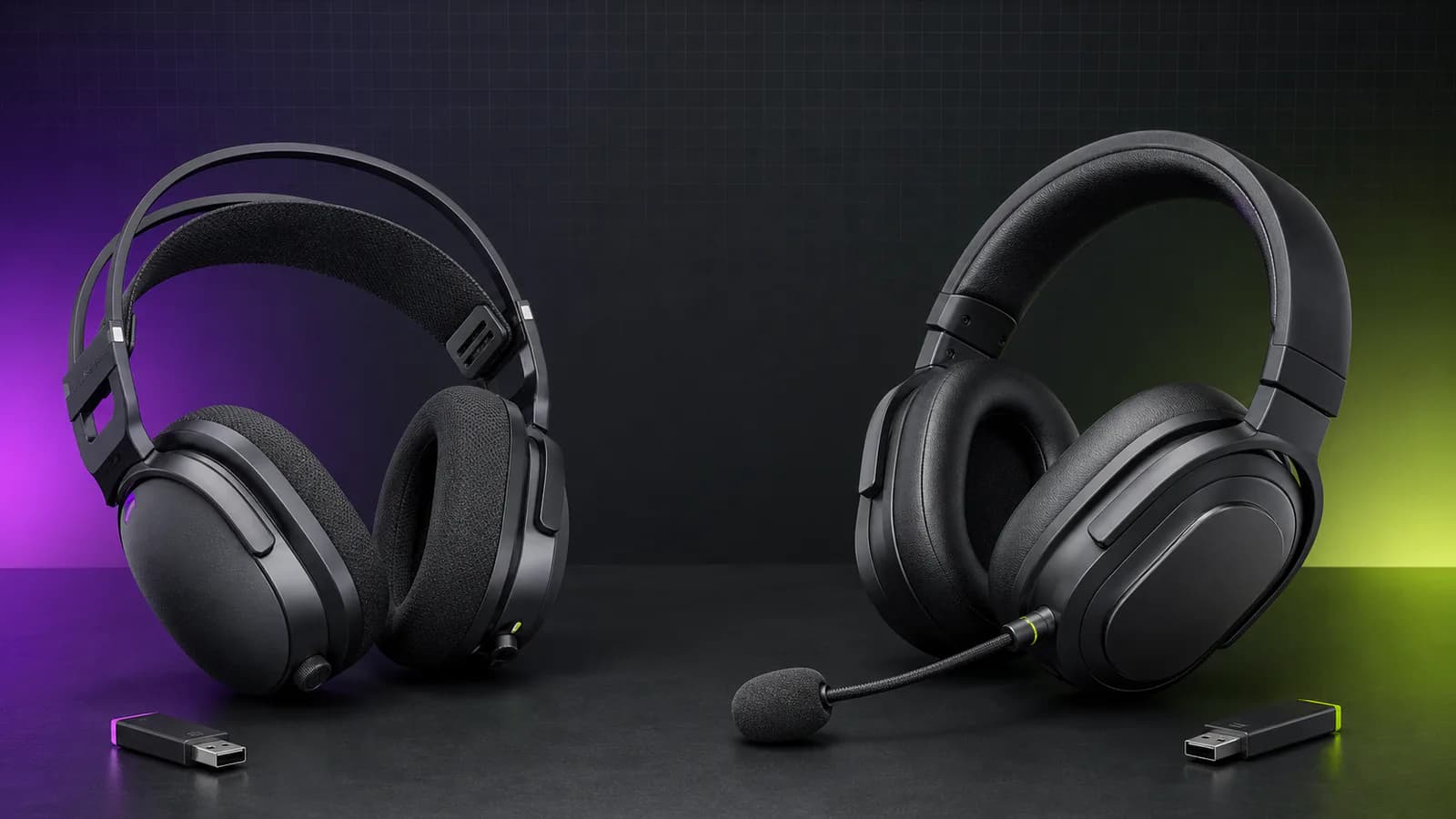
Nova 7 Gen 2 covers the useful dual-wireless basics. BlackShark V3 Pro adds hybrid ANC and stronger microphone hardware. Here is when the upgrade makes sense.
Research-based comparison
How we evaluateQuick picks
The short answer, with the trade-off
Best for most buyers
SteelSeries Arctis Nova 7 Wireless Gen 2
Simultaneous 2.4GHz and Bluetooth
Trade-off: No listening ANC

Best for ANC and competitive comms
Razer BlackShark V3 Pro for PC
Trade-off: 42g heavier by published specifications
On this page
- Quick answer
- Nova 7 Gen 2 vs BlackShark V3 Pro specifications
- The real decision: do you need ANC?
- Both mix game and phone audio
- Microphone hardware: Razer is more ambitious, not automatically better
- Battery and charging
- Weight, fit, and long sessions
- Controls and software
- Platform compatibility is the buying trap
- Who should buy the Nova 7 Gen 2?
- Who should buy the BlackShark V3 Pro?
- Who should skip both?
- Alternatives
- Buying checklist
- FAQ
- Final recommendation
- Sources and methodology
The SteelSeries Arctis Nova 7 Gen 2 is the better buy for most people. It mixes game audio from its 2.4GHz dongle with phone audio over Bluetooth, supports mobile EQ control, has a 3.5mm backup connection, and weighs less than the Razer. Those are the features that make a wireless headset easier to use every day.
Buy the Razer BlackShark V3 Pro when hybrid active noise cancellation is the point of the upgrade. It also gives you a larger 12mm microphone capsule, USB audio, a published 10ms minimum wireless-latency claim, and PC-focused THX Spatial Audio. That is a meaningful package for a noisy room or a competitive setup. It is overkill if you just want Discord, game audio, and occasional phone calls in one headset.
This comparison is research-based. We have not completed matched hands-on testing of these two models. Specifications, controls, platform support, and connection behavior come from current manufacturer documentation and exact US product-page checks. We do not declare a winner for sound, microphone quality, comfort, ANC strength, or latency without controlled testing.
Quick answer
- Buy the Nova 7 Gen 2 if you want simultaneous game and phone audio, lower weight, a retractable microphone, mobile EQ control, and a simpler buying decision.
- Buy the BlackShark V3 Pro if you play in a noisy room, need hybrid ANC, want its more ambitious microphone hardware, or specifically value Razer's competitive features.
- Skip both if you only need one wireless source, do not use voice chat, or mostly play from a quiet desk. The cheaper Nova 5 Wireless or HyperX Cloud III S can cover that job.
The practical split is lower weight and value versus ANC and specialist hardware. Both headsets already solve simultaneous Bluetooth properly, so dual wireless is not a reason to pay extra for the Razer.
Nova 7 Gen 2 vs BlackShark V3 Pro specifications
| Feature | SteelSeries Arctis Nova 7 Gen 2 | Razer BlackShark V3 Pro for PC |
|---|---|---|
| Main reason to buy | Lighter all-round dual-wireless headset | Hybrid ANC and competitive feature set |
| Wireless sources | Simultaneous 2.4GHz and Bluetooth | Simultaneous 2.4GHz and Bluetooth 5.3 |
| Other audio connections | 3.5mm | USB and 3.5mm through included cables |
| Manufacturer battery claim | 50+ hours | Up to 70 hours over 2.4GHz |
| Fast charge claim | 15 minutes for 6 hours | 15 minutes for about 6 hours |
| Listening noise cancellation | Passive isolation only | Hybrid ANC, ambient mode, ANC off |
| Microphone | Retractable noise-rejecting boom mic | Detachable 12mm full-band boom mic |
| Published headset weight | 325g | 367g |
| App and desktop control | SteelSeries Companion app and GG/Sonar | Razer Audio app and Synapse 4 |
| Standard model platform focus | PC, PlayStation, Switch, handhelds | PC; separate PlayStation and Xbox variants exist |
| Spatial audio | 360° Spatial Audio on supported systems | THX Spatial Audio 7.1.4 on supported Windows 11 setups |
Manufacturer battery and latency figures are not matched lab results. Volume, connection mode, microphone use, ANC, firmware, EQ, and radio conditions can change real performance.
The real decision: do you need ANC?
The BlackShark's clearest advantage is hybrid active noise cancellation. It has dedicated ANC, ambient, and off modes, with four adjustable cancellation levels in Razer's software.
That matters if you play near:
- an air conditioner or desktop fan;
- other people talking;
- a loud PC under sustained load;
- traffic or construction noise;
- a shared room where passive cushions are not enough.
The Nova 7 Gen 2 has no listening ANC. Its ear cushions and closed-back design provide passive isolation, while its microphone path includes noise-rejection features. Those are different jobs. Microphone noise reduction can make your voice cleaner for teammates; it does not quiet the room for you.
Do not pay for ANC just because it appears on a specification table. If your room is already quiet, the extra isolation may add less than better fit, lower weight, or a more comfortable cushion. For travel-first listening, start with our noise-cancelling headphones guide instead. A gaming headset prioritises microphone controls and low-latency wireless; a travel headphone prioritises music, portability, and cabin-noise reduction.
Both mix game and phone audio
This category used to be a clean SteelSeries win. It is not anymore.
The Nova 7 Gen 2 can play game audio through its USB-C 2.4GHz receiver while Bluetooth carries music, calls, or chat from a phone. SteelSeries also allows separate game and mobile EQ profiles.
The BlackShark V3 Pro can do the same two-source job. Razer's SmartSwitch cycles between 2.4GHz, Bluetooth, and simultaneous mode. When a Bluetooth call arrives, the headset prioritises the microphone for that call.
For normal use, both let you:
- keep a game running while answering a phone call;
- listen to a podcast from a phone under quiet game audio;
- use Discord or another chat app on a second device;
- move between desk and mobile audio without re-pairing every time.
The controls are not identical, but the capability is. If simultaneous audio is your only requirement, buy the headset that fits your budget, platform, and comfort preference. The Razer premium needs to earn its keep through ANC, microphone hardware, software controls, or the connection options you will actually use.
Microphone hardware: Razer is more ambitious, not automatically better
Razer gives the BlackShark V3 Pro a detachable 12mm unidirectional microphone with a published 20Hz–20kHz response and 48kHz sampling rate. SteelSeries uses a retractable noise-rejecting microphone and adds microphone EQ plus Sonar AI noise reduction on PC.
On paper, Razer is making the stronger microphone case. The larger capsule and full-band specification are sensible reasons to shortlist it for team chat, streaming, or work calls.
They are not proof that every voice sounds better. Microphone position, gain, software processing, room noise, compression in the chat app, and the user's voice all matter. SteelSeries' software processing may be more useful than broader raw capture in a noisy keyboard setup. Razer's microphone may be more useful when you want a less processed signal.
The physical designs also differ:
- Nova's microphone retracts into the earcup, so it is difficult to lose.
- Razer's microphone detaches completely, leaving a cleaner headset for listening.
- Nova keeps the boom available without finding a drawer or case.
- Razer's removable mic is easier to replace if a supported spare remains available.
We would choose the BlackShark for microphone hardware only after hearing a sample recorded through the exact app and settings you use. Specifications narrow the shortlist; they do not settle voice quality.
Battery and charging
Razer publishes up to 70 hours over 2.4GHz for the BlackShark V3 Pro. SteelSeries publishes 50+ hours for the Nova 7 Gen 2. Both claim roughly six hours of use from a 15-minute USB-C charge.
The BlackShark has the higher headline, but its ANC and simultaneous mode give you more ways to consume power. Nova's figure is lower but already long enough to avoid daily charging.
Use these claims as a direction:
- choose Razer if the larger maximum matters and ANC will not stay enabled constantly;
- choose Nova if 50+ hours is already enough and lower weight matters more;
- charge either headset on a routine rather than running it flat mid-session;
- expect battery capacity to decline over years of use.
If maximum runtime matters more than simultaneous audio or ANC, the HyperX Cloud III S Wireless has a much stronger manufacturer battery claim. It is the simpler battery-first alternative, but it switches between 2.4GHz and Bluetooth rather than mixing them.
Weight, fit, and long sessions
SteelSeries lists the Nova 7 Gen 2 at 325g. Razer lists the BlackShark V3 Pro at 367g. A 42g gap is large enough to notice, but weight distribution can matter more than the number.
Nova uses an elastic suspension band and fabric-covered cushions. Razer uses a conventional padded headband, swivelling earcups, and dual-layer Flowknit memory-foam cushions. Neither design guarantees a better fit for your head, jaw, glasses, or ears.
Buy from a retailer with a workable return policy and check:
- whether the headband creates a pressure point after an hour;
- whether the cups seal around glasses without pinching;
- whether your ears touch the inner fabric or driver cover;
- whether the headset moves when you look down;
- whether ANC creates pressure discomfort for you.
Lower weight makes the Nova the safer paper recommendation. The BlackShark may still fit better if its cushion shape and swivel match your head. We have not worn both long enough under matched conditions to claim a comfort winner.
Controls and software
SteelSeries spreads control across the headset, Companion mobile app, GG desktop software, and Sonar on PC. You get game/chat controls, microphone EQ, game presets, and separate EQ handling for the two wireless sources.
Razer uses Synapse 4 on PC and the Razer Audio app for supported mobile controls. The headset includes:
- a SmartSwitch button for EQ and connection modes;
- an ANC button;
- volume and microphone mute controls;
- a configurable dial for game/chat balance, microphone monitoring, or footstep boost;
- presets for games, movies, music, and esports.
SteelSeries is the more flexible all-round audio system. Razer is the more focused competitive interface. Both can become more complicated than necessary.
Our setup advice is boring and effective: start with a neutral EQ, set microphone gain so normal speech does not clip, and change one control at a time. A footstep preset that makes every game thin and harsh is not an automatic upgrade.
Platform compatibility is the buying trap
The standard black Nova 7 Gen 2 linked here is the PC/PlayStation model. SteelSeries also sells Nova 7P and Nova 7X variants. Xbox buyers should use the 7X because Xbox wireless USB audio requires the relevant licensed compatibility path.
Razer sells separate BlackShark V3 Pro versions for PC, PlayStation, and Xbox. Do not assume one retailer listing represents every platform. The exact Amazon link in this article is the PC black model, model RZ04-05400100-R3U1.
Before ordering:
- match the product title to your primary platform;
- check whether game/chat balance works on that platform;
- confirm the dongle connection fits your console or handheld;
- do not buy a PlayStation model for Xbox because the shell looks identical;
- keep the USB-A adapter or analog cable if your setup needs it.
The Nova 7 Gen 2 is straightforward for PC, PlayStation, Switch, and USB-C handhelds. Razer's separate versions give buyers more tailored options, but they also create more room for a wrong-model purchase.
Who should buy the Nova 7 Gen 2?
Buy the Nova if:
- you want simultaneous phone and game audio without flagship spending;
- lower weight is more useful than ANC;
- you like a retractable microphone;
- you want EQ control from a phone;
- you move between PC, PlayStation, Switch, and a handheld;
- 50+ claimed hours is already enough.
SteelSeries Arctis Nova 7 Wireless Gen 2
Why it works
- Simultaneous 2.4GHz and Bluetooth
- 325g published weight
- Retractable microphone and mobile EQ
Main trade-off
- No listening ANC
- Standard model is not the Xbox version
- Full Sonar feature set is PC-focused
Who should buy the BlackShark V3 Pro?
Buy the Razer if:
- hybrid ANC solves a real room-noise problem;
- you want the 12mm full-band microphone hardware;
- you will use USB or analog audio as well as wireless;
- Razer's game profiles and configurable control dial fit your routine;
- the PC-only THX 7.1.4 feature is relevant to your setup;
- you accept the higher weight for the extra hardware.

Razer BlackShark V3 Pro for PC
Why it works
- Hybrid ANC with ambient mode
- Simultaneous 2.4GHz and Bluetooth
- Detachable 12mm full-band microphone
Main trade-off
- 42g heavier by published specifications
- Platform-specific variants are easy to confuse
- Premium features add software and control complexity
Who should skip both?
Skip both if:
- you never mix phone and game audio;
- your room is quiet and ANC adds no value;
- you already own the original Nova 7 and only want a sound upgrade;
- you use a standalone microphone and do not need headset comms;
- wired audio at one desk is acceptable;
- you care more about music than low-latency game audio.
The Nova 7 Gen 2 vs Gen 1 comparison explains why current Nova owners should not treat Gen 2 as a complete redesign. If you want a cheaper SteelSeries model, our Nova 7 Gen 2 vs Nova 5 Wireless guide separates simultaneous mixing from quick switching.
Alternatives
SteelSeries Arctis Nova 5 Wireless: Buy this when app presets and quick switching are enough. It does not mix phone and game audio simultaneously, but it avoids paying for a feature you may not use.
HyperX Cloud III S Wireless: Buy this when battery life and a familiar padded frame matter more than ANC or simultaneous sources. Our BlackShark V3 Pro vs Cloud III S Wireless comparison covers that battery-first decision directly.
Logitech G522: Buy this when lower listed weight and RGB matter more than ANC or mixed wireless audio. Our G522 vs BlackShark V3 Pro comparison covers that exact decision.
Standard Razer BlackShark V3: Check the non-Pro model when you want the current BlackShark shape without paying for every flagship feature. Confirm its connections and platform variant rather than assuming it is a cheaper copy of the Pro.
A normal Bluetooth noise-cancelling headphone: Better for flights, commuting, and music. Worse for low-latency game audio, boom-microphone positioning, and hardware chat controls.
For the broader shortlist, see our best gaming headsets guide.
Buying checklist
Before buying either headset:
- Pick the exact PC, PlayStation, or Xbox version.
- Decide whether listening ANC solves a real problem.
- Check whether you need simultaneous sources or only quick switching.
- Confirm the return window for fit and ANC pressure.
- Ignore spatial-audio branding unless your platform and games support it.
- Test the microphone through your actual chat app.
- Check current price and availability when you buy.
FAQ
Is the BlackShark V3 Pro better than the Nova 7 Gen 2?
It is better equipped for noisy competitive setups because it adds hybrid ANC, a larger microphone capsule, and more wired connection options. The Nova 7 Gen 2 is the better default for most buyers because it covers simultaneous wireless audio at a lower weight and with less specialist hardware.
Can both headsets play Bluetooth and game audio at the same time?
Yes. Both support simultaneous 2.4GHz game audio and Bluetooth audio from a second device. That is different from headsets that merely switch between the two modes.
Does the Nova 7 Gen 2 have active noise cancellation?
No. It has passive isolation and microphone noise-rejection features, but it does not provide active noise cancellation for what the listener hears.
Does the BlackShark V3 Pro work on Xbox?
Razer sells a separate Xbox version. The Amazon link in this guide points to the PC black model, so Xbox buyers should locate and verify the Xbox-specific listing rather than assuming cross-platform USB support.
Is Razer's 10ms latency claim proof that it sounds faster?
No. It is a manufacturer minimum for the 2.4GHz connection, not a matched independent result against the Nova under every firmware, USB, and system configuration. We would not claim a universal latency winner without controlled third-party measurements.
Which headset has the better microphone?
Razer has the stronger paper specification with its detachable 12mm full-band microphone. SteelSeries counters with microphone EQ and Sonar processing on PC. Voice quality still needs matched recordings through the same chat app and settings.
Final recommendation
Buy the SteelSeries Arctis Nova 7 Gen 2 if you want the sensible all-round headset. It mixes two wireless sources, has useful mobile control, weighs less, and does not make you pay for ANC you may never switch on.
Buy the Razer BlackShark V3 Pro when ANC, its microphone hardware, or its extra connection options solve a specific problem. Those are real advantages. They are not automatically worth paying for in a quiet room.
If neither model offers enough source routing, compare the Nova Pro Omni with the original Nova Pro Wireless. The Omni is the more relevant premium alternative for simultaneous PC and console audio.
The unresolved factors are sound tuning, microphone quality, clamp, cushion heat, ANC effectiveness, and measured latency. We verified the models, specifications, connection behavior, and product destinations, but those subjective and performance differences still need matched hands-on testing.
Sources and methodology
- SteelSeries Arctis Nova 7 Gen 2 official product page for simultaneous audio, battery, charging, software, controls, and platform support.
- SteelSeries Nova 7 Gen 2 launch information and official product guide for model-specific specifications.
- Razer BlackShark V3 Pro official product page and official support specifications for ANC, simultaneous audio, connections, microphone, battery, weight, and software support.
- Exact Amazon US pages for Nova 7 Gen 2 PC black (
B0FRNR8Y11) and BlackShark V3 Pro for PC black (B0F3QDLZKG) were checked with the configuredsoldermag-20tag on July 29, 2026. Both returned HTTP 200. Amazon may show automated-access verification, so seller, stock, and price remain unverified.
As an Amazon Associate I earn from qualifying purchases.