Logitech G522 vs Razer BlackShark V3 Pro: Is ANC Worth It?
Logitech G522 or Razer BlackShark V3 Pro? Compare ANC, simultaneous audio, weight, battery claims and connections before paying for the Razer.
Research-based comparison
Recommendations are checked against product documentation, availability, comparative evidence, and clearly disclosed hands-on work where it exists.
Quick picks
The short answer, with the trade-off
Best for most buyers
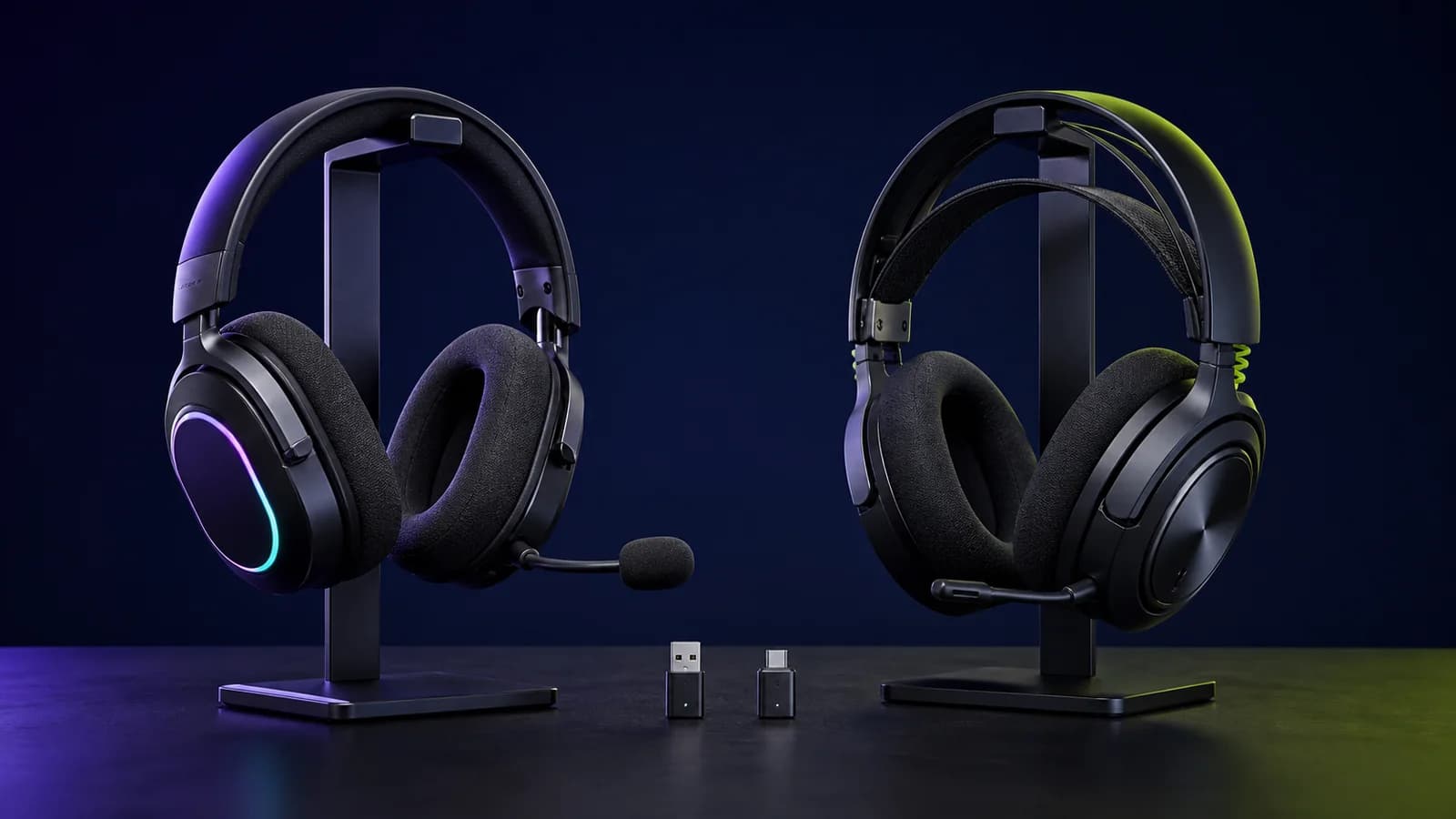
Logitech G522 LIGHTSPEED
290g listed weight
Trade-off: Cannot mix LIGHTSPEED and Bluetooth

Best for ANC and mixed audio
Razer BlackShark V3 Pro for PC
Trade-off: 367g listed weight
On this page
- Quick answer
- Logitech G522 vs BlackShark V3 Pro specifications
- The decisive difference: switching versus simultaneous audio
- ANC is the clearest reason to buy the Razer
- Weight and comfort: the number favours Logitech
- Sound and microphone claims need caution
- Connections and platform traps
- Battery claims are not directly comparable
- Software and controls
- Who should buy the Logitech G522?
- Who should buy the BlackShark V3 Pro?
- Who should skip both?
- Price and value
- Alternatives worth checking
- Common buying mistakes
- Frequently asked questions
- Verdict
- Sources and verification notes
The Logitech G522 is the sensible pick for most people choosing between these two headsets. It is 77g lighter on the manufacturers' specifications, has RGB lighting, and covers the basic PC, PlayStation and mobile connection options without the Razer's extra hardware.
Pay more for the Razer BlackShark V3 Pro only when hybrid active noise cancellation, simultaneous 2.4GHz and Bluetooth audio, or its USB and 3.5mm wired paths solve a real problem. Those are useful upgrades in a noisy room or a multi-device setup. They do not make the Razer an automatic sound-quality winner.
We have not tested these headsets side by side. This comparison is based on current Logitech and Razer specifications, support documentation, and exact product-listing checks. Comfort, microphone quality, ANC effectiveness, latency, battery runtime and long-term durability remain unverified here.
Quick answer
- Buy the Logitech G522 if lower listed weight, RGB, a detachable microphone, and straightforward wireless use matter more than ANC or hearing two sources together.
- Buy the Razer BlackShark V3 Pro if you need hybrid ANC, simultaneous game and phone audio, or a headset that can also accept USB and 3.5mm audio.
- Skip both if Xbox wireless support is essential without checking the exact platform variant, or if you need a proven comfort, microphone or sound winner. Specifications cannot settle those questions.
The main trap is assuming that Bluetooth on the G522 means it can mix a phone call with LIGHTSPEED game audio. Logitech says it cannot: the headset switches between those sources. Razer documents a simultaneous mode for the BlackShark V3 Pro.
Logitech G522 vs BlackShark V3 Pro specifications
| Feature | Logitech G522 LIGHTSPEED | Razer BlackShark V3 Pro for PC |
|---|---|---|
| Listed weight | 290g | 367g |
| Wireless | LIGHTSPEED, Bluetooth 5.3 | 2.4GHz, Bluetooth 5.3 |
| Simultaneous 2.4GHz + Bluetooth | No; switches sources | Yes |
| Wired audio | USB | USB and 3.5mm |
| Active noise cancellation | No | Hybrid ANC with ambient mode |
| Drivers | 40mm | 50mm |
| Microphone | Detachable omnidirectional boom | Detachable 12mm unidirectional boom |
| Published battery claim | Up to 80 hours with lighting off; 35 hours at default lighting | Up to 70 hours over 2.4GHz |
| Lighting | LIGHTSYNC RGB | No RGB listed |
| Exact listing compared | Black, model A00195 | PC black, model RZ04-05400100-R3U1 |
These are manufacturer specifications, not SolderMag measurements. Battery claims use different conditions and should not be read as a controlled winner.
The decisive difference: switching versus simultaneous audio
Both headsets offer a low-latency USB dongle and Bluetooth, but they handle those radios differently.
The G522 lets you move between LIGHTSPEED and Bluetooth. Logitech's support page explicitly says the headset cannot mix the two sources. That is fine if Bluetooth is a fallback for a phone or tablet. It is frustrating if your normal routine is listening to a PC game while taking calls from a phone.
The BlackShark V3 Pro can play 2.4GHz and Bluetooth audio simultaneously. Razer also documents call behaviour: an incoming Bluetooth call takes microphone priority. That makes the Razer more useful for work-and-play setups, Discord on a second device, or anyone who does not want to stop game audio to answer a call.
Do not pay for this feature just because it sounds flexible. If you use one device at a time, the G522's simpler switching is enough. Our Logitech G522 vs SteelSeries Nova 7 Gen 2 comparison covers a lighter simultaneous-audio alternative.
ANC is the clearest reason to buy the Razer
The BlackShark V3 Pro has hybrid active noise cancellation and an ambient mode. The G522 does not list ANC.
That difference matters if you play near a television, air conditioner, shared desk, or steady background hum. It matters less in a quiet room, where passive isolation may be enough and the Razer's extra weight is harder to justify.
We cannot tell you how much noise the BlackShark removes without a controlled side-by-side test. Razer's feature list establishes that ANC is present, not how effective it will be for your room or ear shape. If ANC is not already on your requirements list, do not treat it as a free quality upgrade.
Weight and comfort: the number favours Logitech
Logitech lists the G522 at 290g. Razer lists the BlackShark V3 Pro at 367g. The 77g difference is substantial on paper and is the strongest comfort-related fact available without wearing both.
That does not prove the G522 will fit you better. Clamp force, pad shape, heat and weight distribution can outweigh a scale reading. Buy from a retailer with a workable return policy if you are sensitive to pressure or wear a headset for long sessions.
The useful buying rule is simple: choose the G522 when you have no specific need for the Razer's ANC and extra connections. Choosing the lighter design avoids paying for hardware you may not use.
Sound and microphone claims need caution
The G522 uses 40mm drivers and a detachable omnidirectional boom microphone. The BlackShark V3 Pro uses 50mm drivers and a detachable 12mm unidirectional microphone.
Larger numbers do not establish better sound or clearer voice capture. Driver tuning, enclosure design, microphone processing, placement and software all matter. We have not completed matched recordings or frequency-response measurements, so this comparison does not award either headset a sound or microphone win.
Razer publishes more ambitious microphone specifications. Logitech offers microphone controls through G HUB and G Mobile. Treat both as feature differences to investigate, not proof that one will make every voice sound better.
If competitive communication is the priority, listen to level-matched microphone samples from a source that tested the same firmware and settings. Manufacturer demo clips are not a neutral comparison.
Connections and platform traps
The G522 supports LIGHTSPEED, Bluetooth and USB audio. Logitech lists Windows, macOS and PlayStation 5 support, with mobile control through G Mobile. Its small USB dongle keeps a PC or console setup simple.
The BlackShark V3 Pro offers 2.4GHz, Bluetooth, USB audio and 3.5mm. That analogue input is useful for devices that cannot use the wireless dongle, while USB gives it another digital path.
Razer sells separate PC, PlayStation and Xbox versions. The Amazon link in this guide points to the PC black model, not an interchangeable universal edition. Confirm the platform label before ordering, especially for Xbox. A 3.5mm fallback may carry audio on more devices, but it does not reproduce every wireless, software or microphone feature.
Battery claims are not directly comparable
Logitech publishes up to 80 hours for the G522 with lighting off and up to 35 hours with default lighting. Razer publishes up to 70 hours for the BlackShark V3 Pro over 2.4GHz. Razer also claims roughly six hours from a 15-minute charge.
Those figures were not produced by one lab under one workload. Volume, lighting, ANC, radio mode, calls and charging habits can change actual runtime. The honest conclusion is that both publish multi-day wireless targets, while the G522's RGB setting creates a particularly large stated range.
If battery life is your main concern, compare both with the Nova 7 Gen 2 vs HyperX Cloud III S Wireless. The HyperX is the battery-first option, but it gives up simultaneous Bluetooth mixing.
Software and controls
Logitech uses G HUB on desktop and G Mobile on supported mobile devices. The G522 includes LIGHTSYNC RGB controls as well as audio and microphone adjustment.
Razer uses Synapse on PC for audio, microphone, ANC and related controls. The BlackShark also has physical controls for its connection and noise-control modes.
Software preference is a practical tie-breaker if you already use one brand's peripherals. It should not override the basic hardware decision. No equalizer can add simultaneous audio to the G522, remove 77g from the Razer, or add ANC where none exists.
Who should buy the Logitech G522?
Buy the G522 if you:
- use one audio source at a time;
- want the lighter listed headset;
- like RGB and already use Logitech G HUB;
- want a detachable boom for casual listening;
- do not need ANC, 3.5mm input or simultaneous phone audio.
Logitech G522 LIGHTSPEED
Why it works
- 290g listed weight
- LIGHTSPEED, Bluetooth and USB
- Detachable boom microphone
Main trade-off
- Cannot mix LIGHTSPEED and Bluetooth
- No active noise cancellation
- No 3.5mm audio input
Who should buy the BlackShark V3 Pro?
Buy the BlackShark V3 Pro if you:
- need hybrid ANC for a consistently noisy room;
- want to hear 2.4GHz and Bluetooth sources together;
- need USB and 3.5mm as well as wireless audio;
- accept a 367g listed weight for those extra features;
- have checked that the exact PC, PlayStation or Xbox version matches your system.

Razer BlackShark V3 Pro for PC
Why it works
- Hybrid ANC and ambient mode
- Simultaneous 2.4GHz and Bluetooth
- USB and 3.5mm wired paths
Main trade-off
- 367g listed weight
- Platform-specific versions need care
- Premium features may be wasted in a quiet room
Who should skip both?
Skip both if a wired headset is acceptable and you would rather put the budget into a microphone or speakers. Also skip them if you need a measured winner for sound, microphone quality, ANC performance or long-session comfort; this research-based comparison cannot supply that evidence.
Xbox buyers should avoid ordering either listing on name alone. Check the exact platform version and supported connection path first. Phone-first listeners who mainly want music and commuting ANC may be better served by conventional noise-cancelling headphones plus a separate gaming headset.
Price and value
Do not use a fixed price gap for this decision because retailer pricing moves. Compare current prices, then ask what the Razer's ANC and simultaneous audio are worth in your actual setup.
- If you use one device in a quiet room, the G522 is the cleaner value decision.
- If you regularly mix a PC or console with phone audio, the Razer removes a real workflow annoyance.
- If background noise affects every session, the Razer's ANC may justify a moderate premium.
- If the Razer is much more expensive and those two features are optional, keep the difference.
Paying more for a larger driver or microphone capsule alone is weak reasoning. Neither specification proves a better result.
Alternatives worth checking
SteelSeries Arctis Nova 7 Gen 2: the middle route if you want simultaneous 2.4GHz and Bluetooth in a lighter 325g design but do not need ANC. See our Nova 7 Gen 2 vs BlackShark V3 Pro comparison.
SteelSeries Arctis Nova 5 Wireless: a simpler value option with strong platform coverage. Our Nova 7 Gen 2 vs Nova 5 guide explains when simultaneous audio is worth paying for.
HyperX Cloud III S Wireless: the battery-first alternative. It is worth considering if charging frequency matters more than Bluetooth mixing or ANC.
For a wider shortlist, use our best gaming headsets guide. It separates practical use cases instead of pretending one headset fits everyone.
Common buying mistakes
Assuming two radios means mixed audio
Bluetooth plus a 2.4GHz dongle only proves that both connection methods exist. Logitech says the G522 switches between them. Razer documents simultaneous playback on the BlackShark V3 Pro.
Buying the wrong Razer platform version
The PC, PlayStation and Xbox labels are not cosmetic. Verify the exact model before ordering rather than assuming every advertised feature transfers across variants.
Treating driver size as a sound score
A 50mm driver is not automatically better than a 40mm driver. Without matched measurements and listening, the honest comparison stops at the specification.
Comparing battery numbers without their conditions
RGB and ANC can materially affect power use, and each manufacturer controls its own test. Plan charging around your enabled features, not the largest number on either box.
Frequently asked questions
Is the Razer BlackShark V3 Pro better than the Logitech G522?
It is more capable when you need hybrid ANC, simultaneous 2.4GHz and Bluetooth, USB audio, or 3.5mm input. The G522 is 77g lighter on published specifications and covers the simpler one-source-at-a-time use case. Neither is a proven sound or comfort winner here.
Can the Logitech G522 use Bluetooth and LIGHTSPEED at the same time?
Logitech says no. You can connect through either mode and switch between them, but the G522 does not mix both audio sources.
Can the BlackShark V3 Pro play Bluetooth and game audio together?
Yes. Razer documents simultaneous 2.4GHz and Bluetooth audio. During a Bluetooth call, the headset prioritises the microphone for the call.
Does the Logitech G522 have active noise cancellation?
No ANC feature is listed in Logitech's specifications. The Razer BlackShark V3 Pro includes hybrid ANC and an ambient mode.
Which headset is lighter?
The G522 is listed at 290g and the BlackShark V3 Pro at 367g, a 77g difference. Fit and weight distribution still require hands-on assessment.
Which has better battery life?
There is no controlled winner. Logitech claims up to 80 hours with G522 lighting off and 35 hours at its default lighting, while Razer claims up to 70 hours over 2.4GHz. The test conditions are not directly comparable.
Will the PC BlackShark V3 Pro work on Xbox?
Do not assume full support. Razer sells platform-specific variants, and the product linked here is the PC black model. Confirm the exact Xbox version and its supported modes before buying.
Verdict
Buy the Logitech G522 when you want a lighter wireless headset and do not need to hear two wireless sources together. Its limits are clear, and most buyers should not pay to solve problems they do not have.
Buy the Razer BlackShark V3 Pro when ANC or simultaneous phone and game audio is a requirement rather than a bonus. Its extra connection paths also make sense in a desk setup that changes sources often. Otherwise, the added weight and likely price premium are difficult to justify from specifications alone.
Sources and verification notes
- Logitech G522 specifications for weight, connections, drivers, microphone, compatibility and battery claims.
- Logitech's G522 source-mixing answer for the LIGHTSPEED and Bluetooth limitation.
- Razer BlackShark V3 Pro product information and Razer support specifications for ANC, simultaneous audio, connections, microphone, battery claim, weight and platform variants.
- Exact Amazon US listings for Logitech G522 black (
B0FFM5SP6M) and Razer BlackShark V3 Pro PC black (B0F3QDLZKG) were identity-checked on August 22, 2026. Both direct destinations returned HTTP 200 with the configuredsoldermag-20tag. Price, seller and stock remain unverified and can change.
As an Amazon Associate I earn from qualifying purchases.