Viper V4 Pro vs Logitech G Pro X2 Superstrike: Which to Buy?
Choose the 49g Viper V4 Pro or the 60g Logitech G Pro X2 Superstrike? Compare shape, adjustable clicks and battery claims before paying for either.
Research-based comparison
How we evaluateQuick picks
The short answer, with the trade-off

Best for adjustable rapid-trigger clicks
Logitech G Pro X2 Superstrike
On this page
- Quick answer
- Viper V4 Pro vs Superstrike specs
- Why the Viper V4 Pro is our default pick
- Why you might still choose the Superstrike
- Clicks: fixed optical versus adjustable inductive
- Weight and shape
- Sensor and 8K polling
- Battery and desk setup
- Who should buy each mouse
- Alternatives
- Already own a good gaming mouse?
- Buying checklist
- FAQ
- Final recommendation
- Sources and methodology
The Razer Viper V4 Pro is the safer competitive-FPS pick for most buyers. It is substantially lighter, its optical main clicks work like familiar mouse buttons, and it has fewer click settings to configure. Buy the Logitech G Pro X2 Superstrike only if adjustable actuation, rapid-trigger reset, and tunable click haptics are features you will actually configure.
That does not make the Superstrike a bad mouse. It makes it a specialist one. Logitech has changed how the main buttons register a click; Razer has concentrated on reducing weight and refining a conventional esports layout.
This comparison is research-based. We have not completed hands-on testing of either model. The recommendation is based on official specifications, current US product listings, the controls each model exposes, and comparison against established competitive mice. Shape, coating, click feel, and long-term durability still need hands-on validation.
Quick answer
- Buy the Razer Viper V4 Pro if low weight, conventional click behaviour, and a simple tournament-focused setup matter most. The black model is 49g, uses a Focus Pro 50K Gen-3 sensor, supports up to 8,000Hz wireless polling, and has Gen-4 optical main switches.
- Buy the Logitech G Pro X2 Superstrike if you want to adjust the primary-button actuation point, rapid-trigger reset, and haptic intensity in G HUB. Logitech lists it at 60g with a HERO 2 sensor, up to 8,000Hz polling, and 90 hours of constant-motion battery life.
- Skip both if you mainly play strategy games, need many programmable buttons, want Bluetooth for several devices, or are expecting 8,000Hz polling to transform a normal 60Hz or 144Hz setup.
The main decision is not 50K DPI versus 44K DPI. Maximum DPI describes the sensor setting range; actual turning speed also depends on in-game sensitivity. Before comparing sensor numbers, use our DPI and in-game sensitivity guide to preserve a familiar turning distance. The meaningful difference is 49g with fixed optical clicks versus 60g with configurable inductive click sensing and haptics.
Viper V4 Pro vs Superstrike specs
| Feature | Razer Viper V4 Pro | Logitech G Pro X2 Superstrike |
|---|---|---|
| Weight | 49g black; 50g white | 60g |
| Main click system | Gen-4 optical switches | HITS inductive analogue sensing with haptic feedback |
| Click adjustment | Conventional fixed actuation | Adjustable actuation, rapid-trigger reset, and haptic intensity in G HUB |
| Sensor | Focus Pro 50K Optical Gen-3 | HERO 2 |
| Maximum DPI | 50,000 | 44,000 |
| Maximum polling | 8,000Hz wireless | 8,000Hz wireless |
| Manufacturer battery claim | Up to 180 hours at 1,000Hz; 45 hours at 8,000Hz | Up to 90 hours constant motion; the cited support table does not state a polling rate |
| Primary software | Razer Synapse | Logitech G HUB |
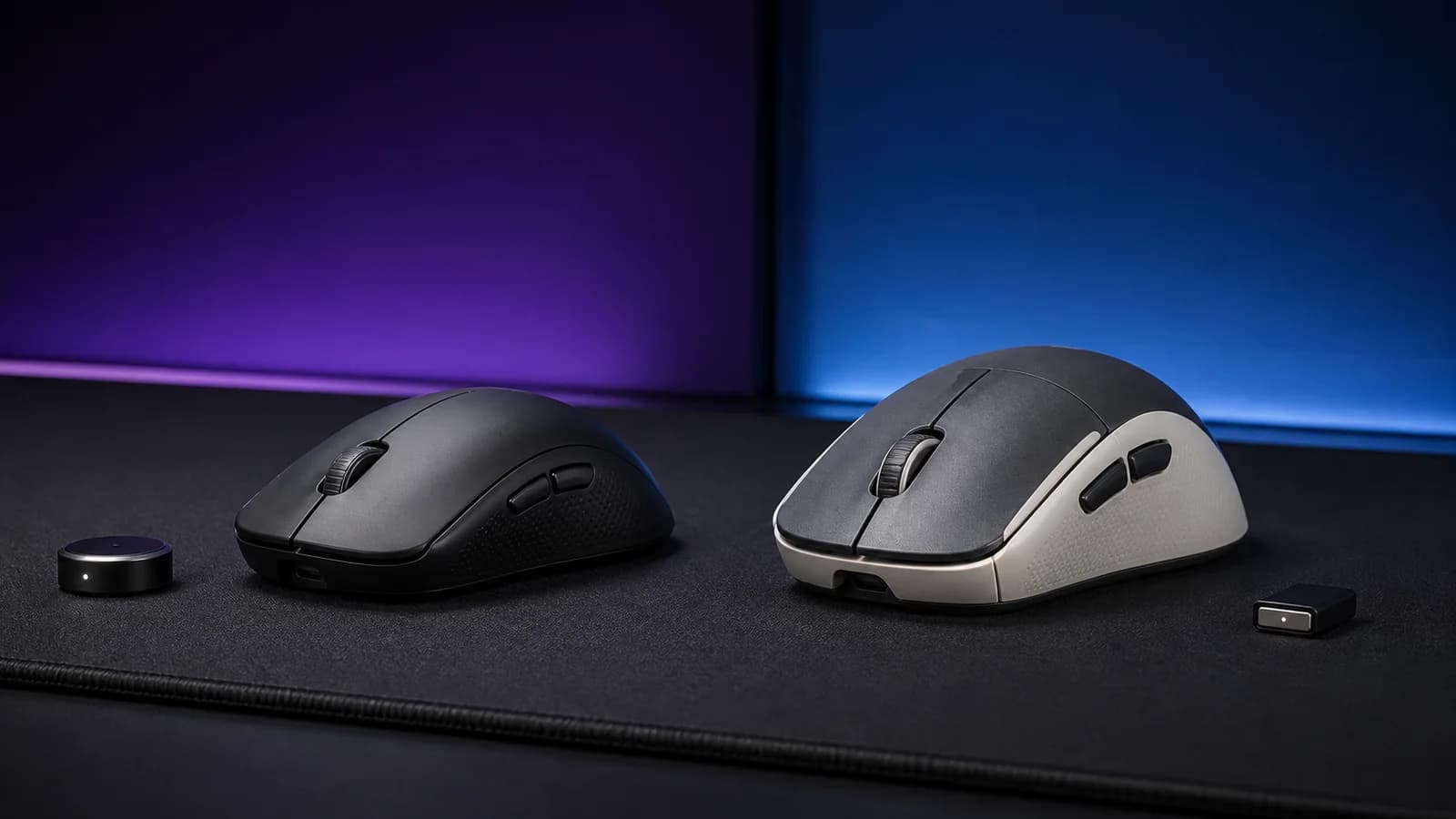
| Shape | Low, symmetrical esports shape; side buttons on the left | Symmetrical Superlight-family shell; side buttons on the left |
Manufacturer battery figures are useful for direction, not a promise of identical real use. Polling rate, idle time, firmware, and lighting or haptic settings can change runtime.
The table's practical takeaway: Razer wins on weight and familiarity; Logitech wins on click adjustment. The sensor and maximum polling figures are not useful tiebreakers.
Why the Viper V4 Pro is our default pick
Razer's advantage is easy to understand before buying: the black Viper V4 Pro is 11g lighter than Logitech's official 60g Superstrike specification. That is a meaningful gap in this class, especially for players who use a low sensitivity and make broad arm movements.
The rest of the design is deliberately conventional. The main buttons use Gen-4 optical switches rated by Razer for more than 100 million clicks. The scroll wheel is optical too. You can change DPI, polling, lift-off behaviour, and rotation in Synapse, but there is no actuation-distance setting to choose. That is the simplicity advantage; it does not establish that the Superstrike needs tuning for ordinary use.
Razer's 50K sensor, 930 IPS rating, and 90G acceleration figure look impressive on a spec sheet. They should not decide the purchase. A competitive player is more likely to notice the weight, shell fit, feet, and click feel than the difference between 44,000 and 50,000 maximum DPI.
The main risk is fit. Razer calls the shape suitable across grip styles, but that is a manufacturer claim, not a guarantee for your hand. It is still a low symmetrical mouse. Palm grippers who want a tall right-handed shell should use our DeathAdder V4 Pro vs Superstrike comparison instead.
Razer Viper V4 Pro Wireless Esports Gaming Mouse
Why it works
- 49g black model is 11g lighter than Logitech's official specification
- Familiar optical click behaviour needs less setup
- 8,000Hz receiver is part of the current platform
Main trade-off
- Low symmetrical shape will not suit every palm grip
- Headline sensor figures add little for normal sensitivities
- Synapse is still needed for deeper tuning
Why you might still choose the Superstrike
The Superstrike's reason to exist is HITS, Logitech's Haptic Inductive Trigger System. It replaces a traditional primary-button microswitch with inductive analogue sensing and generates click feedback through haptics.
In G HUB, Logitech lets you adjust:
- when the primary button actuates;
- how the rapid-trigger reset behaves;
- how strong the click haptic feels.
Logitech also lists onboard memory. G HUB is needed for advanced configuration; adjustable controls should not be confused with a requirement to configure every click before playing.
That is useful for a narrow but real buyer. A player could use a short actuation and rapid reset for repeated taps, then choose a firmer or longer setting when accidental clicks become a problem. The key word is could. We have not independently measured how much those settings change click latency, false inputs, or fatigue.
The Superstrike keeps the familiar Superlight-family shell rather than adding more buttons or an ergonomic thumb rest. Logitech lists the mouse at 60g, with a HERO 2 sensor, 44,000 DPI ceiling, more than 888 IPS tracking, up to 8,000Hz reporting, and 90 hours of constant motion.
Buy it for the click system, not the sensor. If you plan to leave the default click profile untouched, the lighter Viper V4 Pro or the established G Pro X Superlight 2 makes more sense. Our full Superstrike review covers the ten actuation steps, five rapid-trigger settings, haptic controls, setup, and evidence limits in more detail.

Logitech G Pro X2 Superstrike Wireless Gaming Mouse
Why it works
- Adjustable primary-button actuation and rapid-trigger reset
- Tunable click haptic intensity
- HERO 2 sensor and up to 8,000Hz reporting
Main trade-off
- 11g heavier than the black Viper V4 Pro
- Headline feature depends on G HUB configuration
- New click system has less long-term buyer history
Clicks: fixed optical versus adjustable inductive
This is the part worth paying for.
The Viper registers its primary clicks with optical switches. There is no user-facing actuation-distance control. You press until the mechanism clicks and the input registers. It is predictable and familiar.
The Superstrike senses button travel inductively, then uses a haptic system to create feedback. The actuation point and reset point can be adjusted separately. This resembles the logic behind rapid-trigger keyboards: the button can reset based on movement rather than waiting to cross one fixed return point.
Adjustability is not automatically faster for every player. A very short actuation can also make accidental inputs easier. Haptic intensity adjusts feedback, while actuation settings govern click detection. We have not measured a performance benefit or penalty from stronger haptics. Logitech's system has more potential tuning range; Razer has fewer variables to get wrong.
Our practical recommendation:
- Choose the Viper if you prefer fixed optical actuation and have no use for click tuning.
- Choose the Superstrike if tuning input behaviour is part of the appeal.
- Keep the store return policy in mind. Click feel cannot be judged properly from a specification table.
Weight and shape
At this end of the market, 11g is not a rounding error. The Viper's lower mass should require less effort to start and stop, assuming the feet and pad are comparable.
That does not prove it will feel better. The shell still has to fit the hand. Both mice use low symmetrical esports shapes with thumb buttons on the left. Right-handed claw and fingertip users are the clearest audience. Buyers wanting full palm support should compare the Viper V4 Pro with the taller DeathAdder V4 Pro.
Neither model is truly ambidextrous just because the top shell looks symmetrical. Left-handed users do not get mirrored side buttons. Buyers with large hands or a relaxed palm grip should be especially cautious.
If a mouse already fits but feels rough on the pad, do not replace it for weight alone. Our guide to PTFE, glass, and ceramic-style mouse skates explains the cheaper fix.
Sensor and 8K polling
Both mice support a maximum 8,000Hz report rate. That can reduce the time between reports compared with 1,000Hz, but the setting has costs: more CPU work, shorter battery life, and occasional game or system compatibility problems.
Start at 1,000Hz. Try 2,000Hz or 4,000Hz if you use a high-refresh display and the game holds a stable frame rate. Move to 8,000Hz only after checking frame-time stability. Buying either mouse for the “8K” badge while using an inconsistent frame rate misses the point.
The sensor specifications are effectively a tie for normal buyers. Logitech's HERO 2 and Razer's Focus Pro 50K Gen-3 both publish tracking limits well beyond normal hand movement. No credible recommendation can pick a winner from maximum DPI alone.
For the reporting-interval maths and a practical way to check frame-time consistency, read our 1,000Hz vs 4,000Hz vs 8,000Hz mouse polling guide. Test the settings on your current mouse before buying for the 8K label.
Battery and desk setup
Razer specifies up to 180 hours at 1,000Hz and 45 hours at 8,000Hz for the Viper V4 Pro. Logitech lists 90 hours of constant motion in its support specifications without a polling rate in that table. These are manufacturer claims, not a matched battery test. Do not read 180 versus 90 as proof that the Viper lasts twice as long at 8,000Hz.
For someone who dislikes charging, the useful decision is the polling rate they will actually use. Start with a stable 1,000Hz profile; only accept the extra charging if a higher rate is worthwhile in your own games.
The Razer receiver has a weighted round base with status indicators for connection, battery, and polling rate. Logitech includes its LIGHTSPEED receiver and an extension adapter. In either case, placing the receiver close to the mouse is sensible in a crowded 2.4GHz environment.
Both are premium wireless mice, but neither is a productivity hub. If you need Bluetooth switching, a free-spin wheel, or many mapped controls, see our ergonomic mouse guide instead.
Who should buy each mouse
Buy the Razer Viper V4 Pro if:
- you play competitive shooters and want the lower weight;
- you prefer a conventional click with no actuation tuning;
- you want a low symmetrical shape for claw or fingertip grip;
- you would rather optimise grip, sensitivity, and pad choice than maintain click profiles.
Buy the Logitech G Pro X2 Superstrike if:
- adjustable actuation and rapid-trigger reset are the reason you are upgrading;
- you already like the Superlight-family shell;
- you are comfortable using G HUB to tune and save profiles;
- you value configurable click feedback more than the lowest possible weight.
Skip both if:
- you use a full palm grip and need a tall ergonomic shell;
- you need more than two side buttons;
- you want one Bluetooth mouse across several computers;
- you mostly play non-competitive games where shape and extra controls matter more;
- you are happy with a recent 1,000Hz mouse and have no concrete problem to solve.
Alternatives
Logitech G Pro X Superlight 2: the lower-risk Logitech choice if you like the shell but do not need adjustable inductive clicks. It is an established design with conventional LIGHTFORCE switches.
Razer DeathAdder V3 Pro: the better Razer option for right-handed palm grip. It is taller and contoured rather than low and symmetrical.
A cheaper current gaming mouse: most players do not need either flagship. Start with our best gaming mice for 2026 and spend the difference on a pad that suits your control preference.
Already own a good gaming mouse?
Keep it if the shape fits, tracking is consistent, and you are not trying to solve a specific click or weight problem. A Viper V3 Pro owner should judge the weight and control changes against the cost of replacing a working mouse. A Superlight 2 owner should focus on whether adjustable actuation is worth changing a familiar click. Neither upgrade follows automatically from a larger sensor number.
If you cannot try either shell, compare the return policy before the spec sheet. Paying less for a shape you already know can be the better decision than buying the flagship we prefer on paper.
Buying checklist
Before ordering either model:
- Measure your hand and identify your grip.
- Decide whether adjustable click actuation is a feature you will configure.
- Check whether your main games behave properly above 1,000Hz.
- Confirm the return window; shape and click feel remain personal.
- Use the included receiver close to the mouse, not behind a metal desktop tower.
- Ignore maximum DPI as a buying criterion.
- Check current price and availability at the time you buy.
FAQ
Is the Logitech Superstrike faster than the Razer Viper V4 Pro?
We cannot support a universal latency winner without matched independent testing across the settings buyers actually use. Logitech offers adjustable click actuation and rapid-trigger reset; Razer publishes a conventional optical system and a lower weight. Both support 8,000Hz reporting.
Is the Viper V4 Pro better than the Superstrike?
It is the better default for buyers prioritising low weight and familiar click behaviour. The Superstrike is better suited to someone who specifically wants to tune actuation, reset, and haptic feedback.
Does 8,000Hz polling improve aim?
Not by itself. It can make reports more frequent, but frame rate, display refresh, game support, CPU load, sensitivity, and practice matter more. Start at 1,000Hz and raise the rate only if the system remains stable.
Can left-handed players use either mouse?
The top shapes are symmetrical, but the side buttons sit on the left side for right-thumb use. Left-handed buyers should not treat either as a fully mirrored ambidextrous design.
Is the Superstrike worth paying more for?
Only if its adjustable click system is the feature you want. If you will leave the default profile untouched, compare the price with the Superlight 2 and Viper V4 Pro before paying extra.
Final recommendation
Buy the Razer Viper V4 Pro if you want the straightforward competitive choice: low weight, conventional optical clicks, and fewer settings between setup and play.
Buy the Logitech G Pro X2 Superstrike if you know why adjustable actuation and rapid-trigger reset matter to you. Its click system is genuinely different, but different is only valuable when you plan to use it.
The unresolved question is feel. Official specifications establish the weight and controls, but we have not validated shell fit, coating wear, click acoustics, or long-term haptic consistency through hands-on testing. Check the exact model, seller and stock when ordering.
Sources and methodology
- Razer Viper V4 Pro official product page: https://www.razer.com/gaming-mice/razer-viper-v4-pro
- Logitech G Pro X2 Superstrike official announcement: https://www.logitech.com/blog/2026/02/10/pro-x2-superstrike-the-fastest-fully-customizable-click-in-competitive-gaming-lands-february-10th/
- Logitech G Pro X2 Superstrike official support specifications: https://support.logi.com/hc/en-gb/articles/35026563405591-Specification-PRO-X2-SUPERSTRIKE
- Amazon US listing identities for B0GMLBSSTD and B0G12HGHGM were checked on 14 September 2026 against the named models. Check the model, seller, and current availability before ordering.
As an Amazon Associate I earn from qualifying purchases.