Razer DeathAdder V4 Pro vs Logitech G Pro X2 Superstrike
DeathAdder V4 Pro gives palm grippers an ergonomic 56g shell. Superstrike adds adjustable rapid-trigger clicks. Here is which trade-off matters.
Research-based comparison
Recommendations are checked against product documentation, availability, comparative evidence, and clearly disclosed hands-on work where it exists.
Quick picks
The short answer, with the trade-off

Best for adjustable click behaviour
Logitech G Pro X2 Superstrike
On this page
- Quick answer
- DeathAdder V4 Pro vs Superstrike specs
- The decision is shape versus click control
- Why the DeathAdder is better for palm grip
- Why you might choose the Superstrike instead
- Fixed optical clicks versus HITS
- Weight, dimensions, and grip
- Sensor and 8,000Hz polling
- Battery and receiver setup
- Who should buy the DeathAdder V4 Pro?
- Who should buy the G Pro X2 Superstrike?
- Price and value
- Alternatives
- Common buying mistakes
- FAQ
- Final recommendation
- Sources and methodology
Buy the Razer DeathAdder V4 Pro if you want a tall right-handed ergonomic mouse that supports more of your palm. Buy the Logitech G Pro X2 Superstrike if the Superlight-style symmetrical shell already suits you and adjustable actuation, rapid-trigger reset, and click haptics are the point of the upgrade.
The DeathAdder is the safer recommendation for a palm gripper choosing between these exact models. It is also 4g lighter on the manufacturers' black-model specifications. The Superstrike is the more unusual mouse, but its configurable click system cannot rescue a shell that does not fit your hand.
This is a research-based comparison. SolderMag has not tested these mice side by side. We have not measured click latency, tracking, battery life, comfort, coating wear, or long-term switch reliability. The recommendation uses current manufacturer specifications, exact US product identities, and the practical differences between their shapes and controls.
Quick answer
- Choose the DeathAdder V4 Pro for its taller 128 × 68 × 44mm right-handed shape, 56g black-model weight, conventional optical main clicks, and up to 150-hour updated battery claim.
- Choose the G Pro X2 Superstrike for its lower 125 × 63.5 × 40mm symmetrical shell and HITS system, which lets you tune primary-button actuation, rapid-trigger reset, and click haptic intensity in G HUB.
- Skip both if you need Bluetooth, true left-handed controls, many thumb buttons, or a cheaper mouse that merely tracks accurately at 1,000Hz.
This is not a sensor contest. Both sensors and 8,000Hz report-rate ceilings are beyond what most buyers need. Decide whether your hand benefits more from the DeathAdder's ergonomic body or Logitech's configurable click system.
DeathAdder V4 Pro vs Superstrike specs
| Feature | Razer DeathAdder V4 Pro | Logitech G Pro X2 Superstrike | Buyer impact |
|---|---|---|---|
| Shape | Right-handed ergonomic | Symmetrical Superlight-family shell; side buttons on the left | DeathAdder for fuller palm support; Logitech for a familiar low symmetrical shape |
| Listed dimensions | 128 × 68 × 44mm | 125 × 63.5 × 40mm | Razer is wider and 4mm taller |
| Listed weight | 56g black; 57g white | 60g | DeathAdder is 4g lighter than Logitech on the black-model figure |
| Main click system | Gen-4 optical switches | HITS inductive analogue sensing with haptic feedback | Razer is fixed and familiar; Logitech is configurable |
| Click adjustment | No user-facing actuation setting | Adjustable actuation, rapid-trigger reset, and haptic intensity | Superstrike only if you will use the tuning |
| Sensor | Focus Pro 45K Optical Gen-2 | HERO 2 | Both exceed normal sensitivity and tracking needs |
| Maximum report rate | 8,000Hz wired or wireless | 8,000Hz wireless | Begin at 1,000Hz and increase only if the system remains stable |
| Manufacturer battery claim | Up to 150 hours after current firmware update | Up to 90 hours of constant motion | Test methods differ, so treat the direction as useful rather than exact |
| Software | Razer Synapse | Logitech G HUB | Required for deeper configuration |
| Bluetooth | No | No | Neither is a multi-device productivity mouse |
Manufacturer figures are not matched test results. Razer's 150-hour statement requires current firmware, while Logitech describes 90 hours under constant motion. Polling rate, idle behaviour, firmware, haptics, and use pattern can change real runtime.
The decision is shape versus click control
The DeathAdder and Superstrike solve different problems.
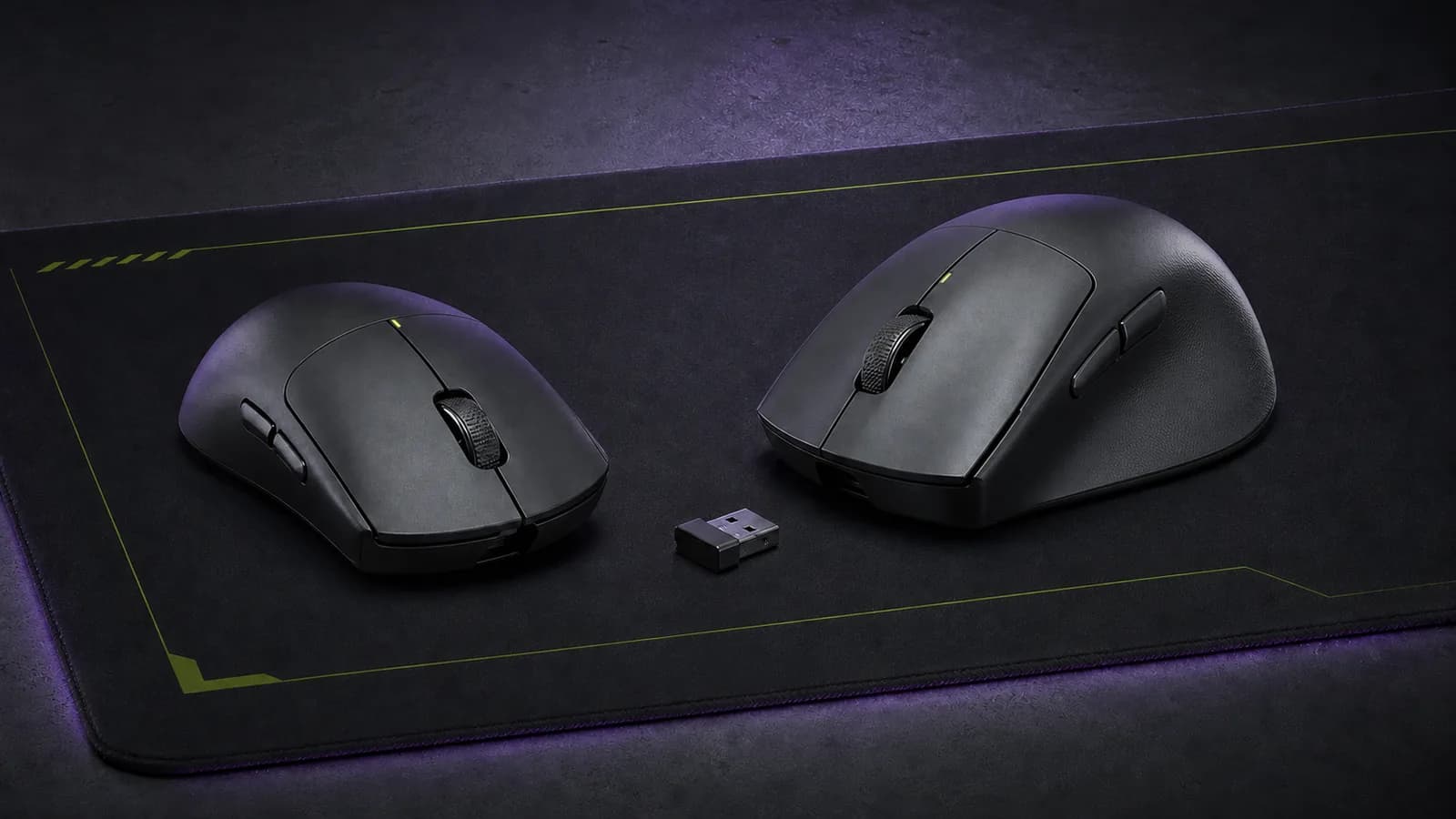
Razer builds the DeathAdder around a raised, right-handed shell. The listed body is 4mm taller and 4.5mm wider than Logitech's. That extra volume can meet the palm instead of leaving it suspended over a low symmetrical mouse. If your current mouse makes you curl the hand more than you want, shape is the meaningful upgrade.
Logitech builds the Superstrike around click control. Its Haptic Inductive Trigger System senses primary-button travel without a conventional main microswitch, then generates click feedback through haptics. G HUB exposes the actuation point, rapid-trigger reset, and haptic intensity.
Those settings are genuinely different. They are not automatically better. A shorter actuation can also make unintended clicks easier, and the haptic strength that feels clear to one person may distract another. We would pay for HITS only when experimenting with the primary buttons is part of the appeal.
Why the DeathAdder is better for palm grip
The DeathAdder's right side drops away from a higher central body, giving the ring and little fingers a different resting path from a symmetrical mouse. Its maximum listed height is 44mm, versus 40mm for the Superstrike. Its maximum width is 68mm, versus 63.5mm.
That does not prove comfort. Hand length, finger position, wrist angle, grip pressure, and pad friction all matter. It does give the DeathAdder the clearer fit hypothesis for a buyer whose palm rests fully on the mouse.
Razer lists the black DeathAdder at 56g. That is unusually light for a larger ergonomic body and 4g below Logitech's 60g specification. Do not overstate the gap: four grams is smaller than the shell difference, and weight distribution can affect perception. The useful conclusion is that choosing the larger shell does not require accepting a heavy mouse.
Razer DeathAdder V4 Pro Wireless Gaming Mouse
Why it works
- Taller 128 × 68 × 44mm ergonomic shell
- 56g black-model specification
- Fixed Gen-4 optical main clicks
Main trade-off
- Right-handed shape is less neutral
- No Bluetooth
- Fit still needs a returnable trial
The linked Amazon US product is the black DeathAdder V4 Pro, ASIN B0F3QCXL82. Confirm the model, colour, seller, and return terms before ordering.
Why you might choose the Superstrike instead
Choose the Superstrike when two things are true: you already know a low symmetrical Superlight-family shape works for you, and you want to tune how the primary buttons register. The full Superstrike HITS review explains the ten actuation steps, five rapid-trigger settings, haptic controls, setup, and evidence limits.
Logitech lists a 125 × 63.5 × 40mm body at 60g. The shell is symmetrical across the top, but the side buttons remain on the left for right-thumb use. It is not a fully mirrored left-handed design.
The HITS system is the reason to buy it. Adjustable actuation changes how far the primary button travels before an input registers. Rapid trigger can reset from movement rather than forcing the button to return past one fixed point. Haptic intensity changes the strength of the generated click feedback.
This creates more tuning range than the DeathAdder's optical switches. It also creates more setup work. A buyer who leaves the default profile untouched should compare the Superstrike with less complicated symmetrical mice before paying for hardware built around configurability.

Logitech G Pro X2 Superstrike Wireless Gaming Mouse
Why it works
- Adjustable actuation and rapid-trigger reset
- Tunable primary-click haptics
- Familiar Superlight-family shell
Main trade-off
- Lower shell offers less palm support
- HITS value depends on G HUB setup
- No Bluetooth
The linked Amazon US product is the G Pro X2 Superstrike, ASIN B0G12HGHGM. Check the exact listing rather than assuming another G Pro X or Superlight model has HITS.
Fixed optical clicks versus HITS
Razer's Gen-4 optical switch registers a primary click through an optical mechanism. The user-facing behaviour remains conventional: press through the button movement and click point, then let it return.
Logitech's inductive analogue system reads travel and adds a generated haptic response. It lets the software decide where actuation and reset occur within the available movement.
There is no responsible universal latency winner here without a matched test across firmware, report rates, actuation settings, debouncing behaviour, and game conditions. Logitech markets a shorter configurable actuation path; Razer offers fewer click variables and publishes an optical system. Those are design facts, not a SolderMag latency result.
Use this rule:
- Buy the DeathAdder if you want the mouse to behave conventionally and fit is the priority.
- Buy the Superstrike if tuning the click is part of the hobby or competitive setup.
- Do not buy either from a claimed millisecond advantage you cannot reproduce on your own PC.
Weight, dimensions, and grip
The DeathAdder is 3mm longer, 4.5mm wider, and 4mm taller on the manufacturers' figures. The larger body is not simply “for big hands.” It changes where the palm, thumb, ring finger, and little finger rest.
Palm grip: start with the DeathAdder. Its height and ergonomic right side are more likely to support the hand.
Claw grip: either can work, depending on how much of the rear shell touches your palm. Start with the Superstrike if you already like the Superlight family. Start with the DeathAdder if a narrow symmetrical rear feels unstable.
Fingertip grip: the Superstrike is the more neutral starting point, though its 60g weight is higher than some current fingertip-focused mice. The DeathAdder's extra height can put more shell under the palm than a fingertip user wants.
Our Viper V4 Pro vs DeathAdder V4 Pro comparison covers Razer's low symmetrical alternative if the DeathAdder looks too tall. The Viper V4 Pro vs Superstrike comparison isolates Logitech's click system against a lighter symmetrical rival.
Sensor and 8,000Hz polling
Razer lists a Focus Pro 45K Optical Gen-2 sensor. Logitech lists HERO 2 with a 44,000 DPI ceiling, more than 888 IPS tracking, and more than 88G acceleration. Both sets of limits sit far above ordinary sensitivity and hand movement.
Maximum DPI is not a useful tiebreaker. Most competitive players operate at a small fraction of either ceiling. Shape, grip, feet, pad, sensitivity consistency, and stable frame delivery matter more.
Both mice support up to 8,000Hz reporting. Higher rates send updates more often, but they also increase system work and reduce wireless runtime. Start at 1,000Hz. Test 2,000Hz or 4,000Hz only when the display is fast, the game holds consistent frame times, and the CPU has headroom. Treat 8,000Hz as an option, not a requirement.
Battery and receiver setup
Razer's current product page says the DeathAdder can reach up to 150 hours after a firmware update, improving the figure printed on its initial packaging. Logitech lists up to 90 hours of constant motion for the Superstrike.
Do not compare those numbers as if one lab ran both mice. Razer's result is an “up to” claim, while Logitech names a constant-motion condition. Superstrike haptic configuration and report rate may also affect its real use.
Put either receiver near the mouse rather than behind a metal PC case or under a crowded dock. Razer uses a weighted receiver base with status indicators. Logitech includes a LIGHTSPEED receiver and cable path. Receiver placement is a more practical first troubleshooting step than changing sensor settings.
Neither mouse has Bluetooth. If one mouse must move between a gaming PC, work laptop, and tablet, a multi-device productivity model will be easier to live with.
Who should buy the DeathAdder V4 Pro?
Buy the DeathAdder if:
- your palm rests fully on the mouse;
- a low symmetrical shell leaves your hand unsupported;
- you want conventional optical main-click behaviour;
- the 56g black-model specification appeals without sacrificing shell size;
- one right-handed ergonomic shape is more useful than click experimentation.
Skip it if you prefer fingertip grip, want a truly neutral shell, use the mouse left-handed, or need Bluetooth and several extra controls.
Who should buy the G Pro X2 Superstrike?
Buy the Superstrike if:
- the Superlight-family shell already fits your grip;
- you want to tune actuation, reset, and haptic intensity;
- managing profiles in G HUB is acceptable;
- a lower symmetrical body suits claw or fingertip use;
- click configuration matters more than the DeathAdder's palm support.
Skip it if you will leave HITS at default, need a tall ergonomic shell, or expect configurable clicks to compensate for a poor fit.
Price and value
Use the current price gap only after choosing the correct shape. A discounted Superstrike is still poor value for a palm gripper who cannot settle on it. A discounted DeathAdder is not a bargain for someone who dislikes tall ergonomic mice.
When prices are close, buy by shape and click philosophy. Pay extra for the Superstrike only if HITS is a feature you will configure. Pay extra for the DeathAdder only if its shell solves a real fit problem.
Do not treat a temporary list price, seller badge, or crossed-out amount as evidence of long-term value. Check the exact product, seller, condition, return window, and current total at checkout.
Alternatives
Razer Viper V4 Pro: choose it when you want Razer's lighter, lower symmetrical flagship rather than the DeathAdder shape. It keeps fixed optical clicks. Compare it directly with both mice through our Viper vs DeathAdder and Viper vs Superstrike guides.
Logitech G Pro X Superlight 2: choose the established Logitech path when the familiar shell matters but HITS does not. Its conventional switch system has less primary-click tuning.
Razer DeathAdder V3 Pro: consider the prior ergonomic model when it is meaningfully cheaper and you do not need the V4 platform changes.
A less expensive mouse that already fits: this is the rational answer for many players. Our best gaming mice guide separates palm, claw, fingertip, budget, and multi-button options.
If the current mouse fits but the glide feels wrong, read our PTFE, UHMWPE, glass, and ceramic mouse-skate guide before replacing the whole device.
Common buying mistakes
- Choosing the Superstrike for rapid trigger without checking whether its lower shell fits.
- Choosing the DeathAdder because it is lighter while ignoring its larger ergonomic body.
- Treating 45K versus 44K DPI as meaningful at normal sensitivity.
- Enabling 8,000Hz immediately and blaming the mouse for unstable game frame times.
- Assuming a symmetrical top shell means mirrored left-handed side buttons.
- Comparing the manufacturers' battery figures as one controlled test.
- Buying from a family listing without checking the exact model and ASIN.
FAQ
Is the DeathAdder V4 Pro better than the Logitech Superstrike?
It is the better choice for a right-handed palm gripper or anyone who needs a taller ergonomic shell. The Superstrike is better for a buyer who already suits its symmetrical shape and specifically wants adjustable actuation, rapid-trigger reset, and click haptics.
Is the Superstrike faster than the DeathAdder V4 Pro?
Logitech provides adjustable click actuation and rapid-trigger reset, but SolderMag has not measured the mice in a matched setup. Firmware, actuation setting, report rate, and system conditions all affect a defensible latency comparison.
Which mouse is lighter?
Razer lists the black DeathAdder V4 Pro at 56g. Logitech lists the G Pro X2 Superstrike at 60g. The four-gram gap matters less than their different shell dimensions and shapes.
Which is better for palm grip?
Start with the DeathAdder. It is a right-handed ergonomic mouse measuring 128 × 68 × 44mm, while the Superstrike is lower and narrower at 125 × 63.5 × 40mm. Fit still depends on the individual hand.
Does either mouse have Bluetooth?
No. Both use a 2.4GHz gaming receiver and support a wired connection. Choose a multi-device mouse if Bluetooth switching is required.
Do I need 8,000Hz polling?
Usually not. Start at 1,000Hz. Higher report rates are worth testing only with a high-refresh display, stable game frame times, and enough CPU headroom.
Is the Superstrike worth paying more for?
Only if HITS is the reason you want it. Adjustable actuation, rapid-trigger reset, and haptic intensity add real configuration options. They do not make the shell fit better or guarantee a measured advantage in your games.
Final recommendation
Buy the Razer DeathAdder V4 Pro if your hand wants an ergonomic shell. Its larger body, 56g black-model weight, fixed optical clicks, and simpler purchase logic make it the better default for a right-handed palm gripper.
Buy the Logitech G Pro X2 Superstrike if you already like a Superlight-style symmetrical mouse and want to tune the primary buttons. HITS is a meaningful technical difference, but it is valuable only when you plan to use it.
Sources and methodology
- Razer official DeathAdder V4 Pro product page for shape, weight, sensor, switches, report rate, controls, feet, and the current 150-hour firmware-dependent battery claim.
- Razer Support DeathAdder V4 Pro specifications for dimensions, connection modes, polling settings, and platform details.
- Logitech Support G Pro X2 Superstrike specifications for dimensions, weight, HERO 2, inductive switches, report rate, and battery condition.
- Logitech's official HITS explanation for adjustable actuation, rapid-trigger reset, and click haptic intensity.
- Exact Amazon US identity checks for DeathAdder V4 Pro black
B0F3QCXL82and G Pro X2 SuperstrikeB0G12HGHGM, using the configuredsoldermag-20Associate tag. Prices, sellers, and availability can change.
As an Amazon Associate I earn from qualifying purchases.