CalDigit TS5 vs OWC Thunderbolt 5 Hub: Dock or Hub?
The CalDigit TS5 is a complete 15-port desk dock; the OWC Thunderbolt 5 Hub is a simpler expansion hub. Here is which one fits your setup.
Research-based comparison
Recommendations are checked against product documentation, availability, comparative evidence, and clearly disclosed hands-on work where it exists.
Quick picks
The short answer, with the trade-offSimple Thunderbolt expansion hub
OWC Thunderbolt 5 Hub
On this page
- Who should buy the CalDigit TS5
- Who should buy the OWC Thunderbolt 5 Hub
- CalDigit TS5 vs OWC Thunderbolt 5 Hub specs
- The port decision matters more than benchmark speed
- CalDigit TS5: the complete desk option
- OWC Thunderbolt 5 Hub: the focused expansion option
- Display support: check the exact host
- Compatibility with older computers
- Charging and downstream power
- Which is better for external SSDs?
- Price and value
- Common buying mistakes
- Alternatives
- Frequently asked questions
- Final recommendation
- Sources
Quick answer: buy the CalDigit TS5 if one cable needs to replace your Ethernet adapter, card readers, audio connections, and ordinary USB hub. Buy the OWC Thunderbolt 5 Hub if you mainly need three downstream Thunderbolt 5 ports and one USB-A port, and you already own the adapters or Thunderbolt devices your desk requires.
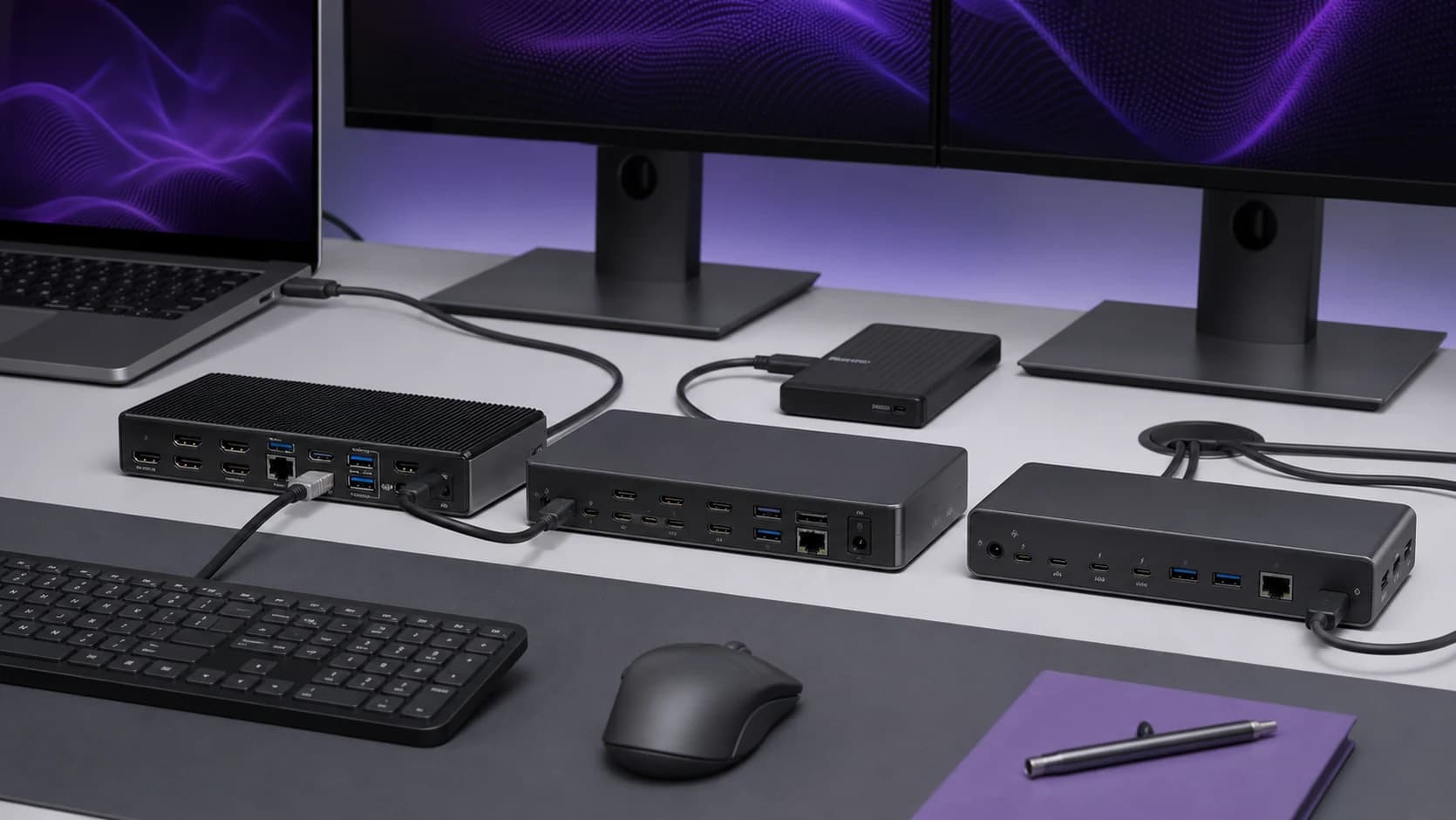
The TS5 is a 15-port dock. The OWC is deliberately a compact five-port hub. They solve different problems, and treating them as near-identical docks makes the comparison harder than it needs to be.
This is a research-based comparison using current manufacturer specifications and compatibility notes. We have not run hands-on performance or thermal tests of these units, so we do not claim measured speed, temperature, or sleep/wake results.
Who should buy the CalDigit TS5
Buy the TS5 if you want a permanent desk dock with 2.5Gb Ethernet, full-size and microSD card readers, audio, several USB-C and USB-A connections, laptop charging, and three downstream Thunderbolt 5 ports.
It is the cleaner choice for a photographer, video editor, or mixed-device desk where ordinary USB accessories matter as much as Thunderbolt bandwidth.
Who should buy the OWC Thunderbolt 5 Hub
Buy the OWC if your priority is turning one host Thunderbolt connection into three downstream Thunderbolt 5 ports. It suits a desk built around Thunderbolt displays, fast external storage, or separate docks and adapters.
Skip it if you need built-in Ethernet, card readers, audio, or several legacy USB devices. Adding those connections separately can erase the simplicity and any price advantage.
CalDigit TS5 vs OWC Thunderbolt 5 Hub specs
| Feature | CalDigit TS5 | OWC Thunderbolt 5 Hub |
|---|---|---|
| Product type | Full desk dock | Thunderbolt expansion hub |
| Total ports | 15 | 5 |
| Host connection | 1x Thunderbolt 5 | 1x Thunderbolt 5 |
| Downstream Thunderbolt | 3x Thunderbolt 5 | 3x Thunderbolt 5 |
| USB-C | 3x 10Gbps | None beyond Thunderbolt ports |
| USB-A | 1x 10Gbps, 1x 480Mbps | 1x 10Gbps |
| Ethernet | 2.5GbE | None |
| Card readers | SD UHS-II and microSD UHS-II | None |
| Audio | Front combo jack, rear input and output | None |
| DisplayPort or HDMI | None | None |
| Host charging | Up to 140W | Up to 140W, depending on downstream power draw |
| Included host cable | 1m Thunderbolt 5 | 0.8m Thunderbolt 5 |
The TS5 should not be confused with the CalDigit TS5 Plus. The Plus is a different, larger product with a different port layout, including DisplayPort. The standard TS5 compared here has 15 ports and no dedicated display connector.
The port decision matters more than benchmark speed
Both products connect over Thunderbolt 5 and expose three downstream Thunderbolt 5 ports. Neither gives every attached device a private 80Gbps lane; displays, storage, networking, and peripherals ultimately share the host connection.
That makes unsupported claims about one being universally faster unhelpful. Actual throughput depends on the host controller, display traffic, drive, enclosure, cable, operating system, and what else is active at the same time.
Choose by the ports you will use every day. The TS5 avoids a pile of small adapters. The OWC avoids paying for fixed-function ports you may never touch.
CalDigit TS5: the complete desk option
CalDigit lists four Thunderbolt 5 connections in total: one host port and three downstream ports. It also includes three 10Gbps USB-C ports, one 10Gbps USB-A port, one USB-A 2.0 port intended for lower-bandwidth accessories, 2.5Gb Ethernet, two UHS-II card slots, and three audio connections.
That mix is unusually practical. A keyboard receiver does not need a high-speed port, while a portable SSD can use USB-C and leave the downstream Thunderbolt ports free for displays or faster storage.
The host port can provide up to 140W. Each downstream Thunderbolt port is rated up to 15W, the front 20W USB-C port can provide more power to a phone or accessory, and the remaining USB ports provide lower output. Power needs still matter: a laptop only takes the charging level it supports, and attached devices share the dock's power budget.
CalDigit TS5
The better fit when one dock must handle networking, cards, audio, USB accessories, and Thunderbolt devices.
OWC Thunderbolt 5 Hub: the focused expansion option
OWC describes its hub as turning one Thunderbolt connection into three downstream Thunderbolt 5 ports plus one 10Gbps USB-A port. That sparse layout is the point.
It works best when the devices on your desk already speak Thunderbolt or USB-C. You can connect supported displays through downstream ports, attach high-speed storage, or daisy-chain another compatible device. OWC also provides its Dock Ejector software for disconnecting attached storage volumes together.
The hub can supply up to 140W to the host, but OWC notes that available host power depends on the power drawn by downstream devices. Each downstream Thunderbolt port can provide up to 15W. Check the power requirements of a large workstation laptop rather than assuming the maximum is available in every setup.
OWC Thunderbolt 5 Hub
The simpler choice when you need downstream Thunderbolt ports rather than a built-in desk port collection.
Display support: check the exact host
Neither product has a native HDMI or DisplayPort connector. Displays connect over a downstream Thunderbolt port, directly when the monitor supports it or through a suitable adapter.
The maximum display combination is not set by the hub alone. It depends on the computer's GPU, Thunderbolt implementation, operating system, display resolution and refresh rate, and whether Display Stream Compression is supported.
OWC explicitly notes that Apple hosts currently support a maximum of two native external displays through the hub even though other compatible systems can support more. CalDigit publishes different display tables for specific Mac chips and Windows hosts. Check the vendor table for your exact computer before buying—especially for three displays, 8K, or high-refresh 4K.
Do not assume a MacBook Air or base-chip MacBook Pro gains extra display capability just because the dock has spare ports. A dock cannot bypass the host GPU's display limit.
Compatibility with older computers
Both products are backwards compatible with newer USB4 and Thunderbolt generations, but they run at the host's available speed. Connecting a Thunderbolt 4 computer does not unlock Thunderbolt 5 bandwidth.
There is also an important Thunderbolt 3 distinction. Both vendors document support for Thunderbolt 3 Macs, while Thunderbolt 3 Windows PCs are not supported. USB-C-only hosts can have further display, charging, and data limitations.
Use the included certified Thunderbolt 5 cable first. If you replace it, use a certified cable rated for the bandwidth and charging level you need. A cable that physically fits can still reduce speed, charging, or display capability.
Charging and downstream power
The 140W headline is useful for compatible large laptops, but it does not mean every connected device receives maximum power simultaneously.
The TS5 uses a 240W external power supply and publishes per-port power figures. That makes it easier to plan a desk with bus-powered drives and phone charging. The OWC hub is also designed to power downstream devices, but its documentation makes clear that heavy downstream draw can reduce power available to the host.
If your laptop normally uses a charger above 140W, expect the dock to charge more slowly under heavy load or keep the original power adapter connected when the computer supports separate charging.
Which is better for external SSDs?
The OWC looks tidy for a storage-focused desk because three downstream Thunderbolt ports are its main feature. The TS5 has the same number of downstream Thunderbolt 5 ports, plus dedicated USB-C connections for slower drives.
That does not make either one automatically faster. For one drive, the SSD and enclosure may be the bottleneck. With several fast drives and displays active, traffic shares the host link. For sustained professional work, check independent testing of your exact host, enclosure, and dock combination rather than extrapolating from a single sequential benchmark.
If your storage is ordinary 10Gbps USB, the TS5's extra USB-C ports are more convenient. If your storage stack is already Thunderbolt and you want a modular chain, the OWC is the cleaner design.
Price and value
Do not compare list prices in isolation because both availability and retailer pricing move. Check the current gap, then price the adapters you would need with the OWC.
The OWC is better value when its lower port count is exactly what you want. The TS5 is better value when it replaces Ethernet, card-reader, audio, and USB adapters you would otherwise buy and cable separately.
If neither product solves a real bandwidth problem, a mature Thunderbolt 4 or USB4 dock is usually the sensible purchase. Thunderbolt 5 is worth paying for when the host and workload can use it.
Common buying mistakes
- Confusing TS5 with TS5 Plus. They are different docks with different port counts and display connections.
- Counting connector labels, not useful ports. Map every real device on your desk before buying.
- Assuming three dock ports mean three Mac displays. The host's display limit still applies.
- Expecting dedicated bandwidth per device. All traffic returns through one host connection.
- Ignoring adapters. The OWC needs extra hardware for Ethernet, cards, audio, HDMI, or DisplayPort.
- Using an unqualified cable. Start with the supplied cable before troubleshooting the dock.
Alternatives
Choose a Thunderbolt 4 or USB4 dock if your laptop is not Thunderbolt 5 or your desk uses one or two ordinary monitors plus basic peripherals. You will spend less without giving up capabilities the host cannot use.
Our best Thunderbolt 5 docks guide explains when the newer standard is justified. If cable capability is the uncertainty, see our USB-C and Thunderbolt cable guide.
Frequently asked questions
Does the CalDigit TS5 have DisplayPort?
No. The standard TS5 has no dedicated DisplayPort or HDMI connector. Displays use downstream Thunderbolt/USB-C ports or adapters. The TS5 Plus is a separate model with a different port layout.
Can either hub run three displays on a Mac?
Do not assume so. Display count depends on the exact Mac chip and model. OWC notes a maximum of two native displays on supported Apple hosts through its hub; check CalDigit's compatibility table for the exact TS5 and Mac combination.
Will these work with Thunderbolt 4?
Yes, on supported systems, but at Thunderbolt 4 limits. Buying a Thunderbolt 5 dock does not increase an older host's bandwidth.
Which is better for a photographer?
The TS5 is usually the better fit because it includes both SD and microSD UHS-II readers, multiple USB ports, Ethernet, and audio. The OWC needs separate readers and adapters.
Which is better for several Thunderbolt SSDs?
Both provide three downstream Thunderbolt 5 ports. The OWC is the more focused layout; the TS5 provides more places for non-Thunderbolt drives. Real multi-drive performance depends on the host and total display/storage traffic.
Final recommendation
The CalDigit TS5 is the practical one-cable dock. The OWC Thunderbolt 5 Hub is a focused way to add downstream Thunderbolt ports.
Buy the TS5 when you want a complete desk and will use its fixed ports. Buy the OWC when you already have a modular Thunderbolt setup and do not want to pay for ports you will ignore. If your computer is still Thunderbolt 4 and the desk works, save the money.
Sources
- CalDigit TS5 specifications and compatibility
- OWC Thunderbolt 5 Hub specifications and compatibility
As an Amazon Associate I earn from qualifying purchases.