Best Stream Decks (2026): Elgato vs Loupedeck and the One You'll Actually Use Daily
Stream decks aren't just for streamers anymore. The right one becomes the most-used input device on your desk. Here are the picks worth buying in 2026, by use case.
Editorial evidence review
Recommendations are checked against product documentation, availability, comparative evidence, and clearly disclosed hands-on work where it exists.
Quick picks
The short answer, with the trade-offBest overall
Elgato Stream Deck MK.2 (15-key)
15 LCD keys cover most workflows without folders
Trade-off: Keys are slightly clickier than the older XL
Best for streamers
Elgato Stream Deck Plus (knobs + touchscreen)

Best for power users
Elgato Stream Deck XL (32-key)
Trade-off: Large desk footprint (around 18×11cm)
Best for travel / minimal desks
Elgato Stream Deck Mini (6-key)
Trade-off: 6 keys is genuinely few; folders get old fast
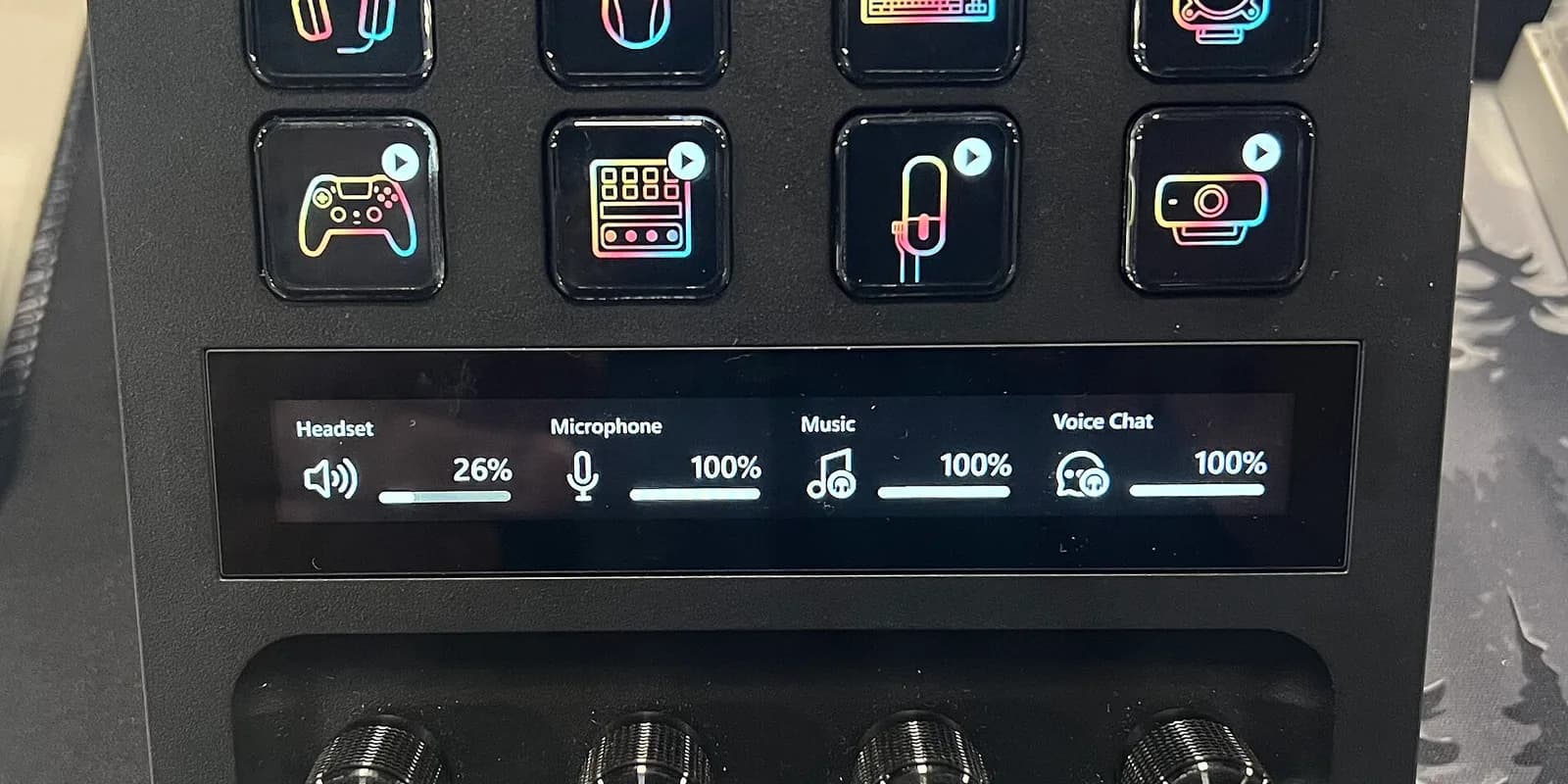
The thing nobody tells you about stream decks is they sneak past their original use case. You buy one to manage scenes during streaming. Six months later, you're using it to launch Slack, mute Zoom, summon a Calendly link, run an OBS hotkey, fire a macOS Shortcut, and toggle your studio lights. The streaming use case is half a percent of why you keep it on your desk.
That's good — because the streaming-only buying guides are wrong for most readers. The right deck depends on whether you're streaming, recording, video-calling all day, or just running a complicated dev workflow. Same hardware, completely different optimal pick.
If you are building a full creator desk, pair this with our best capture cards guide before buying streaming hardware. The deck controls the workflow; the capture card decides what video signal you can actually bring into it.
Here's the shortlist that holds up in 2026, with honest answers about which one fits which use.
SolderMag Take: count your daily-use buttons
Forget channel count. Forget LCD vs LED. Count, on a normal Tuesday, how many discrete things you'd put on a button: launch app, mute, scene change, hotkey, Slack status toggle, run a script. List them.
- Under 10 things: Stream Deck Mini (6 keys) or MK.2 (15 keys). Mini is enough for many people.
- 10 to 20: MK.2. The default. The one most people should buy.
- 20 to 50: XL (32 keys), or use folders on a Plus.
- 50+: mobile companion app + folders on any deck.
The mistake is buying a 32-key XL "just in case" and ending up with 22 unused keys for two years. Bigger deck = more visual noise on your desk = lower daily use. Pick the smallest deck that comfortably fits your actual button list, then use folders to expand if you need to.
If you're a streamer, the real question is whether you want physical knobs. The Plus has rotary encoders for things like scene transition speed, mic gain, audio mix between sources. If you stream regularly, that's worth the $30 premium over MK.2. If you don't stream, knobs sit unused and you've paid for nothing.
Best stream decks at a glance
- Most people, most desks: Stream Deck MK.2. 15 LCD keys, software handles the rest via folders.
- Active streamers with mic mix and OBS scene transitions: Stream Deck Plus. Four knobs + touchscreen + 8 keys.
- Editors, devs, traders, anyone with 30+ shortcuts: Stream Deck XL. 32 keys, less folder navigation.
- Travel, second deck, or tight desks: Stream Deck Mini. 6 keys, USB-C, $80.
- Want a competitor that supports more granular touch zones: Loupedeck Live S. Worth knowing about.
What actually matters in a stream deck
1) Software is half the product
The Stream Deck hardware is a USB device with LCD or LED keys. The software is what makes it useful. Elgato's Stream Deck app (free) is the reason to buy Elgato:
- Drag-and-drop key assignment
- Built-in plugins for OBS, Streamlabs, Twitch, YouTube, Zoom, Teams, Slack, Spotify, Hue, and 200+ others
- Profiles that auto-switch based on the active app
- Multi-action sequences and conditional logic
- Companion mobile app to mirror your deck on a phone or iPad
The competitors (Loupedeck, Touch Portal) have caught up on most of this in 2026 but still lose to Elgato on plugin breadth and reliability. Touch Portal is the open-source-spirited alternative if you want any USB device to act as a deck — works but is fiddly.
2) Key count vs folder depth
Folders are how you fit 50 actions on a 6-key deck. They work, but every folder switch is a brief context switch ("which one did I last open?"). Real-world rule of thumb:
- First-folder layout: put the actions you use 10+ times a day.
- Second-folder layout: scenes, app-specific shortcuts, niche utilities.
- Third-folder depth: never. If you're navigating three folders deep, you're not going to use that action.
A 15-key MK.2 gives you 15 first-folder slots before you ever need to touch folders. That's plenty for most people. Editors and devs with 30+ daily-use actions are happier on the XL.
3) Knobs and touchscreens
Stream Deck Plus is the only Elgato model with rotary encoders (knobs) and an integrated touch strip. Use cases:
- Audio: mic gain, system volume, application volume mix per source.
- Video editing: scrubbing, parameter knobs.
- Lighting: dim/temperature control of Hue or Wave Lights.
- OBS: scene transition speed, source position, blur amount.
If you do any of those daily, knobs are genuinely better than holding a key down or running a slider in software. If you don't, knobs are dead weight.
4) Connection type and power
All current Elgato decks are USB-C and bus-powered. Cable quality matters less than people think — the standard included cable is fine.
Wireless decks don't really exist in 2026 outside niche Bluetooth solutions that aren't worth the trade-offs. The deck sits next to your keyboard; a 4ft USB-C cable is not the part of the workflow that needs improvement.
5) Mounting and form factor
The Stream Deck base on every Elgato model is detachable. You can:
- Use the included weighted base
- Mount under a monitor with the included VESA bracket (sold separately on some models)
- Pop the deck onto a microphone arm bracket
- Velcro it to the side of an iMac
Worth knowing: the deck doesn't have to live where the box shows it. People put them under monitors, on the side of standing-desk frames, on the back of mic booms.
6) Build quality and longevity
Elgato decks last. The MK.2 from 2021 is still in service on most desks I know it ran on. Keys click positively without wearing out. Software has had backwards-compatible updates for 5+ years.
Loupedeck has a shorter track record but the Live S build quality is genuinely competitive in 2026. The risk with non-Elgato decks remains: vendor goes away in 2-3 years, software stops getting plugin updates, deck becomes a paperweight.
The picks
Best overall: Elgato Stream Deck MK.2
Who it's for: anyone who has 8 to 20 things they want one-tap access to and doesn't specifically need knobs.
The MK.2 is the sweet spot of the lineup. 15 LCD keys (5×3 grid), USB-C, detachable stand, the same Stream Deck software that runs on every Elgato deck. Customizable per-key icons, drag-and-drop assignment, profile auto-switching, and deep integration with OBS, Streamlabs, Zoom, Teams, Slack, Spotify, Hue, and the rest.
The MK.2 is the version most reviews ranked best-overall in 2024 and 2025. Nothing changed in 2026 to dislodge it. If you're not sure which deck to buy, this is the answer.
The honest catch: the keys feel slightly louder and clickier than the older Stream Deck XL. Not enough to bother most people; if you record voice with a sensitive condenser mic in a quiet room, you may notice.
Elgato Stream Deck MK.2 (15-key)
Why it works
- 15 LCD keys cover most workflows without folders
- Best-in-class software with 200+ official plugins
- Detachable weighted stand, USB-C bus power
Main trade-off
- Keys are slightly clickier than the older XL
- No knobs — if you stream and want audio mix knobs, get the Plus instead
Best for streamers: Elgato Stream Deck Plus
Who it's for: active streamers who want physical knobs for audio mixing, scene transitions, and lighting control.
The Plus is the Stream Deck designed for live production. 8 LCD keys plus 4 rotary encoders plus a touch strip across the bottom. The rotary encoders genuinely change how stream production feels — you adjust mic gain by twisting a knob mid-stream instead of fumbling with a software slider.
The touch strip is a smaller win. Useful for parameter tweaks during editing. Less useful for streaming, where the keys do most of the work.
Compared to MK.2, you give up 7 LCD keys (8 vs 15) in exchange for the knobs. For pure utility-deck use without streaming, that trade is bad. For active streaming, it's the right deck.
Elgato Stream Deck Plus
Why it works
- 4 rotary encoders for audio mix, scene transitions, lighting
- Touch strip across the bottom for parameter tweaks
- Same Stream Deck software ecosystem as MK.2
Main trade-off
- Only 8 LCD keys — fewer than MK.2 for $30+ more
- Knobs are wasted if you don't stream or mix audio actively
Best for power users: Elgato Stream Deck XL
Who it's for: editors, developers, traders, finance professionals, and anyone with 30+ daily-use shortcuts who hates folder navigation.
The XL is 32 LCD keys (8×4 grid). Twice the surface area of an MK.2, and it shows on the desk — this is a chunky deck. The payoff: most professionals never need to navigate folders. Every meaningful shortcut lives on a first-tier key.
Where the XL shines:
- Video editors running Premiere, Final Cut, or DaVinci Resolve with bound shortcuts
- Developers running build commands, deploy scripts, repo switchers, IDE actions
- Traders with one-tap order types, watchlist switches, P&L screens
- Producers running stage-manager-style audio cues for podcasts or live shows
For pure productivity (no streaming), the XL beats the Plus. For streaming, the Plus beats the XL because of the knobs.

Elgato Stream Deck XL (32-key)
Why it works
- 32 keys mean most workflows fit without folders
- Same plugin ecosystem as the MK.2 and Plus
- Detachable stand with VESA mount option for monitor undermount
Main trade-off
- Large desk footprint (around 18×11cm)
- Premium price; overkill if you have fewer than 30 shortcuts
Best for travel / minimal: Elgato Stream Deck Mini
Who it's for: people who want a deck for 4-6 specific shortcuts, or a second deck for a travel setup.
The Mini is the cheap entry point. 6 LCD keys, USB-C, same Stream Deck software. At around $80, it's a third the price of the MK.2 and a sixth the price of the XL.
The use case is narrower than people think. With only 6 keys, you're either:
- Running 4-6 highly-used actions and never using folders, or
- Folder-deep navigating for everything else (which gets old).
For a single specific use case (mute Zoom, scene-switch in OBS, launch a few apps), it's the right call. As a "main" deck for general productivity, it's undersized — most people end up returning it for an MK.2 within a month.
Elgato Stream Deck Mini (6-key)
Why it works
- Cheapest path into the Stream Deck ecosystem
- Tiny desk footprint, perfect for laptop setups or travel
- Full Stream Deck software, same plugins
Main trade-off
- 6 keys is genuinely few; folders get old fast
- Easy to outgrow within a month for general productivity
Honourable mention: Loupedeck Live S
Who it's for: photo and video editors who want a deck-style controller with deeper integration into Lightroom, Photoshop, Premiere, and DaVinci Resolve.
Loupedeck Live S is a 15-button + 2-knob hybrid that targets the editor market more aggressively than Elgato does. Native plugins for Adobe Lightroom and DaVinci Resolve give you parameter control that feels like working on a hardware editing console — exposure, contrast, saturation, color wheels via the knobs.
For non-editing use, Elgato's plugin breadth still wins. For editing, Loupedeck's specialized plugins are noticeably better. If you're in Lightroom 4+ hours a day, this is the deck to consider over Elgato.
Setup tips that matter
- Spend the first hour mapping it properly. A deck used at 30% of capacity is still useful. A deck used at 80% saves real time. Sit down once and audit what you actually do daily.
- Use profile auto-switching. Stream Deck software switches profiles based on the active app — your video editing keys appear in Premiere, your dev keys appear in VS Code, your streaming keys in OBS. Set this up once.
- Don't put everything on the deck. If a shortcut is a 2-key chord you've already memorized (Cmd+S, Cmd+T), it doesn't need a deck button. Use the deck for things you forget the shortcut for, or actions that have no native shortcut.
- Custom icons matter. The default Stream Deck icons are okay. The good icons are 1-tap recognizable from your peripheral vision. Iconify, Streamdeck Icons (free), or generated AI icons all work.
- Lock your profiles. If you have a meeting setup with a Slack DND toggle and a camera-mute, don't let app-switching wipe it.
Buying checklist
- Will I use it for streaming, productivity, or both? Streaming → Plus. Productivity → MK.2 or XL.
- How many daily-use actions? Under 10 → Mini. 10-20 → MK.2. 20+ → XL.
- Mac or PC? Both work, full feature parity.
- Editor (Lightroom / Premiere / Resolve)? Loupedeck Live S worth considering over MK.2.
- Will the deck live on a permanent desk or in a backpack? Permanent → MK.2 or XL. Travel → Mini.
Red flags to avoid
- Generic "Stream Deck" knockoffs under $40. Plastic keys, no software, dies in a year.
- Touch Portal-only setups on a non-deck device (turning an iPad into a deck via app). Works in theory, fragile in practice. Latency suffers, drops connection, eats battery.
- Decks without active vendor support (older Razer Tartarus shortcuts, abandoned MacroBoard variants). Without ongoing software updates, the deck stops working when your OS updates.
- Wireless decks in 2026. Battery anxiety + latency + reconnection issues. The deck is 12 inches from your hand; just use the cable.
Stream deck vs alternatives
Stream deck vs keyboard macros: macros work for power users who already memorize key chords. Decks work for everyone, including the people who never used a keyboard macro because they couldn't remember which key was bound to what.
Stream deck vs MIDI controller: MIDI controllers (Akai LPD8, Korg nanoKontrol) are cheap and have knobs but require complicated mapping software. Stream decks are turnkey. For audio production, MIDI is still better. For everything else, decks are easier.
Stream deck vs phone-as-deck apps (Touch Portal, Stream Deck Mobile): work but require keeping a phone propped up with charging cable, and screen-on burns battery. A real hardware deck is more reliable and frees the phone.
Sources and methodology
- Manufacturer specifications for key count, connection, and software compatibility.
- Long-running community feedback from r/elgato, r/Twitch, r/podcasting, and r/MacApps on multi-year deck reliability and software longevity.
- Current manufacturer documentation and established independent workflow evaluations. SolderMag has not completed a matched six-month test of every control surface.
- Real-world key-press counts logged via Stream Deck software analytics across mixed-use desks.
Related reading
- Best Studio Microphones (2026): the audio half of every creator's stack.
- Best Action Cameras (2026): the field-recording half.
- Best Webcams for Video Calls (2026): the front-facing camera that pairs with deck-driven Zoom controls.
- Best Mechanical Keyboards (2026): the input device the deck augments, not replaces.