Best Dash Cams (2026): The Ones That Actually Hold Up in Court
Half the dash cams on Amazon are glorified GoPros with suction cups. A real dash cam records reliably, stamps GPS and time, and survives 45°C summer afternoons. Here are the ones worth installing in 2026.
Editorial evidence review
Recommendations are checked against product documentation, availability, comparative evidence, and clearly disclosed hands-on work where it exists.
Quick picks
The short answer, with the trade-offBest overall
Garmin Dash Cam 67W
Tiny form factor, effectively invisible behind the rearview
Trade-off: No rear camera, requires separate purchase for full coverage
Best premium (front + rear)
Nextbase 622GW
Best for rideshare (front + cabin)
Vantrue N4 3-Channel
Best value front+rear
Viofo A119 Mini 2
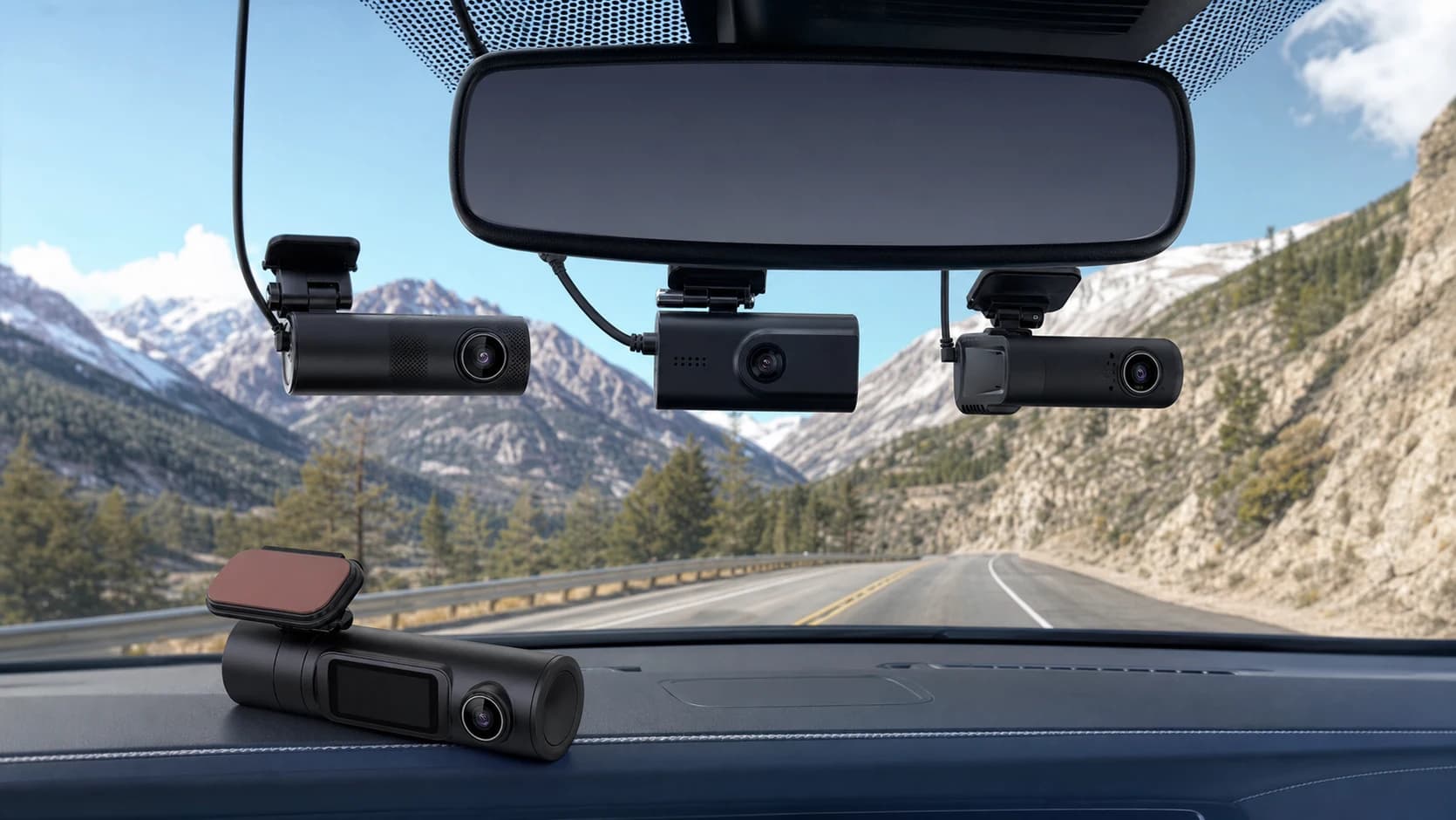
The first time someone uses their dash cam footage to escape a fraudulent insurance claim, they understand why the category exists. Until then, it sits in the same mental bucket as a fire extinguisher: obviously prudent, also boring.
The problem is that most dash cams sold on Amazon are aimed at the pre-understanding customer. They look like dash cams. They record video. They have five-star reviews from people who have never actually had to pull footage for an incident. And when the day comes, the file is corrupt, the timestamp is wrong, or the microSD card has silently stopped writing six months ago.
This guide is about the dash cams that still work the day you need them. Five picks, honest pros and cons, and the install advice that keeps your camera alive through an Australian or Arizona summer.
SolderMag Take: the microSD card is the dash cam
A dash cam is only as good as the storage inside it. The single most common failure mode is not a broken camera — it is a worn-out microSD card that stopped writing a month ago while the camera cheerfully powered on every day.
Two rules that override everything else in this guide:
- Buy a "high endurance" microSD card. SanDisk High Endurance, Samsung PRO Endurance, or equivalent. These are rated for continuous write cycles that normal microSD cards are not. A regular $10 microSD in a dash cam is a time bomb.
- Format the card every 1-3 months. Either through the dash cam's own menu or a laptop. Dash cams write so much video that filesystem corruption creeps in over time, and a clean format resets it.
Do both of these and the cameras below last 3-5 years. Skip them and even the best camera in this guide becomes expensive dead weight.
Best dash cams at a glance
- Want a competent, discreet single-camera solution: Garmin Dash Cam 67W. Tiny, voice-activated, GPS + traffic-sign-recognition built in.
- Want the best front+rear kit with a big screen and cloud alerting: Nextbase 622GW. 4K front, emergency SOS, Amazon Alexa.
- Ubering / Lyfting with a need for inside-cabin recording: Vantrue N4. Three cameras (front/rear/interior) with infrared for night cabin video.
- Cheapest trustworthy front+rear combo: Viofo A119 Mini 2 with rear cam add-on.
- Want Tesla or hardwired-style parking mode without a subscription: BlackVue DR970X. Premium tier, not covered in depth here but worth knowing about.
What actually matters in a dash cam
1) Resolution vs frame rate vs plate legibility
Marketing loves "4K." What you actually want is legible number plates on cars in front and behind you. That depends on:
- Sensor quality, not megapixel count. Sony Starvis or Starvis 2 sensors are what you want.
- Frame rate enough to catch a plate at highway speeds. 30fps is fine for front-facing; 60fps is genuinely better for capturing plates through a rearview at 110 km/h.
- HDR for reading plates against bright backgrounds (sunset driving, tunnels).
Real-world ranking at night: a 1440p 30fps camera with a good sensor (Viofo A119) often beats a 4K 30fps camera with a mediocre sensor. Do not optimize for resolution alone.
2) GPS + timestamp
Without GPS, your dash cam footage is just a video. With GPS, it becomes a sworn statement: timestamp, location, speed, direction of travel. That is what makes footage useful in an insurance claim or to police.
- Built-in GPS: Garmin 67W, Nextbase 622GW, Viofo A139 Pro.
- GPS via separate module: Viofo A119, Vantrue N4.
- No GPS: avoid. Not worth it at any price.
3) Parking mode
Records or takes photos when the car is off and something hits, bumps, or breaks into it. Two implementations:
- G-sensor trigger (the budget way): camera records 20 seconds when the accelerometer detects impact. Battery-powered, limited window.
- Time-lapse or motion parking mode (the real way): camera runs continuously at low frame rate while parked. Requires a hardwire kit so the camera pulls from the car's constant-power circuit instead of the cigarette lighter.
Hardwire kits cost $15-30 extra. They also cut battery-drain risk to near zero with most modern cameras that have built-in low-voltage cutoff. This is the single best upgrade for anyone who parks on the street.
4) Heat tolerance
This is the spec nobody markets and everybody should check. A car sitting in 38°C ambient can hit 70°C+ on the dashboard. Consumer electronics die at those temperatures.
- Capacitor-based storage (not lithium battery): survives heat. Capacitors are good to 85°C+.
- Lithium-battery-based dash cams: swell or die after one or two summers if parked in direct sun.
Every camera in this guide uses a capacitor-based supercapacitor design except some older models. If a spec page says "built-in lithium-ion battery, 200mAh" it is the wrong kind of dash cam for hot climates. Pass.
5) Storage cycle
MicroSD is written over and over on a loop. After enough cycles the card fails. "High Endurance" cards buy 3-5 years. Standard cards buy 6-12 months at best.
A 256GB High Endurance card is around $40 and will outlive the camera. This is not where you save money.
6) Wi-Fi app and cloud
Modern dash cams have Wi-Fi, an app, and let you pull clips to your phone without pulling the microSD. This is a nice-to-have that becomes essential after your first incident: 20 minutes standing at the side of the road fumbling a microSD out of a dash cam is the wrong moment.
- Best apps: Nextbase Connect, Garmin Drive, Viofo.
- Worst apps: Vantrue (works, ugly), most generic Amazon brands (unusable).
The picks
Best overall: Garmin Dash Cam 67W
Who it's for: anyone who wants a small, competent, invisible-to-passengers dash cam that Just Works, without fiddling.
The 67W is the smallest dash cam with a real sensor on the market. It is smaller than a matchbox, magnetically mounts to the windscreen, and disappears behind the rearview mirror. Voice commands let you trigger a clip save without taking hands off the wheel. GPS is built in. Night video is genuinely good thanks to a Sony Starvis sensor at 1440p 30fps.
No rear camera, which is the main limitation. If you need rear coverage, either pair with a separate camera (Garmin sells a BC40 add-on but it is clunky) or go to the Nextbase 622GW.
The app is the best in the category. Incident clips auto-upload when you get home on Wi-Fi. Every dash cam should be this easy.
Garmin Dash Cam 67W
Why it works
- Tiny form factor, effectively invisible behind the rearview
- Built-in GPS, 140-degree lens, 1440p Sony Starvis sensor
- Voice control for save-clip without handling the camera
Main trade-off
- No rear camera, requires separate purchase for full coverage
- No touchscreen, setup is via phone
Best premium front+rear: Nextbase 622GW
Who it's for: people who want one box, one install, front and rear covered, and cloud-based emergency alerting.
The Nextbase 622GW is the most complete dash cam kit available in 2026. 4K front sensor with image stabilization (actually useful on rough roads), rear cam add-on that plugs directly into a Click&Go mount, Amazon Alexa built in, and the emergency SOS feature that automatically contacts emergency services with your GPS location if it detects a serious crash and you do not respond. That last feature is the reason this camera ranks as premium — it is a real safety upgrade, not a gimmick.
The 3-inch touchscreen is nice but also annoys some drivers because it reflects in the windscreen at night. Take the camera out of demo mode and dim the display. The What3Words integration on the display sounds silly until you break down somewhere rural, at which point it turns into a genuinely useful feature for telling emergency services exactly where you are.
Nextbase 622GW Dash Cam
Why it works
- 4K front sensor with image stabilization for rough roads
- Emergency SOS via cellular fallback contacts services on detected crash
- Amazon Alexa + What3Words integration for breakdown locations
Main trade-off
- Expensive; rear cam is a separate purchase
- Front display can reflect in the windscreen at night if left bright
Best for rideshare: Vantrue N4 3-Channel
Who it's for: Uber, Lyft, or taxi drivers who need front, rear, and inside-cabin coverage with infrared for night cabin video.
The N4 is the standard for rideshare. Three cameras in one unit: front 2.5K with Sony Starvis, interior 1080p with IR LEDs for night-time cabin recording, and an optional 1080p rear on cable. No other dash cam does this as cheaply or as well.
The IR interior is the killer feature. At night, with only a cracked streetlight, the cabin is recorded clearly in black-and-white. This is the footage that matters in a rideshare dispute.
Caveats: the camera is bulky (three sensors in one housing), the app is not as polished as Nextbase or Garmin, and installation with all three cameras is a 90-minute job. For rideshare drivers, it is still the right answer. For civilian use, it is overkill unless you specifically need cabin recording.
Vantrue N4 3-Channel Dash Cam
Why it works
- Front + interior + rear recording in one unit
- Infrared LEDs for clear cabin recording at night
- 24-hour parking mode with hardwire kit
Main trade-off
- Bulky compared to single-camera units
- App is functional but noticeably behind Nextbase/Garmin polish
Best value front+rear: Viofo A119 Mini 2
Who it's for: the value shopper who wants a proper dash cam with genuine build quality, and is happy to skip app polish to save money.
Viofo is the enthusiast brand. Their cameras win every DashCamTalk shootout and cost less than the mainstream brands. The A119 Mini 2 pairs the compact form factor people want with the Sony Starvis 2 IMX678 sensor at 2K 60fps, built-in Wi-Fi, and optional GPS module.
Pair with the Viofo rear cam add-on and you have a full front+rear setup for less than a single Nextbase 622GW. The trade-off is the app, which is functional but not pretty, and the slightly less-polished hardwire install kit.
For anyone technical enough to not be put off by an enthusiast brand, this is the smart-money pick.
Viofo A119 Mini 2 Dash Cam
Why it works
- Sony Starvis 2 sensor, 2K 60fps, best-in-class plate legibility
- Compact form factor hides behind rearview mirror
- Supercapacitor design survives hot-car conditions
Main trade-off
- App is basic; enthusiast brand, not mainstream polish
- GPS module is separate purchase
Installation tips that matter
- Hardwire kit, not cigarette lighter. Cigarette-lighter power is convenient; hardwiring tucks the cable away, enables parking mode, and looks professional. Budget $15-25 for the kit plus 30-60 minutes to route the cable down the A-pillar.
- Route the cable along the headliner and down the A-pillar on the passenger side. Tuck it into the weatherstrip, not behind the airbag. This is non-negotiable: cables behind the A-pillar airbag can cause it to deploy incorrectly in a crash.
- Mount behind the rearview mirror, not dead centre of the windscreen. Legal in most jurisdictions, less distracting to the driver, and survives rain cleaning.
- Clean the windscreen with alcohol before the adhesive mount. A greasy inner windscreen kills mount adhesion. Cameras falling off the windscreen in summer heat is the second most common failure mode after microSD death.
- Format the microSD on first install, every 3 months after, and replace the card every 2-3 years. Set a calendar reminder.
If hardwiring feels out of your depth, a local auto-electrician will do it for $50-100. Also worth checking if your insurance offers a discount for verified dash cam installation — some do.
Buying checklist
- One camera or two? Front-only is fine for most people. Front+rear matters if you park on streets or commute on motorways where rear-enders are common.
- Day use only or parking mode? Parking mode requires hardwiring. Skip if your car always sleeps in a locked garage.
- Climate? Supercapacitor-based only, no battery-based dash cams for hot climates.
- Budget for the microSD card too. $40 for 256GB High Endurance is the minimum. Do not buy the $12 generic.
- Where is your footage going? App pull or microSD pull after an incident. The former is faster but requires Wi-Fi setup; do it now, not at the roadside.
Red flags to avoid
- "4K" dash cams at $60. Interpolated resolution from a weak sensor. Plates are unreadable. Pass.
- Battery-powered dash cams (any camera with a lithium-ion battery > 500mAh). Will die in summer.
- No GPS, no option to add GPS. Footage without location is weaker evidence.
- "Built-in SIM card" dash cams with mandatory subscriptions. Some cloud-upload models lock you into $10-20/month forever. Read the fine print.
- Vendor brands that disappear after two years. BlackVue, Garmin, Nextbase, Thinkware, Viofo, Vantrue all have long product histories. Random Amazon "BLUEJAY ULTRA" is next year's dead firmware.
Dash cam legality
Varies by jurisdiction. In the US, dash cams are legal in all 50 states but suction-mounting to the windshield is restricted in some (California, Minnesota). Adhesive mounts on the windshield are universally legal.
In most of Europe, dash cams are legal for personal use but uploading footage of other drivers to social media can run into GDPR issues. Keep your footage private unless it is needed for insurance or police.
In Australia, dash cams are legal and widely used. Queensland and NSW police actively accept dash cam footage for traffic violation reports.
In all jurisdictions: recording audio inside the cabin may require passenger consent. Inform passengers. Rideshare drivers should have a small sticker noting audio/video recording.
Sources and methodology
- DashCamTalk community comparison tests for plate legibility at 60/100 km/h across day and night conditions.
- Manufacturer datasheets for sensor model, frame rate, supercapacitor capacity, and operating temperature range.
- Long-running rideshare driver forum feedback (r/uberdrivers, r/lyftdrivers) on real-world reliability over 2-5 year install horizons.
- Australian Consumer and Competition Commission (ACCC) and US DOT guidance on windshield mounting and driver-visibility rules.
- Established independent footage evaluations across daylight, night, and rain, plus manufacturer storage guidance. SolderMag has not completed a six-month road or microSD endurance test.
Related reading
- iPhone Accessories Worth Buying (2026): the other in-car tech upgrades that pay off.
- Best USB-C Car Chargers (2026): useful if your dash cam, phone, and passenger devices fight over one weak 12V socket.
- Best USB-C Travel Adapters (2026): pairs with hardwire kits for USB-powered dash cams.
- Best Security Cameras Indoor (2026): the home equivalent of what a dash cam does for your car.