SteelSeries Arctis Nova 5 vs HyperX Cloud III S Wireless
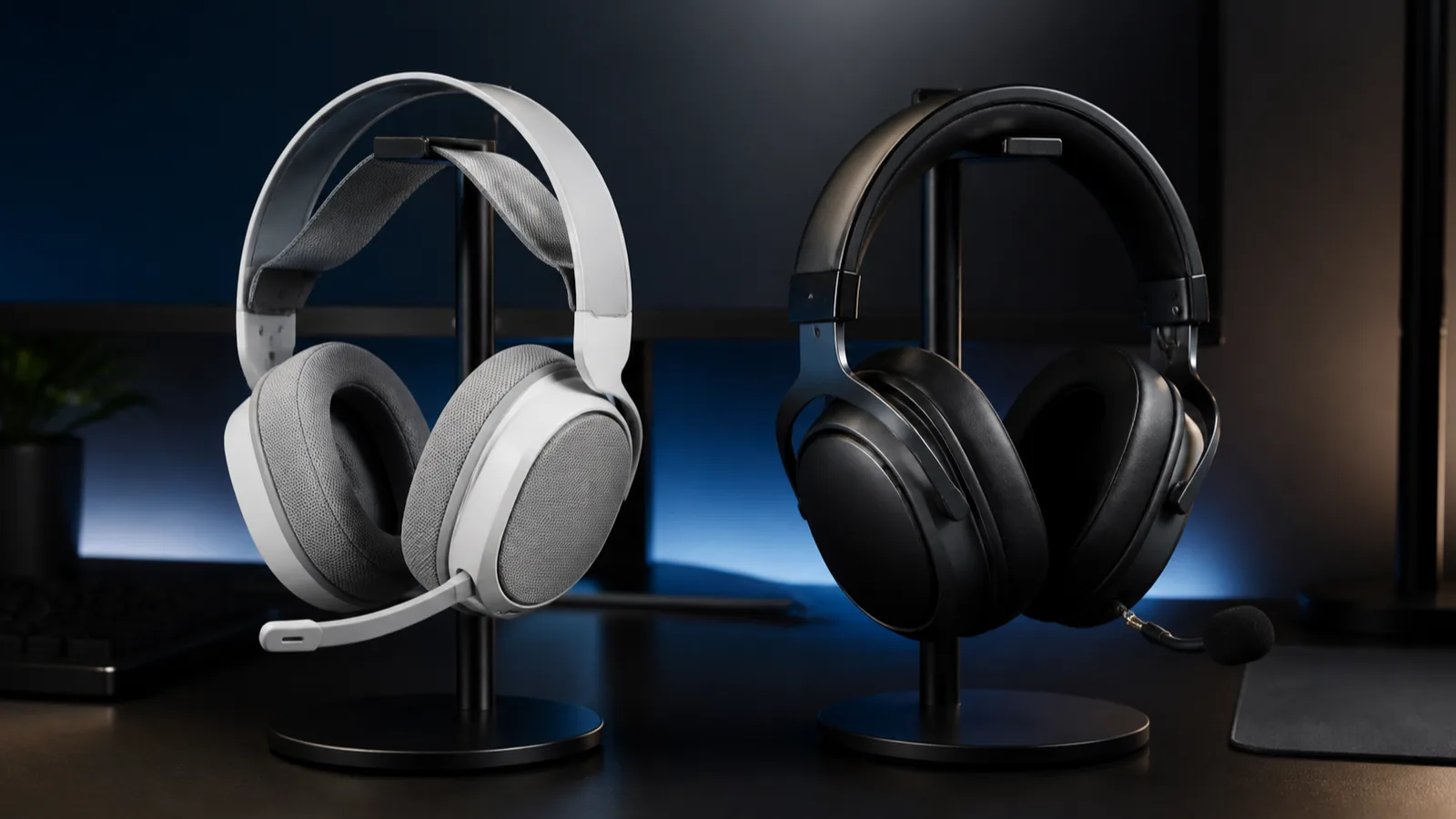
Choose Nova 5 for lower weight and better mobile controls, or Cloud III S for much longer battery claims and a more substantial frame.
Research-based comparison
Recommendations are checked against product documentation, availability, comparative evidence, and clearly disclosed hands-on work where it exists.
Quick picks
The short answer, with the trade-off
Best for low weight and mobile controls
SteelSeries Arctis Nova 5 Wireless
265 g manufacturer weight
Trade-off: No simultaneous Bluetooth and 2.4 GHz

Best for battery life
HyperX Cloud III S Wireless
Trade-off: Much heavier on paper
On this page
- Quick answer
- Arctis Nova 5 vs Cloud III S specifications
- Who should buy the Arctis Nova 5?
- Who should buy the Cloud III S Wireless?
- Battery life: HyperX has the clear paper advantage
- Weight, cushions, and construction
- Bluetooth and 2.4 GHz: both switch rather than mix
- Microphones and controls
- Software and game presets
- Platform and variant warnings
- Who should skip both?
- Price and value
- Alternatives
- FAQ
- Final recommendation
- Sources and methodology
The SteelSeries Arctis Nova 5 Wireless is the better pick for most buyers who want a light headset, useful phone controls, and quick switching between game and mobile audio. Choose the HyperX Cloud III S Wireless when charging as rarely as possible matters more than weight, and you prefer a traditional padded headband with leatherette cushions.
Neither headset is designed around playing Bluetooth and 2.4 GHz audio at the same time. If you need game audio and phone audio together, move up to the Arctis Nova 7 Gen 2.
This comparison is research-based. SolderMag has not completed matched listening, microphone, latency, comfort, battery, or durability tests on these two headsets. The verdict uses current manufacturer specifications, product manuals, connection behavior, exact Amazon product identity, and the practical differences a buyer will notice.
Quick answer
| Buyer | Better choice | Why |
|---|---|---|
| Wants the lighter headset | Arctis Nova 5 | SteelSeries lists 265 g; HyperX lists about 358 g without the detachable boom |
| Hates charging | Cloud III S | HyperX claims up to 120 hours on 2.4 GHz and 200 hours over Bluetooth |
| Changes EQ from a phone | Arctis Nova 5 | The Companion app exposes game presets and separate wireless profiles |
| Already likes a padded Cloud headband | Cloud III S | It keeps the familiar memory-foam and leatherette approach |
| Wants a mic that disappears into the earcup | Arctis Nova 5 | Its boom retracts rather than detaching |
| Wants to remove the boom but keep a call mic | Cloud III S | HyperX includes internal microphones for boomless calls |
| Needs Xbox wireless support | Arctis Nova 5X | The Xbox-compatible SteelSeries variant is the safer route |
| Needs simultaneous phone and game audio | Neither | These models switch modes; consider Nova 7 Gen 2 |
Arctis Nova 5 vs Cloud III S specifications
| Feature | SteelSeries Arctis Nova 5 Wireless | HyperX Cloud III S Wireless | Buyer impact |
|---|---|---|---|
| 2.4 GHz battery claim | Up to 50 hours | Up to 120 hours | HyperX is the battery-first choice |
| Bluetooth battery claim | Up to 60 hours | Up to 200 hours | Both are manufacturer maximums, not SolderMag measurements |
| Weight | 265 g | About 358 g headset-only; boom adds about 12 g | Nova 5 is substantially lighter on paper |
| Drivers | 40 mm neodymium, 20 Hz–22 kHz | Angled 53 mm, 20 Hz–20 kHz | Size and range do not prove a sound winner |
| Wireless behavior | QuickSwitch between 2.4 GHz and Bluetooth 5.3 | Hardware selector for 2.4 GHz or Bluetooth 5.3 | Buy either expecting one active mode at a time |
| Microphone | Retractable ClearCast 2.X boom | Detachable 10 mm boom plus internal microphones | Pick the physical workflow you prefer |
| Mobile software | Arctis Companion app | No equivalent headset-first phone app documented | SteelSeries is easier to adjust away from a PC |
| Desktop software | SteelSeries GG and Sonar on Windows | HyperX NGENUITY | Both add EQ and microphone controls on supported systems |
| Mainstream compatibility | PC, Mac, PlayStation, Switch, handhelds, mobile | PC, Mac, PlayStation, Switch, mobile | Exact console and connector still matter |
| Xbox route | Choose Nova 5X | Xbox is not in HyperX's official compatibility list | Do not assume generic USB means Xbox audio |
| Analog fallback | No 3.5 mm connection documented | No headphone jack documented | Neither is a good choice when wired analog backup is required |
Who should buy the Arctis Nova 5?
Buy the Nova 5 if you:
- want a headset that is easy to wear around the house or pack with a handheld;
- change EQ presets from a phone while using a console;
- move between a USB-C dongle and Bluetooth but do not need both streams together;
- want the boom microphone to retract instead of living in a drawer;
- use PC, PlayStation, Switch, Steam Deck, a phone, or another USB-C device;
- need an Xbox-compatible version and will deliberately choose Nova 5X.
The strongest reason is not a promise of better sound. It is the combination of 265 g weight, useful mobile controls, and a clear switching workflow.
SteelSeries Arctis Nova 5 Wireless
Buy it when low weight, phone-based presets, and a retractable microphone matter more than maximum battery life.
Why it works
- 265 g manufacturer weight
- Companion app with game presets
- Retractable microphone
Main trade-off
- No simultaneous Bluetooth and 2.4 GHz
- No 3.5 mm backup documented
- Standard model is not the Xbox version
Who should buy the Cloud III S Wireless?
Buy the HyperX if you:
- resent adding another device to the weekly charging queue;
- already know that HyperX's traditional Cloud headband works for your head;
- prefer leatherette cushions to the Nova family's fabric approach;
- want a detachable boom with internal microphones available for casual calls;
- use PC, PlayStation, Switch, Mac, or mobile devices rather than Xbox;
- are happy to make most adjustments in NGENUITY on a supported computer.
The trade-off is mass. HyperX lists the headset at 0.79 lb, roughly 358 g, before the detachable boom. That does not prove it will be uncomfortable, but it is a real difference beside a 265 g alternative.

HyperX Cloud III S Wireless
Buy it when long manufacturer battery claims and a traditional padded fit matter more than low weight or mobile controls.
Why it works
- Up to 120-hour 2.4 GHz battery claim
- Detachable boom plus internal microphones
- Metal-supported frame
Main trade-off
- Much heavier on paper
- No Xbox support listed
- No simultaneous wireless mixing documented
Battery life: HyperX has the clear paper advantage
SteelSeries claims up to 50 hours over 2.4 GHz and 60 hours over Bluetooth for the Nova 5. HyperX claims up to 120 hours over 2.4 GHz and 200 hours in Bluetooth mode for the Cloud III S.
Those figures are not directly interchangeable lab results. HyperX states that its battery test used continuous playback at 50% headphone volume. SteelSeries publishes its own conditions and estimates. Volume, microphone activity, EQ, range, connection stability, battery age, and charging habits will change actual runtime.
The useful conclusion is narrower: Cloud III S is designed for far longer gaps between charges. Buy it if that solves a recurring annoyance. Do not accept the extra weight just because the larger number looks impressive if a weekly charge already feels easy.
Nova 5 counters with a fast-charge claim of six hours from 15 minutes. That is useful when you notice an empty battery before a session, but it does not erase HyperX's much higher full-charge claim.
Weight, cushions, and construction
The 93 g manufacturer-weight gap is one of the biggest practical differences in this comparison. Nova 5 uses a light suspension-style design with fabric-covered cushions. Cloud III S uses a padded headband, memory foam, leatherette surfaces, stainless steel, and aluminum forks.
Low weight helps, but it does not settle comfort. A headset can be light and still clamp the wrong part of your head. A heavier headset can work well when the band distributes weight properly. Glasses, ear size, seal, heat, adjustment range, and head shape matter more than a spec table.
Choose Nova 5 when you already dislike heavy headsets or regularly wear one for several hours. Choose HyperX when you know the Cloud fit and prefer leatherette isolation to fabric breathability. Use a retailer with a workable return policy if either fit is unfamiliar.
Do not turn metal content into a durability verdict. The Cloud III S has the more substantial published frame materials, but long-term hinge, cable, cushion, and battery wear require extended testing across multiple units.
Bluetooth and 2.4 GHz: both switch rather than mix
Both headsets advertise Bluetooth and low-latency 2.4 GHz wireless. The trap is assuming that two radios mean two live audio streams.
Nova 5 uses a dedicated QuickSwitch control. A tap moves the headset between its dongle and Bluetooth. SteelSeries keeps the paired phone ready and lets the headset store separate presets for the two connection types.
HyperX documents a wireless mode selector for choosing 2.4 GHz, Bluetooth, or Instant Pair on supported OMEN laptops. It does not claim that Bluetooth and dongle audio play together.
Buy either expecting to change modes, not mix them. If you want game audio from a console or PC while a phone call, podcast, or mobile Discord session stays audible, the Nova 7 Gen 2 vs Cloud III S comparison covers the correct SteelSeries step-up.
Microphones and controls
Nova 5's ClearCast 2.X boom retracts into the earcup. That is convenient when you move from multiplayer chat to music or calls and do not want a loose microphone to store. SteelSeries also exposes microphone and EQ controls through the Companion app and GG/Sonar on Windows.
Cloud III S uses a detachable 10 mm boom with a mute indicator and adds internal microphones for boomless calls. The internal option is about convenience, not a reason to assume recording quality. HyperX's on-headset controls cover volume, mute, wireless mode, media, and calls.
SolderMag has not recorded these microphones in the same room, through the same devices, at matched gain. We would not choose between them on a manufacturer bandwidth claim. Pick Nova 5 for the retractable design and broader phone control; pick HyperX if a detachable boom and boomless call option fit your routine better.
Software and game presets
SteelSeries has the stronger mobile-control story. Its Companion app provides game and entertainment presets and keeps separate saved profiles for gaming wireless and Bluetooth. A console player can change supported settings from a phone rather than moving the headset back to a Windows machine.
SteelSeries GG and Sonar add routing, EQ, microphone controls, and software ChatMix on Windows. The standard Nova 5 does not have the physical ChatMix wheel found on higher Nova models.
HyperX NGENUITY handles supported EQ, microphone, and headset controls on Windows. That is enough for buyers who set a profile once and leave it alone. It is less convenient for someone who changes games and presets from a sofa or console setup.
Software does not guarantee better sound. Presets can make dialogue, bass, or specific game cues more prominent, but they do not replace fit, source quality, or measured driver performance.
Platform and variant warnings
The standard Nova 5 listing is aimed at PC, PlayStation, Switch, Mac, mobile, and USB-C handheld use. Nova 5X is the version to choose for Xbox support. Retailers can group colors and platform variants on one page, so read the complete title before ordering.
HyperX lists Cloud III S compatibility for PC, Mac, PS5, PS4, Switch, mobile, and Bluetooth devices. Xbox is absent. Do not infer Xbox audio support from the presence of USB-C or USB-A connectors.
Neither official specification set documents a normal 3.5 mm headphone connection. If you need analog audio from a controller, interface, or older device, skip both or move to a headset with an explicit 3.5 mm cable path.
Who should skip both?
Skip both if you need simultaneous phone and game audio. Nova 7 Gen 2 is the more relevant SteelSeries model.
Skip both if you want active noise cancellation. Neither is sold as an ANC listening headset; microphone noise processing is not the same feature.
Skip both if your headset never leaves a desk and a cable does not bother you. A wired model removes batteries, dongle placement, and wireless mode management.
Skip both if microphone quality decides the purchase and you cannot hear controlled samples. Manufacturer microphone descriptions are not a substitute for matched recordings.
Price and value
Do not anchor this decision to a fixed price. Retailer pricing and availability move too often.
If the two are close, Nova 5 is the safer default for buyers who value low weight and phone controls. Cloud III S is worth choosing when its battery advantage or familiar fit is specifically useful.
We would not pay extra for Nova 5 just to get a large preset library if you use one EQ profile. We would not pay extra for Cloud III S just to claim a bigger battery number if charging once a week is already acceptable.
Alternatives
SteelSeries Arctis Nova 7 Gen 2: buy this when simultaneous 2.4 GHz and Bluetooth audio is the requirement. It is heavier than Nova 5 and has a much lower battery claim than HyperX, but it solves the two-live-source problem neither headset here handles.
SteelSeries Arctis Nova 3 Wireless: the lighter budget SteelSeries route. Our Nova 3 Wireless vs Cloud III S comparison explains when its lower tier is enough.
Original HyperX Cloud III Wireless: consider it only when it is meaningfully cheaper and Bluetooth is unnecessary. The Cloud III Wireless vs Cloud III S guide separates the similar names.
For more options across budgets, see our best gaming headsets guide. If your shortlist stays inside SteelSeries, the Nova 7 Gen 2 vs Nova 5 comparison explains what paying for the higher tier adds.
FAQ
Is the Arctis Nova 5 better than the HyperX Cloud III S?
Nova 5 is better for buyers who want low weight, a retractable microphone, and phone-based preset controls. Cloud III S is better when long battery claims and a traditional padded Cloud fit matter more.
Can either headset play Bluetooth and game audio at the same time?
Do not buy either for simultaneous mixing. Nova 5 documents QuickSwitch between modes, while Cloud III S uses a wireless mode selector. Choose Nova 7 Gen 2 when two live audio sources are required.
Which headset has better battery life?
Cloud III S has the stronger manufacturer claims: up to 120 hours over 2.4 GHz and 200 hours over Bluetooth. Nova 5 is rated for up to 50 and 60 hours respectively. Actual runtime will vary, and these are not SolderMag test results.
Does the Nova 5 work on Xbox?
Choose the Nova 5X variant for Xbox. The standard PC/PlayStation-oriented model should not be treated as the Xbox version.
Does the HyperX Cloud III S work on Xbox?
HyperX does not list Xbox in the official compatibility line. Do not buy it for Xbox based only on its USB connectors.
Which one sounds better?
SolderMag has not measured or level-matched these headsets, so we will not name a sound winner. Driver diameter and published frequency range cannot settle tuning, distortion, imaging, bass consistency, or fit-dependent seal.
Which one is better for PS5?
Both cover the mainstream PS5 wireless use case. Choose Nova 5 for lower weight and phone controls; choose Cloud III S for its longer battery claim and familiar padded construction.
Final recommendation
Buy the SteelSeries Arctis Nova 5 Wireless if you want the lighter, more controllable everyday headset and one active wireless source is enough. Its phone app, retractable mic, and platform variants make it the more flexible default.
Buy the HyperX Cloud III S Wireless if charging as rarely as possible is the priority and you prefer a traditional padded headset. Its battery claim is the reason to accept the additional weight.
Sources and methodology
- SteelSeries official Arctis Nova 5 product page for QuickSwitch, Companion app, controls, compatibility, weight, microphone, and battery claims: https://steelseries.com/gaming-headsets/arctis-nova-5?color=black&primaryPlatform=pc
- SteelSeries official Arctis Nova 5 Product Information Guide for package contents, controls, Bluetooth behavior, system compatibility, microphone handling, and software: https://downloads.steelseriescdn.com/guides/Nova_5_Product_Information_Guide.pdf
- HyperX official Cloud III S Wireless product page for battery test conditions, connection modes, compatibility, controls, materials, microphones, physical specifications, and package contents: https://hyperx.com/products/hyperx-cloud-iii-s-wireless-gaming-headset
- Amazon US exact-product checks for Nova 5 Wireless (
B0D2YBQQ1P) and Cloud III S Wireless (B0F6NZWPTC) using the configuredsoldermag-20Associate tag. Product availability and seller can change; this page makes no fixed stock or price claim.
As an Amazon Associate I earn from qualifying purchases.