Razer Viper V4 Pro vs DeathAdder V4 Pro: Which Fits You?
Viper V4 Pro is lighter and lower; DeathAdder V4 Pro is taller and ergonomic. Compare grip, weight, battery life, and buying trade-offs.
Research-based comparison
How we evaluateQuick picks
The short answer, with the trade-off
Best for low weight and a symmetrical shell
Razer Viper V4 Pro

Best for a taller right-handed ergonomic shell
Razer DeathAdder V4 Pro
On this page
- Quick answer
- Viper V4 Pro vs DeathAdder V4 Pro specs
- The decision is shape, not sensor
- Why the Viper V4 Pro suits claw and fingertip grips
- Why the DeathAdder V4 Pro suits palm grip
- Grip and hand size: use these as starting points
- Weight: 49g vs 56g
- Battery and 8,000Hz polling
- Clicks, wheel, buttons, and software
- Price and value
- Alternatives
- Who should skip both
- Buying checklist
- FAQ
- Final recommendation
- Sources and methodology
The Razer Viper V4 Pro is the better starting point for claw and fingertip players who want the lowest weight. Choose the Razer DeathAdder V4 Pro if you want a taller, wider right-handed shell that gives a palm grip more support.
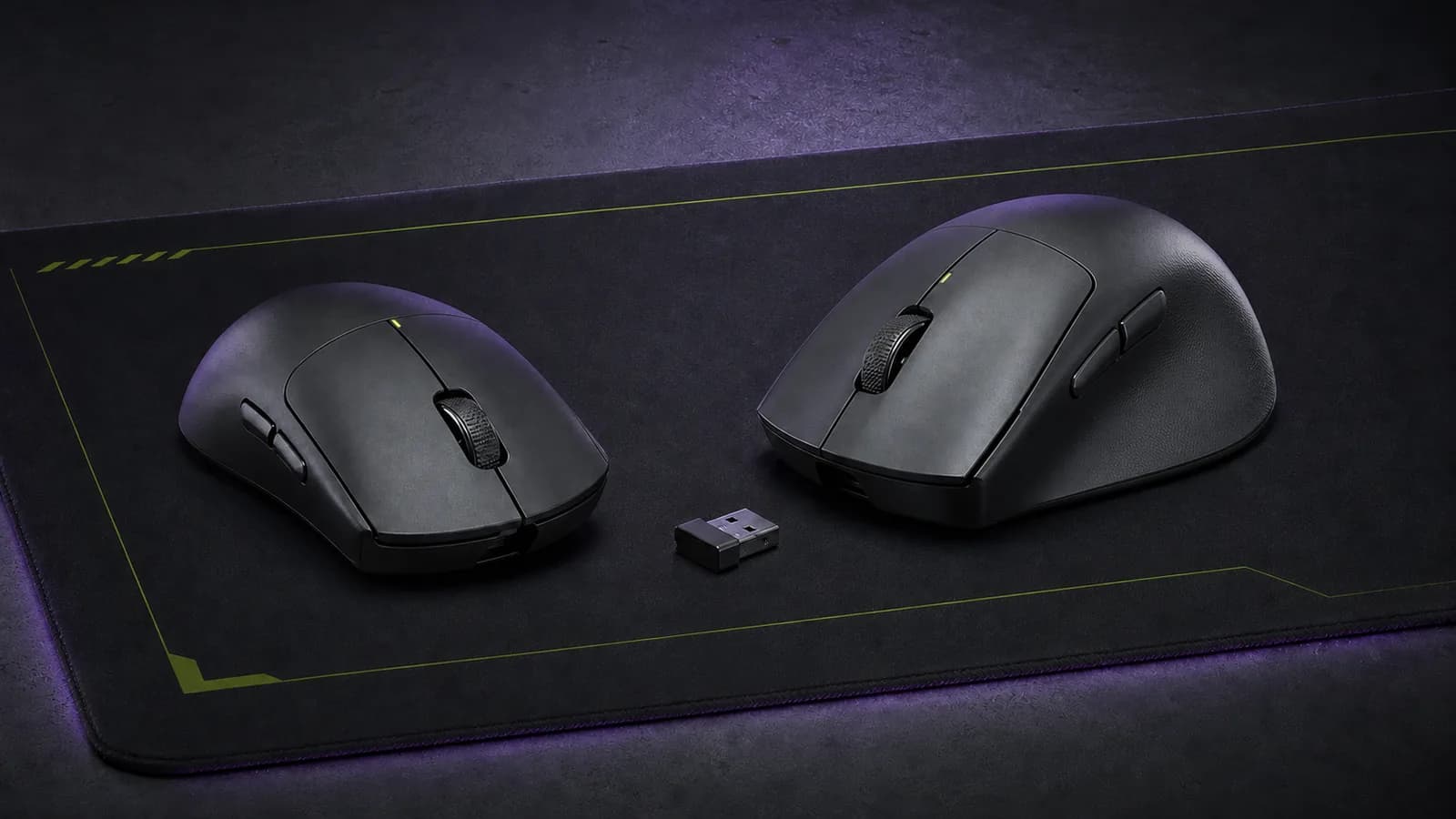
That is the useful difference. The Viper weighs 49g in black and uses a low, right-handed symmetrical shape. The black DeathAdder weighs 56g and is 4.1mm taller and 4.1mm wider at its listed maximum dimensions. Their sensors, 8,000Hz polling, optical switches, and wireless systems are close enough that fit should decide the purchase.
This comparison is research-based. We have not completed matched hands-on testing of these mice. The recommendation uses Razer's current specifications, verified US product identities, physical dimensions, and the established purpose of each shape family. Coating, click acoustics, shell comfort, and long-term durability still need hands-on validation.
Quick answer
- Buy the Viper V4 Pro if you already like low symmetrical mice, use a claw or fingertip grip, or want the lighter option for broad low-sensitivity movements.
- Buy the DeathAdder V4 Pro if your palm rests on the mouse, you want more height under the hand, or a low symmetrical shell leaves your hand feeling unsupported.
- Skip both if you need Bluetooth, a left-handed ergonomic shape, more than two thumb buttons, a free-spin wheel, or a sensible budget mouse rather than a flagship esports model.
If you do not know your grip, do not guess from a product photo. Use your current mouse normally for a day. Note whether your palm stays on the shell, touches only at the rear edge, or floats completely. Our broader best gaming mice guide explains the grip categories and includes cheaper alternatives.
Viper V4 Pro vs DeathAdder V4 Pro specs
| Feature | Razer Viper V4 Pro | Razer DeathAdder V4 Pro |
|---|---|---|
| Shape | Right-handed symmetrical | Right-handed ergonomic |
| Listed size | 127.1 × 63.9 × 39.9mm | 128 × 68 × 44mm |
| Listed weight | 49g black; 50g white | 56g black; 57g white |
| Sensor | Focus Pro 50K Optical Gen-3 | Focus Pro 45K Optical Gen-2 |
| Maximum polling | 8,000Hz wireless or wired | 8,000Hz wireless or wired |
| Main switches | Optical Gen-4 | Optical Gen-4 |
| Scroll wheel | 24-step optical; no tilt | 24-step optical; no tilt |
| Programmable controls | 6 | 6 |
| Manufacturer battery claim at 1,000Hz | Up to 180 hours | Up to 150 hours |
| Manufacturer battery claim at 8,000Hz | Up to 45 hours | Up to 22 hours |
| Connectivity | 2.4GHz HyperSpeed Gen-2 or wired USB | 2.4GHz HyperSpeed Gen-2 or wired USB |
| Bluetooth | No | No |
| RGB | No | No |
Razer's battery figures are not a promise of identical real use. Polling rate, idle time, firmware, power settings, and usage patterns can change runtime. The important point is that both lose substantial runtime at 8,000Hz, and the Viper carries the larger manufacturer claim at both published settings.
The decision is shape, not sensor
The Viper V4 Pro and DeathAdder V4 Pro are closer electronically than their names suggest. Both use Razer HyperSpeed Wireless Gen-2, Gen-4 optical main switches, an optical scroll wheel, PTFE feet, one onboard memory profile, and up to 8,000Hz polling in wireless or wired mode.
The Viper's newer 50K sensor publishes a higher maximum DPI, tracking speed, and acceleration figure than the DeathAdder's 45K sensor. Those ceilings do not make it the better mouse for normal play. Most buyers use a tiny fraction of 45,000 DPI, and both published tracking limits sit far beyond ordinary hand movement.
A mouse that fits poorly will be distracting on every movement. A theoretical sensor advantage at settings you will never use is not a practical advantage.
Why the Viper V4 Pro suits claw and fingertip grips
The Viper is lower and narrower. Razer lists it at 39.9mm high and 63.9mm wide, with a symmetrical top profile and two thumb buttons on the left. That shape gives the fingers room to steer without forcing the whole palm onto a tall rear shell.
The black model is also 7g lighter than the black DeathAdder. That difference should reduce the force needed to start and stop the mouse, assuming the pad and feet are comparable. It is most relevant to players who use a low in-game sensitivity and make large arm movements.
Do not turn that into a universal comfort claim. The Viper is still 127.1mm long, so it is not a tiny mouse, and a specification sheet cannot predict whether its hump position suits your hand. A relaxed palm gripper may find it too low; a small-handed buyer may find its length less manageable than the weight suggests.
Razer Viper V4 Pro Wireless Esports Gaming Mouse
Why it works
- 49g black model is the lighter option
- Low symmetrical shell is the logical starting point for claw and fingertip grip
- Up to 8,000Hz wireless polling with the included receiver
Main trade-off
- Low profile may not support a full palm grip
- Two left-side thumb buttons do not make it fully ambidextrous
- No Bluetooth or extra productivity controls
Why the DeathAdder V4 Pro suits palm grip
The DeathAdder is the more supportive-looking shape on paper. Its listed height is 44mm and its width is 68mm, with a pronounced right-handed contour rather than a mirrored top shell. That gives a palm grip more surface to rest on and creates a clearer thumb-side slope.
It is heavier than the Viper, but 56g is still light for a large ergonomic wireless mouse. The extra 7g is a sensible trade if the larger shell lets you hold the mouse without pinching it or leaving the palm unsupported.
The DeathAdder is not automatically the comfort winner. Its asymmetric shape commits you to one hand position more strongly than the Viper does. Aggressive fingertip players may find the extra height intrusive, and left-handed buyers should skip it entirely.

Razer DeathAdder V4 Pro Wireless Gaming Mouse
Why it works
- Taller and wider shell gives palm grippers more support on paper
- 56g black model remains light for an ergonomic wireless mouse
- Same Gen-4 optical switches and optical wheel as the Viper
Main trade-off
- 7g heavier than the black Viper V4 Pro
- Right-handed shape is a poor fit for left-handed buyers
- Razer's 8,000Hz battery claim is much shorter than at 1,000Hz
Grip and hand size: use these as starting points
Grip labels are useful, but they are not a sizing standard.
Choose the Viper first if:
- your palm floats above the mouse or touches only at the rear edge;
- you steer mainly with your fingers and wrist;
- you already like a low symmetrical Logitech G Pro or Razer Viper-style shell;
- minimum weight matters more than palm support;
- you want more claimed battery headroom at high polling rates.
Choose the DeathAdder first if:
- most of your palm rests on the mouse;
- low symmetrical mice leave a gap under your hand;
- you prefer a right-side slope and a defined thumb groove;
- you have medium or large hands and want more shell volume;
- you would accept 7g more weight for a fuller grip.
Keep the return policy in mind if:
- you are changing from an office mouse with a very different shape;
- your hand sits between grip styles;
- you have a small hand but want the DeathAdder's ergonomic contour;
- you are sensitive to coating, click force, button position, or shell flare.
Those last details cannot be established from dimensions. Buy from a retailer with a clear return window, and do not remove grip tape or discard packaging until the fit is settled.
Weight: 49g vs 56g
Seven grams is noticeable in this category, but it is not enough to overrule fit.
The lighter Viper should feel easier to move during repeated low-sensitivity swipes. The DeathAdder spreads more material across a larger shell and still stays below 60g. If the ergonomic shape lets your hand relax, the larger mouse may feel less tiring despite the extra mass.
Do not compare weight in isolation from the surface. Worn or incompatible feet can make a light mouse feel rough. If your current shell already fits, our mouse-skates guide explains when fresh PTFE is a better purchase than a new flagship mouse. A suitable desk mat or mouse pad also changes control more than another few thousand DPI.
Battery and 8,000Hz polling
Razer claims up to 180 hours at 1,000Hz and 45 hours at 8,000Hz for the Viper. The DeathAdder's published figures are up to 150 hours and 22 hours at the same two rates.
That makes the Viper the clearer choice if you insist on running 8,000Hz away from a charging cable. It does not mean 8,000Hz should be the default.
Start at 1,000Hz. Move to 2,000Hz or 4,000Hz only if the computer maintains stable frame times in the games you play. Try 8,000Hz after that. Higher polling creates more reports for the CPU to process and can expose compatibility or frame-pacing problems. A mouse reporting more often cannot fix an unstable game or a slow display.
For most buyers, the battery difference is a useful tiebreaker after shape. It should not decide the mouse before fit.
Clicks, wheel, buttons, and software
Both mice use the same generation of optical main switch and an optical 24-step scroll wheel. Neither wheel tilts. Both list six programmable controls, which means the conventional primary buttons, wheel click, two thumb buttons, and a DPI/power control rather than an MMO-style bank of inputs.
The standard mouse functions work when connected without installing software. Razer Synapse is needed for deeper remapping, sensitivity, polling, calibration, and profile changes.
Neither model includes Bluetooth. That matters if the same mouse needs to switch between a gaming PC, work laptop, and tablet. It also means neither is a strong productivity-first replacement for a multi-device mouse. See our ergonomic mouse guide if Bluetooth switching, extra buttons, or a free-spin wheel matters more than esports weight.
Price and value
Do not pay more for the Viper because its sensor number is higher. Do not pay more for the DeathAdder simply because it is larger.
At a similar price, choose the shape. If one is meaningfully cheaper, the discount matters only when that shape already suits your grip. A poorly fitting flagship is not good value at any discount.
Amazon availability can vary by seller and region. The product links above target the exact black US models, but a featured offer may not always be present. Check the seller, condition, return policy, and exact model before ordering. Razer also sells both mice directly.
Alternatives
Logitech G Pro X2 Superstrike: consider it if you want a symmetrical shell with adjustable primary-button actuation, rapid-trigger reset, and tunable haptics. Our DeathAdder V4 Pro vs Superstrike comparison isolates the ergonomic-shape-versus-click-control decision; the Viper V4 Pro vs Superstrike comparison covers Logitech against a lower symmetrical rival.
Logitech G Pro X Superlight 2 or Razer DeathAdder V3 Pro: these established models can make more sense when discounted. Our Superlight 2 vs DeathAdder V3 Pro comparison covers the same broad symmetrical-versus-ergonomic decision one generation back.
A cheaper gaming mouse that already fits: this is the rational choice for most people. Shape, reliable wireless, decent switches, and replaceable feet matter more than flagship DPI or 8,000Hz marketing. Use the best gaming mice guide to compare value and multi-button options.
Who should skip both
Skip both if you:
- want a left-handed ergonomic mouse;
- need mirrored side buttons for true ambidextrous use;
- switch frequently between devices over Bluetooth;
- play MMOs or productivity-heavy games that need many mapped controls;
- use a 60Hz or basic 144Hz setup and are buying only for the 8,000Hz badge;
- already own a recent mouse that fits well and has no tracking, button, or battery problem;
- cannot return a mouse that feels wrong after several sessions.
Buying checklist
- Identify whether your palm rests fully, partly, or not at all.
- Compare your current mouse dimensions with the figures above.
- Decide whether lower weight or fuller palm support solves a real problem.
- Treat maximum DPI as irrelevant to the choice.
- Plan to begin at 1,000Hz, not 8,000Hz.
- Confirm the exact black or white variant and seller before ordering.
- Keep the packaging until you know the shell fits.
FAQ
Is the Viper V4 Pro better than the DeathAdder V4 Pro?
It is better for buyers who want the lighter, lower symmetrical shape. The DeathAdder is better for buyers who want a taller right-handed ergonomic shell. Neither shape is universally better.
Is the DeathAdder V4 Pro good for claw grip?
Some claw-grip players may like it, but its extra height and ergonomic contour make it a less neutral starting point than the Viper. Fit depends on hand size and where the shell hump meets the palm, so a returnable purchase is sensible.
Is the Viper V4 Pro good for palm grip?
It can work for some hands, but the listed 39.9mm height is substantially lower than the DeathAdder's 44mm. Full palm grippers who want the shell to support the hand should start with the DeathAdder.
Does the Viper V4 Pro have a better sensor?
It has the newer Focus Pro 50K Gen-3 sensor and higher published tracking ceilings. The DeathAdder's Focus Pro 45K Gen-2 specifications are already far beyond normal sensitivity and movement. The sensor difference should not overrule shape.
Does either mouse have Bluetooth?
No. Both use Razer HyperSpeed Wireless Gen-2 over an included 2.4GHz receiver or a wired USB connection.
Do you need 8,000Hz polling?
Usually not. Begin at 1,000Hz. Higher rates can reduce the interval between reports, but they also shorten battery life and increase system work. Only raise the setting when the game, CPU, display, and frame times justify it.
Final recommendation
Buy the Razer Viper V4 Pro if you want the lighter, lower shell and already know a symmetrical mouse suits your claw or fingertip grip.
Buy the Razer DeathAdder V4 Pro if you want more height, width, and right-handed palm support. The extra 7g is a reasonable trade when the larger shape fits better.
Do not choose between them by 50K versus 45K DPI. Choose the shell your hand can use without fighting it.
Sources and methodology
- Razer Viper V4 Pro official support specifications: https://mysupport.razer.com/app/answers/detail/a_id/20775/
- Razer Viper V4 Pro official product page: https://www.razer.com/gaming-mice/razer-viper-v4-pro
- Razer DeathAdder V4 Pro official support specifications: https://mysupport.razer.com/app/answers/detail/a_id/19852/
- Razer DeathAdder V4 Pro official product page: https://www.razer.com/gaming-mice/razer-deathadder-v4-pro
- Exact US Amazon product pages for Viper V4 Pro black ASIN B0GMLBSSTD and DeathAdder V4 Pro black ASIN B0F3QCXL82 returned HTTP 200 and matched the named models on July 30, 2026. Prices, sellers, and featured-offer availability were not recorded as fixed facts.
As an Amazon Associate I earn from qualifying purchases.