Portable Power Station vs UPS: Which Backup Battery Should You Buy?
A UPS protects computers from dirty power and bad shutdowns. A portable power station gives you hours of backup runtime. Here is when each one makes sense.
Editorial evidence review
Recommendations are checked against product documentation, availability, comparative evidence, and clearly disclosed hands-on work where it exists.
On this page
- Quick answer
- UPS vs power station at a glance
- What a UPS does better
- What a portable power station does better
- The confusing middle: power station UPS mode
- The best setup for a serious home office
- Who should buy a UPS first
- Who should buy a power station first
- What we would not do
- Final recommendation
- FAQ
- Sources
The short version: buy a UPS when the problem is power quality, safe shutdown, or keeping a PC, NAS, modem, or router alive through a short outage. Buy a portable power station when the problem is runtime: keeping a fridge, lights, laptops, fans, or camp gear running for hours.
They overlap, but they are not interchangeable. A power station with "UPS mode" can be useful, but it is not automatically a better computer UPS. A UPS with a big VA number can protect a workstation, but it is not meant to run a house for an afternoon.
If you already know which category you need, start with our best UPS battery backups guide or our best portable power stations guide. If you are still deciding, this is the practical split.
Quick answer
Choose a UPS if you need:
- clean switchover for a desktop PC, NAS, router, or modem
- automatic shutdown signalling over USB or network
- brownout and voltage regulation protection
- 5 to 30 minutes of runtime for controlled shutdown
- a small, always-connected box that sits under a desk
Choose a portable power station if you need:
- hours of runtime instead of minutes
- high-capacity battery backup for outages, camping, RVs, or job sites
- enough output for laptops, lights, fans, a fridge, or small appliances
- solar charging or expandable batteries
- a battery you can move around the house or put in a car
Most home offices with local data should own a UPS first. Most homes preparing for longer outages should consider a portable power station after the critical electronics are already protected.
UPS vs power station at a glance
| Decision point | UPS | Portable power station |
|---|---|---|
| Best job | Protecting electronics and safe shutdown | Long runtime and portable backup power |
| Typical runtime | Minutes | Hours |
| Power quality features | Better for brownouts and automatic transfer | Varies by model; UPS mode is often basic |
| Shutdown signalling | Common on PC/NAS UPS models | Usually limited or absent |
| Output style | AC outlets for desk/network gear | AC, USB-C, DC, car socket, sometimes solar input |
| Battery chemistry | Usually sealed lead-acid on budget units | Often LiFePO4 on current quality units |
| Maintenance | Replace battery every few years | Fewer cycles lost in storage, but still needs care |
| Best buyer | PC, NAS, router, modem, home office | Outages, camping, RV, fridge backup, job site |
What a UPS does better
It handles bad power, not just no power
A good UPS is built for short power events: brownouts, sags, short outages, flicker, and the awkward half-second where mains power drops and comes back. Line-interactive UPS models use AVR to correct modest voltage problems without immediately burning battery.
That matters for desktops, NAS boxes, routers, switches, and workstations. The goal is not to keep working all afternoon. The goal is to avoid a hard cut, save work, keep networking alive, and let storage shut down cleanly.
If your server holds local photos, Plex media, backups, or business files, this is not optional. A single outage during a write can create more work than the UPS costs. Pair the buyer advice here with our home server guide if you are protecting a NAS or mini-PC server.
It can tell devices to shut down
This is the part many buyers miss. A UPS is more valuable when it connects over USB, serial, or network and tells the attached machine what is happening.
For a desktop, that can trigger an automatic save-and-shutdown routine. For a Synology, QNAP, TrueNAS, Unraid, Proxmox, or Linux box, it can tell the system to stop services and unmount storage before the battery is empty.
A portable power station may keep the device running longer, but most do not behave like a proper computer UPS with mature shutdown integration.
It is designed to stay connected
UPS units are boring by design. They sit under the desk, stay plugged in, and wait. Budget units are not glamorous, and the battery will eventually need replacement, but the workflow is right for critical electronics.
The main trade-off is runtime. A 1000VA or 1500VA UPS is for graceful shutdown and short blips, not for powering a gaming PC plus monitors through a multi-hour outage.
What a portable power station does better
It gives you real battery capacity
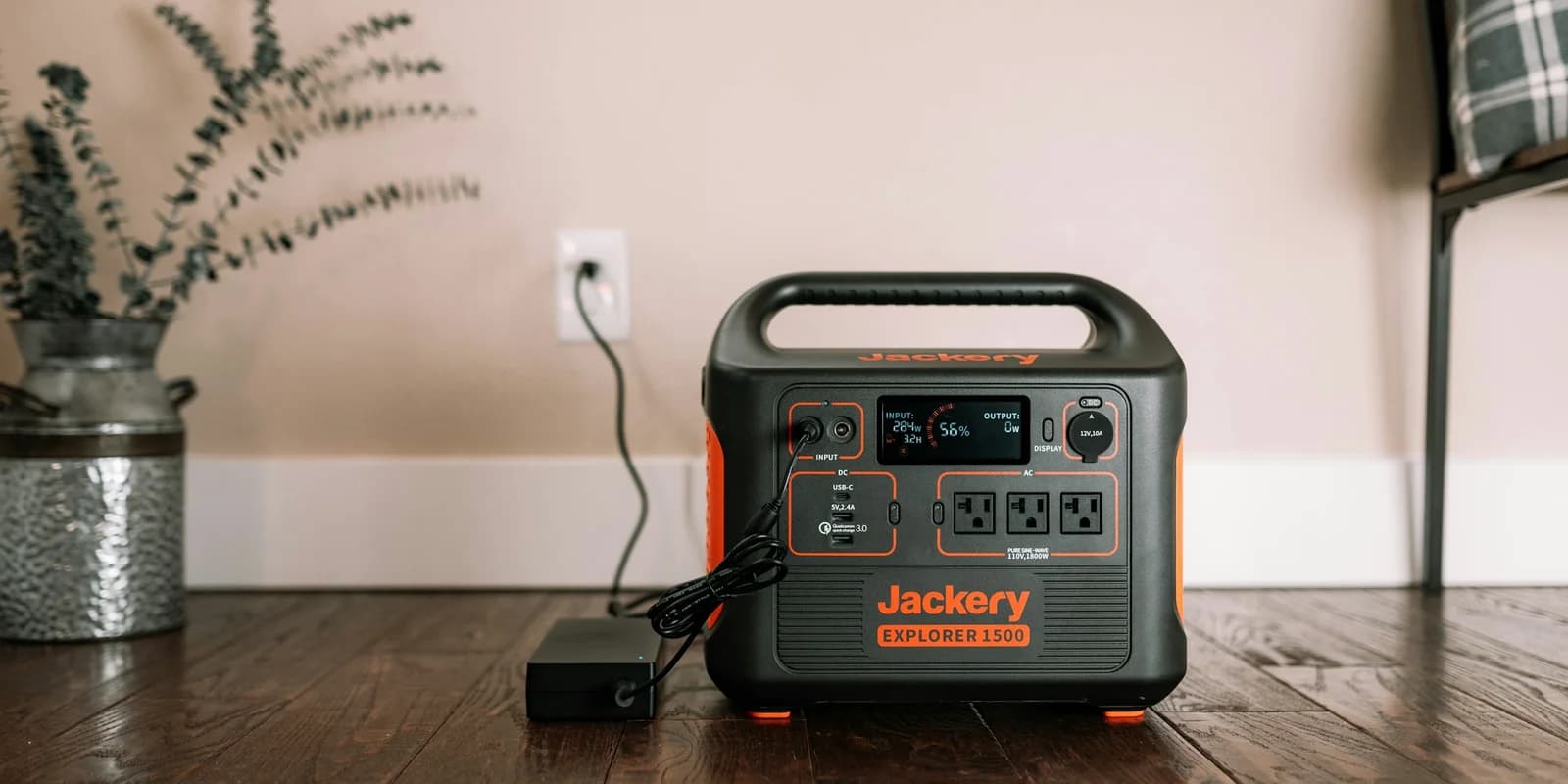
Portable power stations are built around watt-hours, not just VA ratings. A good 1kWh-class unit can keep laptops, phones, lights, a modem/router stack, or a fridge running far longer than a desk UPS.
That makes power stations the better answer for:
- longer blackouts
- camping and RV use
- work-from-anywhere setups
- fridge and medical-device backup where the load is within spec
- solar-assisted top-ups during extended outages
If the question is "how do I keep essentials running for half a day?", a UPS is usually the wrong tool.
It is easier to use around the house
A power station can move from the garage to the kitchen to the office. It can run a laptop, charge phones over USB-C, power lights, or sit beside the fridge during an outage. Many current models use LiFePO4 batteries, which are better suited to long cycle life than older lithium-ion chemistries.
That flexibility is why our portable power station guide treats the category as home backup, not just camping gear.
It can scale beyond desk electronics
Some power stations accept solar input. Some accept add-on batteries. Some can support serious backup setups that a desk UPS cannot touch.
That does not make them automatic replacements for a UPS. It just means the category solves a different problem: available energy over time.
The confusing middle: power station UPS mode
Many power stations advertise UPS or EPS mode. This can be useful for a modem, router, TV, or simple desktop setup. It is not the same as a dedicated online UPS.
The three questions to check before using a power station this way:
- Transfer time: Is the switchover fast enough for the device? Some electronics tolerate 20 to 30 ms. Some workstations and storage gear may not.
- Shutdown signalling: Can the station tell your PC, NAS, or server to shut down safely? Usually no.
- Always-on behavior: Is the model designed to stay plugged in as pass-through backup without annoying fan noise, heat, or battery-management quirks?
For a router, modem, lamp, or TV, a power station with UPS mode may be fine. For a workstation or NAS that stores data, a dedicated UPS is still the cleaner first buy.
The best setup for a serious home office
The sensible stack is usually:
- UPS for the desk and network gear. Protect the PC, NAS, modem, router, switch, and one monitor long enough to save work and shut down.
- Surge protection for non-critical outlets. Chargers, lamps, speakers, and secondary monitors do not all need battery runtime. See our surge protector guide for that layer.
- Portable power station for longer outages. Use it for phones, laptops, lights, fridge backup, and recharging the UPS/network stack if the outage drags on.
This sounds redundant, but it is not. The UPS protects data and power quality. The power station supplies bulk energy. Different jobs.
Who should buy a UPS first
Buy a UPS before a power station if:
- you run a desktop PC, NAS, home server, or external storage array
- you work from home and dropped calls or corrupt files cost you money
- your router and modem take several minutes to recover after a hard power cut
- your power flickers or browns out more often than it fully fails
- you need automatic shutdown support
For most desk setups, the right UPS is a line-interactive model sized for real watts, not just a big VA number. Our UPS buying guide covers the picks and sizing traps.
Who should buy a power station first
Buy a portable power station before a UPS if:
- you mainly use laptops and already have built-in battery backup for work
- your main worry is long outage runtime, not data corruption
- you need portable power for camping, RVs, job sites, or emergency kits
- you want to keep phones, lights, fans, internet gear, and maybe a fridge running
- you may add solar panels or expansion batteries later
For most households, a 1kWh-class unit is the practical starting point. Go larger when you are sizing for fridge runtime, medical equipment, or multi-day outage planning.
What we would not do
Do not plug a space heater, laser printer, kettle, or other high-draw heating appliance into a small UPS. That is how you overload it quickly.
Do not buy a cheap no-name "solar generator" and assume it is safer because the capacity number is large. Check battery chemistry, warranty, inverter rating, and whether the brand publishes real support documentation.
Do not use a power station as the only protection for a NAS unless you have confirmed shutdown signalling another way. Runtime is not the same thing as graceful shutdown.
Do not size either category from the label on your PC power supply. Measure the actual load or use a realistic load estimate. A 750W PSU does not mean the computer pulls 750W in normal use.
Final recommendation
If there is local data involved, buy the UPS first. It is the cheaper, cleaner way to avoid corrupt files, sudden shutdowns, and power-quality problems.
If the problem is outage duration, buy the portable power station. It will run more useful things for longer, and it is the better fit for homes, camping, and emergency kits.
If you care about both, use both: UPS for the devices that must shut down cleanly, power station for the energy reserve that keeps life moving when the outage is longer than a few minutes.
FAQ
Can a portable power station replace a UPS?
Sometimes for simple loads, but not cleanly for every computer or NAS. Check transfer time, pass-through behavior, and shutdown signalling. If data integrity matters, use a dedicated UPS.
Can I plug a UPS into a power station?
Usually yes for light loads, but test the setup before relying on it. Some UPS units dislike inverter output from certain power stations, and the extra conversion steps waste energy.
Is a UPS or power station better for a fridge?
A portable power station is usually better because it has more usable capacity. A small UPS is mainly for electronics and shutdown time, not compressor runtime.
Is a power station safe for a CPAP or medical device?
It can be, but do not guess. Check the device wattage, runtime needs, manufacturer guidance, and whether you need humidifier power. For critical medical use, confirm the backup setup with the equipment provider.
Should I buy a surge protector too?
Yes, for non-critical devices. A UPS covers the important electronics. A good surge protector covers chargers, lamps, speakers, and secondary gear that does not need battery runtime.
Sources
- Eaton. UPS systems are commonly grouped into standby, line-interactive, and online double-conversion designs: https://www.eaton.com/us/en-us/products/backup-power-ups-surge-it-power-distribution/backup-power-ups/types-of-ups-systems.html
- Eaton. UPS topology guide for standby, line-interactive, and online trade-offs: https://www.eaton.com/us/en-us/products/backup-power-ups-surge-it-power-distribution/backup-power-ups/choosing-the-optimal-ups-topology-.html
- APC by Schneider Electric. UPS selector and sizing guidance for load and runtime planning: https://www.apc.com/us/en/tools/ups_selector/
- EcoFlow. DELTA 2 Max official specifications for capacity, AC output, solar input, and expansion: https://us.ecoflow.com/products/delta-2-max-portable-power-station
- Anker SOLIX. C1000 Gen 2 official specifications and UPS switchover claims: https://www.ankersolix.com/c1000-gen2