Plugable USBC-E2500PD Review: 2.5GbE Plus Charging
Plugable's E2500PD combines 2.5GbE and USB-C charging in one small adapter. It is useful for single-port laptops and tablets, but unnecessary when you have a spare charging port.
Research-based review
How we evaluateQuick picks
The short answer, with the trade-off
Best for one-port devices
Plugable USBC-E2500PD
2.5GbE and USB-C PD through one host port
Trade-off: No charger included

Better without charging
Plugable USBC-E2500
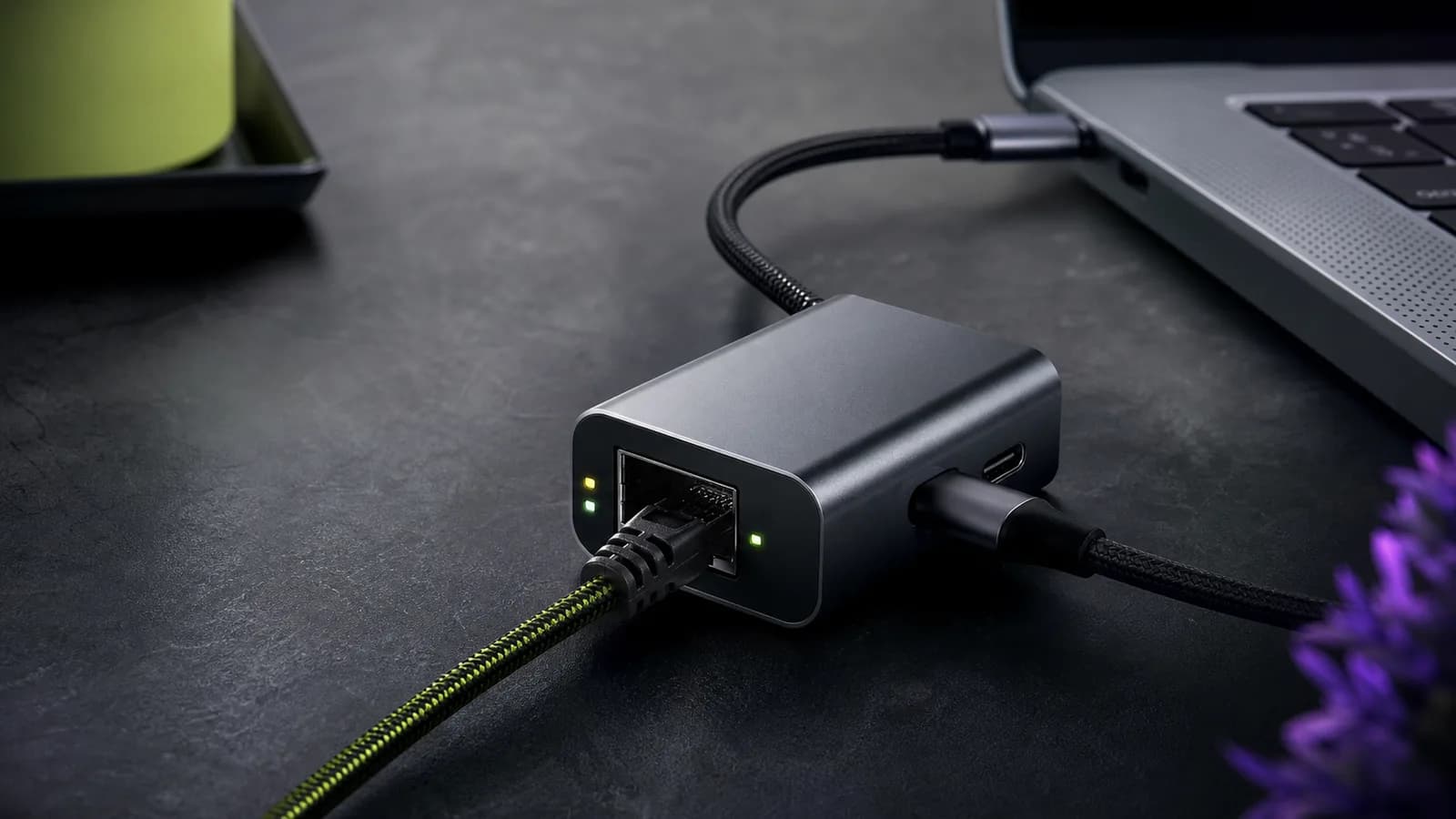
The Plugable USBC-E2500PD is worth buying when one USB-C port must handle both 2.5GbE Ethernet and laptop charging. It is a focused alternative to a full dock: one 2.5GBASE-T port, one USB-C Power Delivery input, and a captive USB-C host cable.
Skip it if the computer has a separate charging port or if you also need displays, storage, and extra USB ports. Plugable's network-only adapter costs less, while a proper dock does more.
This is a research-based review. SolderMag has not measured throughput, thermals, or charging loss on this adapter. The verdict is based on Plugable's official specifications and compatibility notes, the documented Realtek controller, exact US Amazon product identity, and the requirements of a complete 2.5GbE link.
Short verdict
Buy the E2500PD for a thin laptop, tablet, or compatible phone that loses its charging port when Ethernet is attached. Plugable lists 10/100/1000/2500 Mbps Ethernet and USB-C Power Delivery input up to 100W. The adapter is bus-powered and does not include a charger.
The value disappears when port scarcity disappears. A laptop with MagSafe or another free USB-C charging port can use a cheaper network-only adapter. A permanent workstation needing monitors and peripherals should use a dock rather than build a chain of single-purpose dongles.
Plugable USBC-E2500PD
A precise fix for one-port USB-C devices; overpaying if charging passthrough is not required.
Why it works
- 2.5GbE and USB-C PD through one host port
- Up to 100W charging input support
- Documented RTL8156B controller and broad OS support
Main trade-off
- No charger included
- Host receives less than the charger's rated output
- Not a substitute for a multi-port dock
Who this is for
The E2500PD makes sense for:
- an ultraportable laptop with one convenient USB-C port
- a USB-C tablet that needs stable wired networking while charging
- a compatible phone used for tethering, file transfer, or a fixed workstation
- a temporary 2.5GbE connection where a full dock is unnecessary
- a travel kit that needs wired Ethernet but not HDMI or storage ports
It is particularly useful when a large NAS transfer would otherwise drain the same battery that has surrendered its only port to Ethernet.
Who should skip it
Skip it if a regular 1GbE adapter already matches the router, switch, internet plan, and storage. Multi-gig Ethernet does not make browsing, calls, or normal game traffic meaningfully better on its own.
Skip it if the computer has a free charging connector. The network-only Plugable USBC-E2500 is a cleaner buy in that case and also includes a way to connect to USB-A hosts.
Skip it for a desk that also needs monitors, card readers, external SSDs, or several USB devices. Start with our laptop docking-station guide instead.
Key specifications
| Feature | Plugable USBC-E2500PD | Practical meaning |
|---|---|---|
| Ethernet | 10/100/1000/2500 Mbps | Negotiates down on slower networks |
| Controller | Realtek RTL8156B | Widely used 2.5GbE USB controller |
| Host connection | Captive USB-C, 5Gbps class | Host port must expose USB 3.x data |
| Charging input | USB-C PD, up to 100W | Charger is sold separately; host receives less after overhead |
| Power | Bus-powered | Networking can work without the PD input |
| Compatibility | Windows 10/11, macOS 11+, ChromeOS, compatible iPhone 15/16 devices | Advanced features and drivers vary by OS |
| Weight | 25 g | Small enough for a laptop bag |
| Support | Two-year limited warranty and Plugable support | Useful for an adapter sensitive to OS behavior |
The “up to 100W” line refers to supported Power Delivery input. The adapter itself, the cable, and USB-C negotiation consume part of the budget, so a 100W charger does not mean a full 100W reaches the computer.
Design and setup
This is a small two-port adapter rather than a hub. The captive cable goes to the computer. The RJ45 socket connects to the network. The side USB-C socket accepts a Power Delivery charger when charging passthrough is needed.
That layout is easy to understand and easy to troubleshoot. First connect Ethernet and confirm the network. Then connect the charger and confirm that the operating system reports charging. If either side fails, you can isolate the power path from the network path.
The captive cable removes one item from the travel kit but cannot be replaced if it is damaged. Avoid leaving the adapter hanging from the laptop port or placing strain on the connector.
Network performance expectations
A negotiated 2.5GbE link has more than twice the raw link rate of gigabit Ethernet. Real file-transfer performance will be lower than the headline because Ethernet, TCP/IP, file protocols, storage, and CPU activity add overhead.
More importantly, every active part of the path must support the faster link:
- a USB-C host port with a USB 3.x data path
- a compatible operating-system driver
- the adapter
- a sound Cat5e-or-better cable
- a 2.5GbE switch or router LAN port
- a NAS, server, or internet connection able to exceed gigabit
Plugging the adapter into a gigabit switch is valid, but it will negotiate at gigabit. A USB-C connector wired only for USB 2.0 is also a bottleneck even though the plug fits.
Our 2.5GbE vs 10GbE guide helps decide whether multi-gig is enough for the wider network. Most homes get better value from 2.5GbE unless they have fast storage and sustained workstation-class transfers.
Charging behavior
Power Delivery passthrough is the reason to choose this model. Connect a suitable USB-C charger to the adapter, and the same host connection can carry network data and charging power.
Use the laptop's normal charger wattage as the baseline. A small 30W phone adapter will not become a laptop charger because the E2500PD supports 100W input. For a laptop normally supplied with 65W, use a reputable 65W-or-higher USB-C PD charger and a cable rated for that power.
Expect the host to report less than the charger's label. Plugable explicitly notes that some power is retained for operation and lost through the connection. If a performance laptop complains about a slow charger, use a higher-capacity source within the product's 100W input ceiling or connect the original charger directly.
The USB-C charger wattage guide explains the negotiation. Our USB-C cable guide covers power ratings and why data speed is a separate specification.
Compatibility and drivers
Plugable lists Windows 10 and 11, macOS 11 and later, ChromeOS, and newer USB-C iPhones among the supported platforms. Connector compatibility is not the same as feature parity.
Wake-on-LAN, VLAN behavior, jumbo frames, MAC address functions, and power management can vary by operating system and driver. Check the exact requirement in Plugable's current documentation before using this adapter for managed IT deployment, PXE workflows, or a server role.
The E2500PD is not a universal console or TV accessory. If a device is absent from the support list, do not assume a USB-C port guarantees a working network driver.
Heat and reliability
Compact multi-gig adapters can run warm, especially while moving large files and passing charging power. Warmth alone is not evidence of failure. Repeated link drops, charging resets, or performance that falls sharply under sustained load deserve troubleshooting.
Start with a short known-good Ethernet cable, connect directly to the computer, and remove other hubs. Update the operating system and check Plugable's support page for a current driver. Confirm the negotiated Ethernet speed before measuring file transfers.
We have not completed a long-duration heat test, so we cannot claim sustained line-rate performance in every laptop, OS, and charger combination.
Value
The E2500PD earns its premium only when it replaces two connections with one. It is more focused and usually easier to carry than a full dock, but less flexible.
Compare three options on the day you buy:
- Network-only adapter: cheapest when a charging port is free.
- E2500PD: best when Ethernet and charging must share one USB-C port.
- Full dock: best when Ethernet is one of several desktop requirements.
Do not pay for passthrough as future-proofing. Buy it because the current computer has a real port constraint.
Alternatives
Plugable USBC-E2500: the better default when charging passthrough is unnecessary. It supports USB-C and USB-A hosts and is our overall pick in the best USB-C 2.5GbE adapter guide.
TP-Link UE302C: a lighter USB-C-only network adapter for travelers who do not need charging input.
A 2.5GbE dock: worth the extra size and cost when displays and peripheral ports are also required.
A gigabit adapter: the honest budget choice for gigabit networks, office access, streaming, and ordinary broadband.
Frequently asked questions
Does the Plugable USBC-E2500PD include a charger?
No. Plugable lists the adapter without a USB-C power supply. Use a compatible USB-C PD charger and cable suited to the computer.
Does 100W reach the laptop?
No guarantee. The adapter supports up to 100W input, but operating power and conversion losses reduce what reaches the host.
Will it work on a gigabit network?
Yes. It should negotiate down to 1Gbps, 100Mbps, or another common supported rate. You need a complete 2.5GbE path to exceed gigabit.
Is it useful for gaming?
Only if it replaces weak or unstable Wi-Fi with a reliable wired connection. A healthy gigabit Ethernet link already has ample bandwidth for game traffic.
Can it replace a docking station?
Only when wired networking and charging are the complete requirement. It has no display, storage, audio, or additional peripheral ports.
Final recommendation
Buy the Plugable USBC-E2500PD when a single USB-C port must carry 2.5GbE and charging. It solves that narrow problem without the bulk of a dock and has unusually clear product documentation.
Buy the network-only version when charging is already covered. Buy a dock when the desk needs more than Ethernet. The E2500PD is good precisely because it is focused; do not ask it to be something else.
Sources
- Plugable official USBC-E2500PD product page and compatibility notes
- Amazon US exact-product validation for
B0CZYSGKS6with the configured Associate tag.
As an Amazon Associate I earn from qualifying purchases.