Bambu Lab A1 Mini Review: Easy Start, Small Bed
The A1 mini is the easier first 3D printer for small PLA and PETG projects. Its 180mm build volume and open frame are the limits to understand.
Research-based review
Recommendations are checked against product documentation, availability, comparative evidence, and clearly disclosed hands-on work where it exists.
On this page
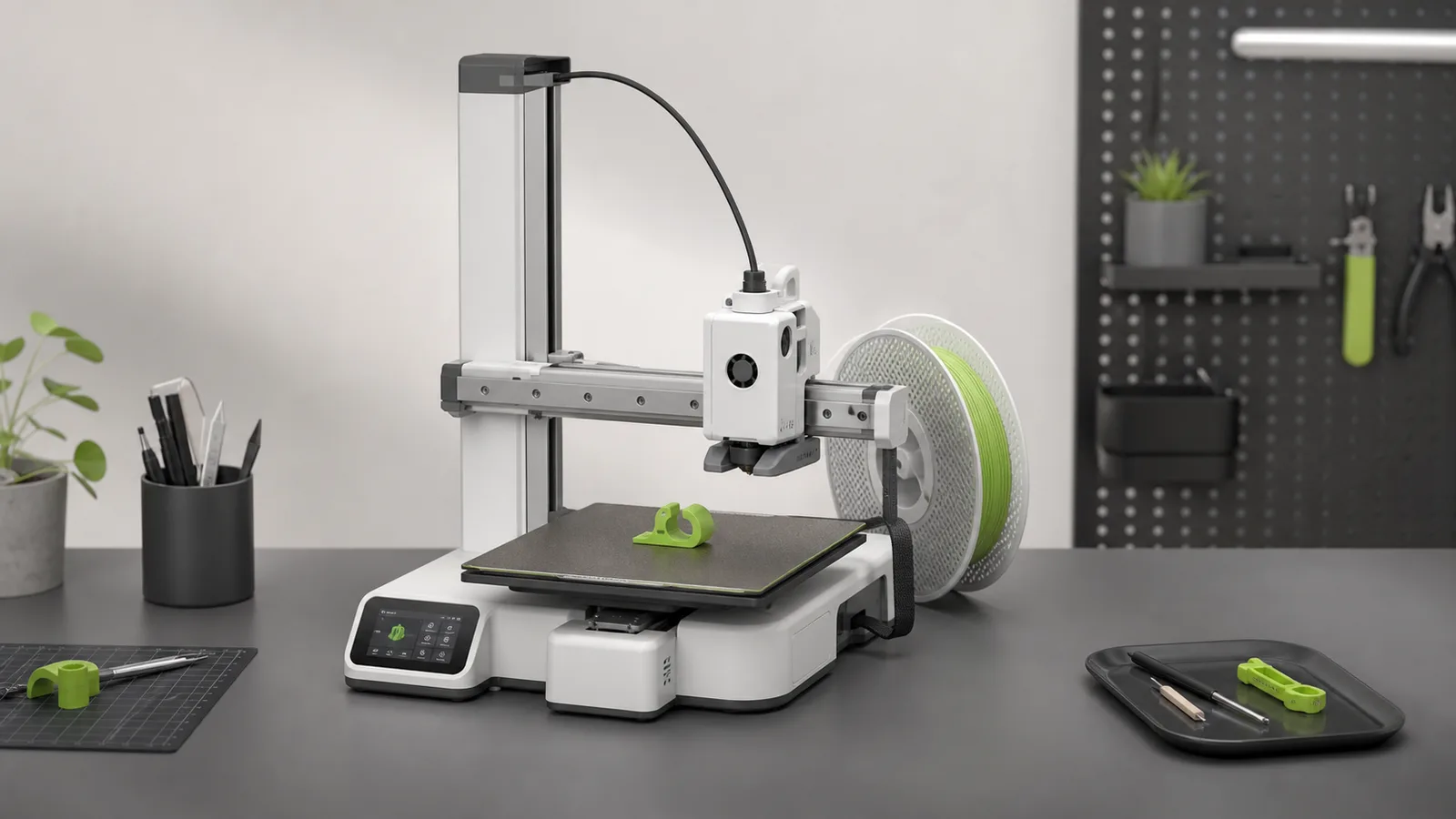
The Bambu Lab A1 mini is the sensible first 3D printer for people who want to make small parts rather than learn printer maintenance first. Automatic calibration, Wi-Fi transfer, tested slicer profiles, a built-in camera, and optional four-spool AMS lite support remove several chores found on cheaper machines.
The 180 × 180 × 180mm build volume is the decision point. It is enough for cable organizers, brackets, desk parts, tabletop pieces, and small prototypes. It is not enough for large enclosures, wide panels, or one-piece costume parts.
This is a research-based review. We have not completed hands-on print-quality, noise, dimensional-accuracy, or long-term reliability testing of this model. The verdict is based on current Bambu Lab specifications, documentation, software support, material limits, product availability, and comparison with nearby printers.
Short verdict
Buy the A1 mini if you want a compact machine for PLA and PETG with a straightforward software workflow. The printer handles bed levelling, vibration compensation, and flow calibration, while Bambu Studio and Bambu Handy cover slicing, remote control, monitoring, and file transfer.
Skip it if your planned parts do not fit within 180mm in every dimension. Also skip it for an ABS, ASA, nylon, or fibre-filled workflow: Bambu marks those materials as not recommended on the A1 mini.
Bambu Lab A1 mini
Why it works
- Automatic calibration and network transfer
- Compact 347 × 315mm desk footprint
- Optional AMS lite for up to four spools
Main trade-off
- 180mm build volume
- Open frame and 80°C bed limit material choice
- No SolderMag hands-on durability data
Who this is for
The A1 mini makes sense for:
- a beginner who wants to spend more time choosing models than tuning hardware
- a desk or apartment setup where the printer footprint matters
- small functional parts, miniatures, toys, organizers, and prototypes
- buyers interested in simple multi-colour or support-material work with AMS lite
- someone who values wireless transfer and remote status checks
The compact format is useful only if your models fit. Check the largest thing you genuinely plan to make, not the calibration object you will print on day one.
Who should skip it
Skip the A1 mini when a 220mm-class bed is a requirement. Splitting a model and joining it later is possible, but it adds seams, orientation decisions, and finishing work.
It is also a poor fit for buyers whose main materials are ABS, ASA, PC, PA, PET, or carbon- and glass-fibre reinforced polymers. Bambu lists those as not recommended. A third-party enclosure does not change the printer's 80°C maximum bed specification or make the stock nozzle suitable for every abrasive material.
Buyers who dislike an integrated software and hardware ecosystem should look at more open alternatives. Bambu offers LAN-only operation, but the smoothest workflow still uses its own apps, profiles, and accessories.
Key specifications
| Feature | A1 mini | Buyer impact |
|---|---|---|
| Build volume | 180 × 180 × 180mm | Compact, but the main constraint |
| Printer dimensions | 347 × 315 × 365mm | Easier to place than a full rectangular gantry |
| Weight | 5.5kg | Reasonably easy to relocate on a stable surface |
| Hotend | All-metal, up to 300°C | Temperature alone does not override material guidance |
| Included nozzle | 0.4mm stainless steel | General-purpose size for common filament |
| Build plate | Textured PEI included | Removable surface for mainstream materials |
| Maximum bed temperature | 80°C | One reason high-warp materials are not recommended |
| Claimed toolhead speed | Up to 500mm/s | Manufacturer ceiling, not a universal quality speed |
| Claimed acceleration | Up to 10,000mm/s² | Automatic vibration compensation supports faster motion |
| Recommended materials | PLA, PETG, TPU, PVA | Strongest stock use case |
| Camera | Low-frame-rate, up to 1080p | Useful for status checks and timelapse, not security monitoring |
| Sensors | Runout, odometry, power-loss recovery, tangle detection | More unattended-print safeguards than basic models |
Maximum speed does not describe how fast a detailed model should print. Filament flow, layer height, cooling, overhangs, and desired finish all set lower practical limits.
Setup and calibration
The A1 mini ships largely assembled and runs a calibration sequence before printing. Bambu's documentation describes automatic bed levelling, vibration compensation, and flow calibration. Those systems reduce manual setup; they do not prove that every model, filament, or build plate will work without inspection.
Watch the first layer of a new material profile. Confirm that the correct plate and filament are selected, clean the build surface as directed, and keep firmware changes separate from urgent projects. Automation is most useful when it removes repetitive work, not when it encourages blind trust.
Bambu Studio and the daily workflow
Bambu Studio is a fork of PrusaSlicer. OrcaSlicer later grew from Bambu Studio and provides a community-led alternative. That lineage matters because the A1 mini sits inside a mature open-source slicer family even though Bambu's device integration is proprietary.
The official workflow is simple: prepare a model in Bambu Studio, select the printer and material profile, slice it, then send it over the network. Bambu Handy adds phone-based monitoring and controls. The built-in camera is low frame rate, so treat it as a check-in tool rather than a detailed live view.
LAN-only mode is available for buyers who do not want cloud-dependent printing. Check current feature limitations in Bambu's documentation before assuming every remote function works without its online services.
Print hardware and evidence limits
The A1 mini uses a cantilever layout rather than a full rectangular gantry. A nozzle pressure sensor and accelerometers support its automatic calibration system. The extruder is in the toolhead; it is not a Bowden-style design.
Those specifications explain why the printer is positioned as easy to use, but they do not give us a measured surface-finish score. We would not promise flawless first layers, exact dimensional tolerance, a specific Benchy time, or quiet operation without repeatable tests.
Bambu advertises a 14-minute Benchy under its stated speed-printing rules. Treat that as a manufacturer demonstration, not the time every useful model will take or a SolderMag lab result.
AMS lite: useful, with a clear trade-off
AMS lite can manage up to four spools for colour changes, support interfaces, or automatic backup when compatible filament runs out. It is a meaningful expansion path for labels, signs, and parts where colour carries information.
Multi-colour printing also creates purge waste and lengthens jobs. Buy the bundle if you can name the projects that need it. If most work is a single neutral filament, the base printer is enough and takes less space.
AMS lite sits beside the printer rather than inside it. Measure the complete arrangement, including spool clearance and cable movement, before calling the system compact.
Material choice
PLA is the straightforward starting point. PETG is useful when a part needs more toughness or heat tolerance, although dry storage and stringing control become more important. TPU is supported, but flexible filament still needs a suitable profile and slower movement.
Bambu lists PVA as ideal as well, typically for soluble support work. Storage matters because support materials can absorb moisture quickly.
For ABS, ASA, PC, nylon, PET, or fibre-reinforced polymers, choose a printer built around those jobs. The right enclosure, ventilation, bed temperature, hotend, and nozzle are a system; one impressive hotend temperature does not make the rest optional.
Noise and placement
The A1 mini has moving motors, fans, and a bed. We have not measured its sound level, so we would not compare it with a dishwasher or promise a quiet mode result.
Place it on a rigid surface with clearance around the moving bed, filament path, and spool system. Avoid a bedroom if long overnight prints would disturb sleep. A smoke alarm, sensible ventilation, and manufacturer maintenance guidance matter more than trying to hide the printer inside improvised furniture.
Value
The A1 mini earns its premium over a basic printer when wireless transfer, automatic calibration, and the integrated profiles save enough friction that you print more often.
Compare current prices rather than relying on a fixed historical range. If the Creality Ender-3 V3 SE is meaningfully cheaper and the larger bed matters, accept the SD-card workflow and save the money. If the gap is modest, the A1 mini's automation is easier to justify.
Alternatives
Creality Ender-3 V3 SE: larger build volume and a lower-cost route, with SD-card transfer and fewer unattended-print safeguards. Our Ender-3 V3 SE review covers the trade-offs.
Full-size Bambu Lab A1: the natural step up when 180mm is too restrictive but the Bambu workflow is still appealing.
Creality Ender-3 V3 KE: a middle route with a 220mm-class bed, network transfer, and faster manufacturer specifications than the V3 SE.
For a ranked shortlist, see our best beginner 3D printers guide.
Frequently asked questions
Is the Bambu A1 mini good for beginners?
Yes, particularly for small PLA and PETG projects. Automatic calibration and network transfer remove several repetitive setup steps, but buyers still need to learn model orientation, supports, filament storage, and first-layer checks.
What is the A1 mini's build volume?
It is 180 × 180 × 180mm. Check all three dimensions of planned models and allow for brim or support material where needed.
Can the A1 mini print ABS or ASA?
Bambu lists ABS and ASA as not recommended. Choose a printer designed for enclosed, higher-temperature material workflows.
Does the A1 mini need AMS lite?
No. The base printer works with a single spool. AMS lite is useful for multi-colour work, support interfaces, and automatic spool backup.
Is the A1 mini better than the Ender-3 V3 SE?
It is better for automation and networked workflow. The Ender offers more build volume and can be the smarter purchase when it is meaningfully cheaper.
Final recommendation
Buy the Bambu Lab A1 mini if most planned parts fit inside 180mm and you want the easiest route from a sliced file to a monitored print. The integrated workflow is the product.
Skip it when the bed size or material limits already conflict with your project list. A convenient printer cannot compensate for a part that does not fit.
Sources
- Bambu Lab official A1 mini product page and specifications
- Bambu Lab official A1 mini quick-start guide
- Bambu Lab official A1 mini documentation
- Bambu Lab official Bambu Studio repository
- OrcaSlicer official project repository