Keychron Q1 Pro Review (2026): A Heavy Wireless Custom Board
A research-based Keychron Q1 Pro review covering its aluminum build, Bluetooth limits, QMK customization, hot-swap support, size, and buyer fit.
Editorial evidence review
Recommendations are checked against product documentation, availability, comparative evidence, and clearly disclosed hands-on work where it exists.
Quick picks
The short answer, with the trade-off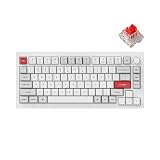
Budget alternative
Keychron C3 Pro

Portable alternative
NuPhy Air75 V2
The Keychron Q1 Pro combines a 75% layout, machined-aluminum case, gasket mount, hot-swap sockets, Bluetooth, and QMK customization. It is best treated as a substantial desk keyboard that can switch among computers, rather than a travel board or a low-latency wireless gaming keyboard.
This review is based on Keychron's current product documentation. SolderMag has not completed controlled latency, acoustics, switch-force, battery-runtime, wear, or long-term reliability testing of this model. Switch and keycap feel remains personal, and the available configuration can change by seller.
SolderMag Take
The Q1 Pro suits someone who wants to modify switches and mappings without building a keyboard from separate parts. Its strongest features are the full-aluminum body, QMK support, Mac and Windows layouts, and hot-swap PCB. Its main limitations are just as clear: the board weighs about 1.74kg, uses Bluetooth for wireless operation, and runs at 90Hz polling wirelessly versus 1,000Hz over USB.
That connection detail matters. The Q1 Pro does not include 2.4GHz wireless. Buyers who want a dedicated receiver and faster wireless polling should compare Keychron's newer Max models or a gaming-focused keyboard.
Key specifications
| Item | Published detail |
|---|---|
| Layout | 75% with rotary knob |
| Case | CNC-machined aluminum |
| Dimensions | 327.5 × 145mm; 22.6mm front height, 35.8mm rear |
| Weight | About 1,736g assembled |
| Connections | Bluetooth 5.1 for up to three devices; USB-C wired |
| Polling | 1,000Hz wired; 90Hz wireless |
| Switch support | Hot-swappable 3-pin and 5-pin MX-style mechanical switches |
| Firmware | QMK with Keychron Launcher/VIA-style remapping over a wired connection |
| Lighting | South-facing RGB |
The 75% layout keeps function keys, arrows, and a small navigation column while removing the numpad. It is compact relative to a full-size board, but the metal case makes it unsuitable for casual bag carry.
Build and customization
Keychron uses a double-gasket design and includes acoustic foam in the assembly. Those construction choices can alter stiffness and resonance, but a spec sheet cannot tell you whether the finished feel or sound will suit your switches, desk mat, typing force, and room. Listen to model- and configuration-specific recordings before choosing a switch solely for sound.
The hot-swap PCB is the practical value. It accepts common 3-pin and 5-pin MX-style switches without soldering, so a worn or disliked switch can be replaced individually. South-facing LEDs reduce interference with Cherry-profile keycaps. Check whether the exact listing is barebone or fully assembled and whether it uses an ANSI or ISO layout; those choices affect what arrives and which replacement keycap sets fit.
QMK support gives the board a durable path for remapping, layers, and macros. Keychron's browser-based Launcher requires a wired connection for customization. The physical Mac/Windows switch and included alternate keycaps make operating-system changes straightforward, but key legends and modifier positions still need to match the chosen layout.
Wireless and battery expectations
Bluetooth can pair with up to three devices. It is convenient for switching between a laptop, tablet, and desktop, but Bluetooth wake behavior and interference depend on the host and environment. The published 90Hz wireless polling rate also makes the wired 1,000Hz connection the sensible choice for timing-sensitive games.
Keychron lists a 4,000mAh battery and publishes runtime figures under its own test conditions. Lighting level, sleep settings, connection quality, and usage change the result, so use those numbers for comparison rather than as a guarantee.
Who should buy it
- Writers, developers, and office users who want a heavy 75% desk board.
- People who want to change switches and key mappings over time.
- Mac and Windows users who value a hardware layout switch.
- Buyers comfortable using USB for configuration and latency-sensitive play.
Who should skip it
- Competitive players who specifically want fast 2.4GHz wireless.
- Frequent travelers; the board weighs more than many laptops.
- Spreadsheet users who rely on a dedicated numpad.
- Anyone who wants a thin, quiet keyboard without choosing switches and evaluating acoustics.
Keychron Q1 Pro Wireless Mechanical Keyboard
Why it works
- Full-aluminum 75% chassis
- QMK remapping and hot-swap switch support
- Bluetooth pairing for three devices
Main trade-off
- No 2.4GHz wireless receiver
- About 1.74kg and designed to stay on a desk
Verdict
The Q1 Pro remains a coherent route into custom mechanical keyboards when its exact configuration is available: substantial construction, replaceable switches, and open firmware in one assembled product. Choose it for typing and customization. Choose another model if low-latency wireless, portability, or a numpad is the priority.
Sources
See our mechanical keyboard guide for layouts and switch basics, or compare current options in the best mechanical keyboards.